

This feature is only available on Chainloop’s platform paid plans.
Which Path You Need
All three are built-in scans you enable per project. Add one from the Workflows step of the Create Project wizard, or to an existing project from its Workflows tab with Create Workflow.

Generate an SBOM and Analyze It
Vulnerability Scan does both halves in one workflow: syft builds a CycloneDX SBOM from the connected repository, and grype scans it for known CVEs. Both are attested, under the namessbom and vulnerability-report, and the commit that triggered the scan is verified.

path, to scope it to one directory of a monorepo, and severity, which sets the lowest severity that counts as a violation and defaults to HIGH.
Start here if you want both an inventory and findings and have nothing else set up — this one scan covers the ground that SBOM Generation and Vulnerability Scan from SBOMs cover together.
Generate an SBOM Only
SBOM Generation produces the inventory and leaves the analysis to you. Every run produces a signed attestation carrying a CycloneDX SBOM namedsbom, built by syft from the repository’s source and its declared dependencies. Chainloop re-runs it at least once a day, so the SBOM follows the default branch rather than aging out.
It needs a connected repository too, and its only run mode is Run periodically — there is no schedule to configure. Its one input is path, relative to the repository root, which defaults to the whole repository. For a monorepo, add one configuration per component: each becomes its own workflow with its own SBOM.
The SBOM describes your repository, not a build output — it is not an SBOM of your container image. If that’s what you need, see Generate SBOMs in Your Own CI Instead.
SBOM Quality Checks
Each run is evaluated against thesbom-quality policy group, which checks the SBOM for banned licenses and components, NTIA minimum elements, license coverage, and freshness. The verdicts are stored with the evidence and never fail the run.
The built-in template exposes only path, so the policy group’s own inputs — the banned-license and banned-component lists, and the freshness window — keep their defaults. To choose your own values, attach the policy group to a contract you control with with: parameters, the same way Set up Vulnerability Management does it.
Analyze the SBOMs You Already Have
Continuous here means a fresh scan at least once a day against an updated vulnerability database: a package that was clean last week gets flagged today without anyone touching the code. Vulnerability Scan from SBOMs does that for every SBOM already attested on the project version, however it got there — one that SBOM Generation produced and one your own pipeline attested are both ordinary evidence, so the scanner picks up either without being told which is which, and keeps picking up new ones as they arrive.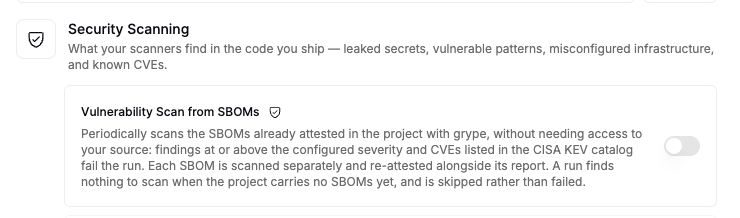
severity, sets the lowest severity that counts as a violation and defaults to HIGH. It reads evidence rather than code, so it needs no connected repository at all.
It runs periodically only, and a run that finds no SBOM to scan is skipped rather than failed — so the scanner sits quiet until the first one lands.
Pair it with SBOM Generation for a source-derived SBOM that gets re-checked daily, or run it alongside Vulnerability Scan to keep scanning SBOMs your pipeline attests as well. The workflows are independent, and their findings merge in the same place.
Where the Findings Land
Findings flow into the project’s Security tab: deduplicated across runs and scanners, flagged when a CVE appears in the CISA KEV catalog, and eligible for AI risk assessment and auto-remediation. Vulnerability Management and Risk Assessment covers the triage loop, the VEX feed, and the reports.Generate SBOMs in Your Own CI Instead
Managed generation needs a connected repository and gives you a source-derived SBOM. When neither fits — no repository connection, or you need an SBOM of a built image — produce the SBOM in your pipeline and attest it:- Attestations has working syft examples for GitHub Actions, GitLab CI, and other systems.
- Declare the material in your workflow contract:
- Set up Vulnerability Management covers the rest of the CI wiring, including the vulnerability report itself.
Send SBOMs Onward
Any CycloneDX SBOM that reaches Chainloop, generated or attested from your CI, can be forwarded automatically to a Dependency-Track instance for component analysis — see Send SBOMs to Dependency-Track. Approved risk assessments also publish as a live VEX feed you can share with customers, covered in Vulnerability Management.Troubleshooting
The SBOM Generation workflow has no runs
The SBOM Generation workflow has no runs
Check that the project has a repository linked and that its provider is GitHub or GitLab — managed scans are skipped when there is no linked source repository. Periodic runs are also dispatched by a sweep rather than the moment you save, so a workflow you just enabled can take a while to show its first run.
Vulnerability Scan from SBOMs is skipped
Vulnerability Scan from SBOMs is skipped
That scanner reads SBOMs already attested on the project version, so it has nothing to do until one arrives. Either turn on SBOM Generation or attest an SBOM from your CI, and the next run will pick it up.
The SBOM is missing dependencies I expected
The SBOM is missing dependencies I expected
Two usual causes. The SBOM is source-derived, so anything introduced at build time — base image packages, vendored binaries — won’t appear; attest an artifact SBOM from your pipeline instead. Or
path points at a subdirectory that doesn’t contain the manifest or lockfile declaring those dependencies.I want banned licenses enforced on the generated SBOM
I want banned licenses enforced on the generated SBOM
The built-in template exposes only
path, so sbom-quality runs with its default lists. Attach the policy group to a contract of your own with with: parameters to set them, and add a control gate if a violation should block a release — policy verdicts on managed runs are recorded, not enforced.Next Steps
- Built-in Scanners — every built-in scan, the tool it runs, and the evidence it produces.
- Vulnerability Management and Risk Assessment — what happens to findings after a scan.
- Cyber Resilience Act — how SBOMs and vulnerability handling map onto CRA obligations.