

Overview
AI Session Score is a per-PR confidence signal for AI-assisted and AI-driven code changes. It reads what the AI did, what the user asked for, and what the diff contains, and turns it into a single reviewer-facing verdict: a color-coded score, a one-sentence summary, and a per-criterion breakdown of findings worth looking into. AI Session Score is powered by session data captured throughchainloop trace, the source code changes in the PR, and other contextual signals such as AI code review bot comments. When developers use AI coding agents with chainloop trace enabled, every session — models used, tool calls, code changes, and the full conversation — is automatically recorded and attested. AI Session Score evaluates all of this data together on each PR to produce its verdict.
- PR authors — expand the yellow and red criteria in the breakdown and work through their 💡 recommendations. Each criterion’s “Improving the score” section in this reference explains the patterns behind them.
- Reviewers — start with the summary sentence, then use the findings under each non-green criterion to decide where to focus attention.
Where the Score Appears
- AI session page — Score & Policies tab. Open a session from the AI Coding dashboard and switch to the Score & Policies tab. The AI session scoring panel there is the full result, shown below.
- PR summary comment. Each session block in the PR comment renders the same result as a table — one row per criterion with its score and findings.
- AI Coding dashboard. The org-wide dashboard aggregates scores across sessions into an AI Score Breakdown with per-criterion averages for the period.
What You’ll See
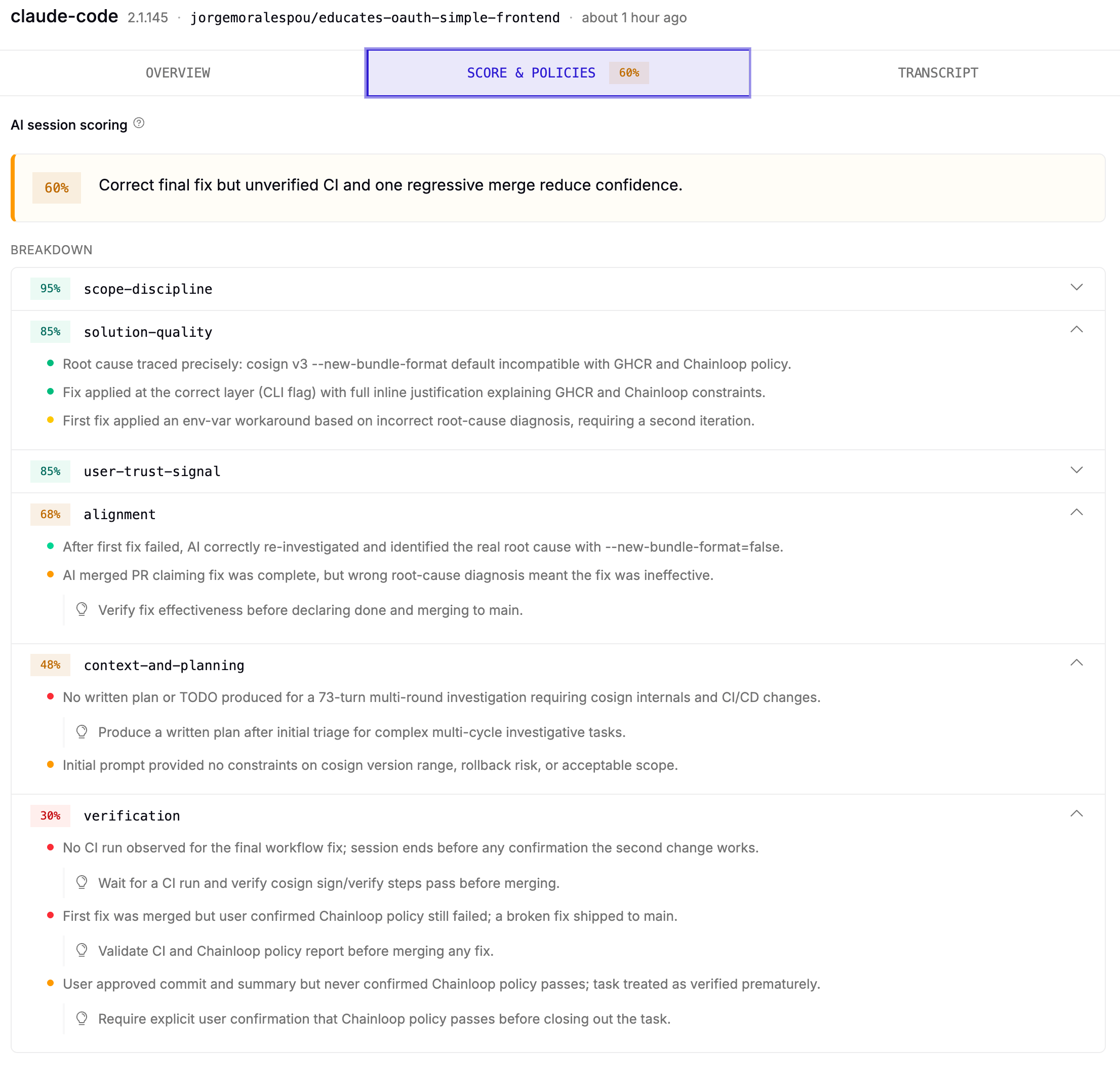
- Score — a 0-100 percentage indicating how well the PR met the criteria for a good change done with or by AI. The badge color is the flag: green, yellow, or red, indicating confidence in the AI part of the PR.
- Summary — the sentence next to the score: the headline judgment and the most important reason.
- Breakdown — one row per criterion, each with its own color-coded percentage (the per-criterion sub-flag). Click a row’s chevron to expand it.
- Findings — inside an expanded criterion, each bullet is one observation, weighted by its dot color: green is a positive signal, yellow is worth attention, red is a serious concern. The text names the files, commands, or session moments involved.
- 💡 Recommendations — findings that deserve action carry a lightbulb row underneath: a concrete next step for the developer and reviewer.
How to Read a Result
Start at the summary sentence. It tells you the headline and the dominant reason in one sentence. If you only have a minute, this is what to read. Use the colors for triage, not the numbers. The overall flag color is derived from the distribution of the criterion colors, not from the number. A change with one red criterion will be yellow even if everything else is green — that’s intentional. The score is a band, not a precise measurement; the same input can return 65 on one run and 72 on the next. Score and flag color are independent. There is no fixed score band that maps to red, yellow, or green. A score of 75 might be green on one PR and yellow on another, depending on which criteria fired. The breakdown tells you what kind of concern this is. A yellowverification means something different from a yellow user-trust-signal. Each criterion section in the Score References below explains what its flag means and what to check when it fires.
Treat the findings as the product. A green score does not mean “skip review.” It means “use the findings to focus where you look.” Expand the yellow and red criteria first, read their findings, and work through the 💡 recommendations attached to them.
The Six Criteria
AI Session Score is built from six independent criterion judges plus a final aggregator. Each criterion scores one axis of confidence, and each appears as its own row in the breakdown:Five of the six criteria can be addressed by changing how you work. User trust signal is the exception — it’s interpretive. A flagged result there scores how the session went and is best used as input for the next session, not as something to fix on the current PR.
What AI Session Score Is Not
- Not a merge gate. AI Session Score does not block PRs.
- Not a substitute for review. A green score still requires review; a red score does not mean the code is wrong, only that a reviewer should look harder.
- Not a developer score. It scores a change, not a person.
When the Score Updates
- A PR is opened. The score computes on the initial content.
- A new commit lands on the PR. The score recomputes, with a small delay so session data finishes syncing.
- A recognized AI code review bot comments. The score takes that feedback into account and recomputes.
chainloop trace. A PR authored without AI assistance is not scored at all — the absence of an AI Session Score means “this flow does not apply,” not “green.”
Grading Against the Spec
Whenchainloop trace captured the context of a session, the score grades the change against what the session was asked to do, not only against the conversation.
- Inputs. The scoring run reads the captured spec sources (tasks, specs and plans) and the code change of the most recent pull request that shares commits with the session. A source with the
referencerole is background, not the baseline. A later instruction from the user in the session still takes precedence over the spec. - Requirements. Scoring first lists the requirements in the captured spec. The delivery and verification checklists account for every applicable requirement. A requirement outside the task keeps the reason it is out of scope, and each result cites the lines of code that support it.
- Criteria. Context & Planning counts a task spec that states the scope and the tests as the plan. Scope Discipline compares the diff with the spec. Alignment compares the claims and the diff with the spec, and counts a reversed user choice as drift. Verification reports each test that the spec asks for as added, ran, missing or parked. Solution Quality checks the design constraints that the spec states.
- In the breakdown. The Score & Policies tab shows the requested outcomes, the scope assessments and the verification checks, with how many passed and how many need attention. Each assessment links to the spec source it cites, and the source opens beside the breakdown at that requirement.
Score References
Context & Planning Score
This criterion asks whether the AI was set up to succeed — the framing, planning, and guidance available before substantive work began. It does not check whether the code is good (that’s Solution Quality Score) or whether the user reacted well later (that’s User Trust Signal Score).What it checks
Setup quality — what guidance and framing the AI had before substantive editing began. This includes the user’s initial framing, any plan or spec produced before code was written, and any project-level guidance loaded at session start. What counts as a plan: The judge is format-agnostic. A structured planning artifact, a spec committed before code was written, or freeform prose that lays out the approach all count. What matters is the content — a plan that names files-to-touch, the chosen approach, and acknowledged unknowns counts. A plan that is just “I’ll fix it” doesn’t count, regardless of where it appears.What raises the flag
- Yellow: vague initial prompt that the user steered actively as work progressed; AI asked some clarifying questions; a partial plan appeared.
- Red: one-line prompt with no constraints; AI dives straight into code; consequential decisions made silently; no acknowledgment of unknowns.
Why this isn’t green
Three patterns commonly trigger Yellow or Red on Context & Planning:- Vague one-liner, no plan, scope drift. The first user turn was a thin instruction with no context, no constraints, and no acceptance criteria. The AI did not produce a plan or surface assumptions before editing.
- Silent decisions on consequential choices. The AI made decisions that materially shape the change — choosing one library over another, picking an architectural pattern — without naming the decision or surfacing a tradeoff.
- Plan landed too late to frame the work. A plan appeared in the session, but only after substantial editing was already done. The plan documented work that had happened rather than guiding work that was about to happen.
Improving the score
Most of the leverage on this criterion is on the next session, not the current PR:- State intent, then constraints. Lead with what you want and what you do not want. “Add X to file Y, but don’t refactor the surrounding code” gives the AI more to work with than “add X.”
- Ask for a plan before editing. A short plan covering files to touch, the approach, and unknowns is cheap to produce and lets you redirect before any code is written.
- Surface decisions explicitly. When you notice the AI reaching a fork (library choice, schema design, naming), ask which options it considered and why it picked one.
- For an in-flight session, write the plan late if needed. Even a late plan is more useful than no plan.
Alignment Score
This criterion asks whether the AI stayed on the task that was actually asked, and whether what the AI said it did matches what the diff actually does. This is only about whether work matches what was asked. The quality of the work is judged by Solution Quality Score. Unsolicited extras are judged by Scope Discipline Score.What it checks
Two questions, evaluated together:- Intent vs. behavior. The user stated an intent; did the AI do that, or something else?
- Claim vs. reality. Along the way and at the end, the AI summarized what it did. Do those summaries match the diff?
What raises the flag
- Yellow: mostly aligned with some drift the user caught and corrected; AI summaries that overstate what was done; one volunteered side-action that was rolled back.
- Red: AI did something materially different from what was asked; claimed coverage or behavior does not match the diff; user had to redirect repeatedly across the session.
Why this isn’t green
- Claim doesn’t match the diff. The AI summarized the work in a way that sounds right but is subtly wrong.
- Premature “done”. The AI declared the change finished one or more times before it actually was.
- Volunteered action the user didn’t ask for. The AI took a step that wasn’t part of the request — removing something extra, bypassing a check, “while-I’m-here” cleanup.
Improving the score
- Read each finding against both ends. Findings on this criterion typically name both the AI’s claim and the code it doesn’t match. Open the session turn and the diff side by side.
- Audit other claims, not just the flagged ones. A claim-vs-reality miss is rarely isolated.
- Revert anything you didn’t ask for. If the AI did something extra and you don’t actively want it, take it out.
- For “premature done” patterns, add a verification step. A small test that pins the actual behavior makes future “done” claims auditable.
Scope Discipline Score
This criterion asks whether the changes stayed within the requested scope, or whether the AI feature-crept beyond the asked-for work. User-originated scope expansion is in-scope. If the user asks for additional changes mid-session, those count as part of the ask and don’t trigger this criterion. The signal it looks for is AI-volunteered scope.What it checks
The change in the diff vs. what the user actually asked for. This is the only criterion that fundamentally requires the diff — scope is a comparison between what was asked and what got changed.What raises the flag
- Yellow: small unsolicited cleanups — a renamed nearby variable, a fixed typo, a drive-by formatting change.
- Red: unsolicited refactors of unrelated code; “while I was here” moments; touching files unrelated to the stated task; opportunistic abstractions (“I made this more reusable”).
Why this isn’t green
- Drive-by fix bundled with the feature. A small unrelated change shipped in the same commit or PR — a typo correction in a different module, a path fix in a build file.
- Opportunistic refactor of pre-existing code. The AI was reading or modifying a file for the feature and decided to also rename, restructure, or “improve” something it noticed along the way.
- Auto-regenerated files outside the feature surface. A tool or generator was run and produced changes in modules unrelated to the feature.
Improving the score
- Identify the unrelated changes. Look at the file list. Which files map to the feature, and which don’t?
- Split or revert. Move drive-by fixes into their own commit or their own PR.
- For opportunistic refactors, judge case-by-case. A rename that genuinely makes the feature clearer can be worth keeping — but it should be acknowledged in the PR description.
- For auto-regenerated noise, check whether the regeneration was actually needed. Limit the regeneration to what the change requires.
Solution Quality Score
This criterion asks whether the change is a real fix, or a workaround that masks the underlying problem. It is not about whether the work matches the ask (that’s Alignment Score) and not about whether the change is verified (that’s Verification Score).What it checks
How the work was done — root-cause fix vs. shortcut, hack, or test-disabled-to-make-CI-green. Most shortcuts get announced in the session — the AI will say “let me just disable this” or “let me wrap this in a try/except” — so the transcript is the primary signal. The diff catches the shortcuts that were taken silently.What raises the flag
- Yellow: working solution with code smells the user accepted; a
TODOleft behind; a one-off hack that’s labeled and justified; a check-bypass attempt that was caught and reverted before shipping. - Red: errors silently swallowed; tests modified or disabled to make them pass; a check-bypass that landed in the diff (pre-commit hook bypassed, signing disabled, type-check suppressed); commented-out failing assertions.
Why this isn’t green
- Speculative fix shipped alongside the real fix. A genuine root-cause change landed, but a guess-fix shipped in the same commit — a sleep added “in case there’s a race,” a retry added “in case the request fails sometimes.”
- Silent error-swallow. A specific error or status code is treated as having a known meaning without verifying that’s actually what the underlying call returns in that case.
- Volunteered bypass of a check. The AI ran into a check it couldn’t satisfy — a pre-commit hook, a signing requirement, a type error — and bypassed it on its own initiative rather than fixing the underlying cause.
Improving the score
- Look for changes to existing tests. If a previously-passing test was modified to make a new change pass, the test was usually telling you something the change broke.
- Find the speculative pieces. Anything that looks like “let’s also do X just in case” without a cited reason. If you remove that piece, does the real fix still work?
- Verify any error-as-meaning assumptions. For each place where a specific error or status is being mapped to a domain meaning, confirm that mapping is correct.
- Revert any bypasses. If a check was skipped, the change should re-engage it.
Verification Score
This criterion asks whether the change was actually validated — whether anyone, AI or human, observed the new behavior working.What it checks
Two questions:- Did tests run, and did they pass? Sessions tell you this directly via tool-call traces.
- Do the tests assert real behavior? A test can run and pass without actually exercising the change. A test that mocks the function being tested and asserts against the mock doesn’t count — real tests pass real input to the real function and assert on real output.
What raises the flag
- Yellow: tests added but only happy path; ran locally but not in CI; user said “looks good” without explicit testing; compile/lint/format only on a small change.
- Red: no tests added for new behavior; tests assert against mocks instead of real behavior; AI claimed to test something it never ran; user never verified.
Why this isn’t green
- Build / lint / type-check only. Compile-time validation passed, but no test runner was invoked at any point in the session.
- Test suite exists but was never run. The codebase has a test framework set up. The AI may have grepped for an existing test file, found none for the specific function, and proceeded without running the broader suite.
- Compile-checked, never exercised end-to-end. The change builds, but no one started a dev server, replayed a request, opened the UI, or hit the endpoint to confirm the new behavior.
Improving the score
- Check that existing tests actually exercise the new code path. Tests can pass while testing the old code path — if a test only loaded a happy-path fixture, the new branch may never have run.
- Run the existing test suite. If the project has one, invoke it. Lint and type-check are not substitutes.
- Add at least one test that pins the new behavior. A single test exercising the change is more verification than any amount of compile-time checking.
- Exercise the change end-to-end at least once. For UI: open it. For endpoint: hit it. For configuration: apply it in a sandbox or staging.
User Trust Signal Score
This criterion asks what the user’s behavior across the session tells us. The other criteria score what the AI produced; this one scores how the user reacted along the way. Unlike the other five criteria, this one scores something you cannot retroactively change. A session is a historical record. The value of this criterion is as an interpretive lens for the other flags, and as input for the next session you run.How to use this criterion
The most concrete reviewer move: ask whether the user was steering, or being assisted. If the session looks more like the user manually directing the AI step-by-step, the change may need a closer human read. Read the result alongside the other flags:- Yellow here + Yellow on Alignment or Solution Quality is the strongest version of this signal. The user’s friction was tied to something that actually went wrong.
- Yellow here + everything else Green is informational. The user worked harder than usual, but the result looks fine.
- Green here + a hacky session in the other criteria is also information — the user appears comfortable with the shortcuts.
What it checks
The user’s reaction arc across the session — corrections, interrupts, frustration markers, abandoned approaches, restarts.What raises the flag
- Yellow: several mid-session corrections; user re-explained intent once or twice; mild friction with no abandonment.
- Red: sharp repeated corrections; explicit frustration markers; user restarted from scratch; user abandoned the AI’s approach and finished manually.
Why this isn’t green
- Substantive correction after the work was declared complete. The AI declared the change finished and then the user came back with a real correction.
- Repeated mid-task interrupts. The user had to interrupt the AI multiple times during the session to redirect.
- Steady low-grade friction without escalation. No “stop”, no caps — but the user re-explained intent more than once, asked the AI to redo a piece of work, or quietly took over part of the task.
Improving the score on the next session
- A clearer initial framing (state intent, constraints, and acceptance criteria upfront).
- Asking for a plan before editing.
- Earlier checkpoints — “show me what you’re about to do before doing it.”
- Choosing a different agent or workflow if the same friction recurs.
Final Scoring
The final stage rolls up the six per-criterion verdicts into the headline score, summary sentence, and flag color a reviewer sees at the top of the panel.Reading a result step by step
- Read the summary sentence. One sentence with the headline judgment and the dominant reason.
- Glance at the breakdown. The color of each criterion’s percentage tells you where the concern is.
- Expand the yellow and red criteria. Read their findings and the 💡 recommendations attached to them.
- For any criterion that is not green, open its section above. The criterion docs explain what triggered the flag.
- Treat abstention findings with the same weight as flagged ones. “This wasn’t checked” is not “no concern.”
How the rollup works
The rollup is itself a judgment, not a deterministic function. Two runs on the same input may produce slightly different scores or shuffle findings of similar weight. The flag and the broad shape of the findings are more stable than the exact numbers. Score: Each criterion’s score, flag, and contributed findings are taken into account. Verification and Solution Quality carry the most weight. Red sub-flags lower the ceiling so green elsewhere cannot wash out a serious concern. Abstained criteria do not penalize the score; their weight is removed and the abstention is surfaced as a finding. Flag: A single Red sub-flag forces the headline to at least Yellow, even when everything else is Green. Abstained criteria are no-signal — they neither push toward green nor toward red. Findings: De-duplicated when judges flag the same underlying problem from different angles, and kept to a small number to stay skimmable. Abstentions are surfaced as explicit “this wasn’t checked” findings.Patterns that surprise people
Special cases
- When the AI worked autonomously without user follow-up, the rollup does not bias the flag toward Yellow because of it, but does surface the absence of human verification as a finding.
- When the only concern is verification on a non-testable change (configuration, documentation), the rollup may keep the flag at Yellow rather than Red. The gap is still surfaced.
- When few criteria had enough signal to run, the rollup biases one step toward Yellow and the summary line says so.
Troubleshooting
The score didn’t update after I changed something
The score recomputes when a new commit lands on the PR (and when a recognized AI code review bot leaves a comment). It does not recompute on edits-without-commit, on session updates alone, or on time. Push a commit; the recompute follows.I addressed a finding but it’s still there
A few possibilities:- The recompute hasn’t happened yet. There is a small delay after a commit so session data finishes syncing.
- The fix didn’t address the underlying pattern. Re-read the finding against the current diff or session.
- The finding references a session turn from an earlier session in the PR. Some criteria evaluate sessions individually, and a session’s verdict is computed once when the session arrives and reused for all subsequent commits. The diff-level fix doesn’t change what already happened in the session record.
I disagree with a flag or finding
The score is a triage hint, not a verdict. If a yellow finding points at something you’ve decided is fine, that’s a legitimate reviewer call. Disagreeing with the AI Session Score does not require “fixing” anything.A criterion abstained — what do I do?
Abstention means “I had no signal here,” not “looks fine.” Read the abstention finding to see what specifically wasn’t checked. Decide whether you can check it yourself.The score drifted between runs even though nothing changed
LLM-based evaluation has run-to-run drift on the number. The flag is more stable than the number; treat the score as a band, not a measurement.A PR has no AI Session Score at all
AI Session Score only runs on PRs with session data fromchainloop trace. A PR authored without AI assistance is not scored. Absence of an AI Session Score is not Green — it means the flow does not apply.