

Overview
chainloop trace records AI-assisted coding sessions and pushes them to Chainloop as signed CHAINLOOP_AI_CODING_SESSION attestations. This guide walks through setting it up end to end. For the underlying model — what a session is, how it’s correlated with PRs, and how the dashboard metrics are computed — see the AI Coding Sessions concept page.
The command is part of the open-source Chainloop CLI, so recording sessions and storing them as signed evidence works against any Chainloop instance — including the self-hosted Evidence Store. The policy library, the session UI, and pull request correlation come with the Enterprise Edition. See Open Source vs. Enterprise Edition at the end of this guide for the split.
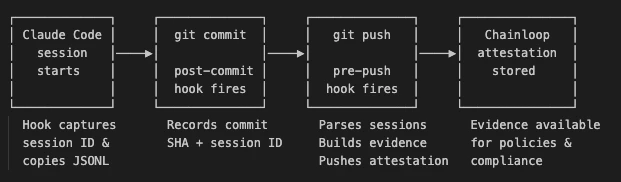
Two Ways to Record
Most teams want the first one: set a repository up once and every session in it is recorded from then on. Reach for the second when you want the record of what an agent did without leaving anything in the repository — or when there’s no repository at all.
Prerequisites
- Latest Chainloop CLI, authenticated against your Chainloop instance:
chainloop traceships in the open-source CLI, so either edition works — add-- --ossor-- --eeto the install command to pick one explicitly. See CLI installation for the full set of options. Both user tokens and service accounts work. - A Chainloop project to associate sessions with —
chainloop trace initoffers to create one if you don’t have it yet. - A Git repository with Claude Code configured.
chainloop trace supports Claude Code and opencode sessions with full metrics (token usage, cost, tool counts, and conversation metrics). Cursor support is experimental and incomplete (no usage metrics or cost). Support for additional AI coding agents is planned.Record Sessions in Your Repository
Run this once from your repository root:.chainloop.yml already holds, so pressing Enter in an already-configured repository keeps it. You need to be logged in: the command creates the Chainloop workflow the attestations target before it writes anything to the repository.
When it finishes, the repository has:
.chainloop.ymlat the root, holding the organization, project, and workflow that every push reads.- The hook configuration for each agent you picked —
.claude/settings.json,.cursor/hooks.json, and/or.opencode/plugins/chainloop-trace.ts. - Git hooks that build and push the attestation on
git push.
Commit
.chainloop.yml and the agent configuration files. Git hooks live in .git/hooks, which git doesn’t carry between clones, so each teammate still runs chainloop trace init once — but with those files committed, the command has nothing left to ask them. They only need the Chainloop CLI installed and authenticated.Work as Usual
Once initialized, there’s nothing else to do. Write code with your agent, commit, and push.Record a Single Agent Run
chainloop trace init sets a repository up once and records every session in it. chainloop trace run does the opposite: it wraps a single agent invocation, records that one run, and leaves nothing behind.
trace run safe to drop into a CI step.
It ignores .chainloop.yml entirely, so the attestation identity comes from the flags: --org, --project, and --workflow are required on every invocation. Agent selection works the same way as in trace init, and --version pins the project version.
Two things make this the mode for recording agents rather than repositories:
- It doesn’t need a git repository. Run it in a scratch directory or a sandbox and the session is still recorded, without commit attribution.
- It records the session even when it produced no commits. A run that only read code, ran tests, or answered a question is attested like any other.
Everything up to this point works on any Chainloop instance, including the open-source Evidence Store. The session UI, pull request correlation, and the AI Coding dashboard that follow are Enterprise Edition features — see Open Source vs. Enterprise Edition.
Visualize AI Coding Sessions
Once a session has been pushed, you can inspect it directly in the Chainloop Web UI. Navigate to the workflow run that contains theCHAINLOOP_AI_CODING_SESSION material.
Rendered View
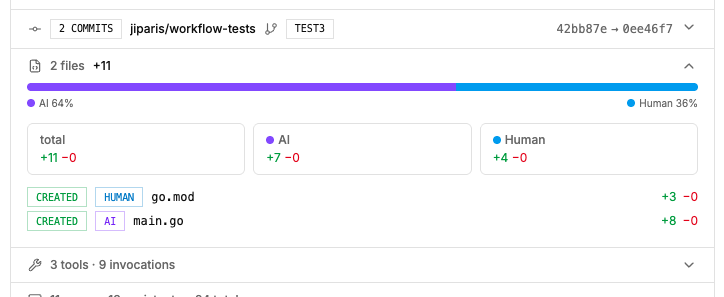
Chainloop renders a structured summary of the session — model usage, token consumption, estimated cost, tool invocations, code changes, and per-line attribution.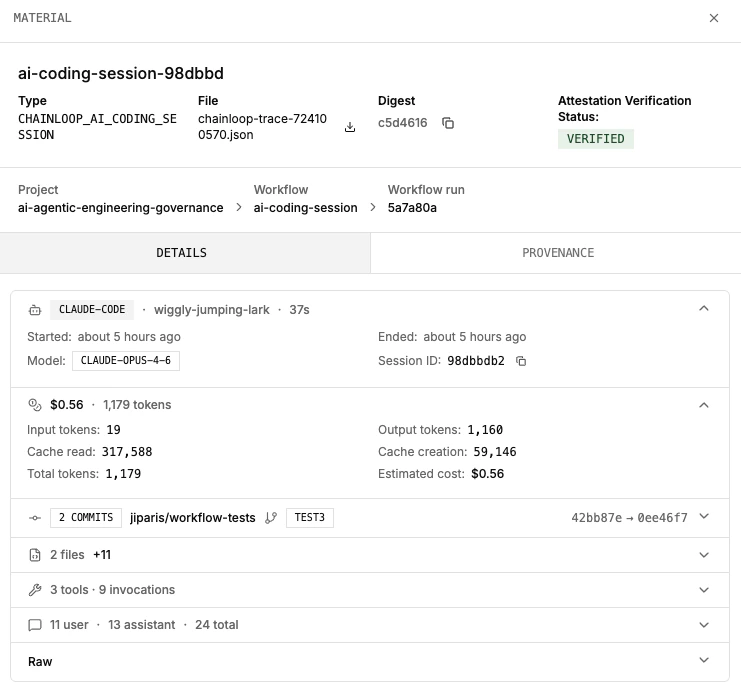
Raw View
Switch to the raw view to see the full JSON evidence as captured by the hooks. This is useful for debugging policies or understanding the exact data available for Rego evaluation.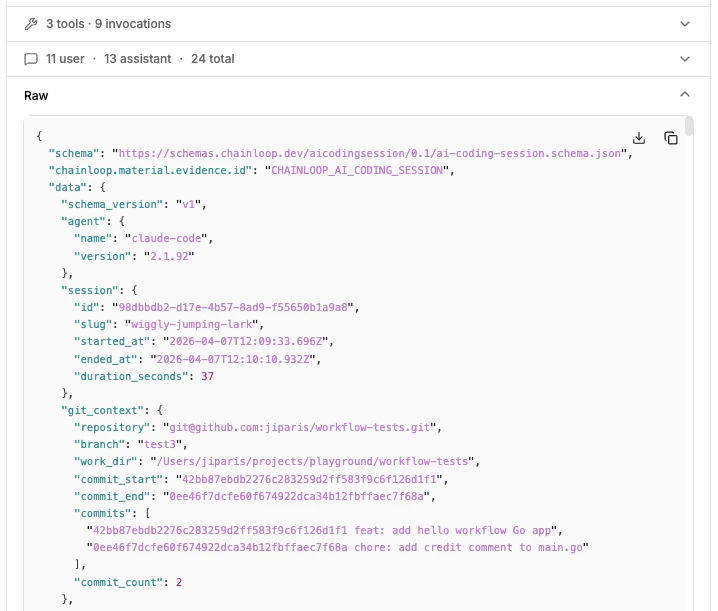
Pull Request Correlation
When a pull request or merge request is opened or updated, Chainloop posts a summary comment listing every AI coding session that contributed to it and, when policies fire, aChainloop AI Policies result on the head commit. Both require the repository to be connected to Chainloop.
GitHub and GitLab are both supported. The summary comment is posted the same way on a GitHub pull request and a GitLab merge request. The policy result differs by provider: GitHub gets a check run carrying the full rendered summary, while GitLab — which has no check-run equivalent — gets a commit status named
Chainloop AI Policies with a one-line description and a link to the details in Chainloop.Connect Your Repository
Connecting is a one-time, organization-level action: GitHub installs the Chainloop GitHub App, GitLab registers a connection with an access token. See Connect GitHub & GitLab for both flows. If your repository is already enrolled — for keyless attestations, for example — you’re done.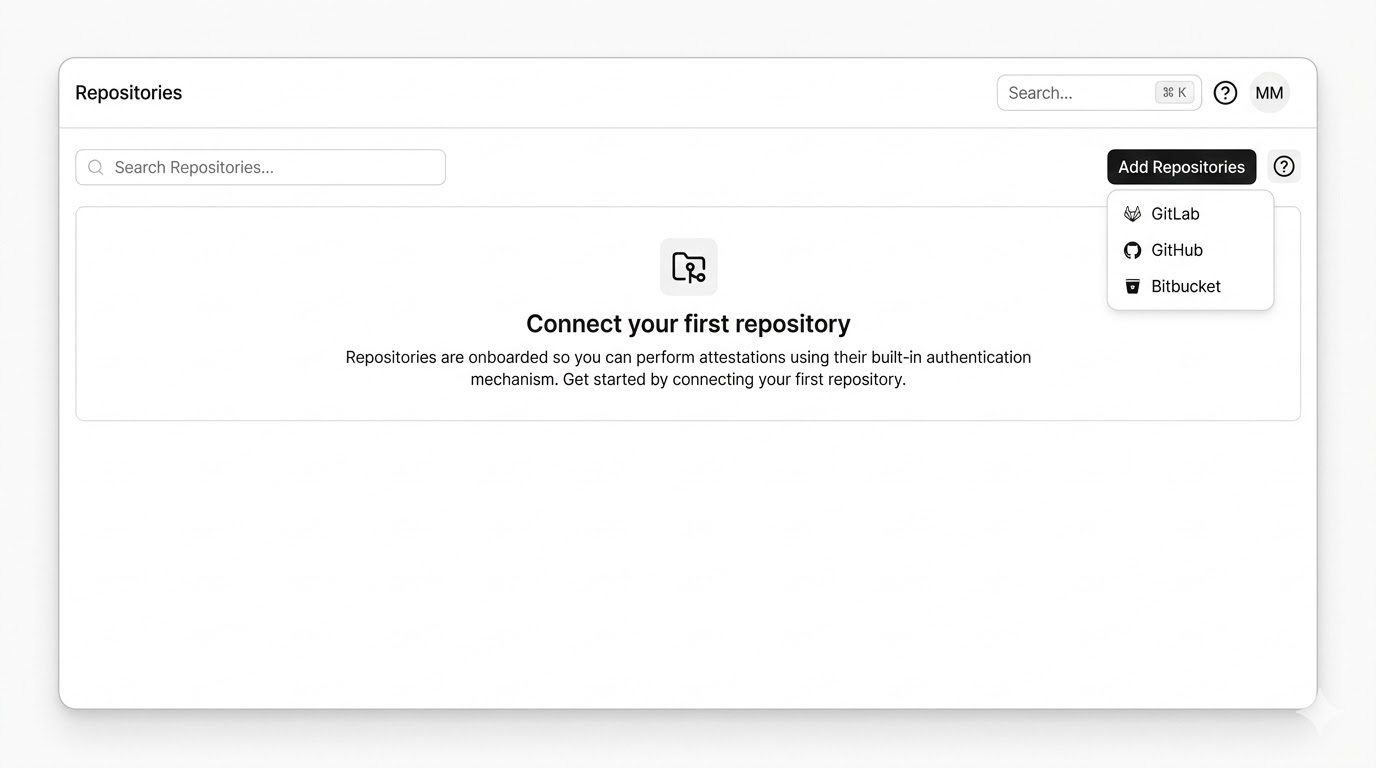

Chainloop stores only repository metadata (ID and name), not your repository code.
Summary Comment

- Aggregate table — one row per contributing session, with the agent and version, model, AI Session Score, attribution %, files touched, lines added/removed, tokens in/out, estimated cost, and session duration. Attribution % counts both added and removed lines.
- Per-session file breakdown (collapsible) — status, attribution label, file path linked to the blob at the PR head, and lines added/removed for each file the session modified. Each session block also includes its AI Session Score breakdown — per-criterion scores and the findings reviewers should focus on.
Chainloop AI Policies Check Run
When you’ve attached policies to CHAINLOOP_AI_CODING_SESSION (see Applying policies below), Chainloop publishes a check run on the PR head commit — or, on GitLab, a commit status of the same name:
failure— fails when either of the following is true:- Policy violations in the aggregated session — any attestation generated during the same AI session has a policy violation. Sessions are aggregated by their commit-message trailer, so a single failing material in any of the session’s attestations fails the check.
- Missing session attestations — a session referenced in a commit’s trailer can’t be found in Chainloop (typically because its attestation push failed for that session).
neutral— policy data couldn’t be evaluated. GitLab has no neutral state, so this surfaces as askippedcommit status.success— every referenced session is present and every aggregated session passes its policies.

checks:write permission; on GitLab, a connection token that can write commit statuses.
When It Runs
- The summary is posted when the PR is opened and re-evaluated every time new commits are pushed.
- Closed or merged PRs are not updated — the last posted summary stays in place.
- No comment is posted when none of the PR’s commits match a stored AI coding session.
Use the AI Coding Dashboard
For an organization-wide view across every recorded session, open Dashboards → AI Coding in the sidebar (/u/<your-org>/dashboards/ai). The dashboard aggregates every CHAINLOOP_AI_CODING_SESSION attestation pushed to the org.

The dashboard only includes sessions that have been pushed as attestations. If a developer hasn’t set up recording yet, their work won’t appear here.
Applying Policies
DefineCHAINLOOP_AI_CODING_SESSION in your contract to attach policies to recorded sessions. Chainloop ships a curated contract of built-in policies you can opt into with the Enterprise Edition; the examples below show three custom Rego policies you can write yourself, which work on any Chainloop instance since the policy engine is open source.
contract.yaml
Example: Restrict to Approved Models
check-approved-models.yaml
Example: Enforce a Token Budget
check-token-budget.yaml
Example: Limit the AI-Authored Code Ratio
check-ai-code-ratio.yaml
Enforcing Chainloop Trace
Recording AI sessions is opt-in by default — if a developer hasn’t set it up, or an attestation push fails for any reason, the work simply doesn’t appear in Chainloop. When AI traceability is mandatory, you can enforce it at three different points: locally on push, on the attestation itself, and on the pull request.Block the push when attestations fail
SetrequireTrace: true in .chainloop.yml (or pass --require-trace to chainloop trace init) to make the pre-push hook fail the git push if a session attestation can’t be produced — for example, when the developer isn’t authenticated, the network is unreachable, or the Chainloop instance rejects the attestation. Without it, the same conditions only emit a warning and the push proceeds.
.chainloop.yml
Both
.chainloop.yml and .chainloop.yaml are accepted. If both exist, .chainloop.yml wins. Commit this file to the repository so your team shares one source of truth.Gate the attestation with policies
Attach policies toCHAINLOOP_AI_CODING_SESSION and enable control gates at the org level (or per policy). When a gated policy fails, the attestation push returns a non-zero exit code, which propagates to the pre-push hook and interrupts the git push — the developer can’t push code that violates AI policy. With the Enterprise Edition, pair this with the built-in policies for signed commits, agent allowlists, dangerous-command detection, and secret scanning; on an open-source instance, attach your own Rego or WASM policies instead.
Detect missing sessions on the pull request
This last mechanism needs the Enterprise Edition and a connected repository.chainloop trace adds a trailer to every commit produced by an AI session, listing the session IDs that contributed to that commit. When Chainloop correlates a pull or merge request, it compares those trailers against the session attestations it holds, and the Chainloop AI Policies result fails when any referenced session is missing — typically because its push failed and was never retried. This catches the case where requireTrace is off and a developer’s attestation silently dropped.
A developer who deliberately wants to bypass detection on a specific PR can add a skip-ai-session label to the pull or merge request; Chainloop will skip the missing-session check for it. Use this sparingly — it’s an explicit opt-out that’s visible on the PR and reviewable.
Removing Tracing
To uninstall all hooks and clean up local state:.claude/settings.json), and the .git/chainloop-trace/ directory. If existing hooks were backed up during installation, they’re restored. Pass --yes to skip the confirmation prompt.
Troubleshooting
If hooks aren’t producing attestations or the dashboard looks empty, work through this list before opening a support ticket:- Use the latest Chainloop CLI and confirm it’s authenticated against your Chainloop instance:
Both user tokens and service accounts work.
- Cursor support is experimental and incomplete — for example, no usage metrics or cost data are captured. Use Claude Code if you need full coverage.
- Confirm the git hooks fire on
git push— you should seechainloop tracelog lines in the push output. If you don’t, re-runchainloop trace initfrom the repository root. - Run from the repository root — Claude Code hooks don’t trigger when you launch the agent from a sub-folder of the repository.
- Check the hook log at
.git/chainloop-trace/log.txt— it records every hook invocation with full detail and is the first place to look when something silent breaks. - PR comment warns about missing sessions — when a commit’s trailer references a session that wasn’t registered in Chainloop, the PR comment shows a “missing sessions” warning and the
Chainloop AI Policiescheck run lists the offending session IDs (the actual Claude or Cursor session IDs). Grep for those IDs in.git/chainloop-trace/log.txton the developer’s machine to see why the attestation push didn’t land — typically auth failure, network error, or a rejected attestation.
Open Source vs. Enterprise Edition
chainloop trace itself is open source. Against an open-source Evidence Store, a recorded session is a signed piece of evidence like any other: it’s captured with full metrics and per-line attribution, redacted of secrets, stored in your own CAS backend, and retrievable through the CLI and API. You can download it, evaluate it with your own Rego or WASM policies, and gate the git push on the result with control gates.
The Enterprise Edition adds what happens once the evidence has landed:
- A curated policy library. Instead of only the Rego you write yourself, you get Chainloop’s built-in policies for signed commits, agent allowlists, dangerous-command detection, and secret scanning.
- The session UI and the organization-wide view. Rendered session summaries with attribution drill-down, and the AI Coding dashboard aggregating every session across the org.
- Pull request correlation. The summary comment, the
Chainloop AI Policiesresult on the head commit, missing-session detection, and the AI Session Score.
Enterprise Edition features are available on paid plans. For the full capability-by-capability breakdown, see Open Source vs. Platform.
Related Resources
- AI Coding Sessions — what sessions are, how PR correlation works, and what each dashboard card means
- Open Source vs. Platform — which trace capabilities need a paid plan
- AI Session Score — per-PR confidence signal for AI-assisted changes
- How to record AI coding sessions in a Docker Sandbox — record sessions from agents running in an ephemeral sandbox
- How to collect AI agent configuration — capture static AI agent configuration files
- Keyless attestations in GitHub — enroll a GitHub repository and link it to a Chainloop project
- PR-Policies control gate — enforce pull request quality standards with Chainloop policies
- Material Types — full list of supported material types
- Policies — how policies work in Chainloop
- How to write custom policies — write Rego policies for your evidence