

Overview
An AI coding session is a unit of work an AI agent performed against a repository — the models it used, the tools it invoked, the messages exchanged, and the exact lines of code it produced. Chainloop captures every session automatically through hooks installed bychainloop trace init and turns it into a signed CHAINLOOP_AI_CODING_SESSION attestation.
Once those attestations are stored, the platform correlates them with pull requests, evaluates policies against them, and aggregates them on the AI Coding dashboard — giving security and engineering teams a single view of how AI agents contribute to the codebase.
Capture, attribution, redaction, attestation, and policy evaluation are open source. Pull request correlation, the dashboard, the score, and Chainloop’s curated policies are platform features — see Open Source vs. Platform for the full split.
The Problem It Solves
AI agents now write a meaningful share of production code, but the activity is invisible to the rest of the organization. Without a record of what the agent did, security and engineering leaders can’t answer basic questions: which commits were AI-assisted, which models were used, how much did a session cost, did the agent invoke dangerous tools, and how much of the diff was actually human-reviewed. Self-disclosure doesn’t scale. Most agents leave no durable, tamper-evident record of their actions, which means policies (e.g., “only approved models”, “no secrets in transcripts”, “signed commits”) have nothing to evaluate against, dashboards have nothing to aggregate, and reviewers have nothing to anchor on when the diff looks suspicious. Chainloop closes that loop with three complementary pieces:- Context — every session is captured as a
CHAINLOOP_AI_CODING_SESSIONmaterial, paired with the agent’s static configuration via the AI config collector (CHAINLOOP_AI_AGENT_CONFIG). Together they give policies and reviewers something concrete to evaluate, both at runtime and at config time. - Policies — built-in checks for signed commits, dangerous commands, secrets, and approved agents, plus custom Rego for organization-specific rules.
- Tooling —
chainloop traceautomates capture so developers don’t change how they work, while the dashboard, PR summary, and check run surface the data wherever security and engineering teams already operate.
Open Source vs. Platform
chainloop trace, the CHAINLOOP_AI_CODING_SESSION evidence type, and the policy engine that evaluates it are all part of open source Chainloop. Capturing sessions, attesting them, and gating them with your own policies works against a self-hosted Evidence Store with no paid plan involved.
What the platform adds is everything that happens after the evidence lands: correlating sessions with pull requests, rendering them in the UI, aggregating them across projects, and scoring them for reviewers.
Without the platform you still get the evidence and the verdict: sessions are signed, stored, retrievable through the CLI and API, and gated by the policies you attach to them.
How Sessions Are Captured
While an agent is working, hooks installed in the agent’s runtime record everything that matters:- Session metadata — start and end time, duration, slug, agent and version.
- Model and token usage — primary model, every model used, input/output/cache tokens, estimated cost.
- Tool invocations — every tool the agent called (
Read,Edit,Bash, etc.) and how many times. - Conversation summary — counts of user and assistant messages.
- Per-line code attribution — every time the agent edits a file via
Edit,Write, orMultiEdit, the hooks snapshot the file before and after the change. Diffing the snapshots gives the exact line ranges the agent touched.
.git/chainloop-trace/ until you push.
Aggregation on Git Push
A single commit can include changes from multiple sessions, or a mix of AI and human edits. On push, the pre-push hook reconciles all of that into one attestation: For each contributing session, the bundle records git context (repo, branch, commit range), aggregate stats, and a per-file attribution label (ai or human) with the exact line ranges. The bundle is then signed and pushed as a Chainloop attestation. Hooks are non-blocking by default — if anything fails, they log a warning but never block the push (toggle this with the requireTrace setting in .chainloop.yml).
Before the evidence leaves the machine, the CLI scans the session for secrets and replaces the ones it finds with placeholders. Only the uploaded copy is redacted — the local session files are left untouched — and redaction fails closed, so a session that can’t be scanned isn’t uploaded at all. What redaction did is recorded in the attestation, so policies can reject sessions that were stored unscanned.
After the push, the local session data is cleaned up. The attestation lives in Chainloop, tied to the project the repository is linked to.
PR Correlation
Once attestations land in Chainloop, the platform connects them to the pull requests they belong to. When a PR is opened or new commits land, the Chainloop GitHub App receives a webhook event, fetches the PR’s commit list, and matches each commit SHA against the stored AI coding session attestations for the linked project. The matches drive three downstream surfaces — the PR summary comment, the policy check run, and the dashboard’s PR-related metrics. If session data arrives after the PR is opened, the comment is updated automatically once the session lands.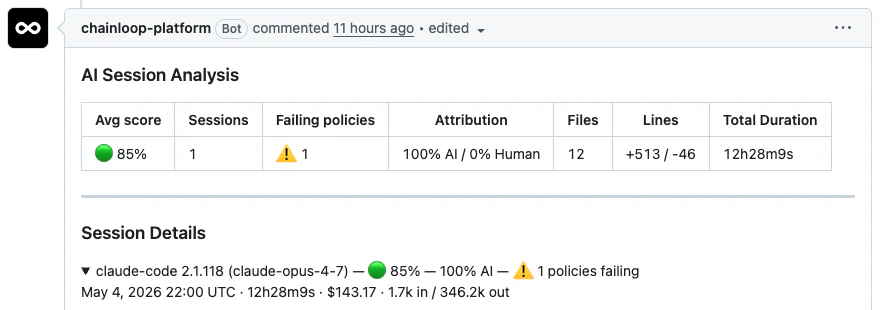
AI Sessions Dashboard Metrics
The org-wide AI Coding dashboard at/u/<your-org>/dashboards/ai aggregates everything captured above. Each card maps to a specific backend metric:
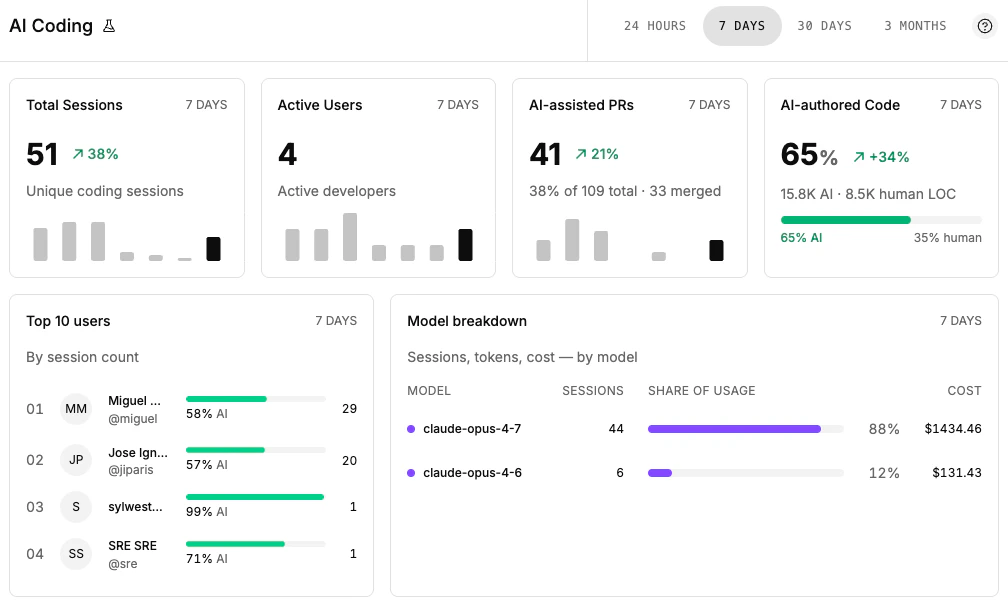
The PR card uses the same correlation mechanism as the per-PR comment, so the two views are always consistent.
Policies and Scoring
Because each session lands as a regular Chainloop material, every policy mechanism that works on materials works on AI coding sessions too.Built-in Policies
Chainloop ships a curated contract of deterministic checks forCHAINLOOP_AI_CODING_SESSION:
source-commit— verifies the attestation references a specific Git commit and (optionally) that the commit is signedai-agent-present— confirms an AI agent is present in the attestation or as a known bot reviewer on the PRai-config-ai-agents-allowed— restricts which AI agents may produce sessions (e.g., onlyclaude-code)ai-config-mcp-servers-allowed— restricts which MCP servers a session may invokeai-config-no-dangerous-commands— flags destructive shell commands captured during the sessionai-config-no-secrets— detects hardcoded secrets in session transcripts
PR Check Run
When a session in a PR violates any attached policy, Chainloop publishes aChainloop AI Policies GitHub check run on the head commit. The check is failure when there are violations, neutral when policy data can’t be evaluated, and success otherwise — making AI policy compliance a first-class merge gate alongside CI.
AI Session Score
In addition to deterministic policies, Chainloop computes an AI Session Score — a per-PR confidence signal derived from session data, the diff, and contextual signals like AI code review bot comments. Where policies say “did this break a specific rule?”, the score says “does this PR look healthy enough to merge?” and surfaces actionable findings for reviewers.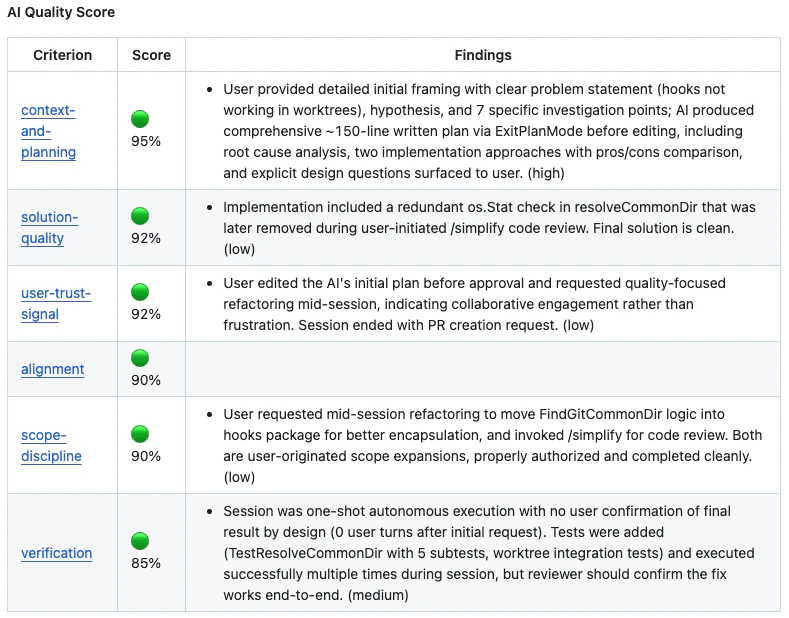
Relationship to AI Config Collection
chainloop trace captures runtime session data. It pairs naturally with the AI config collector, which captures the static configuration an agent runs with (CLAUDE.md, MCP config, settings, rules, skills).
Use both together for full coverage: the config collector ensures agents are set up correctly, while trace ensures they behave as expected at runtime.
Set It Up
Ready to capture sessions in your repositories? Follow How to record AI coding sessions — it walks through prerequisites,chainloop trace init, recording a single agent run with chainloop trace run, the GitHub App, the dashboard, enforcement options, and troubleshooting.
Further Reading
- AI Session Score — per-PR confidence signal for AI-assisted changes
- How to collect AI agent configuration — capture static AI agent configuration files
- Policies — how policies work in Chainloop
- Material Types — full list of supported material types