

Run Modes

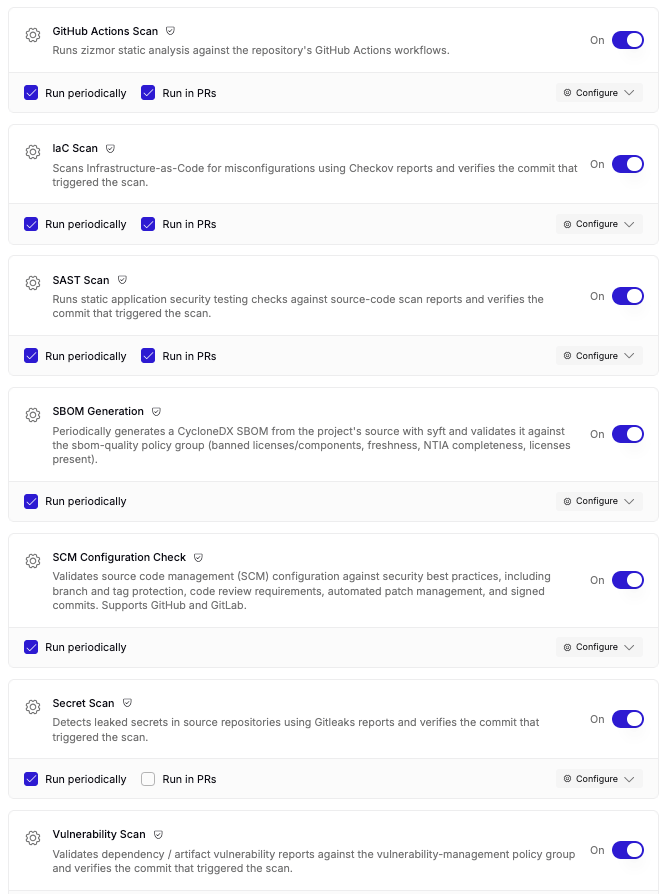
The two run modes are independent: enable both for scheduled baseline coverage plus per-change feedback, or enable just one. Where a template supports only a single mode, that mode stays selected.
Turning a workflow on without selecting either run mode falls back to manual delivery, for the templates that allow it: Chainloop sets up the workflow and its contract, and you instrument your CI with the Chainloop CLI to send attestations yourself.
Server-side runs — periodic or in PRs — require a repository connected through a provider that supports them, currently GitHub or GitLab. If no repository is linked to the project, or the linked repository’s provider doesn’t support them, the run modes are disabled and you can use manual delivery instead, where the template allows it.
Which Templates Run Where
Built-in vs. Custom Templates
Workflow templates come from two sources:- Built-in templates are provided by Chainloop, available on Chainloop Cloud, and pre-selected by default.
- Custom templates are defined by your organization. Note that these are only available in on-prem installations.
On self-hosted instances, only your organization’s custom templates are listed — Chainloop’s built-in templates aren’t available.
What Managed Workflows Do After Connection
With Run periodically enabled, Chainloop runs the workflow on a schedule against the connected repository — you don’t need to trigger anything from your CI. For templates that scan for vulnerabilities, these periodic runs power AI auto-remediation: Chainloop assesses each finding with AI and, when a fix is available, proposes it as a pull request (GitHub) or merge request (GitLab). See Vulnerability Management for how the assessment and remediation flow works. With Run in PRs enabled, the same scanners run when a pull request is opened or updated, and reviewers get the result in the pull request itself before the code merges. Either way, the run is stored as evidence: the scan reports — and, for PR runs, the pull request metadata — are captured as a signed attestation, evaluated by the same policies as the rest of your evidence, and retained for audit. Managed workflows can also check your repository’s SCM configuration, such as branch protection settings, against good practices.Template Categories
Templates are grouped into categories:- Repository Watch — tracks changes to the repository itself, such as configuration drift.
- Security Scanning — scans code, dependencies, or containers for vulnerabilities.
- AI Governance — monitors AI agent configuration and usage.
- Other — templates that don’t fit the categories above.
Configuring a Template
Each template has a Configure panel where you set its options before adding it to the project.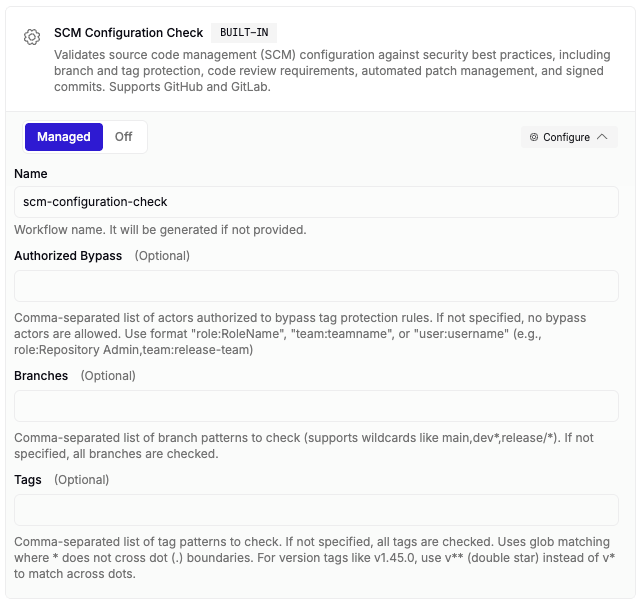
- Workflow name — optional; if you leave it blank, Chainloop generates one automatically.
- Template inputs — any additional fields the template requires.