

This deployment guide has been deprecated and replaced by the Enterprise edition documentation. If you are looking to migrate from the previous Platform+OSS charts to the new
chainloop-ee chart, please refer to the Migration Guide.This documentation is for the proprietary Chainloop Platform. If you are looking for the Open Source Evidence Store documentation, please refer to the Chainloop Evidence Store guide
Migrate to new Helm Chart
Thechainloop-ee chart replaces both the separate Platform and OSS charts with a single unified Helm chart. Migration is straightforward — most configuration keys remain in the same sections.
For step-by-step instructions, see the Migration Guide.
Introduction
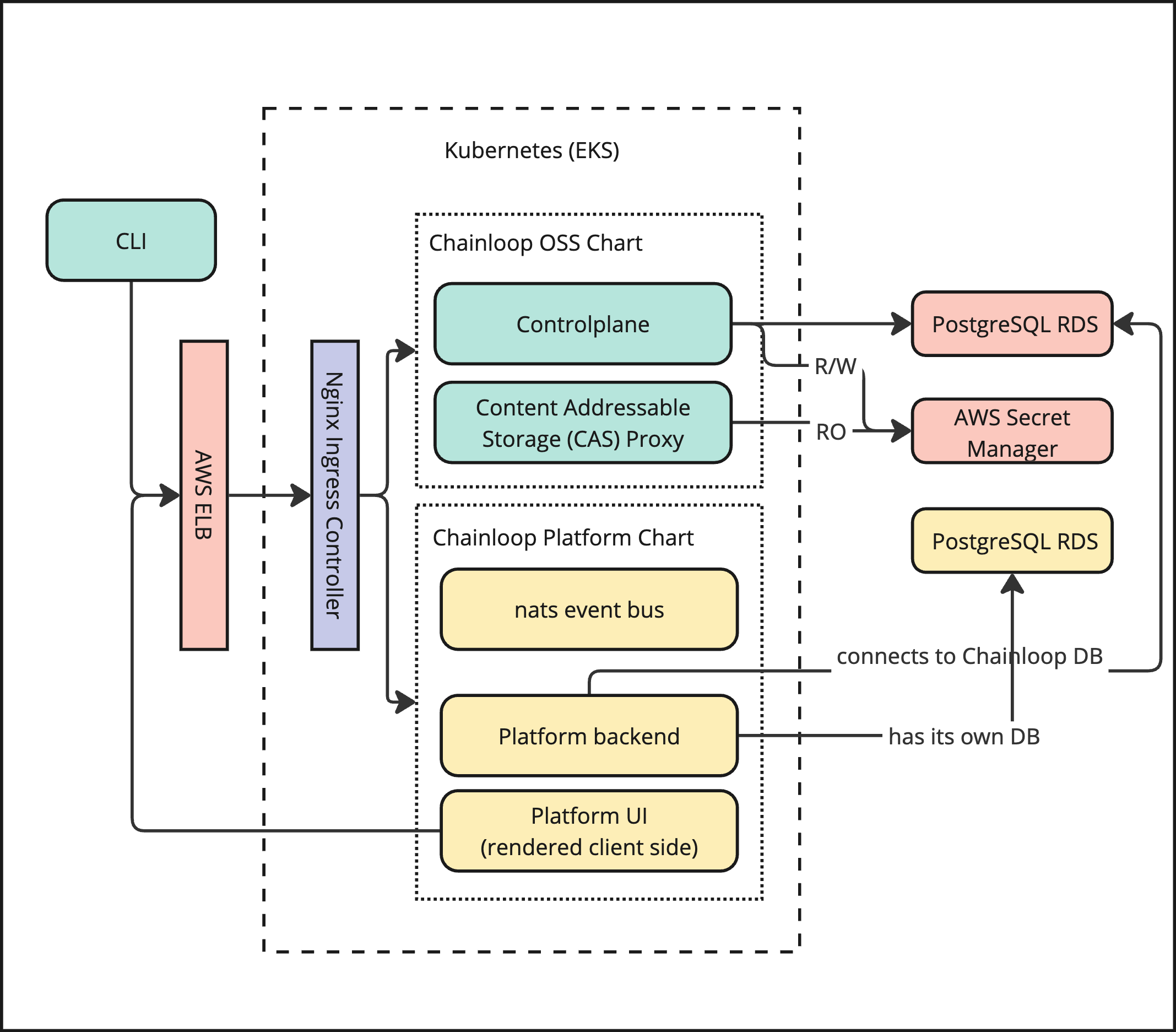
The Chainloop platform has two top-level components: Chainloop Evidence Store and Chainloop Platform. These are deployed using two different Helm Charts.We have a new deployment method available in preview that simplifies the deployment process. For more information please refer to this other guide
- The source code can be found in this repository https://github.com/chainloop-dev/chainloop
- It is deployed using the Helm Chart that can be found upstream here or its relocated version here oci://chainloop.azurecr.io/chart/chainloop
- It comprises two server-side components, a control plane, and a content-addressable proxy.
- The source code of the server components is the property of Chainloop Inc.
- The Helm Chart can be found here oci://chainloop.azurecr.io/chart/chainloop-platform
- It’s comprised of three server-side components, a backend, a frontend and a nats.io server.
Retrieve Private OCI Registry credentials.
To pull the Helm Charts and container images you’ll need to authenticate with a private OCI registry managed. If you don’t have them yet, please contact the Chainloop team. Once you get the creds, you can give it a try by authenticating locally and pulling the latest version of both Helm Charts.Configure credentials for deployment
You have two options to consume the provided Helm Charts and container images in your Kubernetes cluster:Option 1: Pull images and Chart directly from Private Azure Registry
To pull the images, you’ll need to store these credentials as a K8s secret in the cluster where you will deploy the Helm Charts. Later, they will be referenced in the Helm charts as imagePullSecrets.Option 2: Relocate Helm Chart and images to your own registry
Both charts are compatible with relocation processes performed by the Helm Relocation Plugin. This means that you can easily import the Helm Charts and Container images provided by the Chainloop team into your registry, even behind the firewall. This is a two-step process (wrap -> unwrap)- Pull all the container images and Helm chart and wrap them in an intermediate tarball.
- If needed, transfer that tarball to your air-gap environment via an offline medium
- Unwrap the tarball and push container images, update the Helm Chart with new image references, and push it to the target registry.
Deploy and Configure in Kubernetes
The Chainloop platform has two top-level components: Chainloop Evidence Store and Chainloop Platform. These are deployed using two different Helm Charts.We are working on an umbrella Helm Chart that will contain both evidence store and platform charts. This will greatly simplify the deployment, configuration and update process, stay tuned!
Step 1 - Deploy Evidence Store Chart
Please refer to Chart Readme file that can be found on the chart tarball that can be pulled like thisStep 2 - Deploy Platform Chart
Please refer to Chart Readme file that can be found on the chart tarball that can be pulled like thisStep 3 - Enable Built-in Library of Policies
The Chainloop platform backend exposes through its API a curated library of policies. To leverage it, some configuration changes needs to be done in the Chainloop Vault controlplane Helm chart values.yaml file.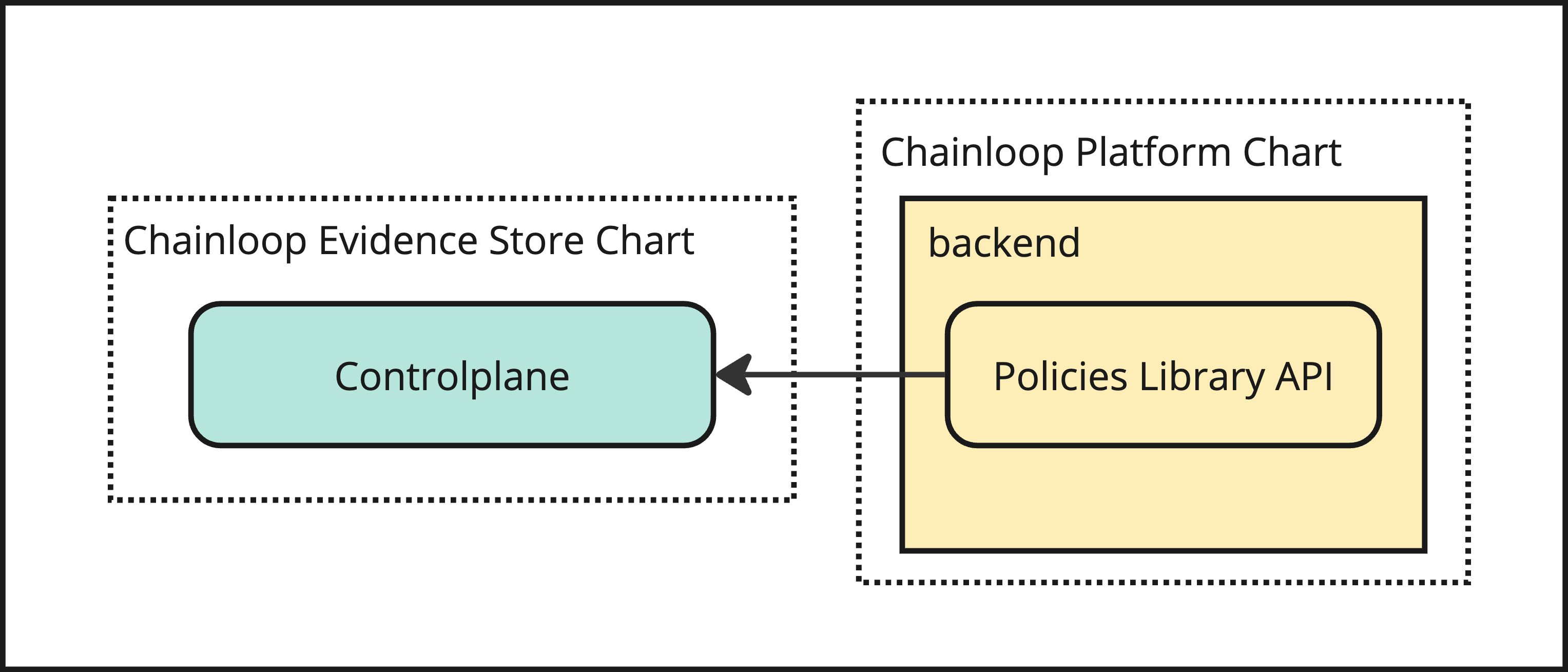
Chainloop Chart values.yaml
Example Contract file
Step 4: Configure Controlplane and CAS clients in backend
In order to enable advanced features like manual evidence compliance capabilities and more, you need to configure the Chainloop Platform backend to be able to talk to the Chainloop Controlplane and CAS.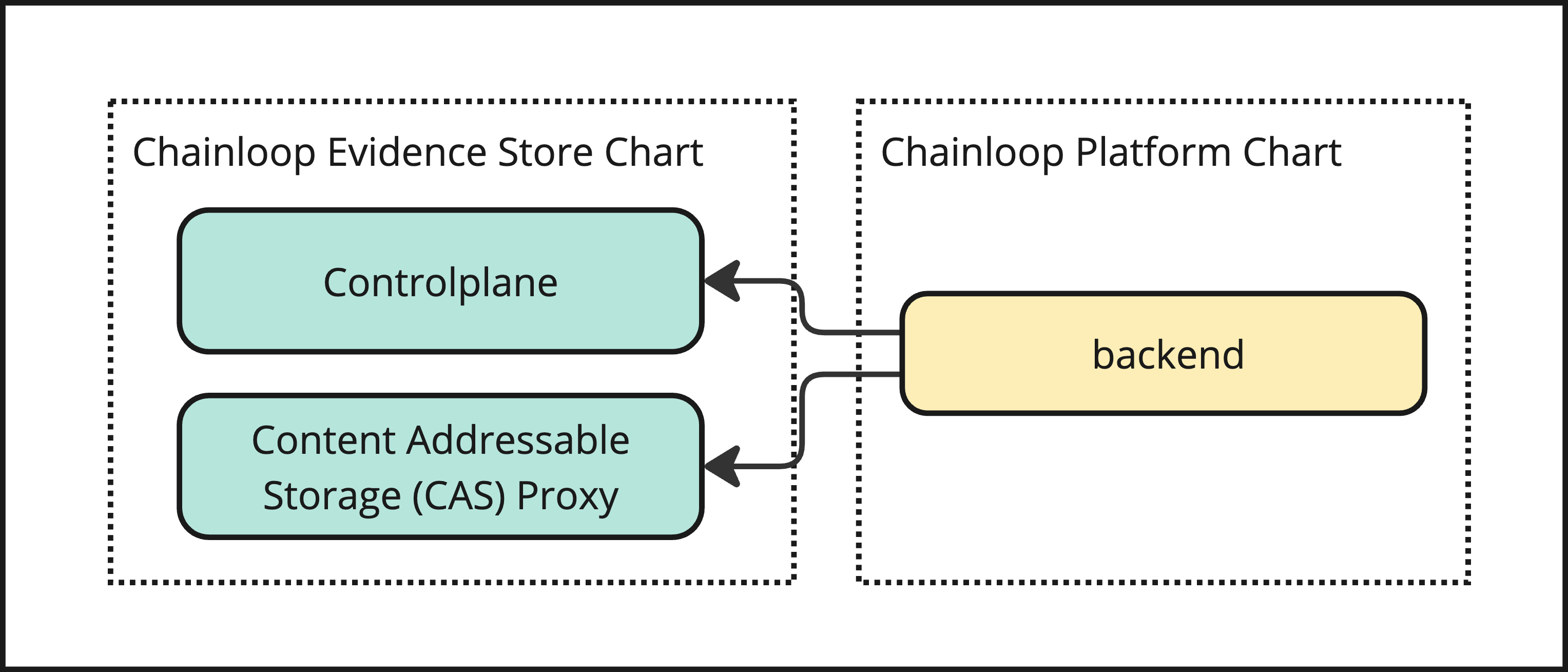
Platform Chart values.yaml
Step 5 - Connect to NATS event bus
Many of the advanced features in Chainloop Platform require the use of the NATS event bus. The platform Helm Chart deployed a Nats.io server, so the next step is to configure the controlplane to connect to it. To find the hostname, you can query the service like thischainloop-platform-nats is what you will use as the hostname or the FQDN chainloop-platform-nats.[my-namespace].svc.cluster.local. if you are connecting from another namespace.
Then you’ll update the Chainloop Vault controlplane Helm chart values.yaml file like this:
Step 6 (optional) - Configure Secret Manager in platform Chart
To enable notifications integrations, you must configure the secret manager to be able to store and retrieve secrets. The configuration is similar to the one you have already setup in the Chainloop Chart.Platform Chart values.yaml
Step 7 (optional) - Setup SMTP configuration
To enable email notifications, you need to configure the SMTP settings in the Chainloop Platform backend Helm chartvalues.yaml file like this:
Platform Chart values.yaml
Step 8 (optional) - Configure users auto-onboarding
This step allows automatically onboarding users to specific organizations and user groups. Follow this guide to configure Chainloop Platform for auto-provisioning.Step 9 (optional) - Restrict organization creation
This step allows restricting organization creation to specific users. Follow this guide to configure Chainloop Platform for restricting organization creation.Step 10 (optional): Configure Keyless attestation for GitLab
1 - Configure Federated Authentication in Controlplane
Then you’ll update the Chainloop Vault controlplane Helm chart values.yaml file like thisChainloop Chart values.yaml
2 - Register a GitLab connection
To support GitLab keyless attestation, the platform backend needs to be able to authenticate incoming tokens and authorize them against onboarded repositories. Both are handled by registering a GitLab connection — no static Helm configuration is required:- An org admin registers a GitLab connection with the instance host and an access token, following the Connect GitHub & GitLab flow. This lets users onboard GitLab repositories and link them to projects.
- The backend derives the trusted OIDC issuer automatically from each registered connection, so incoming GitLab tokens are authenticated without adding a static entry to
backend.machineIdentityIssuers, and without a redeploy.
Step 10 (optional) - Expose MCP server
The Chainloop Model Context Protocol (MCP) server is served by the backend under the/mcp path, so it is exposed through the existing backend domain.
This means the MCP server is available at https://[your-backend-hostname]/mcp, for example https://api.app.chainloop.dev/mcp.