> ## Documentation Index
> Fetch the complete documentation index at: https://docs.chainloop.dev/llms.txt
> Use this file to discover all available pages before exploring further.
# Built-in Scanners
> The built-in scans Chainloop runs against a connected repository — the tool behind each one, the evidence it produces, and how to turn them on.
This feature is only available on Chainloop's platform [paid plans](https://chainloop.dev/pricing).
Chainloop's built-in [workflow templates](/concepts/workflow-templates) scan your code for you: Chainloop clones the repository connected to your project into a sandbox it manages, runs one open-source tool there, and records the output as a signed [attestation](/concepts/attestations). Nothing runs in your CI.
In the product you pick a scan by name — **SAST Scan**, **Secret Scan**, **Vulnerability Scan** — without seeing what's behind it. This page names the tool each scan runs, what it looks for, the evidence it produces, and how to enable it. Throughout, *scan* means the built-in template you turn on and *tool* means the binary it runs.
## Scanners at a Glance
| Scan | Tool | Looks for | Evidence produced | Run modes |
| --------------------------- | ----------------------------------------------------------------------------------- | --------------------------------------- | --------------------------------------------------------------------- | ----------------------------------- |
| **SAST Scan** | [opengrep](https://github.com/opengrep/opengrep) | Weaknesses in your source code | `SARIF` — `sast-report` | Periodic, PRs, manual |
| **Secret Scan** | [betterleaks](https://github.com/betterleaks/betterleaks) | Committed credentials and other secrets | `GITLEAKS_JSON` — `secret-report` | Periodic, PRs, manual |
| **Vulnerability Scan** | [syft](https://github.com/anchore/syft) + [grype](https://github.com/anchore/grype) | Known CVEs in your dependencies | `SARIF` — `vulnerability-report`, plus `SBOM_CYCLONEDX_JSON` — `sbom` | Periodic, PRs, manual |
| **IaC Scan** | [checkov](https://www.checkov.io/) | Misconfigured infrastructure as code | `SARIF` — `iac-report` | Periodic, PRs, manual |
| **GitHub Actions Scan** | [zizmor](https://docs.zizmor.sh) | Unsafe GitHub Actions workflows | `SARIF` — `actions-report` | Periodic, PRs, manual — GitHub only |
| **SBOM Generation** | [syft](https://github.com/anchore/syft) | — produces a CycloneDX SBOM | `SBOM_CYCLONEDX_JSON` — `sbom` | Periodic only |
| **SCM Configuration Check** | none — queries your provider's API | Weak repository settings | `CHAINLOOP_RUNNER_CONTEXT` — `runner-context` | Periodic only |
Each evidence entry is a [material](/concepts/material-types) type and a material name, so you can find the report inside the attestation and write [policies](/concepts/policies) against it.
## Turning Scans On
Every scan has an **On/Off** toggle and, when it's on, up to two independent **run modes**: **Run periodically** and **Run in PRs**. You set these per scan, either in the [Create Project wizard](/get-started/projects/create-project) or later from the project's workflow settings.
### Run Modes
 | Setting | What happens |
| -------------------- | -------------------------------------------------------------------------------------------------------------------------------------------------------------------------------------------------------------------------------- |
| **Run periodically** | Chainloop runs the scan server-side on a schedule, in a sandbox, against your repository code. No CI changes are required. |
| **Run in PRs** | Chainloop runs the scan on every pull or merge request, scoping the analysis to the files that changed, and reports back on the pull request itself as a single **Chainloop PR Validation** check plus one consolidated comment. |
| **Off** | The workflow is not created. |
The two modes are independent: enable both for scheduled baseline coverage plus per-change feedback, or enable just one. Where a scan supports only a single mode, that mode stays selected — the table above lists what each one supports.
| Setting | What happens |
| -------------------- | -------------------------------------------------------------------------------------------------------------------------------------------------------------------------------------------------------------------------------- |
| **Run periodically** | Chainloop runs the scan server-side on a schedule, in a sandbox, against your repository code. No CI changes are required. |
| **Run in PRs** | Chainloop runs the scan on every pull or merge request, scoping the analysis to the files that changed, and reports back on the pull request itself as a single **Chainloop PR Validation** check plus one consolidated comment. |
| **Off** | The workflow is not created. |
The two modes are independent: enable both for scheduled baseline coverage plus per-change feedback, or enable just one. Where a scan supports only a single mode, that mode stays selected — the table above lists what each one supports.
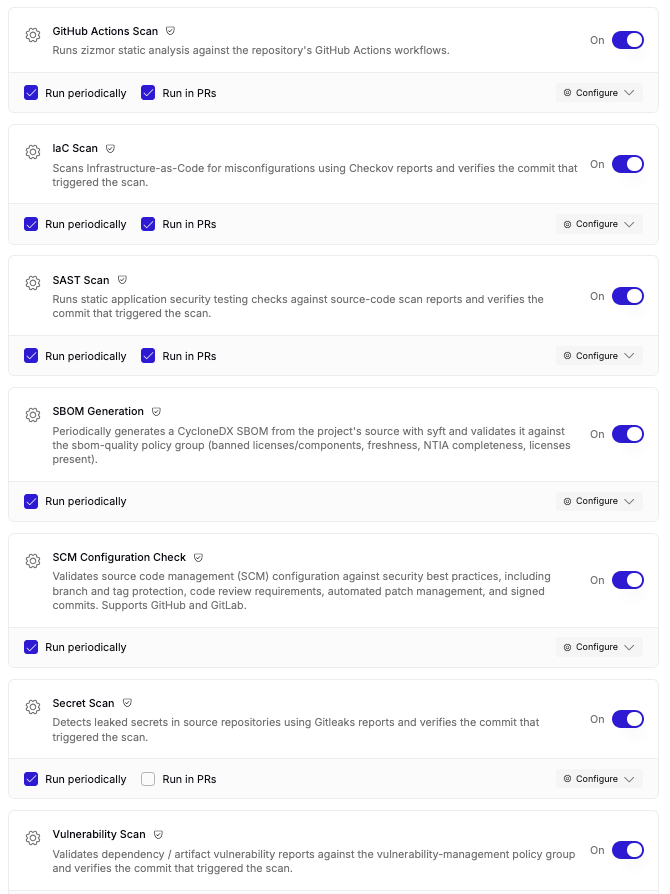 Turning a scan on without selecting either run mode falls back to **manual delivery**, for the scans that allow it: Chainloop sets up the workflow and its [contract](/concepts/contracts), and you instrument your CI with the [Chainloop CLI](/get-started/first-attestation) to send attestations yourself.
Server-side runs — periodic or in PRs — need a repository connected through a provider that supports them, currently **GitHub or GitLab**. If no repository is linked to the project, or its provider doesn't support them, the run modes are disabled and you can use manual delivery instead where the scan allows it.
### Configuring a Scan
Each scan has a **Configure** panel where you set its options before adding it to the project.
Turning a scan on without selecting either run mode falls back to **manual delivery**, for the scans that allow it: Chainloop sets up the workflow and its [contract](/concepts/contracts), and you instrument your CI with the [Chainloop CLI](/get-started/first-attestation) to send attestations yourself.
Server-side runs — periodic or in PRs — need a repository connected through a provider that supports them, currently **GitHub or GitLab**. If no repository is linked to the project, or its provider doesn't support them, the run modes are disabled and you can use manual delivery instead where the scan allows it.
### Configuring a Scan
Each scan has a **Configure** panel where you set its options before adding it to the project.
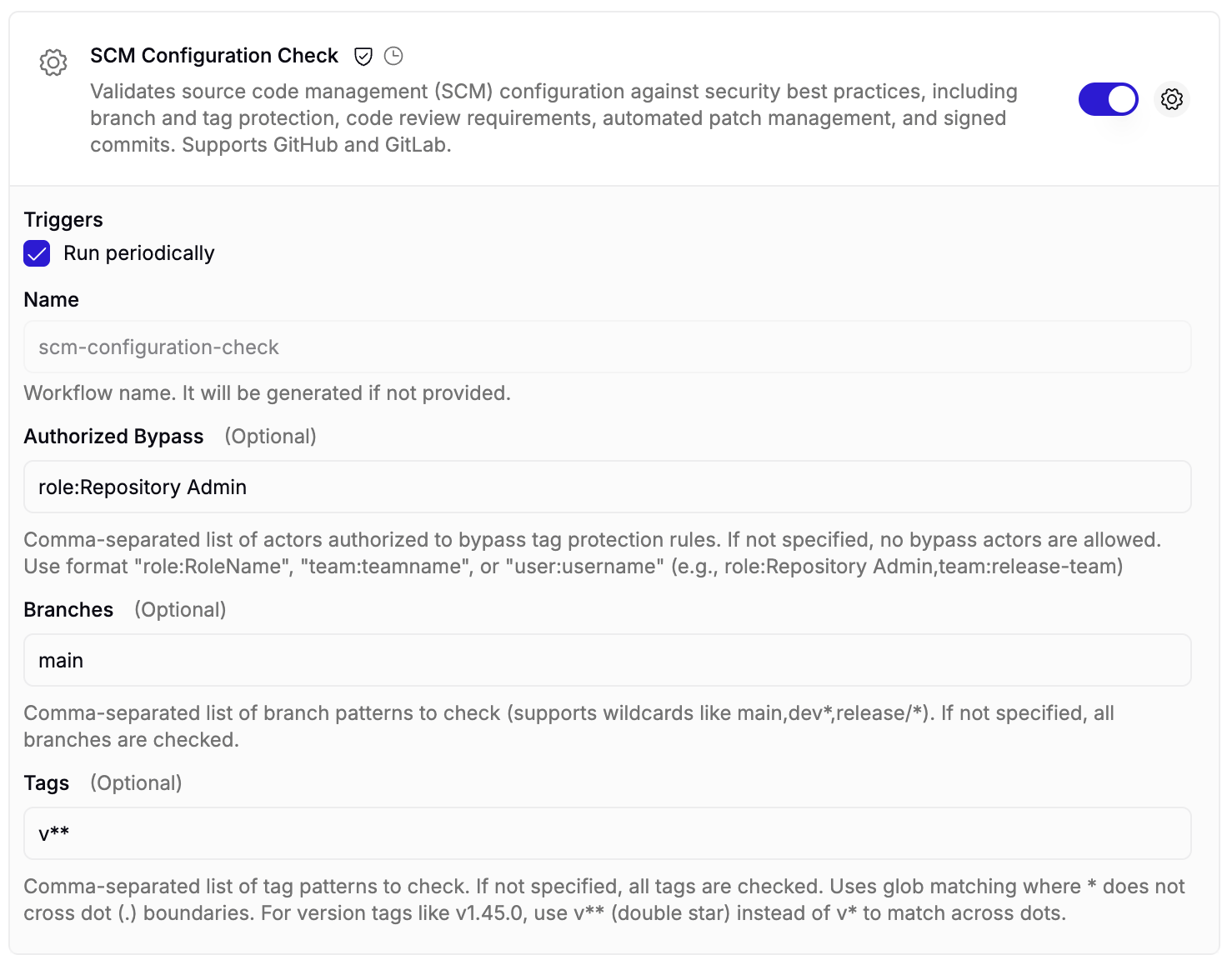 * **Triggers** — the [run modes](#run-modes) to enable. Only the modes the scan supports are offered, so the SCM Configuration Check above shows just **Run periodically**.
* **Name** — optional; if you leave it blank, Chainloop generates one automatically.
* **Template inputs** — the fields the scan accepts, each with a description of the format it expects. The inputs for every built-in scan are listed under each scan below.
Some scans allow multiple configurations. Adding more than one configuration for the same scan creates a separate workflow for each, which is how you cover several components of a monorepo.
### Built-in and Custom Templates
Workflow templates come from two sources:
* **Built-in templates** — the scans on this page. Provided by Chainloop, available on Chainloop Cloud, and pre-selected by default.
* **Custom templates** — defined by your organization, and only available in on-prem installations. See [Managing Custom Templates](/concepts/workflow-templates#managing-custom-templates) for the `chainloop apply` workflow.
On self-hosted instances, only your organization's custom templates are listed — Chainloop's built-in templates aren't available.
## How Scans Run
### Where Scans Run
Chainloop clones the repository linked to your project into a sandbox it manages and runs the tool there. None of your runners are involved. A scan is skipped when the project has no linked repository. The one exception is the SCM Configuration Check, which needs no sandbox and no clone — it only calls your provider's API.
Every scan that reads source takes a `path` input, relative to the repository root, which defaults to the whole repository. Point it at a subdirectory to scan one component of a monorepo.
### How Often Periodic Scans Run
At least once a day. Chainloop re-scans any workflow whose most recent run is more than 24 hours old, so there is no schedule to configure. A workflow that has never run is treated the same way, so a scan you just enabled is picked up shortly after.
### Where the Results Go
Every run is stored as evidence: the scan reports — and, for PR runs, the pull request metadata — are captured as a signed [attestation](/concepts/attestations), evaluated by the same [policies](/concepts/policies) as the rest of your evidence, and retained for audit.
Policy verdicts are recorded, not enforced: a violation never fails the run or rejects the attestation, so you always get the report. To make a violation stop something, use [control gates](/concepts/control-gates).
Findings from the vulnerability scans feed [vulnerability management](/concepts/vulnerability-management), where periodic runs power **AI auto-remediation** — Chainloop assesses each finding with AI and, when a fix is available, proposes it as a pull or merge request. See [assessment and auto-remediation](/concepts/vulnerability-management#assessment-and-auto-remediation-using-ai) for that flow.
## Scanning in Pull Requests
Turn on **Run in PRs** for as many scans as you like: they share one sandbox run per pull or merge request, so a pull request gets one clone, one attestation, one **Chainloop PR Validation** check, and one consolidated comment instead of a separate set per scan.
There is no PR validation workflow to create. Chainloop provisions one for the project on its first pull request, named `pr-validation`, deriving its contract from the scans you opted into.
### How the Diff Is Scoped
Each tool narrows to the change in its own way, which is worth knowing when a finding looks unrelated to the pull request:
| Tool | Runs when | Scoped to |
| ----------- | ------------------------------------------------------- | --------------------------------------------------------------------------------- |
| betterleaks | Any file changed | The commits between the merge base and the head, so only newly introduced secrets |
| opengrep | Any file changed | The diff against the merge base |
| zizmor | A workflow or action definition changed | The changed workflow files |
| checkov | A `.tf`, `.yaml`, `.json`, or `Dockerfile` file changed | Those paths, but not the diff inside them |
| osv-scanner | A dependency manifest or lockfile changed | The head commit, not the diff |
## SAST Scan
Runs [opengrep](https://github.com/opengrep/opengrep) — an open-source fork of Semgrep — over your source code with the bundled Community ruleset. Semgrep's proprietary Pro rules are not included.
* **Evidence** — a `SARIF` report named `sast-report`.
* **Policies** — [`source-commit`](/reference/policies#source-commit) and [`owasp-top10-2025`](/reference/policies#owasp-top10-2025), plus the `sast` and `cwes` [policy groups](/reference/policies#policy-groups), which check findings against the OWASP Top 10 (2025) and the CWE Top 25 together with the 26–40 "on the cusp" list.
* **Configuration** — reads `.semgrep.yml`, a `.semgrep/` directory, and `.semgrepignore` from your repository.
## Secret Scan
Runs [betterleaks](https://github.com/betterleaks/betterleaks), a drop-in successor to gitleaks maintained by gitleaks' original authors. Reports keep the gitleaks format, which is why the material type is still called `GITLEAKS_JSON`.
* **Evidence** — a `GITLEAKS_JSON` report named `secret-report`.
* **Policies** — [`source-commit`](/reference/policies#source-commit) and [`secrets-detection`](/reference/policies#secrets-detection).
* **Configuration** — reads `.gitleaks.toml` or `.betterleaks.toml` from your repository.
## Vulnerability Scan
Reports known CVEs affecting your dependencies. The `source` input decides where the dependency list comes from.
#### Source code mode
The default. [syft](https://github.com/anchore/syft) builds a CycloneDX SBOM from your repository, then [grype](https://github.com/anchore/grype) scans that SBOM for known vulnerabilities. Both the SBOM and the vulnerability report are attested, so you get an inventory and its findings from one run.
#### SBOM mode
Set `source` to **SBOMs** when your pipeline already produces SBOMs, or when Chainloop shouldn't touch your source. Chainloop collects the SBOMs already attested on the project version, runs grype over each one, and re-attests them as indexed pairs — `sbom-1` and `vulnerability-report-1`, `sbom-2` and `vulnerability-report-2`, and so on. Because the SBOMs can arrive in several formats and there can be more than one per run, the fixed material names below don't apply.
This mode needs no access to your repository, and it is skipped when the project has no SBOM evidence to scan. It has no pull request mode — there is no pull request to react to. See [Generate and Continuously Scan SBOMs](/guides/generate-and-scan-sboms) for the setup.
* **Evidence** — a `SARIF` report named `vulnerability-report` and an `SBOM_CYCLONEDX_JSON` named `sbom`. Both are optional, since SBOM mode produces indexed names instead.
* **Policies** — [`source-commit`](/reference/policies#source-commit), [`cves-in-kev`](/reference/policies#cves-in-kev), and the [`vulnerability-management`](/reference/policies#vulnerability-management) policy group. A finding at or above the configured severity fails the run, as does any CVE listed in the CISA KEV catalog.
* **Inputs** — `severity` sets the lowest severity that counts as a violation, and defaults to `HIGH`.
## IaC Scan
Runs [checkov](https://www.checkov.io/) over your infrastructure as code — Terraform, Dockerfiles, Kubernetes manifests, and YAML or JSON configuration — looking for misconfigurations such as public storage buckets, missing encryption, and over-broad permissions.
* **Evidence** — a `SARIF` report named `iac-report`.
* **Policies** — [`source-commit`](/reference/policies#source-commit), [`iac-scan-present`](/reference/policies#iac-scan-present), and [`iac-misconfiguration`](/reference/policies#iac-misconfiguration).
* **Configuration** — reads `.checkov.yaml` or `.checkov.yml` from your repository.
## GitHub Actions Scan
Runs [zizmor](https://docs.zizmor.sh) over the workflow and action definitions in your repository, looking for the ways a CI pipeline gets compromised: actions pinned to a mutable tag instead of a digest, workflows granted more permissions than they need, and untrusted input interpolated into a `run` block.
This scan is offered for GitHub repositories only.
* **Evidence** — a `SARIF` report named `actions-report`.
* **Policies** — [`ci-pipeline-security`](/reference/policies#ci-pipeline-security).
## SBOM Generation
Runs [syft](https://github.com/anchore/syft) over your repository and attests the result as a CycloneDX SBOM, giving every project a dependency inventory that refreshes on its own. Runs periodically only.
* **Evidence** — an `SBOM_CYCLONEDX_JSON` named `sbom`.
* **Policies** — [`source-commit`](/reference/policies#source-commit) and the [`sbom-quality`](/reference/policies#sbom-quality) policy group, which checks the SBOM for banned licenses and components, NTIA minimum elements, license coverage, and freshness.
The SBOM describes your repository and its declared dependencies, not a built artifact. If you need an SBOM of a container image, produce it in your pipeline and attest it — see [Generate and Continuously Scan SBOMs](/guides/generate-and-scan-sboms).
## SCM Configuration Check
The exception on this page: it runs no scanning tool and never clones your code. Chainloop reads your repository's configuration from your provider's API — branch and tag protection, code review requirements, automated patch management, and signed commits — records what it read as evidence, and evaluates that evidence with policies. It runs periodically on GitHub and GitLab, and a repository can have only one.
* **Evidence** — a `CHAINLOOP_RUNNER_CONTEXT` material named `runner-context`, holding the repository configuration Chainloop read. It uses the same format the [Enterprise Edition CLI collects in your pipeline](/reference/runner-context), so the same policies apply to both.
* **Policies** — [`patch-policy-present`](/reference/policies#patch-policy-present) and [`commits-signed-required`](/reference/policies#commits-signed-required), plus the [`branch-protection`](/reference/policies#branch-protection), [`code-review`](/reference/policies#code-review), and [`tag-protection`](/reference/policies#tag-protection) policy groups.
* **Inputs** — `branches` and `tags` select the refs to check, and `authorized_bypass` lists the accounts allowed to bypass protection.
When a permission stops Chainloop from reading part of the configuration, the gap is recorded in the evidence rather than silently dropped, so policies can tell "not configured" apart from "not visible to us".
For what each check expects, see [SCM Protection Policies](/reference/branch-protection-policies).
## Related
Template anatomy, inputs, and custom templates.
Set up SBOM generation and continuous CVE checks.
What happens to findings after a scan.
Every built-in policy and policy group.
The evidence formats these scans produce.
What the SCM Configuration Check expects.
Link a repository so scans can run.
The one built-in template that runs no scanner.
* **Triggers** — the [run modes](#run-modes) to enable. Only the modes the scan supports are offered, so the SCM Configuration Check above shows just **Run periodically**.
* **Name** — optional; if you leave it blank, Chainloop generates one automatically.
* **Template inputs** — the fields the scan accepts, each with a description of the format it expects. The inputs for every built-in scan are listed under each scan below.
Some scans allow multiple configurations. Adding more than one configuration for the same scan creates a separate workflow for each, which is how you cover several components of a monorepo.
### Built-in and Custom Templates
Workflow templates come from two sources:
* **Built-in templates** — the scans on this page. Provided by Chainloop, available on Chainloop Cloud, and pre-selected by default.
* **Custom templates** — defined by your organization, and only available in on-prem installations. See [Managing Custom Templates](/concepts/workflow-templates#managing-custom-templates) for the `chainloop apply` workflow.
On self-hosted instances, only your organization's custom templates are listed — Chainloop's built-in templates aren't available.
## How Scans Run
### Where Scans Run
Chainloop clones the repository linked to your project into a sandbox it manages and runs the tool there. None of your runners are involved. A scan is skipped when the project has no linked repository. The one exception is the SCM Configuration Check, which needs no sandbox and no clone — it only calls your provider's API.
Every scan that reads source takes a `path` input, relative to the repository root, which defaults to the whole repository. Point it at a subdirectory to scan one component of a monorepo.
### How Often Periodic Scans Run
At least once a day. Chainloop re-scans any workflow whose most recent run is more than 24 hours old, so there is no schedule to configure. A workflow that has never run is treated the same way, so a scan you just enabled is picked up shortly after.
### Where the Results Go
Every run is stored as evidence: the scan reports — and, for PR runs, the pull request metadata — are captured as a signed [attestation](/concepts/attestations), evaluated by the same [policies](/concepts/policies) as the rest of your evidence, and retained for audit.
Policy verdicts are recorded, not enforced: a violation never fails the run or rejects the attestation, so you always get the report. To make a violation stop something, use [control gates](/concepts/control-gates).
Findings from the vulnerability scans feed [vulnerability management](/concepts/vulnerability-management), where periodic runs power **AI auto-remediation** — Chainloop assesses each finding with AI and, when a fix is available, proposes it as a pull or merge request. See [assessment and auto-remediation](/concepts/vulnerability-management#assessment-and-auto-remediation-using-ai) for that flow.
## Scanning in Pull Requests
Turn on **Run in PRs** for as many scans as you like: they share one sandbox run per pull or merge request, so a pull request gets one clone, one attestation, one **Chainloop PR Validation** check, and one consolidated comment instead of a separate set per scan.
There is no PR validation workflow to create. Chainloop provisions one for the project on its first pull request, named `pr-validation`, deriving its contract from the scans you opted into.
### How the Diff Is Scoped
Each tool narrows to the change in its own way, which is worth knowing when a finding looks unrelated to the pull request:
| Tool | Runs when | Scoped to |
| ----------- | ------------------------------------------------------- | --------------------------------------------------------------------------------- |
| betterleaks | Any file changed | The commits between the merge base and the head, so only newly introduced secrets |
| opengrep | Any file changed | The diff against the merge base |
| zizmor | A workflow or action definition changed | The changed workflow files |
| checkov | A `.tf`, `.yaml`, `.json`, or `Dockerfile` file changed | Those paths, but not the diff inside them |
| osv-scanner | A dependency manifest or lockfile changed | The head commit, not the diff |
## SAST Scan
Runs [opengrep](https://github.com/opengrep/opengrep) — an open-source fork of Semgrep — over your source code with the bundled Community ruleset. Semgrep's proprietary Pro rules are not included.
* **Evidence** — a `SARIF` report named `sast-report`.
* **Policies** — [`source-commit`](/reference/policies#source-commit) and [`owasp-top10-2025`](/reference/policies#owasp-top10-2025), plus the `sast` and `cwes` [policy groups](/reference/policies#policy-groups), which check findings against the OWASP Top 10 (2025) and the CWE Top 25 together with the 26–40 "on the cusp" list.
* **Configuration** — reads `.semgrep.yml`, a `.semgrep/` directory, and `.semgrepignore` from your repository.
## Secret Scan
Runs [betterleaks](https://github.com/betterleaks/betterleaks), a drop-in successor to gitleaks maintained by gitleaks' original authors. Reports keep the gitleaks format, which is why the material type is still called `GITLEAKS_JSON`.
* **Evidence** — a `GITLEAKS_JSON` report named `secret-report`.
* **Policies** — [`source-commit`](/reference/policies#source-commit) and [`secrets-detection`](/reference/policies#secrets-detection).
* **Configuration** — reads `.gitleaks.toml` or `.betterleaks.toml` from your repository.
## Vulnerability Scan
Reports known CVEs affecting your dependencies. The `source` input decides where the dependency list comes from.
#### Source code mode
The default. [syft](https://github.com/anchore/syft) builds a CycloneDX SBOM from your repository, then [grype](https://github.com/anchore/grype) scans that SBOM for known vulnerabilities. Both the SBOM and the vulnerability report are attested, so you get an inventory and its findings from one run.
#### SBOM mode
Set `source` to **SBOMs** when your pipeline already produces SBOMs, or when Chainloop shouldn't touch your source. Chainloop collects the SBOMs already attested on the project version, runs grype over each one, and re-attests them as indexed pairs — `sbom-1` and `vulnerability-report-1`, `sbom-2` and `vulnerability-report-2`, and so on. Because the SBOMs can arrive in several formats and there can be more than one per run, the fixed material names below don't apply.
This mode needs no access to your repository, and it is skipped when the project has no SBOM evidence to scan. It has no pull request mode — there is no pull request to react to. See [Generate and Continuously Scan SBOMs](/guides/generate-and-scan-sboms) for the setup.
* **Evidence** — a `SARIF` report named `vulnerability-report` and an `SBOM_CYCLONEDX_JSON` named `sbom`. Both are optional, since SBOM mode produces indexed names instead.
* **Policies** — [`source-commit`](/reference/policies#source-commit), [`cves-in-kev`](/reference/policies#cves-in-kev), and the [`vulnerability-management`](/reference/policies#vulnerability-management) policy group. A finding at or above the configured severity fails the run, as does any CVE listed in the CISA KEV catalog.
* **Inputs** — `severity` sets the lowest severity that counts as a violation, and defaults to `HIGH`.
## IaC Scan
Runs [checkov](https://www.checkov.io/) over your infrastructure as code — Terraform, Dockerfiles, Kubernetes manifests, and YAML or JSON configuration — looking for misconfigurations such as public storage buckets, missing encryption, and over-broad permissions.
* **Evidence** — a `SARIF` report named `iac-report`.
* **Policies** — [`source-commit`](/reference/policies#source-commit), [`iac-scan-present`](/reference/policies#iac-scan-present), and [`iac-misconfiguration`](/reference/policies#iac-misconfiguration).
* **Configuration** — reads `.checkov.yaml` or `.checkov.yml` from your repository.
## GitHub Actions Scan
Runs [zizmor](https://docs.zizmor.sh) over the workflow and action definitions in your repository, looking for the ways a CI pipeline gets compromised: actions pinned to a mutable tag instead of a digest, workflows granted more permissions than they need, and untrusted input interpolated into a `run` block.
This scan is offered for GitHub repositories only.
* **Evidence** — a `SARIF` report named `actions-report`.
* **Policies** — [`ci-pipeline-security`](/reference/policies#ci-pipeline-security).
## SBOM Generation
Runs [syft](https://github.com/anchore/syft) over your repository and attests the result as a CycloneDX SBOM, giving every project a dependency inventory that refreshes on its own. Runs periodically only.
* **Evidence** — an `SBOM_CYCLONEDX_JSON` named `sbom`.
* **Policies** — [`source-commit`](/reference/policies#source-commit) and the [`sbom-quality`](/reference/policies#sbom-quality) policy group, which checks the SBOM for banned licenses and components, NTIA minimum elements, license coverage, and freshness.
The SBOM describes your repository and its declared dependencies, not a built artifact. If you need an SBOM of a container image, produce it in your pipeline and attest it — see [Generate and Continuously Scan SBOMs](/guides/generate-and-scan-sboms).
## SCM Configuration Check
The exception on this page: it runs no scanning tool and never clones your code. Chainloop reads your repository's configuration from your provider's API — branch and tag protection, code review requirements, automated patch management, and signed commits — records what it read as evidence, and evaluates that evidence with policies. It runs periodically on GitHub and GitLab, and a repository can have only one.
* **Evidence** — a `CHAINLOOP_RUNNER_CONTEXT` material named `runner-context`, holding the repository configuration Chainloop read. It uses the same format the [Enterprise Edition CLI collects in your pipeline](/reference/runner-context), so the same policies apply to both.
* **Policies** — [`patch-policy-present`](/reference/policies#patch-policy-present) and [`commits-signed-required`](/reference/policies#commits-signed-required), plus the [`branch-protection`](/reference/policies#branch-protection), [`code-review`](/reference/policies#code-review), and [`tag-protection`](/reference/policies#tag-protection) policy groups.
* **Inputs** — `branches` and `tags` select the refs to check, and `authorized_bypass` lists the accounts allowed to bypass protection.
When a permission stops Chainloop from reading part of the configuration, the gap is recorded in the evidence rather than silently dropped, so policies can tell "not configured" apart from "not visible to us".
For what each check expects, see [SCM Protection Policies](/reference/branch-protection-policies).
## Related
Template anatomy, inputs, and custom templates.
Set up SBOM generation and continuous CVE checks.
What happens to findings after a scan.
Every built-in policy and policy group.
The evidence formats these scans produce.
What the SCM Configuration Check expects.
Link a repository so scans can run.
The one built-in template that runs no scanner.