> ## Documentation Index
> Fetch the complete documentation index at: https://docs.chainloop.dev/llms.txt
> Use this file to discover all available pages before exploring further.
# Quickstart
This quickstart will guide you through performing your first attestation.
An [attestation](/concepts/attestations) is a **signed and verifiable unit of data** sent to Chainloop. It can capture metadata about any artifact or process in your Software Delivery Lifecycle. From references to source code, a reference to an artifact, a Software Bill of Materials, a Vulnerability Scan results, environment details, and [more](/concepts/material-types).
## Install the Chainloop CLI
This guide assumes that you have access to a [Chainloop Cloud](https://app.chainloop.dev/) account or to your own Chainloop instance of Chainloop. If you don't, please [contact us](https://app.chainloop.dev/request-access), and we'll get back to you shortly.
Typically attestations are created by CI/CD pipelines, but in our quickstart we'll do it locally using the Chainloop CLI.
```bash theme={"dark"}
curl -sfL https://dl.chainloop.dev/cli/install.sh | bash -s
```
Refer to [these instructions](/get-started/setup#install-the-chainloop-command-line-interface-cli) for more installation methods.
Authenticate to the Control Plane:
```bash theme={"dark"}
chainloop auth login
```
## Perform an attestation
We are now ready to perform our first attestation. In a nutshell, an attestation process has three steps: initialization, adding evidence, and storage. See [lifecycle](/concepts/attestations#attestation-lifecycle) for more details.
#### Initialization
We'll start with the [initialization](/concepts/attestations#attestation-init) of an attestation. The command requires the name of a [workflow](/concepts/workflows), a [project](/concepts/projects-versions) and optionally a [contract](/concepts/contracts).
Copy the command that suits your environment:
```bash theme={"dark"}
chainloop att init \
--workflow mywf \
--project myproject \
--contract https://raw.githubusercontent.com/chainloop-dev/chainloop/refs/heads/main/docs/examples/quickstart/quickstart-contract.yaml
```
```bash theme={"dark"}
chainloop att init \
--workflow mywf \
--project myproject \
--contract https://raw.githubusercontent.com/chainloop-dev/chainloop/refs/heads/main/docs/examples/quickstart/quickstart-contract-oss.yaml
```
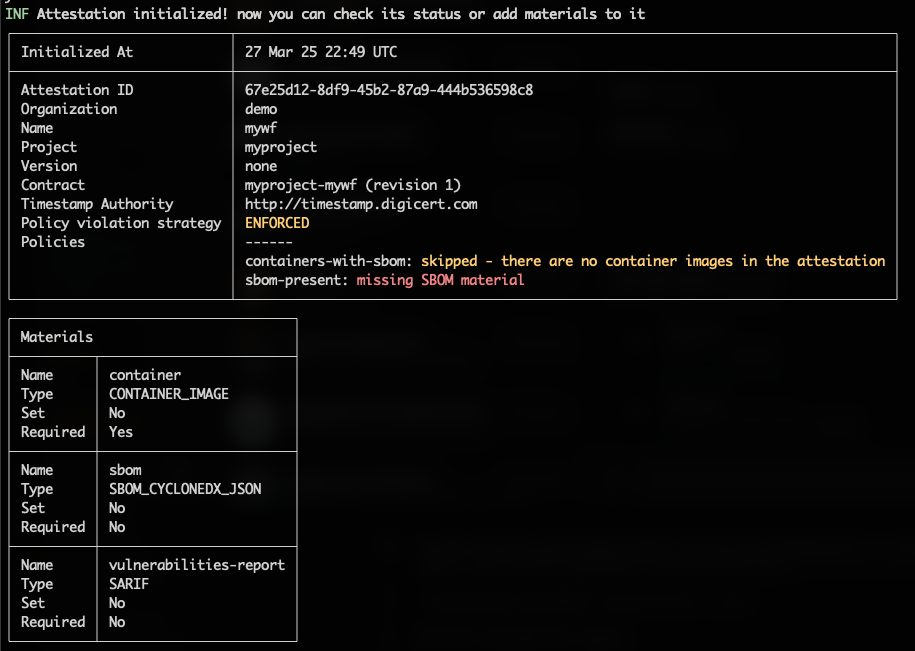 We can see that the command output tell us that we should provide three materials, a container image, an SBOM, and a vulnerability report. These requirements are part of the [contract](/concepts/contracts) that we attached during the initialization.
#### Add Pieces of Evidence
Once attestation is initialized, we can start adding materials to it. In this case, we are attesting the latest version of the Chainloop's control-plane image as an example.
For a complete list of supported material types, see the [material types](/concepts/material-types) reference.
```bash theme={"dark"}
chainloop att add --name container --value ghcr.io/chainloop-dev/chainloop/control-plane
```
Next we'll attest a Software Bill Of Materials (SBOM), note that we are pointing to a remote file location, a local filepath would work too.
```bash theme={"dark"}
chainloop att add --name sbom --value https://raw.githubusercontent.com/chainloop-dev/chainloop/refs/heads/main/docs/examples/quickstart/sbom.json
```
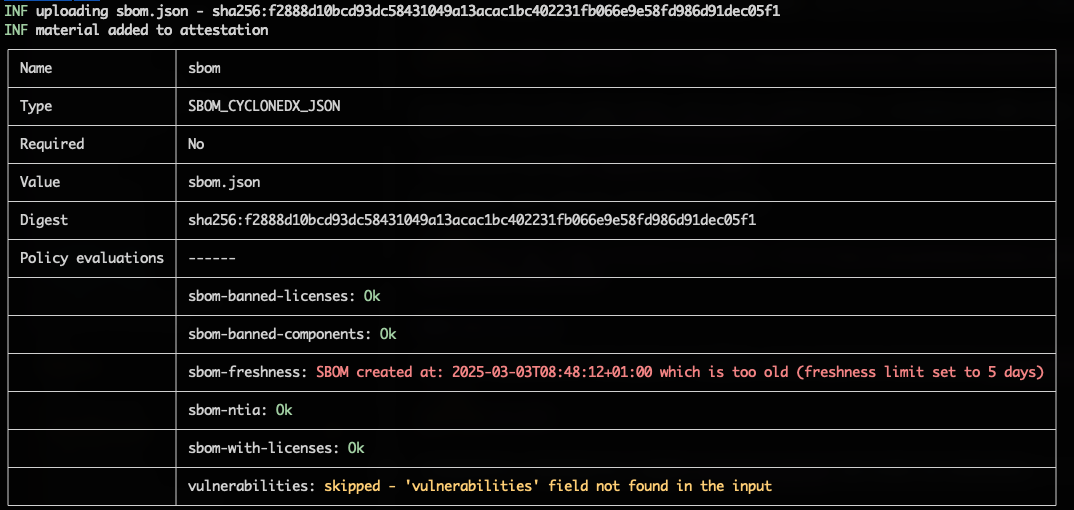
As you can see in the output below, the CLI has automatically 1) validated the SBOM format, 2) uploaded the file to the [content addressable storage](/concepts/cas-backend) and 3) run a set of [policies](/concepts/policies).
We can see that the command output tell us that we should provide three materials, a container image, an SBOM, and a vulnerability report. These requirements are part of the [contract](/concepts/contracts) that we attached during the initialization.
#### Add Pieces of Evidence
Once attestation is initialized, we can start adding materials to it. In this case, we are attesting the latest version of the Chainloop's control-plane image as an example.
For a complete list of supported material types, see the [material types](/concepts/material-types) reference.
```bash theme={"dark"}
chainloop att add --name container --value ghcr.io/chainloop-dev/chainloop/control-plane
```
Next we'll attest a Software Bill Of Materials (SBOM), note that we are pointing to a remote file location, a local filepath would work too.
```bash theme={"dark"}
chainloop att add --name sbom --value https://raw.githubusercontent.com/chainloop-dev/chainloop/refs/heads/main/docs/examples/quickstart/sbom.json
```
As you can see in the output below, the CLI has automatically 1) validated the SBOM format, 2) uploaded the file to the [content addressable storage](/concepts/cas-backend) and 3) run a set of [policies](/concepts/policies).
 And finally, we'll add the vulnerability report:
```bash theme={"dark"}
chainloop att add --name vulnerabilities-report --value https://raw.githubusercontent.com/chainloop-dev/chainloop/refs/heads/main/docs/examples/quickstart/vulnerability-report.json
```
#### Sign and Store
Once we've gathered all the pieces of evidence, we can [push the attestation](concepts/attestations#attestation-push) for permanent storage.
```bash theme={"dark"}
chainloop att push
```
Transparently, Chainloop has [signed](/reference/signing) and stored the attestation.
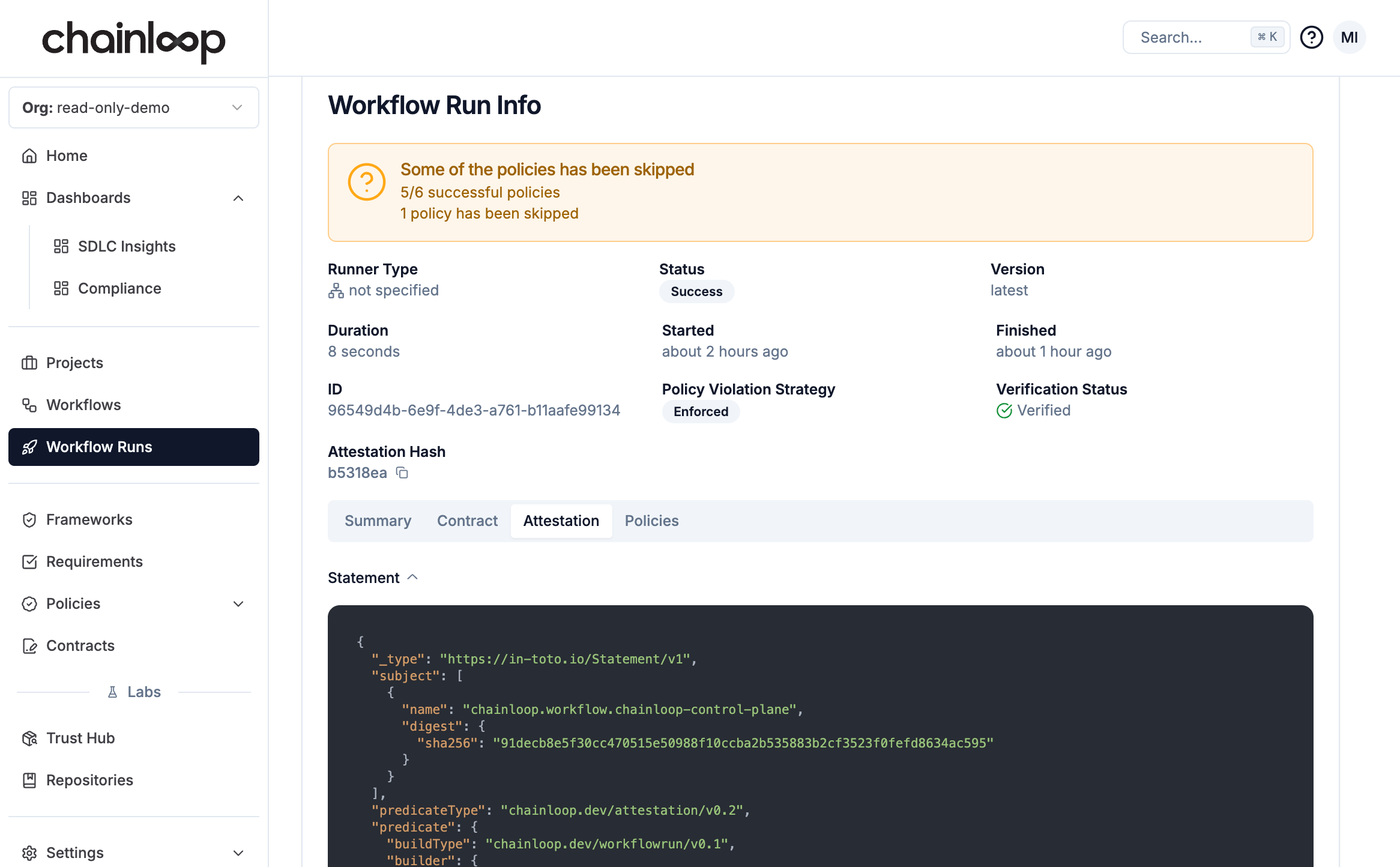
You can now use either the CLI or the web UI to inspect the attestation, verify the signature, and learn more about the data.
You can find your attestation in the [workflows](https://app.chainloop.dev/workflows) section.
And finally, we'll add the vulnerability report:
```bash theme={"dark"}
chainloop att add --name vulnerabilities-report --value https://raw.githubusercontent.com/chainloop-dev/chainloop/refs/heads/main/docs/examples/quickstart/vulnerability-report.json
```
#### Sign and Store
Once we've gathered all the pieces of evidence, we can [push the attestation](concepts/attestations#attestation-push) for permanent storage.
```bash theme={"dark"}
chainloop att push
```
Transparently, Chainloop has [signed](/reference/signing) and stored the attestation.
You can now use either the CLI or the web UI to inspect the attestation, verify the signature, and learn more about the data.
You can find your attestation in the [workflows](https://app.chainloop.dev/workflows) section.
 ```bash theme={"dark"}
# List workflow runs (attestations)
chainloop workflow run ls
# Get information about a specific run
chainloop workflow run describe --id [runID]
# Get the raw output of an attestation
chainloop workflow run get --id [runID] --output attestation
```
Great! You've completed this guide. Now you are ready to dive deeper into our [Getting Started](/get-started) guide.
Good luck, and have fun with Chainloop! 🚀
```bash theme={"dark"}
# List workflow runs (attestations)
chainloop workflow run ls
# Get information about a specific run
chainloop workflow run describe --id [runID]
# Get the raw output of an attestation
chainloop workflow run get --id [runID] --output attestation
```
Great! You've completed this guide. Now you are ready to dive deeper into our [Getting Started](/get-started) guide.
Good luck, and have fun with Chainloop! 🚀