> ## Documentation Index
> Fetch the complete documentation index at: https://docs.chainloop.dev/llms.txt
> Use this file to discover all available pages before exploring further.
# SLSA Levels
> How Chainloop enables SLSA compliance through automated provenance generation, source track validation, and policy enforcement for both build and source code security.
This feature is only available on Chainloop's platform [paid plans](https://chainloop.dev/pricing).
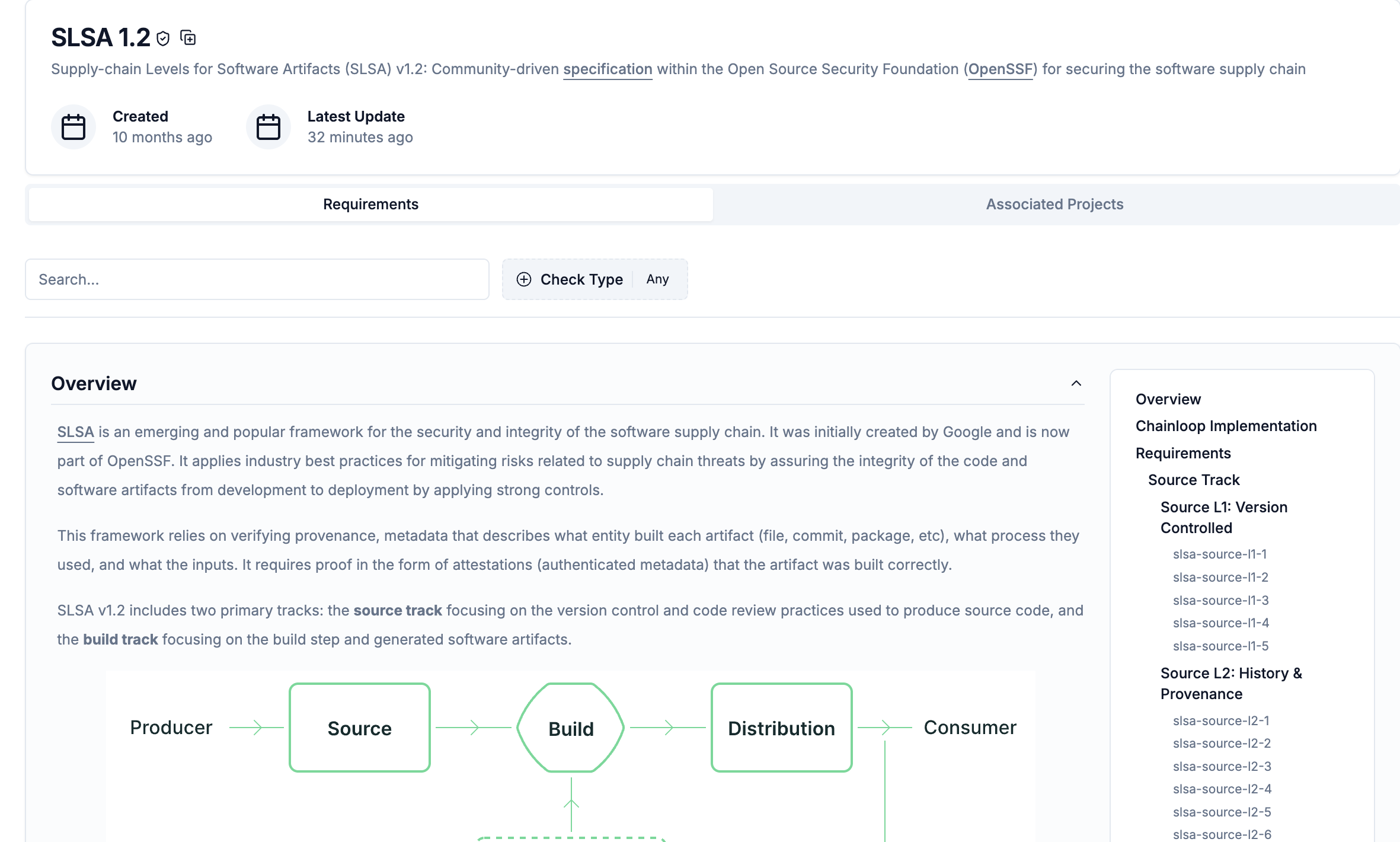 With Chainloop, you can continuously evaluate SLSA compliance posture of your projects for both **source track** and **build track** requirements in three steps:
1. **Create a product and attach the SLSA framework** to enable compliance tracking.
2. **Create and configure workflows and projects** for both source track and build track validation.
3. **Verify SLSA compliance** for your source code and build environment using Chainloop platform.
## 1 - Create Product and Attach SLSA Framework
Before configuring workflows, you need to create a product and attach the SLSA framework to enable compliance tracking. Frameworks are attached at the product level, not the project level.
### Create a Product
Create a product that will contain your projects and have the SLSA framework attached (full docs available [here](/concepts/products)):
1. Go to the [Web UI](https://app.chainloop.dev/products/new) and create a new product
2. **Name**: Unique name for your product (e.g., "Skynet Platform")
3. **Description**: Description of what the product encompasses
### Attach SLSA Framework
Once you have a product, attach the SLSA framework to it (full docs available [here](/get-started/add-frameworks)):
1. **Attach Framework**: Add the **SLSA 1.2** framework to your product
## 2 - Create and Configure Workflows and Projects
This step involves creating workflows for both tracks, attaching the project to your product, and configuring attestation processes. We assume you already have the chainloop command line tool available ([installation docs](/get-started/setup)).
### Step 2.1: Create Workflows and Project
Create Chainloop workflows for both source track and build track validation. Both workflows will use the same project `skynet`, which will be automatically created:
#### Build Track Workflow
```bash theme={"dark"}
chainloop workflow create --name "build" --project "skynet" --team "cyberdyne core"
```
Replace "skynet" with your actual project name and "cyberdyne core" with your team name. This example uses "skynet" consistently throughout the guide.
Update the workflow contract to include materials and SLSA checks. You can use this [example file](https://raw.githubusercontent.com/chainloop-dev/chainloop/main/docs/examples/contracts/slsa/github.yaml):
```bash theme={"dark"}
chainloop workflow contract update --name skynet-build -f https://raw.githubusercontent.com/chainloop-dev/chainloop/main/docs/examples/contracts/slsa/github.yaml
```
**GitLab users**: If you're using GitLab CI, download the contract file and update the runner type from `GITHUB_ACTION` to `GITLAB_PIPELINE` before applying it.
#### Source Track Workflow
```bash theme={"dark"}
chainloop workflow create --name "source-code" --project "skynet" --team "cyberdyne core"
```
Update the workflow contract for source track validation. You can use this [example file](https://raw.githubusercontent.com/chainloop-dev/chainloop/main/docs/examples/contracts/slsa/source-code.yaml):
```bash theme={"dark"}
chainloop workflow contract update --name skynet-source-code -f https://raw.githubusercontent.com/chainloop-dev/chainloop/main/docs/examples/contracts/slsa/source-code.yaml
```
**GitLab users**: If you're using GitLab CI, download the contract file and uncomment the runner section, changing it from `GITHUB_ACTION` to `GITLAB_PIPELINE`.
The contract name follows the pattern `{project-name}-{workflow-name}`. Since we created workflows for the "skynet" project, the contracts are named `skynet-build` and `skynet-source-code`.
### Step 2.2: Attach Project to Product
After creating your workflows (which automatically created the `skynet` project), attach it to your product:
1. Go to the [products page](https://app.chainloop.dev/products) in the Web UI
2. Select your product (created in step 1)
3. Click "Edit Product"
4. In the "Projects" section, attach the automatically created project:
* `skynet` (created by the workflows above)
5. Save the changes
### Step 2.3: Send Attestations to Chainloop
Configure attestation processes for both tracks to continuously validate SLSA compliance.
#### Build Track Attestations
Configure your CI workflow to perform runner verification and send build attestations:
Add `id_token write` permission to your GitHub workflow file:
```yaml theme={"dark"}
permissions:
id-token: write
```
Then perform regular [attestation process](/concepts/attestations) in your build pipeline.
For GitLab CI, the chainloop CLI will expect a GitLab OIDC token that's retrieved either from an environment variable called `GITLAB_OIDC` or performing [keyless attestations](/guides/gitlab-keyless#2-send-gitlab-token-during-the-attestation-process).
In either way, the `.gitlab-ci.yml` file could look like this:
```yaml theme={"dark"}
id_tokens:
GITLAB_OIDC:
aud: chainloop # make sure the audience is chainloop
```
Then perform regular [attestation process](/concepts/attestations) in your build pipeline.
#### Source Track Attestations
Source track validation requires proper SCM configuration and permissions. The `gather-runner-context` command needs access tokens with specific permissions to collect repository security settings. See the [CI/CD Runner Context documentation](/reference/runner-context#create-the-access-token) for required permissions for GitHub (Administration, Contents, Members) and GitLab (read\_api scope).
Set up periodic GitHub or GitLab actions for continuous source compliance monitoring:
Create `.github/workflows/slsa-source-validation.yml`:
```yaml theme={"dark"}
name: SLSA Source Validation
on:
schedule:
- cron: '0 0 * * *' # Daily
workflow_dispatch: # Manual trigger
jobs:
source-validation:
runs-on: ubuntu-latest
permissions:
id-token: write
contents: read
steps:
- uses: actions/checkout@v4
- name: Install Chainloop
run: |
curl -sfL https://raw.githubusercontent.com/chainloop-dev/chainloop/main/install.sh | bash
- name: Run source validation
run: |
chainloop att init --workflow source-code --project "skynet"
chainloop att add --name runner-context --value "$(chainloop gather-runner-context)" --kind CHAINLOOP_RUNNER_CONTEXT
chainloop att push
```
Add to `.gitlab-ci.yml`. This configuration allows the job to run automatically via a pipeline schedule or manually when needed:
```yaml theme={"dark"}
stages:
- validate
slsa-source-validation:
image: ubuntu:latest
stage: validate
rules:
- if: $CI_PIPELINE_SOURCE == "schedule"
- when: on_success
id_tokens:
CHAINLOOP_TOKEN:
aud: chainloop
GITLAB_OIDC:
aud: chainloop
script:
- apt-get update
- apt-get install -y curl
- curl -sfL https://dl.chainloop.dev/cli/install.sh | bash -s
- chainloop att init --workflow source-code --project "skynet"
- chainloop gather-runner-context --runner-token $CHAINLOOP_GITLAB_TOKEN --debug
- chainloop att add --name runner-context --value ./runner-context.json --kind CHAINLOOP_RUNNER_CONTEXT
- chainloop att push
artifacts:
paths:
- runner-context.json
when: always
```
The `gather-runner-context` command collects comprehensive repository security configuration data including:
* Branch protection settings (admin enforcement, push restrictions, deletion controls, and linear history requirements)
* Pull request protection (review requirements, conversation resolution, and dismissal rules)
* Commit protection (signing requirements)
* Repository access settings (team access and custom roles)
This command requires Chainloop CLI Enterprise Edition (CLI EE) and appropriate access tokens. For detailed setup instructions including GitHub App configuration and access token requirements, see the [CI/CD Runner Context documentation](/reference/runner-context).
## 3 - Verify SLSA Compliance
Now that you are generating SLSA provenance and source track attestations through your configured workflows, you can monitor SLSA compliance in Chainloop. The SLSA framework attached to your product (configured in step 1) will automatically evaluate both automated policies and manual requirements.
### View SLSA Compliance Status
Go to your project in the Chainloop platform to view compliance status:
1. Navigate to your project (e.g., "skynet")
2. Go to the **Frameworks** section
3. View the SLSA 1.2 framework compliance status
With Chainloop, you can continuously evaluate SLSA compliance posture of your projects for both **source track** and **build track** requirements in three steps:
1. **Create a product and attach the SLSA framework** to enable compliance tracking.
2. **Create and configure workflows and projects** for both source track and build track validation.
3. **Verify SLSA compliance** for your source code and build environment using Chainloop platform.
## 1 - Create Product and Attach SLSA Framework
Before configuring workflows, you need to create a product and attach the SLSA framework to enable compliance tracking. Frameworks are attached at the product level, not the project level.
### Create a Product
Create a product that will contain your projects and have the SLSA framework attached (full docs available [here](/concepts/products)):
1. Go to the [Web UI](https://app.chainloop.dev/products/new) and create a new product
2. **Name**: Unique name for your product (e.g., "Skynet Platform")
3. **Description**: Description of what the product encompasses
### Attach SLSA Framework
Once you have a product, attach the SLSA framework to it (full docs available [here](/get-started/add-frameworks)):
1. **Attach Framework**: Add the **SLSA 1.2** framework to your product
## 2 - Create and Configure Workflows and Projects
This step involves creating workflows for both tracks, attaching the project to your product, and configuring attestation processes. We assume you already have the chainloop command line tool available ([installation docs](/get-started/setup)).
### Step 2.1: Create Workflows and Project
Create Chainloop workflows for both source track and build track validation. Both workflows will use the same project `skynet`, which will be automatically created:
#### Build Track Workflow
```bash theme={"dark"}
chainloop workflow create --name "build" --project "skynet" --team "cyberdyne core"
```
Replace "skynet" with your actual project name and "cyberdyne core" with your team name. This example uses "skynet" consistently throughout the guide.
Update the workflow contract to include materials and SLSA checks. You can use this [example file](https://raw.githubusercontent.com/chainloop-dev/chainloop/main/docs/examples/contracts/slsa/github.yaml):
```bash theme={"dark"}
chainloop workflow contract update --name skynet-build -f https://raw.githubusercontent.com/chainloop-dev/chainloop/main/docs/examples/contracts/slsa/github.yaml
```
**GitLab users**: If you're using GitLab CI, download the contract file and update the runner type from `GITHUB_ACTION` to `GITLAB_PIPELINE` before applying it.
#### Source Track Workflow
```bash theme={"dark"}
chainloop workflow create --name "source-code" --project "skynet" --team "cyberdyne core"
```
Update the workflow contract for source track validation. You can use this [example file](https://raw.githubusercontent.com/chainloop-dev/chainloop/main/docs/examples/contracts/slsa/source-code.yaml):
```bash theme={"dark"}
chainloop workflow contract update --name skynet-source-code -f https://raw.githubusercontent.com/chainloop-dev/chainloop/main/docs/examples/contracts/slsa/source-code.yaml
```
**GitLab users**: If you're using GitLab CI, download the contract file and uncomment the runner section, changing it from `GITHUB_ACTION` to `GITLAB_PIPELINE`.
The contract name follows the pattern `{project-name}-{workflow-name}`. Since we created workflows for the "skynet" project, the contracts are named `skynet-build` and `skynet-source-code`.
### Step 2.2: Attach Project to Product
After creating your workflows (which automatically created the `skynet` project), attach it to your product:
1. Go to the [products page](https://app.chainloop.dev/products) in the Web UI
2. Select your product (created in step 1)
3. Click "Edit Product"
4. In the "Projects" section, attach the automatically created project:
* `skynet` (created by the workflows above)
5. Save the changes
### Step 2.3: Send Attestations to Chainloop
Configure attestation processes for both tracks to continuously validate SLSA compliance.
#### Build Track Attestations
Configure your CI workflow to perform runner verification and send build attestations:
Add `id_token write` permission to your GitHub workflow file:
```yaml theme={"dark"}
permissions:
id-token: write
```
Then perform regular [attestation process](/concepts/attestations) in your build pipeline.
For GitLab CI, the chainloop CLI will expect a GitLab OIDC token that's retrieved either from an environment variable called `GITLAB_OIDC` or performing [keyless attestations](/guides/gitlab-keyless#2-send-gitlab-token-during-the-attestation-process).
In either way, the `.gitlab-ci.yml` file could look like this:
```yaml theme={"dark"}
id_tokens:
GITLAB_OIDC:
aud: chainloop # make sure the audience is chainloop
```
Then perform regular [attestation process](/concepts/attestations) in your build pipeline.
#### Source Track Attestations
Source track validation requires proper SCM configuration and permissions. The `gather-runner-context` command needs access tokens with specific permissions to collect repository security settings. See the [CI/CD Runner Context documentation](/reference/runner-context#create-the-access-token) for required permissions for GitHub (Administration, Contents, Members) and GitLab (read\_api scope).
Set up periodic GitHub or GitLab actions for continuous source compliance monitoring:
Create `.github/workflows/slsa-source-validation.yml`:
```yaml theme={"dark"}
name: SLSA Source Validation
on:
schedule:
- cron: '0 0 * * *' # Daily
workflow_dispatch: # Manual trigger
jobs:
source-validation:
runs-on: ubuntu-latest
permissions:
id-token: write
contents: read
steps:
- uses: actions/checkout@v4
- name: Install Chainloop
run: |
curl -sfL https://raw.githubusercontent.com/chainloop-dev/chainloop/main/install.sh | bash
- name: Run source validation
run: |
chainloop att init --workflow source-code --project "skynet"
chainloop att add --name runner-context --value "$(chainloop gather-runner-context)" --kind CHAINLOOP_RUNNER_CONTEXT
chainloop att push
```
Add to `.gitlab-ci.yml`. This configuration allows the job to run automatically via a pipeline schedule or manually when needed:
```yaml theme={"dark"}
stages:
- validate
slsa-source-validation:
image: ubuntu:latest
stage: validate
rules:
- if: $CI_PIPELINE_SOURCE == "schedule"
- when: on_success
id_tokens:
CHAINLOOP_TOKEN:
aud: chainloop
GITLAB_OIDC:
aud: chainloop
script:
- apt-get update
- apt-get install -y curl
- curl -sfL https://dl.chainloop.dev/cli/install.sh | bash -s
- chainloop att init --workflow source-code --project "skynet"
- chainloop gather-runner-context --runner-token $CHAINLOOP_GITLAB_TOKEN --debug
- chainloop att add --name runner-context --value ./runner-context.json --kind CHAINLOOP_RUNNER_CONTEXT
- chainloop att push
artifacts:
paths:
- runner-context.json
when: always
```
The `gather-runner-context` command collects comprehensive repository security configuration data including:
* Branch protection settings (admin enforcement, push restrictions, deletion controls, and linear history requirements)
* Pull request protection (review requirements, conversation resolution, and dismissal rules)
* Commit protection (signing requirements)
* Repository access settings (team access and custom roles)
This command requires Chainloop CLI Enterprise Edition (CLI EE) and appropriate access tokens. For detailed setup instructions including GitHub App configuration and access token requirements, see the [CI/CD Runner Context documentation](/reference/runner-context).
## 3 - Verify SLSA Compliance
Now that you are generating SLSA provenance and source track attestations through your configured workflows, you can monitor SLSA compliance in Chainloop. The SLSA framework attached to your product (configured in step 1) will automatically evaluate both automated policies and manual requirements.
### View SLSA Compliance Status
Go to your project in the Chainloop platform to view compliance status:
1. Navigate to your project (e.g., "skynet")
2. Go to the **Frameworks** section
3. View the SLSA 1.2 framework compliance status
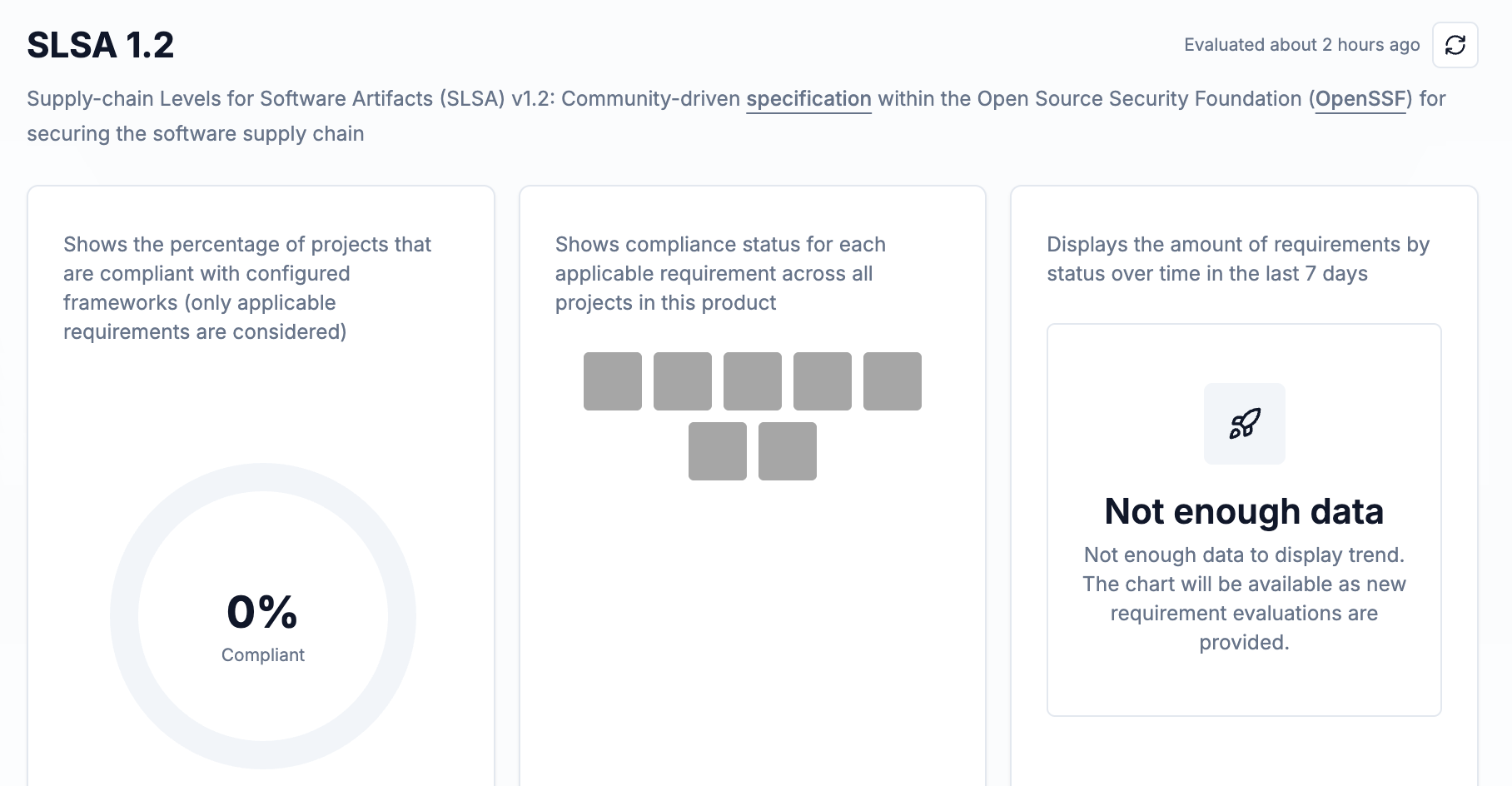 You'll see compliance status for both tracks:
* **Build Track**: Requirements automatically validated through your build workflows with signed provenance
* **Source Track**: Requirements automatically validated through your source validation workflows with repository security configuration data
By default, Chainloop runs in **ADVISORY** mode for policy violations, meaning failing policies won't block attestation submission but will be flagged for review. This allows you to identify compliance gaps while maintaining development velocity. Policy violations can be configured as **ENFORCED** to block attestations when policies fail.
### Manual Evidence and Configuration Confirmation
SLSA compliance includes both automated validations and manual evidence requirements. While Chainloop automatically validates technical controls, you must manually confirm organizational processes and security configurations to achieve higher SLSA levels.
In addition to the automated validations from your workflows, SLSA compliance requires manual confirmation of:
* **Organizational processes** (e.g., code review practices, access control policies)
* **Security configuration verification** (e.g., multi-factor authentication enforcement, build platform isolation)
* **Documentation of security controls** (e.g., evidence files for strong platform controls)
To learn more about each automatic and manual evidence requirement, head over to the **Frameworks** section in the Chainloop Platform UI and check the **SLSA 1.2** framework for detailed requirement descriptions and manual evidence forms.
## 4 - Troubleshooting
When working with SLSA attestation you might run into the following errors:
### Runner not Authenticated
Chainloop will report that runner is not authenticated or that the workflow file path is missing when the OIDC token can't be retrieved. The errors
that you might see in your SLSA policies execution are:
* `Runner is not authenticated`
* `Runner workflow file path is missing or is empty`
The remediation depends on the build platform you are using:
When using GitHub Actions, make sure that the `id_token` permission is set on the workflow level, not job level. For example:
```yaml theme={"dark"}
permissions:
id-token: write
```
When using GitLab make sure that the `GITLAB_OIDC` environment variable is set. For example:
```yaml theme={"dark"}
id_tokens:
GITLAB_OIDC:
aud: chainloop
```
### Runner Environment is not Valid
Chainloop will report that runner environment is not valid when the runner environment is not as the one provided in the policy. This means that the
build runner platform is not as expected. The expected and actual runner platform are provided in the error message.
The errors that you might see in your SLSA policies execution are:
* `Runner environment is not valid`
### Keyless Signatures not Supported
Chainloop will report that keyless signatures are not supported when the provenance is not signed. Verify that your build platform is using the newest
version of Chainloop.
The errors that you might see in your SLSA policies execution are:
* `Keyless signing configuration is invalid or not found`
## 5 - Manual Evidence Explained
Chainloop uses a number of manual evidence to verify the SLSA requirements that you need to ensure are fulfilled in order to get SLSA Level 3 compliance.
The description of the evidence can be found in [Chainloop SLSA reference](/reference/slsa-provenance).
You'll see compliance status for both tracks:
* **Build Track**: Requirements automatically validated through your build workflows with signed provenance
* **Source Track**: Requirements automatically validated through your source validation workflows with repository security configuration data
By default, Chainloop runs in **ADVISORY** mode for policy violations, meaning failing policies won't block attestation submission but will be flagged for review. This allows you to identify compliance gaps while maintaining development velocity. Policy violations can be configured as **ENFORCED** to block attestations when policies fail.
### Manual Evidence and Configuration Confirmation
SLSA compliance includes both automated validations and manual evidence requirements. While Chainloop automatically validates technical controls, you must manually confirm organizational processes and security configurations to achieve higher SLSA levels.
In addition to the automated validations from your workflows, SLSA compliance requires manual confirmation of:
* **Organizational processes** (e.g., code review practices, access control policies)
* **Security configuration verification** (e.g., multi-factor authentication enforcement, build platform isolation)
* **Documentation of security controls** (e.g., evidence files for strong platform controls)
To learn more about each automatic and manual evidence requirement, head over to the **Frameworks** section in the Chainloop Platform UI and check the **SLSA 1.2** framework for detailed requirement descriptions and manual evidence forms.
## 4 - Troubleshooting
When working with SLSA attestation you might run into the following errors:
### Runner not Authenticated
Chainloop will report that runner is not authenticated or that the workflow file path is missing when the OIDC token can't be retrieved. The errors
that you might see in your SLSA policies execution are:
* `Runner is not authenticated`
* `Runner workflow file path is missing or is empty`
The remediation depends on the build platform you are using:
When using GitHub Actions, make sure that the `id_token` permission is set on the workflow level, not job level. For example:
```yaml theme={"dark"}
permissions:
id-token: write
```
When using GitLab make sure that the `GITLAB_OIDC` environment variable is set. For example:
```yaml theme={"dark"}
id_tokens:
GITLAB_OIDC:
aud: chainloop
```
### Runner Environment is not Valid
Chainloop will report that runner environment is not valid when the runner environment is not as the one provided in the policy. This means that the
build runner platform is not as expected. The expected and actual runner platform are provided in the error message.
The errors that you might see in your SLSA policies execution are:
* `Runner environment is not valid`
### Keyless Signatures not Supported
Chainloop will report that keyless signatures are not supported when the provenance is not signed. Verify that your build platform is using the newest
version of Chainloop.
The errors that you might see in your SLSA policies execution are:
* `Keyless signing configuration is invalid or not found`
## 5 - Manual Evidence Explained
Chainloop uses a number of manual evidence to verify the SLSA requirements that you need to ensure are fulfilled in order to get SLSA Level 3 compliance.
The description of the evidence can be found in [Chainloop SLSA reference](/reference/slsa-provenance).