> ## Documentation Index
> Fetch the complete documentation index at: https://docs.chainloop.dev/llms.txt
> Use this file to discover all available pages before exploring further.
# Keyless Attestations in GitLab
> How to configure Chainloop to perform attestation from GitLab without the need to provide Chainloop API tokens.
This feature is only available on Chainloop's platform [paid plans](https://chainloop.dev/pricing).
You can now perform attestations from GitLab runners without the need to use Chainloop API tokens. In addition to the benefit of not having to manage API tokens, this also allows you to enable [SLSA 3](/guides/slsa) compliance checks by default.
To achieve this you'll need to:
* Enroll your GitLab repositories in Chainloop and connect them to your project
* Send GitLab token during the attestation process
## 1 - Enroll your GitLab repositories and connect them to your project
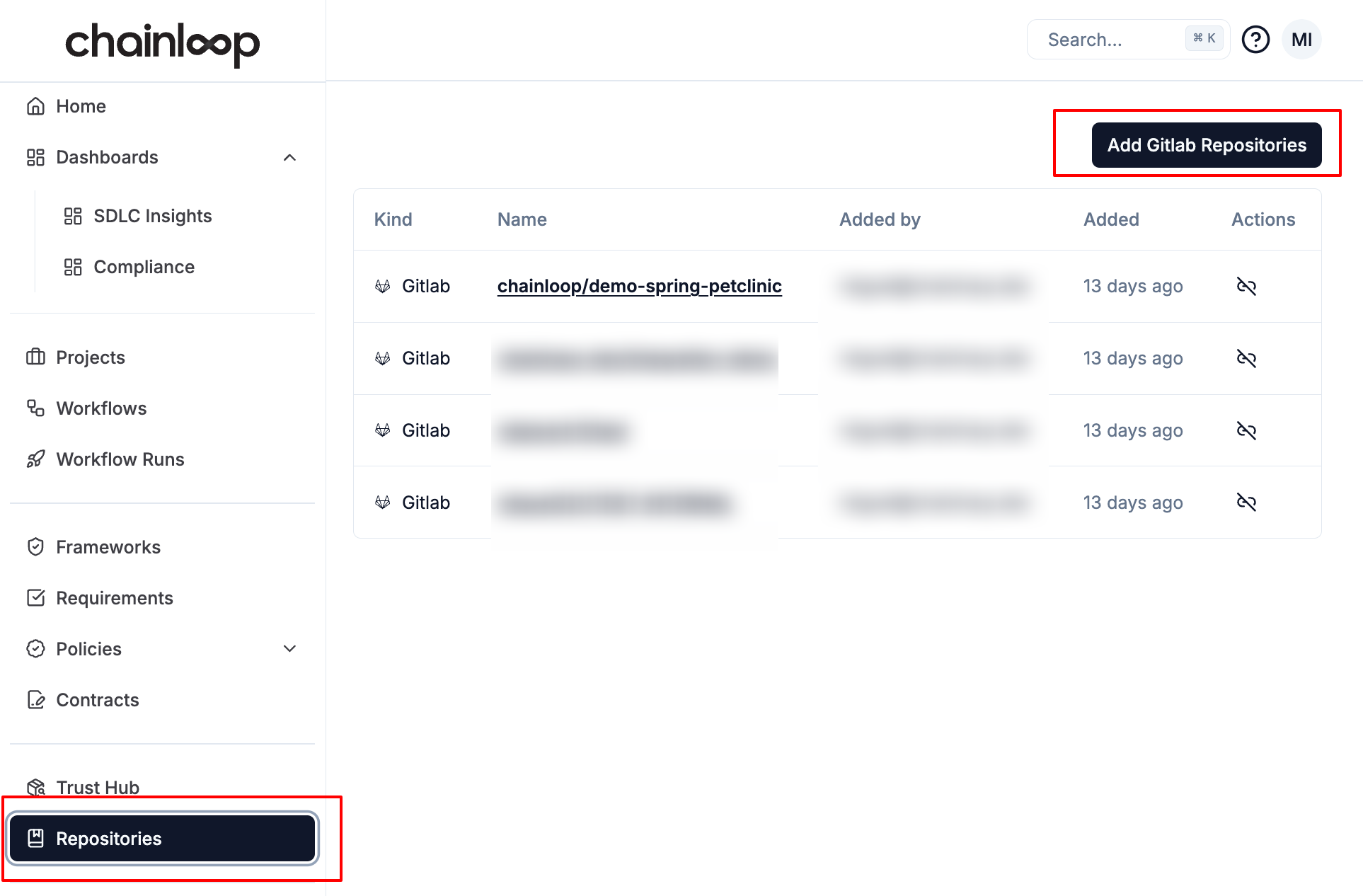
To make sure you own the repository that the attestation is coming from, you'll need to onboard your GitLab repository into the Chainloop platform first. This can be done by clicking on the "Add GitLab repositories" button in the repositories section.
Chainloop will only store repositories ID and Name, it will not store repository code.
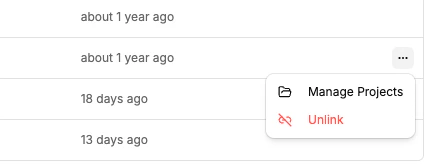
 Once enrolled, connect the repository to the project that will receive attestations. Open the repository's context menu and select "Manage Projects" to link it. **Attestations from repositories that are not connected to a project will not be accepted.**
 ## 2 - Send GitLab token during the attestation process
You are now ready to leverage GitLab's OIDC tokens from your pipelines. The requirement is to create an ID token that has the chainloop audience.
To achieve this in GitLab, you can add the following snippet to your pipeline yaml file.
```yaml theme={"dark"}
id_tokens:
CHAINLOOP_TOKEN:
aud: chainloop # make sure the audience is chainloop
```
A full pipeline example could look like
```yaml theme={"dark"}
stages:
- build
build-job:
stage: build
id_tokens:
CHAINLOOP_TOKEN:
aud: chainloop
script:
- curl -sfL https://dl.chainloop.dev/cli/install.sh | bash -s
- chainloop att init --workflow test-gitlab --project demo
- chainloop attestation push
after_script:
- chainloop attestation reset || true
```
Note that if you have onboarded the same repository to more than one Chainloop organization, you'll need to pass the --org flag to the init command, for example.
```bash theme={"dark"}
chainloop att init --workflow test-gitlab --project demo --org my-org
```
## 2 - Send GitLab token during the attestation process
You are now ready to leverage GitLab's OIDC tokens from your pipelines. The requirement is to create an ID token that has the chainloop audience.
To achieve this in GitLab, you can add the following snippet to your pipeline yaml file.
```yaml theme={"dark"}
id_tokens:
CHAINLOOP_TOKEN:
aud: chainloop # make sure the audience is chainloop
```
A full pipeline example could look like
```yaml theme={"dark"}
stages:
- build
build-job:
stage: build
id_tokens:
CHAINLOOP_TOKEN:
aud: chainloop
script:
- curl -sfL https://dl.chainloop.dev/cli/install.sh | bash -s
- chainloop att init --workflow test-gitlab --project demo
- chainloop attestation push
after_script:
- chainloop attestation reset || true
```
Note that if you have onboarded the same repository to more than one Chainloop organization, you'll need to pass the --org flag to the init command, for example.
```bash theme={"dark"}
chainloop att init --workflow test-gitlab --project demo --org my-org
```