> ## Documentation Index
> Fetch the complete documentation index at: https://docs.chainloop.dev/llms.txt
> Use this file to discover all available pages before exploring further.
# How to record AI coding sessions in a Docker Sandbox
> Run Claude Code inside a Docker Sandbox with `chainloop trace` already set up, so every session in the sandbox is recorded and attested.
This is a preview/beta feature. Further changes are expected.
## Overview
A [Docker Sandbox](https://docs.docker.com/ai/sandboxes/) is an isolated VM you hand to an AI coding agent. It gets a workspace, a controlled network, and no access to the rest of your machine. It is also disposable: when the sandbox is torn down, the record of what the agent did goes with it.
**`chainloop/sbx-kit-claude`** is a Chainloop-published [sandbox kit](https://docs.docker.com/ai/sandboxes/customize/kits/) that runs Claude Code with [`chainloop trace`](/guides/chainloop-trace) already set up. Each session is recorded as an [AI coding session](/concepts/ai-coding-sessions) and pushed to Chainloop as signed evidence.
The kit wraps Claude Code, the agent Docker Sandboxes ships built in. For what a session contains, how it is correlated with pull requests, and which other agents `chainloop trace` supports, see the [chainloop trace guide](/guides/chainloop-trace).
## What It's For
Inside the sandbox the agent edits files, runs commands, and calls tools and MCP servers. Afterwards you want to know which model ran, what it touched, what it cost, and whether it broke a rule. Sandbox logs can't answer that, because they don't outlive the sandbox.
The kit captures it as signed evidence instead. Chainloop stores that evidence, runs [policies](/guides/chainloop-trace#applying-policies) against it, and [summarizes it on the pull request](/guides/chainloop-trace#pull-request-correlation). That gives you three things:
* **Security policy on the session itself.** Check that only sanctioned agents and models ran, that the agent reached only allowlisted MCP servers, that it ran no destructive commands, and that no secret leaked into a tool output. Chainloop ships [built-in policies](/concepts/ai-coding-sessions#built-in-policies) for each, and a failing one can block the merge.
* **Cost and model usage.** Token counts and estimated cost per session, attributable to a project, a feature, or a single pull request.
* **A read on the contribution itself.** Per-file AI-vs-human line attribution and an [AI Session Score](/reference/ai-score) per run, so reviewers can tell which changes need a closer look — and, across many runs, which agents and models produce better work.
Developers run the agent as they always have.
Because the kit is a published artifact, everyone launching from the same tag gets the same CLI version and the same egress allowlist. Releases are signed, carry [SLSA provenance](/reference/slsa-provenance), and are published under a version tag when you need to pin one.
## Get Started
### Prerequisites
* **[Docker Sandboxes](https://docs.docker.com/ai/sandboxes/install/) installed**, with Docker running. Use `sbx` **v0.42.0 or later** — earlier versions record nothing without reporting an error, see [Troubleshooting](#troubleshooting-and-faq). On macOS:
```bash theme={"dark"}
brew trust docker/tap
brew install docker/tap/sbx
sbx daemon restart # so the daemon matches the CLI
```
* **A repository configured for Chainloop Trace.** Run `chainloop trace init` in it once and commit what it writes — see [Record your first session](/ai-sessions#record-your-first-session). The kit takes the organization, project, and workflow from that committed configuration.
* **A Chainloop [API token](/reference/api-tokens#chainloop-api-tokens) and an Anthropic token.** Create the first with `chainloop organization api-token create`; the second is Claude Code's own credential, supplied as a host-side secret (`sbx secret set -g anthropic`) or an interactive login inside the sandbox.
### Launch the Sandbox
Two ways to launch: a standalone `sbx run`, or a committed environment file.
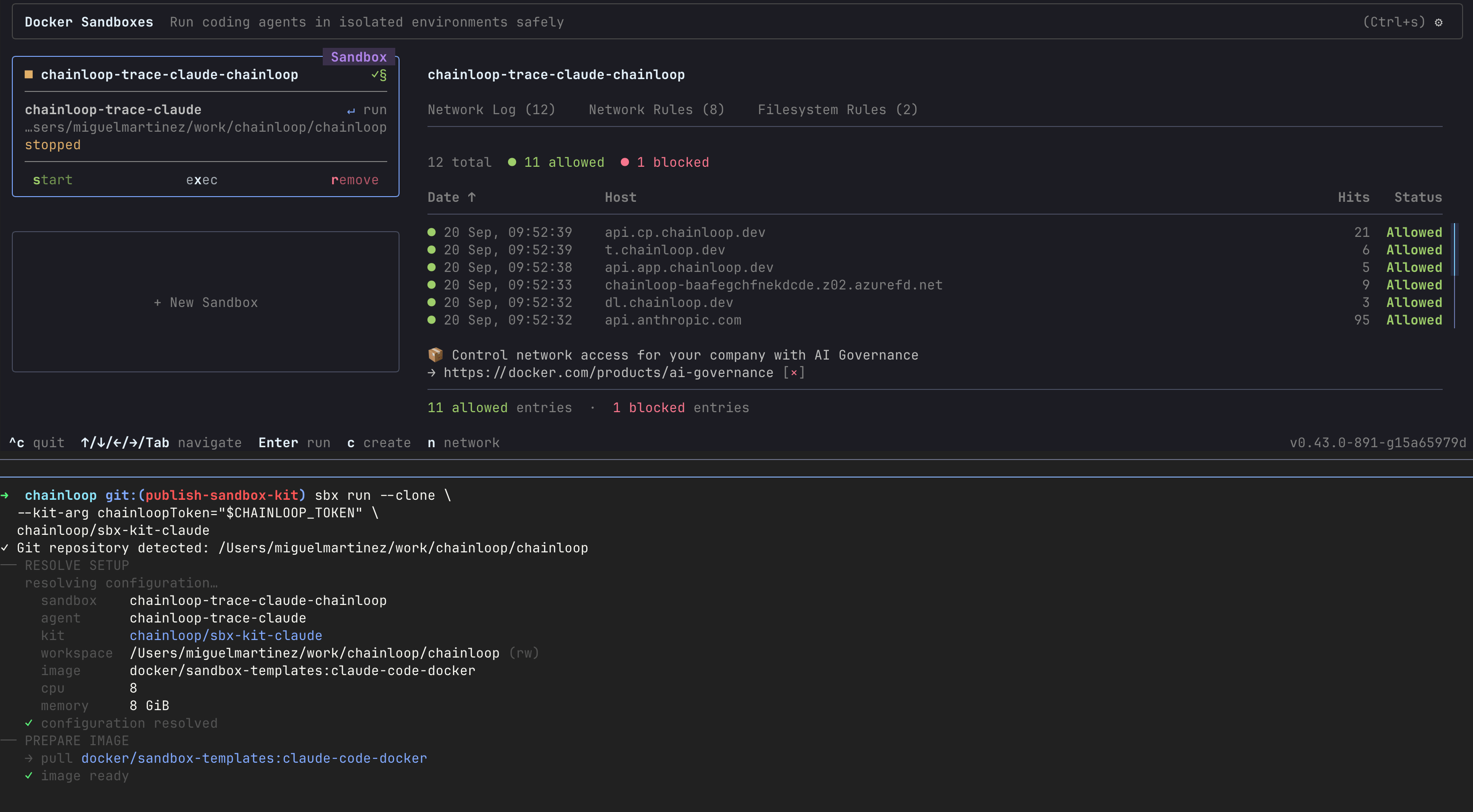
Run `sbx run` from the repository you want the agent to work in. The kit defines a complete sandbox environment rather than mixing into an existing one, so its reference goes in the positional slot, not behind `--kit`. **The token is the only argument you need**:
```bash theme={"dark"}
sbx run --clone \
--kit-arg chainloopToken="$CHAINLOOP_TOKEN" \
chainloop/sbx-kit-claude
```
`--clone` gives the sandbox a private clone of the repository, which per-file attribution needs. `--kit-args-file` reads the same arguments from a file, keeping the token out of your shell history.
 An [`sbxenv.yaml`](https://docs.docker.com/ai/sandboxes/configuration/environment-files/) at the repository root pins the setup for the whole team, so nobody has to remember the flags:
```yaml sbxenv.yaml theme={"dark"}
schemaVersion: "1"
name: chainloop-traced-claude
args:
chainloopToken:
default: ""
description: Chainloop API token with access to the organization in .chainloop.yml.
agent: chainloop-trace-claude
kits:
- source: chainloop/sbx-kit-claude
args:
chainloopToken: ${{ env.args.chainloopToken }}
traceMode: persistent
workspace:
path: .
clone: true
```
`agent:` names what to run and `kits:` loads the artifact it comes from. `traceMode: persistent` makes a sandbox launched against a repository that was never initialized fail loudly.
Launch it from the repository root, passing only the token:
```bash theme={"dark"}
sbx env run --env-arg chainloopToken="$CHAINLOOP_TOKEN"
```
Everyone then gets the same sandbox, and the configuration is reviewed like any other file in the repository.
### Work as Usual
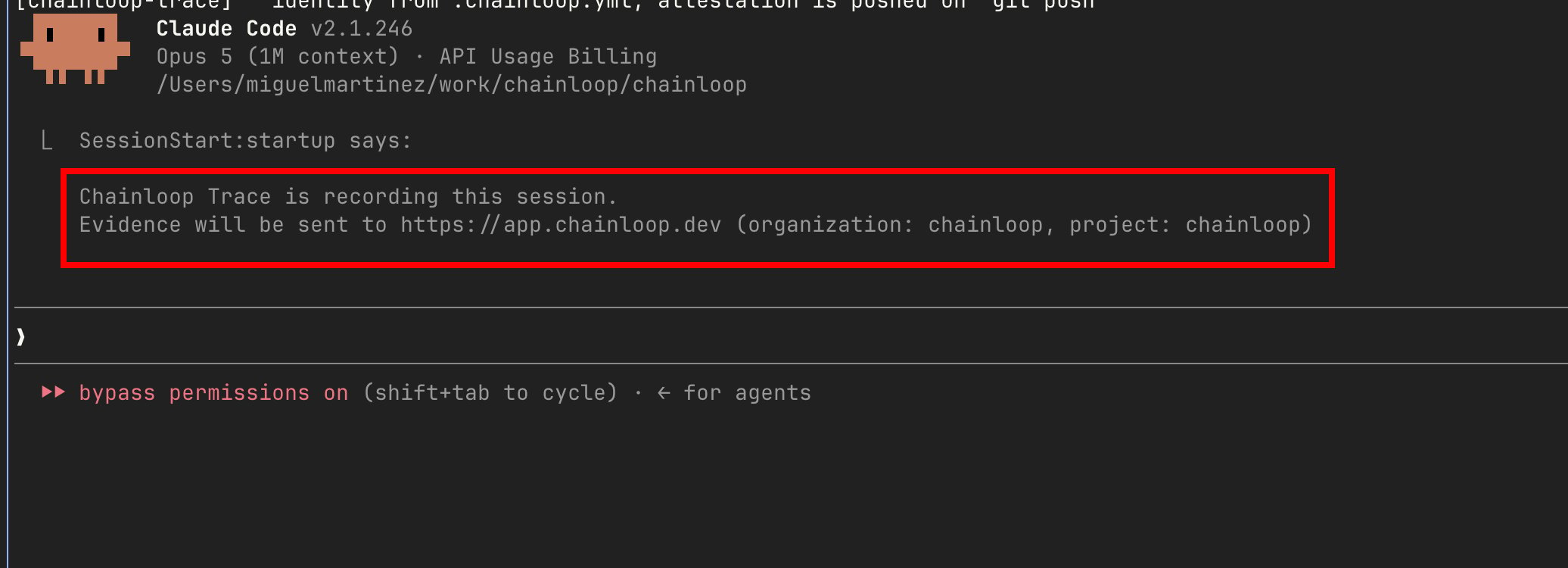
Attach to the sandbox and use Claude Code as you would outside it. At the start of the session the agent confirms that recording is on, naming the organization and project the evidence will go to. Check for it before you start working — if it isn't there, the session isn't being recorded:
An [`sbxenv.yaml`](https://docs.docker.com/ai/sandboxes/configuration/environment-files/) at the repository root pins the setup for the whole team, so nobody has to remember the flags:
```yaml sbxenv.yaml theme={"dark"}
schemaVersion: "1"
name: chainloop-traced-claude
args:
chainloopToken:
default: ""
description: Chainloop API token with access to the organization in .chainloop.yml.
agent: chainloop-trace-claude
kits:
- source: chainloop/sbx-kit-claude
args:
chainloopToken: ${{ env.args.chainloopToken }}
traceMode: persistent
workspace:
path: .
clone: true
```
`agent:` names what to run and `kits:` loads the artifact it comes from. `traceMode: persistent` makes a sandbox launched against a repository that was never initialized fail loudly.
Launch it from the repository root, passing only the token:
```bash theme={"dark"}
sbx env run --env-arg chainloopToken="$CHAINLOOP_TOKEN"
```
Everyone then gets the same sandbox, and the configuration is reviewed like any other file in the repository.
### Work as Usual
Attach to the sandbox and use Claude Code as you would outside it. At the start of the session the agent confirms that recording is on, naming the organization and project the evidence will go to. Check for it before you start working — if it isn't there, the session isn't being recorded:
 The evidence is pushed by the pre-push hook, so **push from inside the sandbox** before it is reclaimed. Once it lands, the session appears in Chainloop like any other: [rendered in the workflow run](/guides/chainloop-trace#visualize-ai-coding-sessions), aggregated in the [AI Coding dashboard](/guides/chainloop-trace#use-the-ai-coding-dashboard), and [summarized on the pull request](/guides/chainloop-trace#pull-request-correlation) for a connected repository.
## Troubleshooting and FAQ
Almost always an `sbx` older than v0.42.0. Earlier versions drop part of what a kit inherits from the agent it extends ([docker/sbx-releases#415](https://github.com/docker/sbx-releases/issues/415)), leaving the agent unable to write the transcript `chainloop trace` reads. The sandbox still starts normally, which is what makes it hard to spot.
Check a sandbox with:
```bash theme={"dark"}
sbx exec -- stat -c '%U:%G' /home/agent/.claude/projects
```
It should print `agent:agent`. If it prints `root:root`, upgrade `sbx` and recreate the sandbox.
The evidence is pushed by the pre-push git hook, so it is only sent when you `git push` from inside the sandbox. Push before the sandbox is reclaimed.
The kit fails at launch when it has no Chainloop credentials, rather than run a session that records nothing. Pass `--kit-arg chainloopToken=`.
Not with this kit — it wraps the Claude Code agent that Docker Sandboxes ships built in. `chainloop trace` itself supports other agents outside a sandbox; see [supported agents](/guides/chainloop-trace#prerequisites).
Not yet. The kit ships preconfigured for Chainloop's hosted platform and its endpoints aren't configurable — see [Current Limitations](#current-limitations).
## Current Limitations
**The kit only talks to Chainloop's hosted platform.** The control plane, CAS, and platform endpoints ship baked into the kit and are not configurable yet, so it cannot be pointed at a self-hosted Chainloop instance. Support for that is planned.
**The Chainloop token reaches the sandbox as an environment variable.** Docker Sandboxes can keep a secret on the host and inject it per request, so the value never enters the VM. That does not work for Chainloop yet: injection requires the egress proxy to terminate TLS, and the intercepted connection only negotiates HTTP/1.1, while `chainloop trace` reaches the control plane over gRPC and needs HTTP/2 ([docker/sbx-releases#574](https://github.com/docker/sbx-releases/issues/574)). Until that is fixed, the kit takes the token as a value and keeps the Chainloop hosts off the intercepted path.
While that stands:
* Scope the token to the organization it needs and rotate it like any other credential.
* **Do not bind a Chainloop host to an `sbx` credential**, for example with `sbx secret set-custom --host api.cp.chainloop.dev`. That flips the host to the intercepted path and silently stops attestation.
We are working with Docker on this. Once it is fixed, the token will no longer be passed as an environment variable.
## Further Reading
* [How to record AI coding sessions](/guides/chainloop-trace) — setting up `chainloop trace`, applying policies, and enforcing it
* [AI Coding Sessions](/concepts/ai-coding-sessions) — what sessions are, how PR correlation works, and what each dashboard card means
* [AI Session Score](/reference/ai-score) — per-PR confidence signal for AI-assisted changes
* [Docker Sandboxes documentation](https://docs.docker.com/ai/sandboxes/) — sandboxes, kits, and the `sbx` CLI
The evidence is pushed by the pre-push hook, so **push from inside the sandbox** before it is reclaimed. Once it lands, the session appears in Chainloop like any other: [rendered in the workflow run](/guides/chainloop-trace#visualize-ai-coding-sessions), aggregated in the [AI Coding dashboard](/guides/chainloop-trace#use-the-ai-coding-dashboard), and [summarized on the pull request](/guides/chainloop-trace#pull-request-correlation) for a connected repository.
## Troubleshooting and FAQ
Almost always an `sbx` older than v0.42.0. Earlier versions drop part of what a kit inherits from the agent it extends ([docker/sbx-releases#415](https://github.com/docker/sbx-releases/issues/415)), leaving the agent unable to write the transcript `chainloop trace` reads. The sandbox still starts normally, which is what makes it hard to spot.
Check a sandbox with:
```bash theme={"dark"}
sbx exec -- stat -c '%U:%G' /home/agent/.claude/projects
```
It should print `agent:agent`. If it prints `root:root`, upgrade `sbx` and recreate the sandbox.
The evidence is pushed by the pre-push git hook, so it is only sent when you `git push` from inside the sandbox. Push before the sandbox is reclaimed.
The kit fails at launch when it has no Chainloop credentials, rather than run a session that records nothing. Pass `--kit-arg chainloopToken=`.
Not with this kit — it wraps the Claude Code agent that Docker Sandboxes ships built in. `chainloop trace` itself supports other agents outside a sandbox; see [supported agents](/guides/chainloop-trace#prerequisites).
Not yet. The kit ships preconfigured for Chainloop's hosted platform and its endpoints aren't configurable — see [Current Limitations](#current-limitations).
## Current Limitations
**The kit only talks to Chainloop's hosted platform.** The control plane, CAS, and platform endpoints ship baked into the kit and are not configurable yet, so it cannot be pointed at a self-hosted Chainloop instance. Support for that is planned.
**The Chainloop token reaches the sandbox as an environment variable.** Docker Sandboxes can keep a secret on the host and inject it per request, so the value never enters the VM. That does not work for Chainloop yet: injection requires the egress proxy to terminate TLS, and the intercepted connection only negotiates HTTP/1.1, while `chainloop trace` reaches the control plane over gRPC and needs HTTP/2 ([docker/sbx-releases#574](https://github.com/docker/sbx-releases/issues/574)). Until that is fixed, the kit takes the token as a value and keeps the Chainloop hosts off the intercepted path.
While that stands:
* Scope the token to the organization it needs and rotate it like any other credential.
* **Do not bind a Chainloop host to an `sbx` credential**, for example with `sbx secret set-custom --host api.cp.chainloop.dev`. That flips the host to the intercepted path and silently stops attestation.
We are working with Docker on this. Once it is fixed, the token will no longer be passed as an environment variable.
## Further Reading
* [How to record AI coding sessions](/guides/chainloop-trace) — setting up `chainloop trace`, applying policies, and enforcing it
* [AI Coding Sessions](/concepts/ai-coding-sessions) — what sessions are, how PR correlation works, and what each dashboard card means
* [AI Session Score](/reference/ai-score) — per-PR confidence signal for AI-assisted changes
* [Docker Sandboxes documentation](https://docs.docker.com/ai/sandboxes/) — sandboxes, kits, and the `sbx` CLI