> ## Documentation Index
> Fetch the complete documentation index at: https://docs.chainloop.dev/llms.txt
> Use this file to discover all available pages before exploring further.
# Send SBOMs to Dependency-Track
> [Dependency-Track](https://github.com/DependencyTrack/dependency-track) is an intelligent Component Analysis platform that allows organizations to identify and reduce risk in the software supply chain.
> Dependency-Track takes a unique and highly beneficial approach by leveraging the capabilities of Software Bill of Materials (SBOM).
Chainloop can be configured to **automatically send any [CycloneDX Software Bill Of Materials](https://cyclonedx.org/)** that has been received as part of an attestation **to a Dependency-Track instance**.
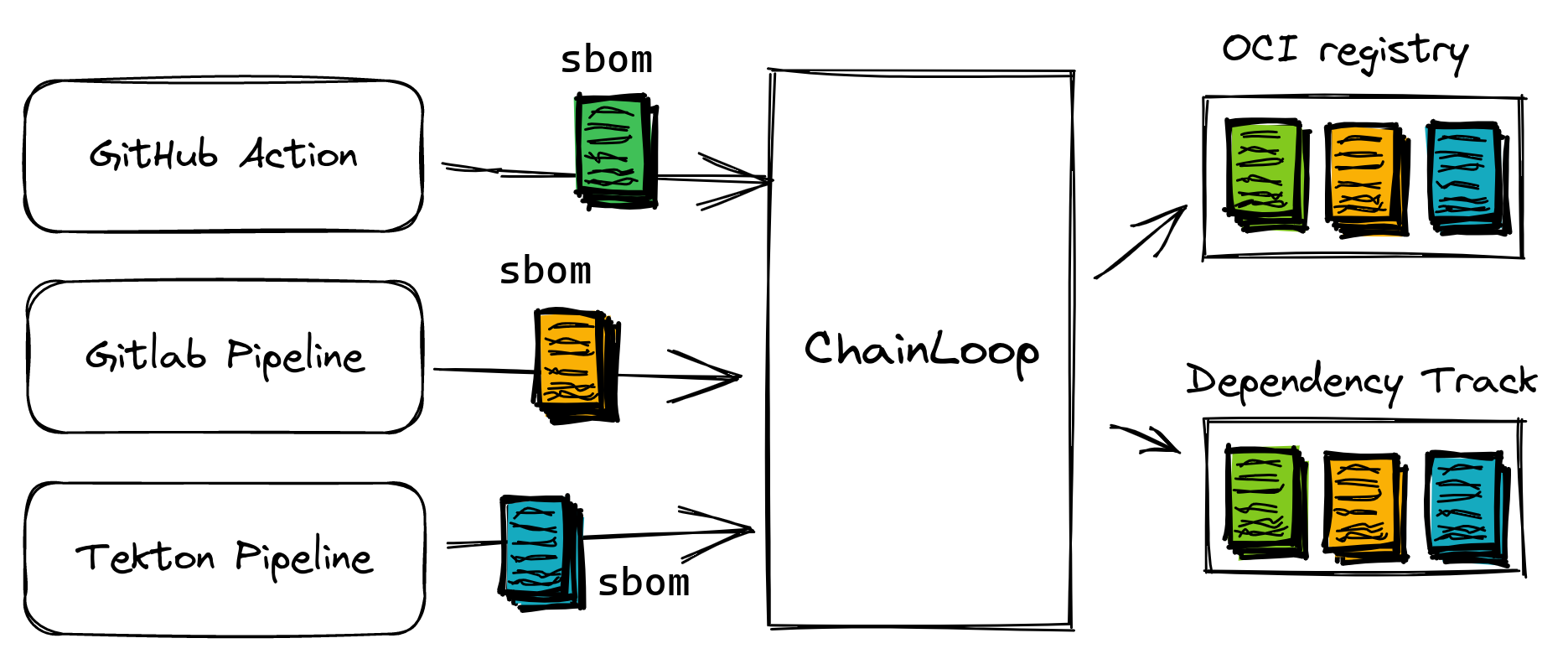
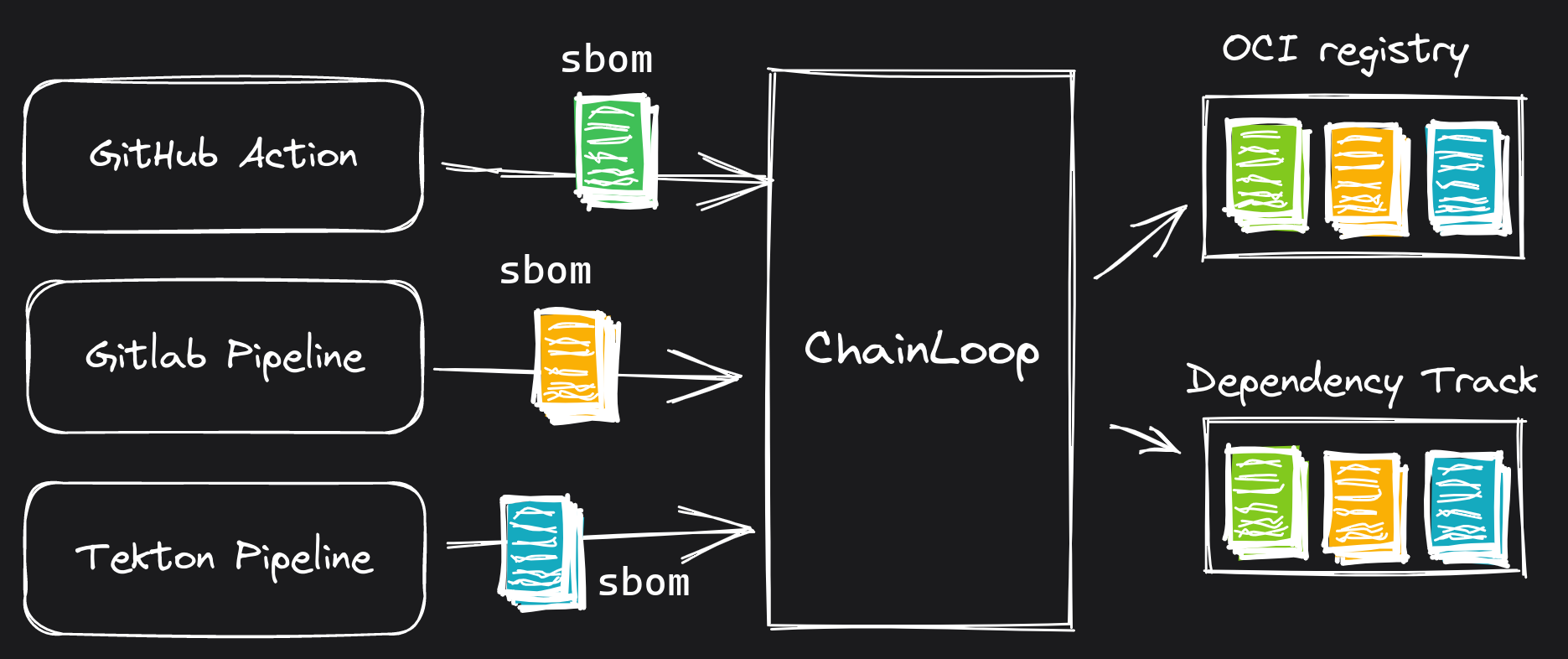 Once configured, any `SBOM_CYCLONEDX_JSON` piece of evidence received during the [attestation process](/concepts/attestations) will be sent to Dependency-Track.
See below an example of a [contract](/concepts/contracts) that includes a `SBOM_CYCLONEDX_JSON` material.
```yaml theme={"dark"}
apiVersion: chainloop.dev/v1
kind: Contract
metadata:
name: skynet-contract
spec:
materials:
# SBOMs will be uploaded to the CAS Backend of your choice, such as an OCI registry and referenced in the attestation
- type: SBOM_CYCLONEDX_JSON
name: skynet-sbom
```
See the integration in action in the following video:
## Configure Integration
There are two steps involved to enable this integration:
1. Setup a Dependency-Track integration provider in your Chainloop account
2. Attach this integration instance to your workflow
### Prerequisites
**Dependency-Track API Token**
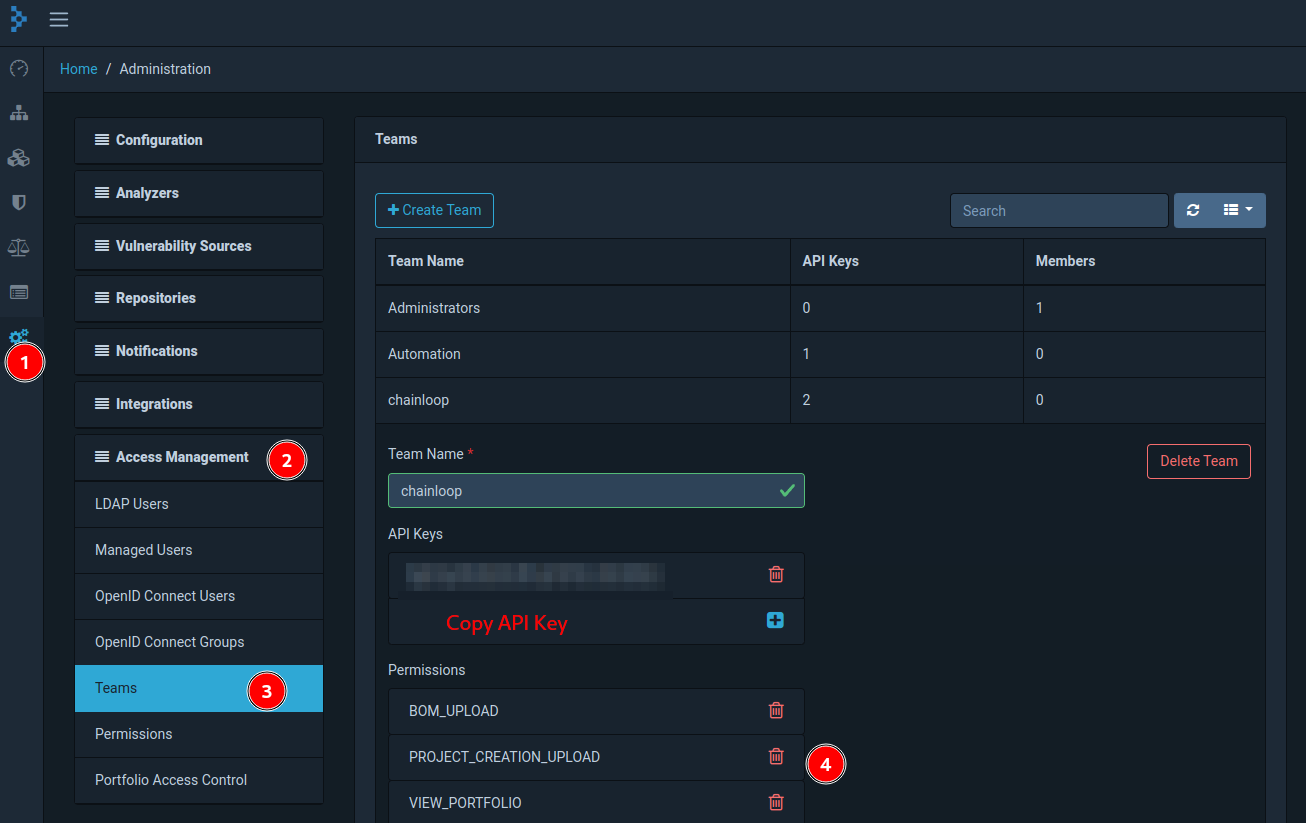
An API Token is required for the Chainloop instance to communicate securely with DependencyTrack. The required permissions are `BOM_UPLOAD`, `VIEW_PORTFOLIO` (to validate that the provided project ID exists) and optionally `PROJECT_CREATION_UPLOAD` if `project-auto-creation` is enabled, more on that later.
The API Key can be created by going to Settings -> Access Management -> Teams -> Select (or create) a Team -> Set permissions -> Copy API key
Once configured, any `SBOM_CYCLONEDX_JSON` piece of evidence received during the [attestation process](/concepts/attestations) will be sent to Dependency-Track.
See below an example of a [contract](/concepts/contracts) that includes a `SBOM_CYCLONEDX_JSON` material.
```yaml theme={"dark"}
apiVersion: chainloop.dev/v1
kind: Contract
metadata:
name: skynet-contract
spec:
materials:
# SBOMs will be uploaded to the CAS Backend of your choice, such as an OCI registry and referenced in the attestation
- type: SBOM_CYCLONEDX_JSON
name: skynet-sbom
```
See the integration in action in the following video:
## Configure Integration
There are two steps involved to enable this integration:
1. Setup a Dependency-Track integration provider in your Chainloop account
2. Attach this integration instance to your workflow
### Prerequisites
**Dependency-Track API Token**
An API Token is required for the Chainloop instance to communicate securely with DependencyTrack. The required permissions are `BOM_UPLOAD`, `VIEW_PORTFOLIO` (to validate that the provided project ID exists) and optionally `PROJECT_CREATION_UPLOAD` if `project-auto-creation` is enabled, more on that later.
The API Key can be created by going to Settings -> Access Management -> Teams -> Select (or create) a Team -> Set permissions -> Copy API key
 ### 1 - Setup the integration in your Chainloop account
Let's register an instance of Dependency-Track that later on can be attached to any of your workflows.
Navigate to the integrations section and click [Add Registration](https://app.chainloop.dev/integrations/dependency-track).
### 1 - Setup the integration in your Chainloop account
Let's register an instance of Dependency-Track that later on can be attached to any of your workflows.
Navigate to the integrations section and click [Add Registration](https://app.chainloop.dev/integrations/dependency-track).
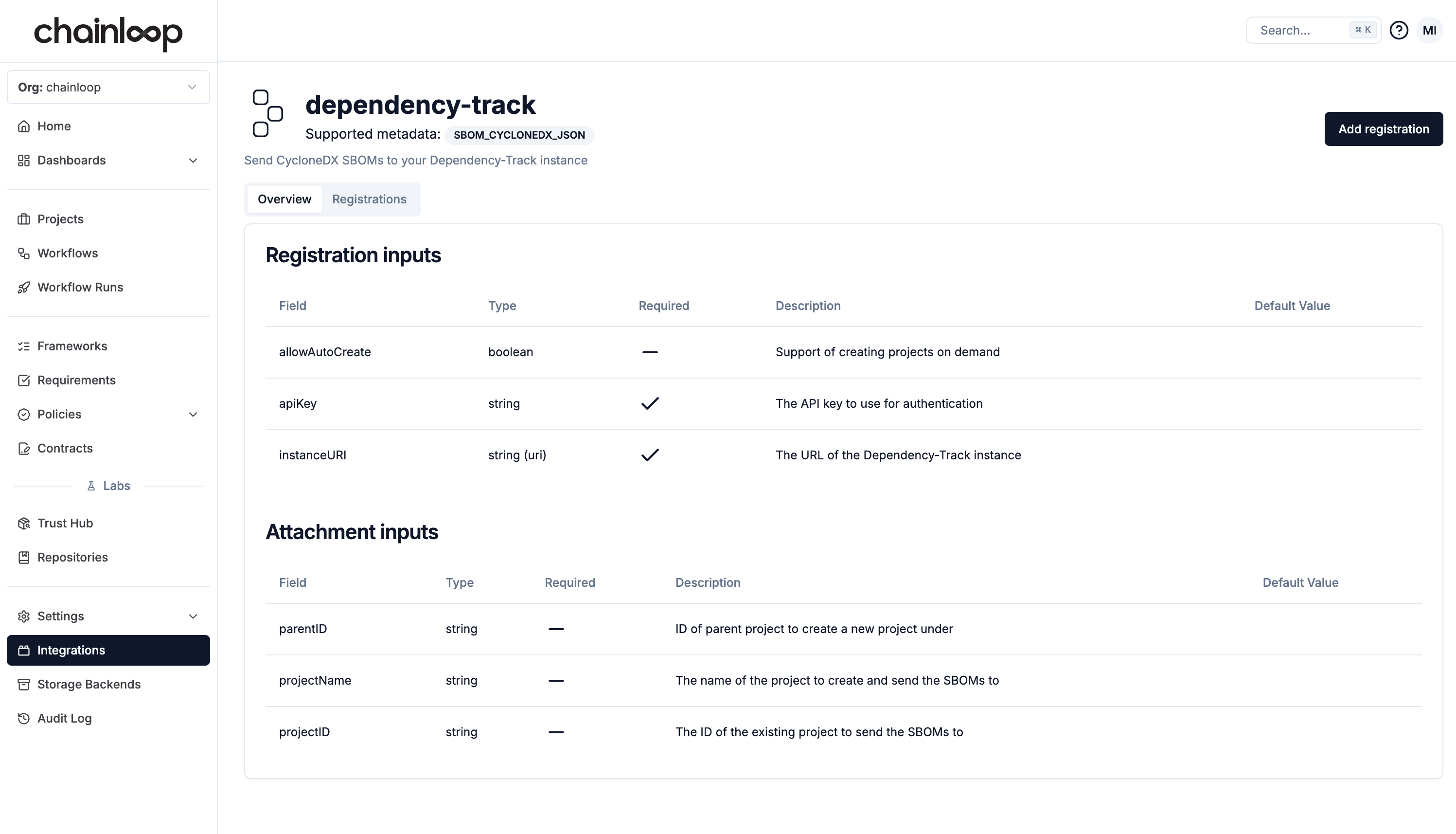 We can see that there are two required inputs: apiKey and instanceURI, provide those values and click on the `Register` button.
With the [CLI](/get-started/setup), we'll use the `chainloop integration registered add` command but first let's find out what are the required inputs using the `available describe` command.
```bash theme={"dark"}
chainloop integration available describe --name dependency-track
```
```
┌──────────────────┬─────────┬──────────────────────┬────────────────────────────────────────────────────────┐
│ ID │ VERSION │ MATERIAL REQUIREMENT │ DESCRIPTION │
├──────────────────┼─────────┼──────────────────────┼────────────────────────────────────────────────────────┤
│ dependency-track │ 1.4 │ SBOM_CYCLONEDX_JSON │ Send CycloneDX SBOMs to your Dependency-Track instance │
└──────────────────┴─────────┴──────────────────────┴────────────────────────────────────────────────────────┘
┌──────────────────────────────────────────────────────────────────────────────────────┐
│ Registration inputs │
├─────────────────┬──────────────┬──────────┬──────────────────────────────────────────┤
│ FIELD │ TYPE │ REQUIRED │ DESCRIPTION │
├─────────────────┼──────────────┼──────────┼──────────────────────────────────────────┤
│ allowAutoCreate │ boolean │ no │ Support of creating projects on demand │
│ apiKey │ string │ yes │ The API key to use for authentication │
│ instanceURI │ string (uri) │ yes │ The URL of the Dependency-Track instance │
└─────────────────┴──────────────┴──────────┴──────────────────────────────────────────┘
...
```
We can see that there are two required inputs: `apiKey` and `instanceURI`.
Let's go ahead and add an integration for an instance hosted at [https://dependency-track.chainloop.dev](https://dependency-track.chainloop.dev) that allows the auto-creation of projects. You'll get a prompt to introduce the API key
```
chainloop integration registered add dependency-track --name [my-registration] --opt instanceURI=https://dependency-track.chainloop.dev --opt apiKey=[REDACTED] --opt=allowAutoCreate=true
```
```
┌──────────────────────────────────────┬──────────────────┬──────────────────────────────────────────────┬─────────────────────┐
│ ID │ KIND │ CONFIG │ CREATED AT │
├──────────────────────────────────────┼──────────────────┼──────────────────────────────────────────────┼─────────────────────┤
│ c48f3041-5745-4773-aed9-ccf2f288b2e4 │ Dependency-Track │ host: https://dependency-track.chainloop.dev │ 21 Dec 22 16:29 UTC │
│ │ │ allowAutoCreate: true │ │
└──────────────────────────────────────┴──────────────────┴──────────────────────────────────────────────┴─────────────────────┘
```
### 2 - Attach the Integration to a Workflow
Once the integration is live, it can be **attached** to any workflow. In practice, that means that every workflow attestation that is received that contains a `SBOM_CYCLONEDX_JSON` material will be forwarded.
The same integration can be attached to multiple workflows
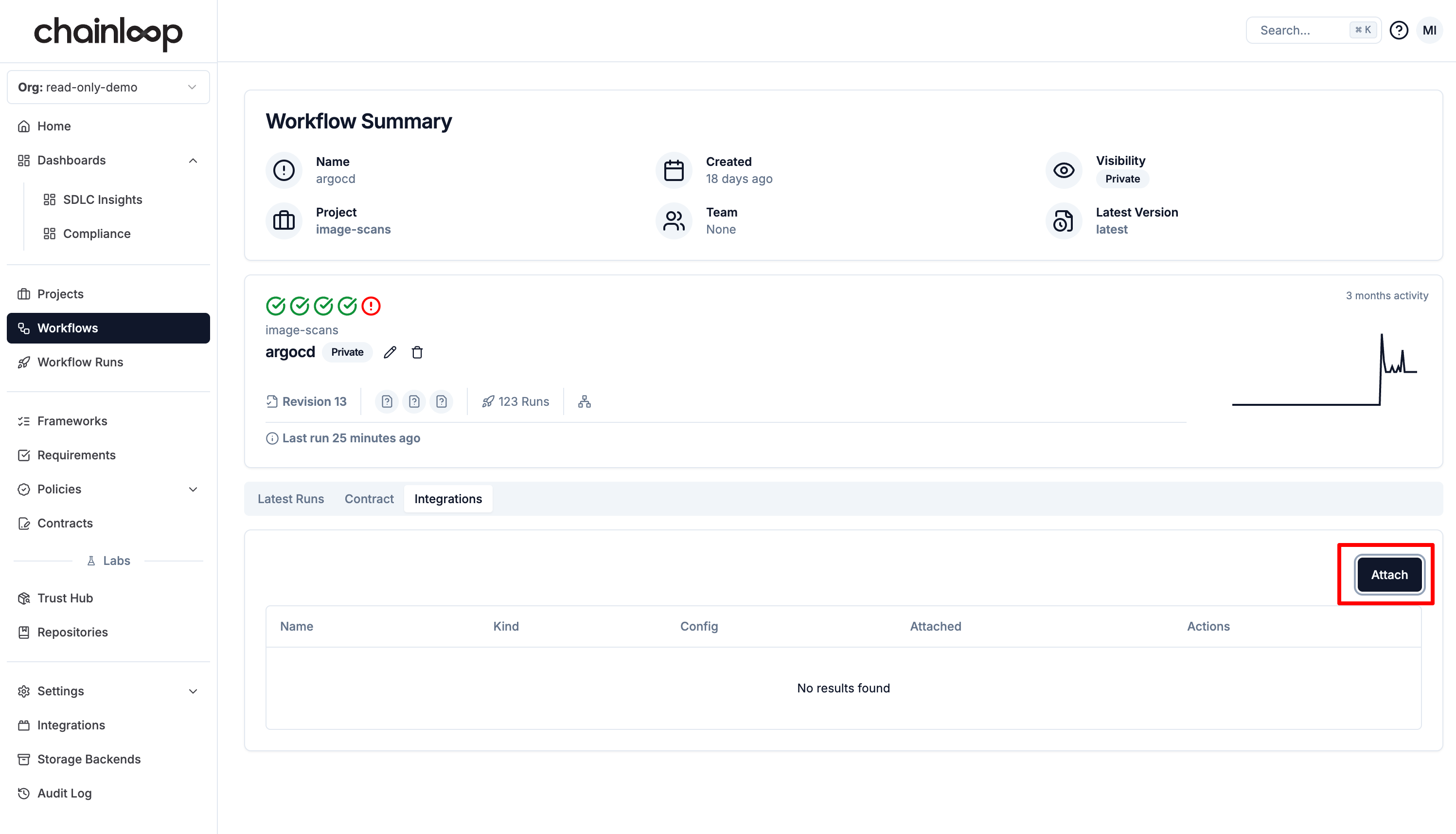
Navigate to the workflow section and click on the `Attach` button.
We can see that there are two required inputs: apiKey and instanceURI, provide those values and click on the `Register` button.
With the [CLI](/get-started/setup), we'll use the `chainloop integration registered add` command but first let's find out what are the required inputs using the `available describe` command.
```bash theme={"dark"}
chainloop integration available describe --name dependency-track
```
```
┌──────────────────┬─────────┬──────────────────────┬────────────────────────────────────────────────────────┐
│ ID │ VERSION │ MATERIAL REQUIREMENT │ DESCRIPTION │
├──────────────────┼─────────┼──────────────────────┼────────────────────────────────────────────────────────┤
│ dependency-track │ 1.4 │ SBOM_CYCLONEDX_JSON │ Send CycloneDX SBOMs to your Dependency-Track instance │
└──────────────────┴─────────┴──────────────────────┴────────────────────────────────────────────────────────┘
┌──────────────────────────────────────────────────────────────────────────────────────┐
│ Registration inputs │
├─────────────────┬──────────────┬──────────┬──────────────────────────────────────────┤
│ FIELD │ TYPE │ REQUIRED │ DESCRIPTION │
├─────────────────┼──────────────┼──────────┼──────────────────────────────────────────┤
│ allowAutoCreate │ boolean │ no │ Support of creating projects on demand │
│ apiKey │ string │ yes │ The API key to use for authentication │
│ instanceURI │ string (uri) │ yes │ The URL of the Dependency-Track instance │
└─────────────────┴──────────────┴──────────┴──────────────────────────────────────────┘
...
```
We can see that there are two required inputs: `apiKey` and `instanceURI`.
Let's go ahead and add an integration for an instance hosted at [https://dependency-track.chainloop.dev](https://dependency-track.chainloop.dev) that allows the auto-creation of projects. You'll get a prompt to introduce the API key
```
chainloop integration registered add dependency-track --name [my-registration] --opt instanceURI=https://dependency-track.chainloop.dev --opt apiKey=[REDACTED] --opt=allowAutoCreate=true
```
```
┌──────────────────────────────────────┬──────────────────┬──────────────────────────────────────────────┬─────────────────────┐
│ ID │ KIND │ CONFIG │ CREATED AT │
├──────────────────────────────────────┼──────────────────┼──────────────────────────────────────────────┼─────────────────────┤
│ c48f3041-5745-4773-aed9-ccf2f288b2e4 │ Dependency-Track │ host: https://dependency-track.chainloop.dev │ 21 Dec 22 16:29 UTC │
│ │ │ allowAutoCreate: true │ │
└──────────────────────────────────────┴──────────────────┴──────────────────────────────────────────────┴─────────────────────┘
```
### 2 - Attach the Integration to a Workflow
Once the integration is live, it can be **attached** to any workflow. In practice, that means that every workflow attestation that is received that contains a `SBOM_CYCLONEDX_JSON` material will be forwarded.
The same integration can be attached to multiple workflows
Navigate to the workflow section and click on the `Attach` button.
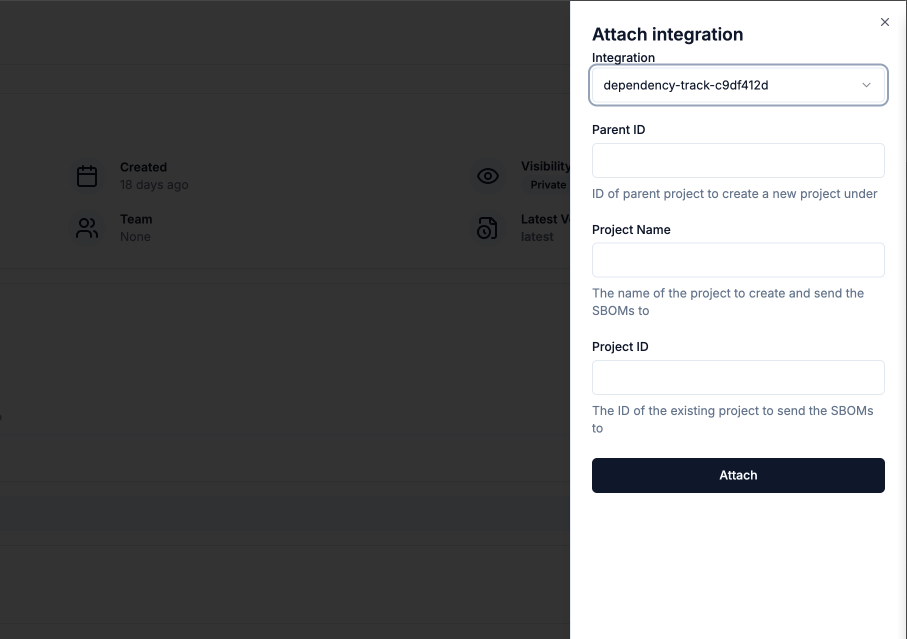
 During the attachment process, you can decide whether to send the SBOMs to a specific project `projectID` or create a new one defined by the provided `projectName`. For the latter to work, you need to make sure that the integration was setup with `--allow-project-auto-create` option. Furthermore, you can request the new project is created as a child of an existing one `parentID`, to enable you to group projects in Dependency Track.
 The attachment is done via `chainloop integration attached add` command. But as we did before, let's first find out what are the required inputs using the `available describe` command.
```bash theme={"dark"}
chainloop integration available describe --name dependency-track
```
```
┌──────────────────┬─────────┬──────────────────────┬────────────────────────────────────────────────────────┐
│ ID │ VERSION │ MATERIAL REQUIREMENT │ DESCRIPTION │
├──────────────────┼─────────┼──────────────────────┼────────────────────────────────────────────────────────┤
│ dependency-track │ 1.4 │ SBOM_CYCLONEDX_JSON │ Send CycloneDX SBOMs to your Dependency-Track instance │
└──────────────────┴─────────┴──────────────────────┴────────────────────────────────────────────────────────┘
...
┌───────────────────────────────────────────────────────────────────────────────────────────┐
│ Attachment inputs │
├─────────────┬────────┬──────────┬─────────────────────────────────────────────────────────┤
│ FIELD │ TYPE │ REQUIRED │ DESCRIPTION │
├─────────────┼────────┼──────────┼─────────────────────────────────────────────────────────┤
│ parentID │ string │ no │ ID of parent project to create a new project under │
│ projectID │ string │ no │ The ID of the existing project to send the SBOMs to │
│ projectName │ string │ no │ The name of the project to create and send the SBOMs to │
└─────────────┴────────┴──────────┴─────────────────────────────────────────────────────────┘
```
During the attachment process, you can decide whether to send the SBOMs to a specific project `projectID` or create a new one defined by the provided `projectName`. For the latter to work, you need to make sure that the integration was setup with `--allow-project-auto-create` option. Furthermore, you can request the new project is created as a child of an existing one `parentID`, to enable you to group projects in Dependency Track.
The workflowID can be found by running `chainloop workflow list`
```bash theme={"dark"}
# Attach integration to a specific workflow
$ chainloop integration attached add \
--integration my-registered-integration \
--workflow my-workflow --project my-workflow-project \
--opt projectName=example-project
```
That's all!
Next time Chainloop receives an attestation, its contained SBOMs will be uploaded to [https://dependency-track.chainloop.dev](https://dependency-track.chainloop.dev) to a project called `example-project`.
## Advanced Options
### Filter SBOMs dispatch
You can filter the SBOMs that are sent to Dependency-Track based on the attestation or material [annotations](/concepts/attestations#add-annotations) by providing an optional `filter` option.
* If multiple filters are provided, they will be applied in an AND operation.
* If the same annotation is provided in both the attestation and the material, the value in the material will take precedence.
```bash theme={"dark"}
$ chainloop integration attached add \
...
--opt filter="environment=prod,team=security"
```
### Dynamically set the project name
You can also use interpolation to calculate the Depdendency-Track project name dynamically based on the annotations set in either the attestation and the materials.
For example, let's say that you have the following contract
```yaml chainloop-contract.yaml theme={"dark"}
apiVersion: chainloop.dev/v1
kind: Contract
metadata:
name: chainloop-contract
spec:
annotations:
- name: version
value: oss
materials:
- type: SBOM_CYCLONEDX_JSON
name: controlplane-sbom
annotations:
- name: component
value: controlplane
```
You can then use the `{{ .Material.Annotations.Component }}` or `{{ .Attestation.Annotations.Asset }}` templates during attachment, for example
```bash theme={"dark"}
$ chainloop integration attached add \
...
--opt projectName="project-{{ .Material.Annotations.component }}"
# or both combined
--opt projectName="project-{{ .Material.Annotations.component }}-{{ .Attestation.Annotations.version }}"
```
this will send the SBOM to a project called `project-controlplane` or `project-controlplane-oss` respectively.
The attachment is done via `chainloop integration attached add` command. But as we did before, let's first find out what are the required inputs using the `available describe` command.
```bash theme={"dark"}
chainloop integration available describe --name dependency-track
```
```
┌──────────────────┬─────────┬──────────────────────┬────────────────────────────────────────────────────────┐
│ ID │ VERSION │ MATERIAL REQUIREMENT │ DESCRIPTION │
├──────────────────┼─────────┼──────────────────────┼────────────────────────────────────────────────────────┤
│ dependency-track │ 1.4 │ SBOM_CYCLONEDX_JSON │ Send CycloneDX SBOMs to your Dependency-Track instance │
└──────────────────┴─────────┴──────────────────────┴────────────────────────────────────────────────────────┘
...
┌───────────────────────────────────────────────────────────────────────────────────────────┐
│ Attachment inputs │
├─────────────┬────────┬──────────┬─────────────────────────────────────────────────────────┤
│ FIELD │ TYPE │ REQUIRED │ DESCRIPTION │
├─────────────┼────────┼──────────┼─────────────────────────────────────────────────────────┤
│ parentID │ string │ no │ ID of parent project to create a new project under │
│ projectID │ string │ no │ The ID of the existing project to send the SBOMs to │
│ projectName │ string │ no │ The name of the project to create and send the SBOMs to │
└─────────────┴────────┴──────────┴─────────────────────────────────────────────────────────┘
```
During the attachment process, you can decide whether to send the SBOMs to a specific project `projectID` or create a new one defined by the provided `projectName`. For the latter to work, you need to make sure that the integration was setup with `--allow-project-auto-create` option. Furthermore, you can request the new project is created as a child of an existing one `parentID`, to enable you to group projects in Dependency Track.
The workflowID can be found by running `chainloop workflow list`
```bash theme={"dark"}
# Attach integration to a specific workflow
$ chainloop integration attached add \
--integration my-registered-integration \
--workflow my-workflow --project my-workflow-project \
--opt projectName=example-project
```
That's all!
Next time Chainloop receives an attestation, its contained SBOMs will be uploaded to [https://dependency-track.chainloop.dev](https://dependency-track.chainloop.dev) to a project called `example-project`.
## Advanced Options
### Filter SBOMs dispatch
You can filter the SBOMs that are sent to Dependency-Track based on the attestation or material [annotations](/concepts/attestations#add-annotations) by providing an optional `filter` option.
* If multiple filters are provided, they will be applied in an AND operation.
* If the same annotation is provided in both the attestation and the material, the value in the material will take precedence.
```bash theme={"dark"}
$ chainloop integration attached add \
...
--opt filter="environment=prod,team=security"
```
### Dynamically set the project name
You can also use interpolation to calculate the Depdendency-Track project name dynamically based on the annotations set in either the attestation and the materials.
For example, let's say that you have the following contract
```yaml chainloop-contract.yaml theme={"dark"}
apiVersion: chainloop.dev/v1
kind: Contract
metadata:
name: chainloop-contract
spec:
annotations:
- name: version
value: oss
materials:
- type: SBOM_CYCLONEDX_JSON
name: controlplane-sbom
annotations:
- name: component
value: controlplane
```
You can then use the `{{ .Material.Annotations.Component }}` or `{{ .Attestation.Annotations.Asset }}` templates during attachment, for example
```bash theme={"dark"}
$ chainloop integration attached add \
...
--opt projectName="project-{{ .Material.Annotations.component }}"
# or both combined
--opt projectName="project-{{ .Material.Annotations.component }}-{{ .Attestation.Annotations.version }}"
```
this will send the SBOM to a project called `project-controlplane` or `project-controlplane-oss` respectively.