> ## Documentation Index
> Fetch the complete documentation index at: https://docs.chainloop.dev/llms.txt
> Use this file to discover all available pages before exploring further.
# How to trace AI coding sessions
> Set up `chainloop trace`, connect repositories, and use the AI Coding dashboard.
This is a preview/beta feature. Further changes are expected.
## Overview
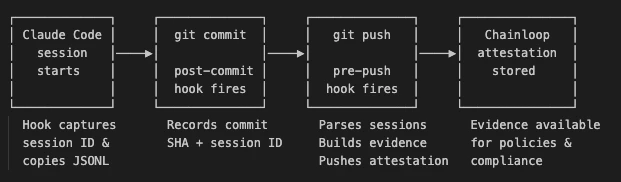
`chainloop trace` captures every AI-assisted coding session in your repository and pushes it to Chainloop as a signed [`CHAINLOOP_AI_CODING_SESSION`](/concepts/material-types) attestation. This guide walks through setting it up end to end. For the underlying model — what a session is, how it's correlated with PRs, and how the dashboard metrics are computed — see the [AI Coding Sessions](/concepts/ai-coding-sessions) concept page.
 ## Prerequisites
* **Latest Enterprise Edition CLI**, authenticated against your Chainloop instance:
```bash theme={"dark"}
curl -sfL https://dl.chainloop.dev/cli/install.sh | bash -s -- --ee
chainloop auth login
```
Both user tokens and service accounts work.
* A [Chainloop project](/concepts/projects-versions) to associate traces with.
* A Git repository with [Claude Code](https://docs.anthropic.com/en/docs/claude-code) configured.
`chainloop trace` currently supports **Claude Code** sessions. Cursor support is experimental and incomplete (no usage metrics or cost). Support for additional AI coding agents is planned.
## 1. Initialize Tracing
Run `chainloop trace init` once from your repository root, choosing which AI agent(s) to instrument:
```bash theme={"dark"}
# Claude Code (default)
chainloop trace init --project my-project
# Cursor
chainloop trace init --project my-project --cursor
# Both
chainloop trace init --project my-project --claude --cursor
```
The command modifies `.claude/settings.json` and/or `.cursor/hooks.json` to hook the agent into Chainloop, installs the git hooks that build and push the attestation on `git push`, and persists `--project` (and any explicit `--org`) to `.chainloop.yml` at the repo root.
If you already have git hooks in place, `chainloop trace` backs them up automatically and chains them — your existing hooks continue to run as before.
**Run this once per repository.** Commit `.chainloop.yml` and the agent config file(s) (`.claude/settings.json`, `.cursor/hooks.json`) to your repo and the rest of your team is onboarded automatically — the agent hooks install the git hooks themselves the first time a teammate's agent runs in the repo. Teammates only need the [Chainloop EE CLI](#prerequisites) installed and authenticated; they don't need to run `trace init`.
### Useful Flags
| Flag | Effect |
| ----------------- | -------------------------------------------------------------------------------------------------------------------------------------------------- |
| `--project` | Project name for the attestation. Persisted to `.chainloop.yml`. |
| `--claude` | Install Claude Code hooks. Default when neither `--claude` nor `--cursor` is passed. |
| `--cursor` | Install Cursor hooks. Combine with `--claude` to instrument both agents. |
| `--org` | Pin trace attestations to a specific Chainloop organization (overrides the CLI default on every push). Persisted to `.chainloop.yml`. |
| `--require-trace` | When `true`, the pre-push hook **blocks** the push if the trace attestation fails. Default: `false` (non-blocking). Persisted to `.chainloop.yml`. |
### Work as Usual
Once initialized, there's nothing else to do. Write code with Claude Code, commit, and push.
```bash theme={"dark"}
# Start a Claude Code session and work on your code
# ... make changes, commit ...
git push origin my-branch
# pre-push hook automatically creates the attestation
```
The pre-push hook only creates attestations for commits linked to a Claude Code session. Regular (non-AI-assisted) commits pass through without overhead.
## 2. Pin Project and Organization with `.chainloop.yml`
`chainloop trace init` writes a `.chainloop.yml` file at the repository root so every developer working in the repo targets the same Chainloop project and organization without extra flags.
```yaml .chainloop.yml theme={"dark"}
projectName: my-project
organization: acme-corp
requireTrace: true
```
| Field | Purpose |
| ---------------- | ------------------------------------------------------------------------------------------------------------------------------- |
| `projectName` | Project the attestation is associated with. Required. |
| `organization` | Forces trace attestations (init, hooks, push) to target this Chainloop organization, ignoring the CLI's currently selected one. |
| `requireTrace` | When `true`, the pre-push hook fails the push on attestation errors. Default `false`. |
| `projectVersion` | Optional project version label. |
Both `.chainloop.yml` and `.chainloop.yaml` are accepted. If both exist, `.chainloop.yml` wins. Commit this file to the repository so your team shares one source of truth.
## 3. Connect Your Repository (GitHub App)
Pushing attestations is enough to capture sessions, but to get the **PR summary comment** and the **`Chainloop AI Policies` check run** you need to connect your GitHub repository to Chainloop via the GitHub App.
The setup is the same as for [keyless attestations in GitHub](/guides/github-keyless) — if your repo is already enrolled, you're done.
### Install the Chainloop GitHub App
From the Chainloop Web UI, open **Repositories → Add Repositories**, choose **GitHub**, and follow the install flow.
## Prerequisites
* **Latest Enterprise Edition CLI**, authenticated against your Chainloop instance:
```bash theme={"dark"}
curl -sfL https://dl.chainloop.dev/cli/install.sh | bash -s -- --ee
chainloop auth login
```
Both user tokens and service accounts work.
* A [Chainloop project](/concepts/projects-versions) to associate traces with.
* A Git repository with [Claude Code](https://docs.anthropic.com/en/docs/claude-code) configured.
`chainloop trace` currently supports **Claude Code** sessions. Cursor support is experimental and incomplete (no usage metrics or cost). Support for additional AI coding agents is planned.
## 1. Initialize Tracing
Run `chainloop trace init` once from your repository root, choosing which AI agent(s) to instrument:
```bash theme={"dark"}
# Claude Code (default)
chainloop trace init --project my-project
# Cursor
chainloop trace init --project my-project --cursor
# Both
chainloop trace init --project my-project --claude --cursor
```
The command modifies `.claude/settings.json` and/or `.cursor/hooks.json` to hook the agent into Chainloop, installs the git hooks that build and push the attestation on `git push`, and persists `--project` (and any explicit `--org`) to `.chainloop.yml` at the repo root.
If you already have git hooks in place, `chainloop trace` backs them up automatically and chains them — your existing hooks continue to run as before.
**Run this once per repository.** Commit `.chainloop.yml` and the agent config file(s) (`.claude/settings.json`, `.cursor/hooks.json`) to your repo and the rest of your team is onboarded automatically — the agent hooks install the git hooks themselves the first time a teammate's agent runs in the repo. Teammates only need the [Chainloop EE CLI](#prerequisites) installed and authenticated; they don't need to run `trace init`.
### Useful Flags
| Flag | Effect |
| ----------------- | -------------------------------------------------------------------------------------------------------------------------------------------------- |
| `--project` | Project name for the attestation. Persisted to `.chainloop.yml`. |
| `--claude` | Install Claude Code hooks. Default when neither `--claude` nor `--cursor` is passed. |
| `--cursor` | Install Cursor hooks. Combine with `--claude` to instrument both agents. |
| `--org` | Pin trace attestations to a specific Chainloop organization (overrides the CLI default on every push). Persisted to `.chainloop.yml`. |
| `--require-trace` | When `true`, the pre-push hook **blocks** the push if the trace attestation fails. Default: `false` (non-blocking). Persisted to `.chainloop.yml`. |
### Work as Usual
Once initialized, there's nothing else to do. Write code with Claude Code, commit, and push.
```bash theme={"dark"}
# Start a Claude Code session and work on your code
# ... make changes, commit ...
git push origin my-branch
# pre-push hook automatically creates the attestation
```
The pre-push hook only creates attestations for commits linked to a Claude Code session. Regular (non-AI-assisted) commits pass through without overhead.
## 2. Pin Project and Organization with `.chainloop.yml`
`chainloop trace init` writes a `.chainloop.yml` file at the repository root so every developer working in the repo targets the same Chainloop project and organization without extra flags.
```yaml .chainloop.yml theme={"dark"}
projectName: my-project
organization: acme-corp
requireTrace: true
```
| Field | Purpose |
| ---------------- | ------------------------------------------------------------------------------------------------------------------------------- |
| `projectName` | Project the attestation is associated with. Required. |
| `organization` | Forces trace attestations (init, hooks, push) to target this Chainloop organization, ignoring the CLI's currently selected one. |
| `requireTrace` | When `true`, the pre-push hook fails the push on attestation errors. Default `false`. |
| `projectVersion` | Optional project version label. |
Both `.chainloop.yml` and `.chainloop.yaml` are accepted. If both exist, `.chainloop.yml` wins. Commit this file to the repository so your team shares one source of truth.
## 3. Connect Your Repository (GitHub App)
Pushing attestations is enough to capture sessions, but to get the **PR summary comment** and the **`Chainloop AI Policies` check run** you need to connect your GitHub repository to Chainloop via the GitHub App.
The setup is the same as for [keyless attestations in GitHub](/guides/github-keyless) — if your repo is already enrolled, you're done.
### Install the Chainloop GitHub App
From the Chainloop Web UI, open **Repositories → Add Repositories**, choose **GitHub**, and follow the install flow.
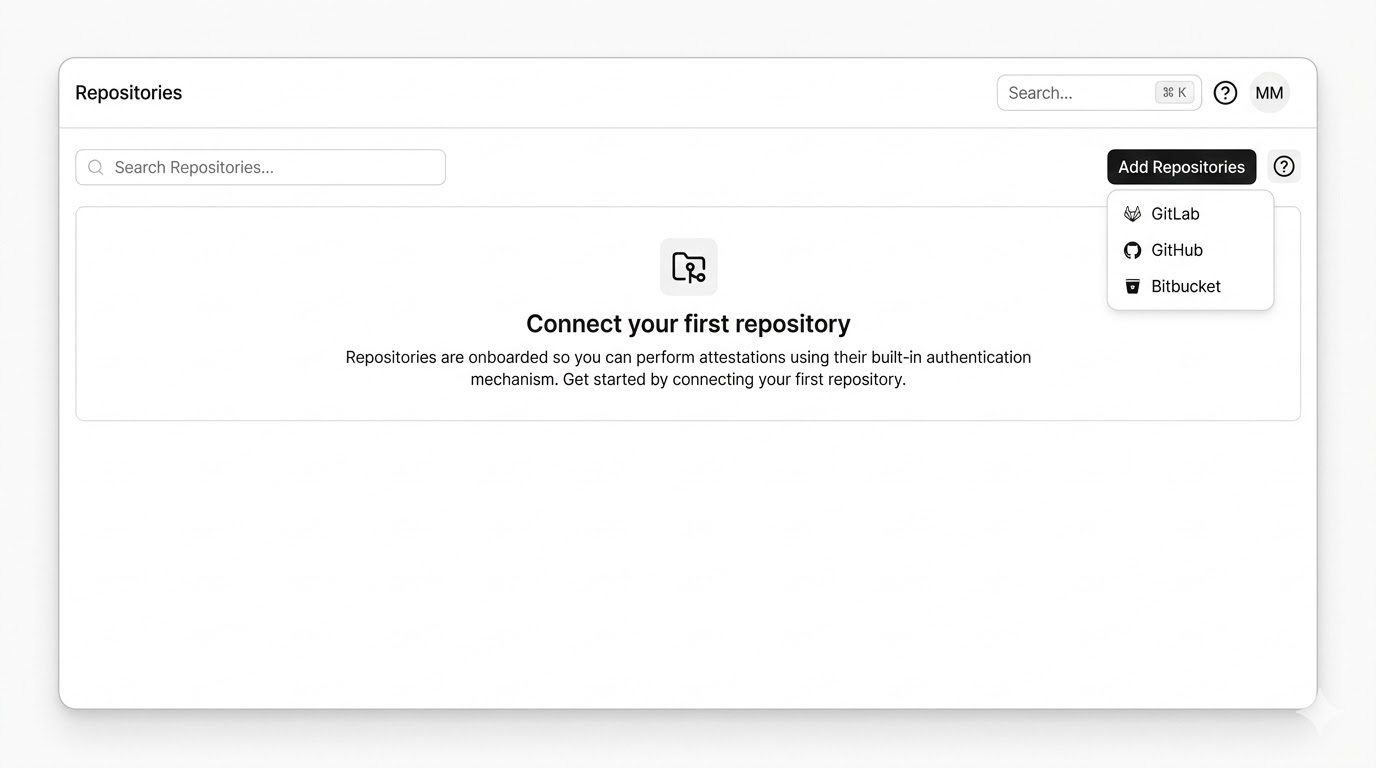 Chainloop stores only repository metadata (ID and name), not your repository code.
### Required Permissions and Events
The GitHub App requests these permissions:
| Scope | Why |
| ------------------------------- | -------------------------------------------------------- |
| **Metadata: Read** | Identify the repository (default GitHub App requirement) |
| **Code: Read & Write** | Read commit metadata to correlate sessions to PR commits |
| **Pull requests: Read & Write** | Post and update the AI session summary comment on PRs |
| **Checks: Read & Write** | Publish the `Chainloop AI Policies` check run |
Chainloop stores only repository metadata (ID and name), not your repository code.
### Required Permissions and Events
The GitHub App requests these permissions:
| Scope | Why |
| ------------------------------- | -------------------------------------------------------- |
| **Metadata: Read** | Identify the repository (default GitHub App requirement) |
| **Code: Read & Write** | Read commit metadata to correlate sessions to PR commits |
| **Pull requests: Read & Write** | Post and update the AI session summary comment on PRs |
| **Checks: Read & Write** | Publish the `Chainloop AI Policies` check run |
 Subscribed webhook events: **Pull request** — opens, syncs, and reopens trigger correlation.
### Link the Repository to a Project
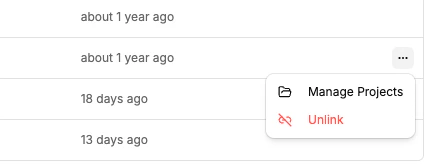
Once enrolled, open the repository's context menu in Chainloop and select **Manage Projects** to link it to the project that receives attestations. Attestations from repositories that aren't linked to a project are still accepted, but **PR correlation won't work** — Chainloop can't recognize which project the PR belongs to, so no summary comment, policy check run, or dashboard PR metrics will appear.
Subscribed webhook events: **Pull request** — opens, syncs, and reopens trigger correlation.
### Link the Repository to a Project
Once enrolled, open the repository's context menu in Chainloop and select **Manage Projects** to link it to the project that receives attestations. Attestations from repositories that aren't linked to a project are still accepted, but **PR correlation won't work** — Chainloop can't recognize which project the PR belongs to, so no summary comment, policy check run, or dashboard PR metrics will appear.
 ## 4. Visualize AI Coding Sessions
Once a trace attestation has been pushed, you can inspect it directly in the Chainloop Web UI. Navigate to the workflow run that contains the `CHAINLOOP_AI_CODING_SESSION` material.
### Rendered View
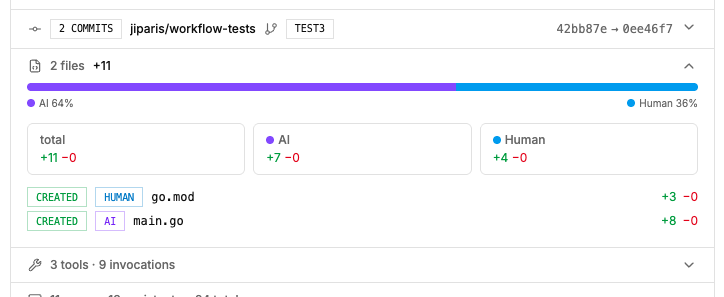
The platform renders a structured summary of the session — model usage, token consumption, estimated cost, tool invocations, code changes, and per-line attribution.
## 4. Visualize AI Coding Sessions
Once a trace attestation has been pushed, you can inspect it directly in the Chainloop Web UI. Navigate to the workflow run that contains the `CHAINLOOP_AI_CODING_SESSION` material.
### Rendered View
The platform renders a structured summary of the session — model usage, token consumption, estimated cost, tool invocations, code changes, and per-line attribution.
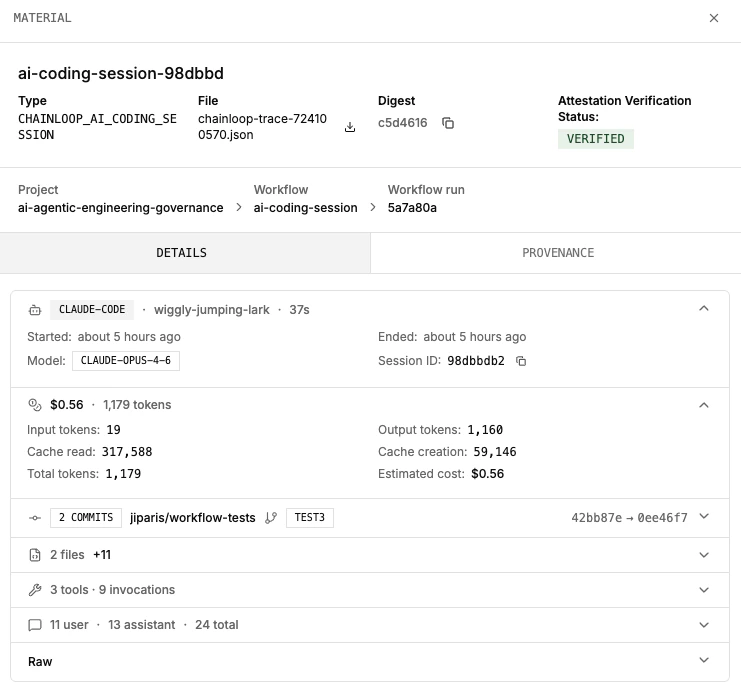 The attribution breakdown shows which files were modified by AI vs human, with exact line ranges and aggregate statistics.
 ### Raw View
Switch to the raw view to see the full JSON evidence as captured by the hooks. This is useful for debugging policies or understanding the exact data available for Rego evaluation.
### Raw View
Switch to the raw view to see the full JSON evidence as captured by the hooks. This is useful for debugging policies or understanding the exact data available for Rego evaluation.
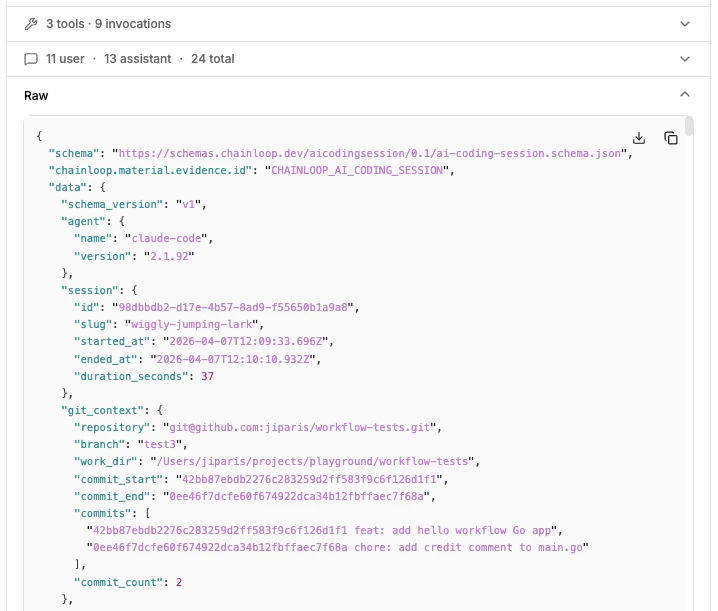 Inspect any `CHAINLOOP_AI_CODING_SESSION` material the same way you inspect other evidence types — click on the material in the workflow run details to toggle between rendered and raw views.
## 5. Use the AI Coding Dashboard
For an organization-wide view across every traced session, open **Dashboards → AI Coding** in the sidebar (`/u//dashboards/ai`). The dashboard aggregates every `CHAINLOOP_AI_CODING_SESSION` attestation pushed to the org.
Inspect any `CHAINLOOP_AI_CODING_SESSION` material the same way you inspect other evidence types — click on the material in the workflow run details to toggle between rendered and raw views.
## 5. Use the AI Coding Dashboard
For an organization-wide view across every traced session, open **Dashboards → AI Coding** in the sidebar (`/u//dashboards/ai`). The dashboard aggregates every `CHAINLOOP_AI_CODING_SESSION` attestation pushed to the org.
 Use the time-range selector in the top right to switch between **24 hours**, **7 days**, **30 days**, and **3 months**. Each card shows the delta vs. the previous period of the same length.
The cards on the dashboard are: **Total Sessions**, **Active Users**, **AI-assisted PRs**, **AI-authored Code**, **Top Users**, and **Model Breakdown**. What each card shows and which backend metric drives it is documented in [AI Coding Sessions → AI Sessions Dashboard Metrics](/concepts/ai-coding-sessions#ai-sessions-dashboard-metrics).
The dashboard only includes sessions that have been pushed as attestations. If a developer hasn't run `chainloop trace init` yet, their work won't appear here.
## 6. PR Correlation in Action
When a pull request is opened or updated on a connected repository, Chainloop posts a summary comment listing every AI coding session that contributed to the PR and (when policies fire) a `Chainloop AI Policies` check run. The comment updates automatically as new commits land or new session attestations arrive.
Use the time-range selector in the top right to switch between **24 hours**, **7 days**, **30 days**, and **3 months**. Each card shows the delta vs. the previous period of the same length.
The cards on the dashboard are: **Total Sessions**, **Active Users**, **AI-assisted PRs**, **AI-authored Code**, **Top Users**, and **Model Breakdown**. What each card shows and which backend metric drives it is documented in [AI Coding Sessions → AI Sessions Dashboard Metrics](/concepts/ai-coding-sessions#ai-sessions-dashboard-metrics).
The dashboard only includes sessions that have been pushed as attestations. If a developer hasn't run `chainloop trace init` yet, their work won't appear here.
## 6. PR Correlation in Action
When a pull request is opened or updated on a connected repository, Chainloop posts a summary comment listing every AI coding session that contributed to the PR and (when policies fire) a `Chainloop AI Policies` check run. The comment updates automatically as new commits land or new session attestations arrive.
 ### Summary Comment
Two parts:
* **Aggregate table** — one row per contributing session, with the agent and version, model, [AI Session Score](/reference/ai-score), attribution %, files touched, lines added/removed, tokens in/out, estimated cost, and session duration. Attribution % counts both added and removed lines.
* **Per-session file breakdown** (collapsible) — status, attribution label, file path linked to the blob at the PR head, and lines added/removed for each file the session modified. Each session block also includes its [AI Session Score](/reference/ai-score) breakdown — per-criterion sub-flags and the items list reviewers should focus on.
### `Chainloop AI Policies` Check Run
When you've attached policies to `CHAINLOOP_AI_CODING_SESSION` (see [Applying policies](#applying-policies) below), Chainloop publishes a check run on the PR head commit:
* `failure` — fails when **either** of the following is true:
* **Policy violations in the aggregated session** — any attestation generated during the same AI session has a policy violation. Sessions are aggregated by their commit-message trailer, so a single failing material in any of the session's attestations fails the check.
* **Missing session attestations** — a session referenced in a commit's trailer can't be found in Chainloop (typically because its attestation push failed for that session).
* `neutral` — policy data couldn't be evaluated.
* `success` — every referenced session is present and every aggregated session passes its policies.
### Summary Comment
Two parts:
* **Aggregate table** — one row per contributing session, with the agent and version, model, [AI Session Score](/reference/ai-score), attribution %, files touched, lines added/removed, tokens in/out, estimated cost, and session duration. Attribution % counts both added and removed lines.
* **Per-session file breakdown** (collapsible) — status, attribution label, file path linked to the blob at the PR head, and lines added/removed for each file the session modified. Each session block also includes its [AI Session Score](/reference/ai-score) breakdown — per-criterion sub-flags and the items list reviewers should focus on.
### `Chainloop AI Policies` Check Run
When you've attached policies to `CHAINLOOP_AI_CODING_SESSION` (see [Applying policies](#applying-policies) below), Chainloop publishes a check run on the PR head commit:
* `failure` — fails when **either** of the following is true:
* **Policy violations in the aggregated session** — any attestation generated during the same AI session has a policy violation. Sessions are aggregated by their commit-message trailer, so a single failing material in any of the session's attestations fails the check.
* **Missing session attestations** — a session referenced in a commit's trailer can't be found in Chainloop (typically because its attestation push failed for that session).
* `neutral` — policy data couldn't be evaluated.
* `success` — every referenced session is present and every aggregated session passes its policies.
 This makes AI policy compliance a first-class merge gate. Required GitHub App permission: `checks:write`.
PR summaries and check runs are currently available for **GitHub** only. GitLab support is planned.
### When It Runs
* The summary is posted when the PR is opened and re-evaluated every time new commits are pushed.
* Closed or merged PRs are not updated — the last posted summary stays in place.
* No comment is posted when none of the PR's commits match a stored AI coding session.
## Applying Policies
Define `CHAINLOOP_AI_CODING_SESSION` in your contract to attach policies to traced sessions. Chainloop ships a curated contract of [built-in policies](/concepts/ai-coding-sessions#built-in-policies) you can opt into; the examples below show three custom Rego policies you can write yourself.
```yaml contract.yaml theme={"dark"}
apiVersion: chainloop.dev/v1
kind: Contract
metadata:
name: ai-session-governance
spec:
materials:
- type: CHAINLOOP_AI_CODING_SESSION
name: ai-coding-session
policies:
materials:
- ref: file://check-approved-models.yaml
```
### Example: Restrict to Approved Models
```yaml check-approved-models.yaml theme={"dark"}
apiVersion: chainloop.dev/v1
kind: Policy
metadata:
name: check-approved-models
description: Ensure AI coding sessions only use approved models
spec:
policies:
- kind: CHAINLOOP_AI_CODING_SESSION
embedded: |
package main
import rego.v1
valid_input if {
input.data.model.models_used
}
approved_models := {"claude-opus-4-6", "claude-sonnet-4-6"}
violations contains msg if {
valid_input
some model in input.data.model.models_used
not model in approved_models
msg := sprintf("Model '%s' is not approved for AI coding sessions.", [model])
}
```
### Example: Enforce Token Budget
```yaml check-token-budget.yaml theme={"dark"}
apiVersion: chainloop.dev/v1
kind: Policy
metadata:
name: check-token-budget
description: Flag sessions that exceed a token budget
spec:
policies:
- kind: CHAINLOOP_AI_CODING_SESSION
embedded: |
package main
import rego.v1
valid_input if {
input.data.usage.total_tokens
}
max_tokens := 500000
violations contains msg if {
valid_input
input.data.usage.total_tokens > max_tokens
msg := sprintf("Session used %d tokens, exceeding the %d token budget.", [input.data.usage.total_tokens, max_tokens])
}
```
### Example: Limit AI-Authored Code Ratio
```yaml check-ai-code-ratio.yaml theme={"dark"}
apiVersion: chainloop.dev/v1
kind: Policy
metadata:
name: check-ai-code-ratio
description: Flag sessions where AI-authored code exceeds a threshold
spec:
policies:
- kind: CHAINLOOP_AI_CODING_SESSION
embedded: |
package main
import rego.v1
valid_input if {
input.data.code_changes.lines_added > 0
}
max_ai_ratio := 80
violations contains msg if {
valid_input
total := input.data.code_changes.lines_added
ai := input.data.code_changes.ai_lines_added
ratio := (ai * 100) / total
ratio > max_ai_ratio
msg := sprintf("AI authored %d%% of added lines (%d/%d), exceeding the %d%% threshold.", [ratio, ai, total, max_ai_ratio])
}
```
## Enforcing Chainloop Trace
Capturing AI sessions is opt-in by default — if a developer hasn't run `chainloop trace init`, or an attestation push fails for any reason, the work simply doesn't appear in Chainloop. When AI traceability is mandatory, you can enforce it at three different points: locally on push, on the attestation itself, and on the pull request.
### Block the push when attestations fail
Set `requireTrace: true` in `.chainloop.yml` (or pass `--require-trace` to `chainloop trace init`) to make the pre-push hook fail the `git push` if a trace attestation can't be produced — for example, when the developer isn't authenticated, the network is unreachable, or the Chainloop instance rejects the attestation. Without this flag, the same conditions only emit a warning and the push proceeds.
```yaml .chainloop.yml theme={"dark"}
projectName: my-project
organization: acme-corp
requireTrace: true
```
### Gate the attestation with policies
Attach policies to `CHAINLOOP_AI_CODING_SESSION` and enable [control gates](/concepts/control-gates) at the org level (or per policy). When a gated policy fails, the attestation push returns a non-zero exit code, which propagates to the pre-push hook and **interrupts the `git push`** — the developer can't push code that violates AI policy. Pair this with [built-in policies](/concepts/ai-coding-sessions#built-in-policies) for signed commits, agent allowlists, dangerous-command detection, and secret scanning.
### Detect missing sessions on the pull request
`chainloop trace` adds a trailer to every commit produced by an AI session, listing the session IDs that contributed to that commit. When the GitHub App correlates a PR, it compares the trailers against the AI session attestations stored in Chainloop:
* If every referenced session is present, the `Chainloop AI Policies` check run reports `success` (assuming policies pass).
* If any session referenced in a trailer is missing in Chainloop — typically because its push failed and was never retried — the check run fails. This catches the case where `requireTrace` is off and a developer's attestation silently dropped.
A developer who deliberately wants to bypass detection on a specific PR can add a `skip-ai-session` label to the pull request; Chainloop will skip the missing-session check for that PR. Use this sparingly — it's an explicit opt-out that's visible on the PR and reviewable.
## Removing Tracing
To uninstall all hooks and clean up local state:
```bash theme={"dark"}
chainloop trace uninstall
```
This removes the Git hooks, the Claude Code hooks from `.claude/settings.json`, and the `.git/chainloop-trace/` directory. If existing hooks were backed up during installation, they're restored. Pass `--yes` to skip the confirmation prompt.
## Troubleshooting
If hooks aren't producing attestations or the dashboard looks empty, work through this list before opening a support ticket:
* **Use the latest Enterprise Edition CLI** and confirm it's authenticated against your Chainloop instance:
```bash theme={"dark"}
curl -sfL https://dl.chainloop.dev/cli/install.sh | bash -s -- --ee
chainloop auth login
```
Both user tokens and service accounts work.
* **Cursor support is experimental and incomplete** — for example, no usage metrics or cost data are captured. Use Claude Code if you need full coverage.
* **Confirm the git hooks fire on `git push`** — you should see `chainloop trace` log lines in the push output. If you don't, re-run `chainloop trace init` from the repository root.
* **Run from the repository root** — Claude Code hooks don't trigger when you launch the agent from a sub-folder of the repository.
* **Check the hook log** at `.git/chainloop-trace/log.txt` — it records every hook invocation with full detail and is the first place to look when something silent breaks.
* **PR comment warns about missing sessions** — when a commit's trailer references a session that wasn't registered in Chainloop, the PR comment shows a "missing sessions" warning and the `Chainloop AI Policies` check run lists the offending session IDs (the actual Claude or Cursor session IDs). Grep for those IDs in `.git/chainloop-trace/log.txt` on the developer's machine to see why the attestation push didn't land — typically auth failure, network error, or a rejected attestation.
## Related Resources
* [AI Coding Sessions](/concepts/ai-coding-sessions) — what sessions are, how PR correlation works, and what each dashboard card means
* [AI Session Score](/reference/ai-score) — per-PR confidence signal for AI-assisted changes
* [How to collect AI agent configuration](/guides/ai-config-collector) — capture static AI agent configuration files
* [Keyless attestations in GitHub](/guides/github-keyless) — enroll a GitHub repository and link it to a Chainloop project
* [PR-Policies control gate](/guides/pr-policies-control-gate) — enforce pull request quality standards with Chainloop policies
* [Material Types](/concepts/material-types) — full list of supported material types
* [Policies](/concepts/policies) — how policies work in Chainloop
* [How to write custom policies](/guides/custom-policies) — write Rego policies for your evidence
This makes AI policy compliance a first-class merge gate. Required GitHub App permission: `checks:write`.
PR summaries and check runs are currently available for **GitHub** only. GitLab support is planned.
### When It Runs
* The summary is posted when the PR is opened and re-evaluated every time new commits are pushed.
* Closed or merged PRs are not updated — the last posted summary stays in place.
* No comment is posted when none of the PR's commits match a stored AI coding session.
## Applying Policies
Define `CHAINLOOP_AI_CODING_SESSION` in your contract to attach policies to traced sessions. Chainloop ships a curated contract of [built-in policies](/concepts/ai-coding-sessions#built-in-policies) you can opt into; the examples below show three custom Rego policies you can write yourself.
```yaml contract.yaml theme={"dark"}
apiVersion: chainloop.dev/v1
kind: Contract
metadata:
name: ai-session-governance
spec:
materials:
- type: CHAINLOOP_AI_CODING_SESSION
name: ai-coding-session
policies:
materials:
- ref: file://check-approved-models.yaml
```
### Example: Restrict to Approved Models
```yaml check-approved-models.yaml theme={"dark"}
apiVersion: chainloop.dev/v1
kind: Policy
metadata:
name: check-approved-models
description: Ensure AI coding sessions only use approved models
spec:
policies:
- kind: CHAINLOOP_AI_CODING_SESSION
embedded: |
package main
import rego.v1
valid_input if {
input.data.model.models_used
}
approved_models := {"claude-opus-4-6", "claude-sonnet-4-6"}
violations contains msg if {
valid_input
some model in input.data.model.models_used
not model in approved_models
msg := sprintf("Model '%s' is not approved for AI coding sessions.", [model])
}
```
### Example: Enforce Token Budget
```yaml check-token-budget.yaml theme={"dark"}
apiVersion: chainloop.dev/v1
kind: Policy
metadata:
name: check-token-budget
description: Flag sessions that exceed a token budget
spec:
policies:
- kind: CHAINLOOP_AI_CODING_SESSION
embedded: |
package main
import rego.v1
valid_input if {
input.data.usage.total_tokens
}
max_tokens := 500000
violations contains msg if {
valid_input
input.data.usage.total_tokens > max_tokens
msg := sprintf("Session used %d tokens, exceeding the %d token budget.", [input.data.usage.total_tokens, max_tokens])
}
```
### Example: Limit AI-Authored Code Ratio
```yaml check-ai-code-ratio.yaml theme={"dark"}
apiVersion: chainloop.dev/v1
kind: Policy
metadata:
name: check-ai-code-ratio
description: Flag sessions where AI-authored code exceeds a threshold
spec:
policies:
- kind: CHAINLOOP_AI_CODING_SESSION
embedded: |
package main
import rego.v1
valid_input if {
input.data.code_changes.lines_added > 0
}
max_ai_ratio := 80
violations contains msg if {
valid_input
total := input.data.code_changes.lines_added
ai := input.data.code_changes.ai_lines_added
ratio := (ai * 100) / total
ratio > max_ai_ratio
msg := sprintf("AI authored %d%% of added lines (%d/%d), exceeding the %d%% threshold.", [ratio, ai, total, max_ai_ratio])
}
```
## Enforcing Chainloop Trace
Capturing AI sessions is opt-in by default — if a developer hasn't run `chainloop trace init`, or an attestation push fails for any reason, the work simply doesn't appear in Chainloop. When AI traceability is mandatory, you can enforce it at three different points: locally on push, on the attestation itself, and on the pull request.
### Block the push when attestations fail
Set `requireTrace: true` in `.chainloop.yml` (or pass `--require-trace` to `chainloop trace init`) to make the pre-push hook fail the `git push` if a trace attestation can't be produced — for example, when the developer isn't authenticated, the network is unreachable, or the Chainloop instance rejects the attestation. Without this flag, the same conditions only emit a warning and the push proceeds.
```yaml .chainloop.yml theme={"dark"}
projectName: my-project
organization: acme-corp
requireTrace: true
```
### Gate the attestation with policies
Attach policies to `CHAINLOOP_AI_CODING_SESSION` and enable [control gates](/concepts/control-gates) at the org level (or per policy). When a gated policy fails, the attestation push returns a non-zero exit code, which propagates to the pre-push hook and **interrupts the `git push`** — the developer can't push code that violates AI policy. Pair this with [built-in policies](/concepts/ai-coding-sessions#built-in-policies) for signed commits, agent allowlists, dangerous-command detection, and secret scanning.
### Detect missing sessions on the pull request
`chainloop trace` adds a trailer to every commit produced by an AI session, listing the session IDs that contributed to that commit. When the GitHub App correlates a PR, it compares the trailers against the AI session attestations stored in Chainloop:
* If every referenced session is present, the `Chainloop AI Policies` check run reports `success` (assuming policies pass).
* If any session referenced in a trailer is missing in Chainloop — typically because its push failed and was never retried — the check run fails. This catches the case where `requireTrace` is off and a developer's attestation silently dropped.
A developer who deliberately wants to bypass detection on a specific PR can add a `skip-ai-session` label to the pull request; Chainloop will skip the missing-session check for that PR. Use this sparingly — it's an explicit opt-out that's visible on the PR and reviewable.
## Removing Tracing
To uninstall all hooks and clean up local state:
```bash theme={"dark"}
chainloop trace uninstall
```
This removes the Git hooks, the Claude Code hooks from `.claude/settings.json`, and the `.git/chainloop-trace/` directory. If existing hooks were backed up during installation, they're restored. Pass `--yes` to skip the confirmation prompt.
## Troubleshooting
If hooks aren't producing attestations or the dashboard looks empty, work through this list before opening a support ticket:
* **Use the latest Enterprise Edition CLI** and confirm it's authenticated against your Chainloop instance:
```bash theme={"dark"}
curl -sfL https://dl.chainloop.dev/cli/install.sh | bash -s -- --ee
chainloop auth login
```
Both user tokens and service accounts work.
* **Cursor support is experimental and incomplete** — for example, no usage metrics or cost data are captured. Use Claude Code if you need full coverage.
* **Confirm the git hooks fire on `git push`** — you should see `chainloop trace` log lines in the push output. If you don't, re-run `chainloop trace init` from the repository root.
* **Run from the repository root** — Claude Code hooks don't trigger when you launch the agent from a sub-folder of the repository.
* **Check the hook log** at `.git/chainloop-trace/log.txt` — it records every hook invocation with full detail and is the first place to look when something silent breaks.
* **PR comment warns about missing sessions** — when a commit's trailer references a session that wasn't registered in Chainloop, the PR comment shows a "missing sessions" warning and the `Chainloop AI Policies` check run lists the offending session IDs (the actual Claude or Cursor session IDs). Grep for those IDs in `.git/chainloop-trace/log.txt` on the developer's machine to see why the attestation push didn't land — typically auth failure, network error, or a rejected attestation.
## Related Resources
* [AI Coding Sessions](/concepts/ai-coding-sessions) — what sessions are, how PR correlation works, and what each dashboard card means
* [AI Session Score](/reference/ai-score) — per-PR confidence signal for AI-assisted changes
* [How to collect AI agent configuration](/guides/ai-config-collector) — capture static AI agent configuration files
* [Keyless attestations in GitHub](/guides/github-keyless) — enroll a GitHub repository and link it to a Chainloop project
* [PR-Policies control gate](/guides/pr-policies-control-gate) — enforce pull request quality standards with Chainloop policies
* [Material Types](/concepts/material-types) — full list of supported material types
* [Policies](/concepts/policies) — how policies work in Chainloop
* [How to write custom policies](/guides/custom-policies) — write Rego policies for your evidence