> ## Documentation Index
> Fetch the complete documentation index at: https://docs.chainloop.dev/llms.txt
> Use this file to discover all available pages before exploring further.
# Your First Attestation
An attestation is a unit of data sent to Chainloop. Users and CI systems use the Chainloop CLI to initialize an attestation process, add pieces of evidence to them, and "push" them to Chainloop service (the evidence store).
In this step, we'll use the CLI locally to craft an attestation referencing a container image and a Software Bill of materials (SBOM).
## Authentication
First, you need to authenticate the CLI to Chainloop service. Currently we support two authentication methods during the attestation process, user authentication and API key authentication, for this step we'll use the user authentication, which can be done by running the following command:
```bash theme={"dark"}
chainloop auth login
```
## Initialize the Attestation process
In a nutshell, an [attestation process](/concepts/attestations) has three steps: initialization, adding evidence, and storage. Refer to this section to learn more about the attestation lifecycle.
We'll start by initializing an attestation. The attestation process requires the name of a workflow and a project to associate with it. Chainloop workflows represent any CI or process that you want to attest. Projects and project versions represent your software product lifecycle.
```bash theme={"dark"}
chainloop att init --workflow build-container-image --project myproject
```
```bash theme={"dark"}
┌───────────────────────────┬──────────────────────────────────────────────┐
│ Initialized At │ 13 May 25 09:44 UTC │
├───────────────────────────┼──────────────────────────────────────────────┤
│ Attestation ID │ da728652-b646-41c1-a618-10d0392a102c │
│ Organization │ gs-demo │
│ Name │ build-container-image │
│ Project │ myproject │
│ Version │ none │
│ Contract │ myproject-build-container-image (revision 1) │
│ Timestamp Authority │ http://timestamp.digicert.com │
│ Policy violation strategy │ ADVISORY │
└───────────────────────────┴──────────────────────────────────────────────┘
```
## Add Pieces of Evidence (a.k.a materials)
Once the attestation process is initiated, we can attach as many pieces of evidence as we want. In this case, we are adding a reference to a container image. Many other material types are supported - check the [supported list](/concepts/material-types).
```bash theme={"dark"}
chainloop att add --value ghcr.io/chainloop-dev/chainloop/control-plane
```
```bash theme={"dark"}
INF material kind detected kind=CONTAINER_IMAGE
INF material added to attestation
┌──────────┬─────────────────────────────────────────────────────────────────────────┐
│ Name │ material-1741811432481645000 │
├──────────┼─────────────────────────────────────────────────────────────────────────┤
│ Type │ CONTAINER_IMAGE │
├──────────┼─────────────────────────────────────────────────────────────────────────┤
│ Required │ No │
├──────────┼─────────────────────────────────────────────────────────────────────────┤
│ Value │ ghcr.io/chainloop-dev/chainloop/control-plane:latest │
├──────────┼─────────────────────────────────────────────────────────────────────────┤
│ Digest │ sha256:9e0c48652ddf82e04dd1c7b8feb57b7300b74e1d39252830373f88c425fb9c63 │
└──────────┴─────────────────────────────────────────────────────────────────────────┘
```
We just attached a reference to a container image, note how the digest was automatically resolved and injected.
Next, let's add a Software Bill Of Materials (SBOM) by pointing to its remote URL (using the local file path works too).
```bash theme={"dark"}
chainloop att add --value https://raw.githubusercontent.com/chainloop-dev/chainloop/refs/heads/main/docs/examples/quickstart/sbom.json
```
```bash theme={"dark"}
┌─────────────┬─────────────────────────────────────────────────────────────────────────┐
│ Name │ material-1747129602198087000 │
├─────────────┼─────────────────────────────────────────────────────────────────────────┤
│ Type │ SBOM_CYCLONEDX_JSON │
├─────────────┼─────────────────────────────────────────────────────────────────────────┤
│ Required │ No │
├─────────────┼─────────────────────────────────────────────────────────────────────────┤
│ Value │ sbom.json │
├─────────────┼─────────────────────────────────────────────────────────────────────────┤
│ Digest │ sha256:f2888d10bcd93dc58431049a13acac1bc402231fb066e9e58fd986d91dec05f1 │
├─────────────┼─────────────────────────────────────────────────────────────────────────┤
│ Annotations │ ------ │
├─────────────┼─────────────────────────────────────────────────────────────────────────┤
│ │ chainloop.material.tool.name: syft │
├─────────────┼─────────────────────────────────────────────────────────────────────────┤
│ │ chainloop.material.tool.version: 1.19.0 │
└─────────────┴─────────────────────────────────────────────────────────────────────────┘
```
In this other case, the file's content will get uploaded to the Content Addressable Storage of your choice and referenced in the attestation also by its digest.
## Sign and Store the Attestation
Finally, we sign and push the attestation to Chainloop for permanent preservation using.
```bash theme={"dark"}
chainloop att push
```
```bash theme={"dark"}
INF push completed
┌───────────────────────────┬─────────────────────────────────────────────────────────────────────────┐
│ Initialized At │ 13 May 25 09:44 UTC │
├───────────────────────────┼─────────────────────────────────────────────────────────────────────────┤
│ Attestation ID │ da728652-b646-41c1-a618-10d0392a102c │
│ Digest │ sha256:99124501a003e3dc646711b6604d90f515b25e2cff866bce08f073bd8a734a39 │
│ Organization │ gs-demo │
│ Name │ build-container-image │
│ Project │ myproject │
│ Version │ none │
│ Contract │ myproject-build-container-image (revision 1) │
│ Timestamp Authority │ http://timestamp.digicert.com │
│ Policy violation strategy │ ADVISORY │
└───────────────────────────┴─────────────────────────────────────────────────────────────────────────┘
┌───────────────────────────────────────────────────────────────────────────────────────┐
│ Materials │
├─────────────┬─────────────────────────────────────────────────────────────────────────┤
│ Name │ material-1747129596943160000 │
│ Type │ CONTAINER_IMAGE │
│ Set │ Yes │
│ Required │ No │
│ Value │ ghcr.io/chainloop-dev/chainloop/control-plane:latest │
│ Digest │ sha256:beffeac0c87b0412d3d578e1aacec67cc85121e6bb709dbae0db8e6b0e4bef6e │
├─────────────┼─────────────────────────────────────────────────────────────────────────┤
│ Name │ material-1747129602198087000 │
│ Type │ SBOM_CYCLONEDX_JSON │
│ Set │ Yes │
│ Required │ No │
│ Value │ sbom.json │
│ Digest │ sha256:f2888d10bcd93dc58431049a13acac1bc402231fb066e9e58fd986d91dec05f1 │
│ Annotations │ ------ │
│ │ chainloop.material.tool.name: syft │
│ │ chainloop.material.tool.version: 1.19.0 │
└─────────────┴─────────────────────────────────────────────────────────────────────────┘
```
## Inspect the Attestation
Congratulations! We've performed our first attestation, now we can head to the [workflow runs section](https://app.chainloop.dev/workflow-runs) in the platform UI and inspect the attestation we just created.
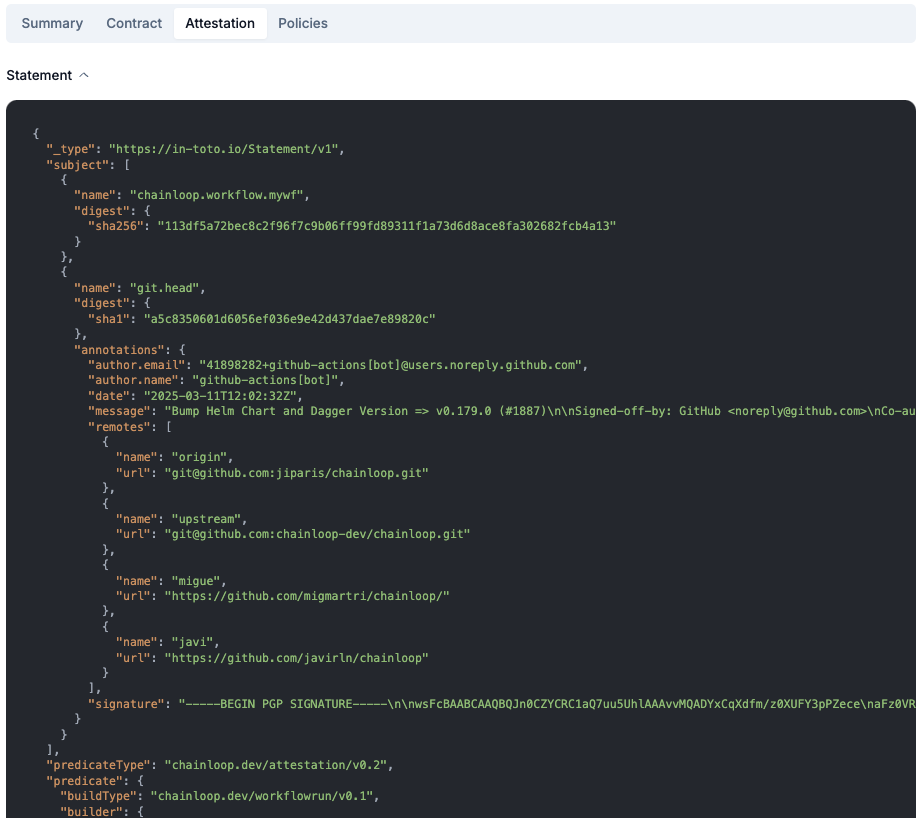
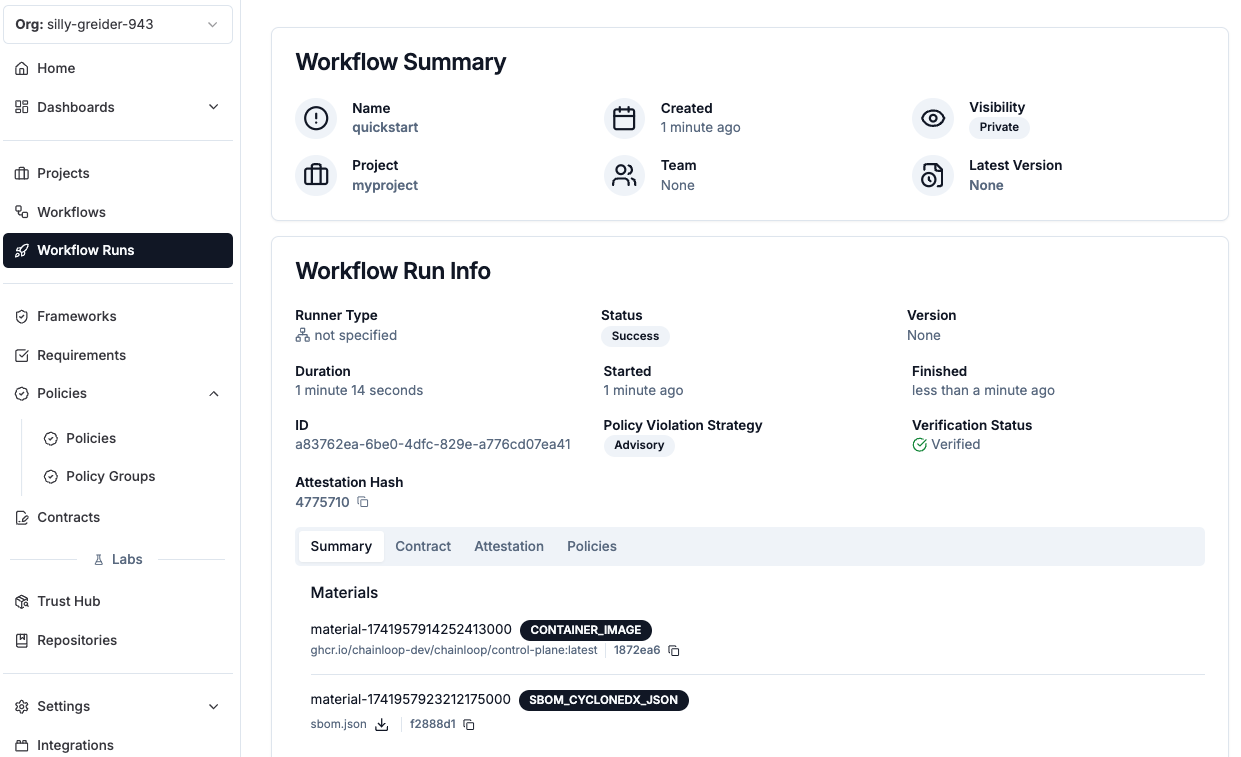 The "Attestation" tab will provide the full attestation payload, consisting of an in-toto attestation with a Chainloop predicate. After a quick inspection, we can confirm that our pieces of evidence (the container image reference and the SBOM) are included in the attestation
 ## Verifying your attestation
You can verify the integrity of the attestation by downloading the bundle (in Sigstore format) and running the verification command.
## Verifying your attestation
You can verify the integrity of the attestation by downloading the bundle (in Sigstore format) and running the verification command.
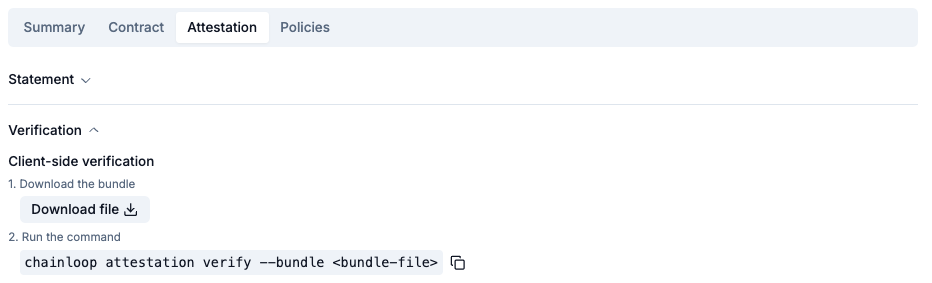 ```bash theme={"dark"}
chainloop att verify -b bundle.json
```
Under the hood, the command is:
* Checking the validity of the signing certificate included in the bundle, against the Chainloop trusted root
* Checking the validity of the timestamp signature
* Verifying the payload integrity (the in-toto attestation included in the bundle) and its signature.
Visit the signing reference for more information about signing and verification methods.
```bash theme={"dark"}
chainloop att verify -b bundle.json
```
Under the hood, the command is:
* Checking the validity of the signing certificate included in the bundle, against the Chainloop trusted root
* Checking the validity of the timestamp signature
* Verifying the payload integrity (the in-toto attestation included in the bundle) and its signature.
Visit the signing reference for more information about signing and verification methods.