> ## Documentation Index
> Fetch the complete documentation index at: https://docs.chainloop.dev/llms.txt
> Use this file to discover all available pages before exploring further.
# Set Policies expectations
In the previous step, we created a contract that set the expectation of a container image, an SBOM and a vulnerability report. Our Compliance team now wants to verify that those comply with the company's security and compliance criteria.
We introduce [Policies](/concepts/policies), which are rules evaluated against materials and/or the whole attestation document. Policies can be grouped into [Policy Groups](/concepts/policy-groups) to be able to attach a set of policies to a workflow contract.
## Attaching policies to the contract
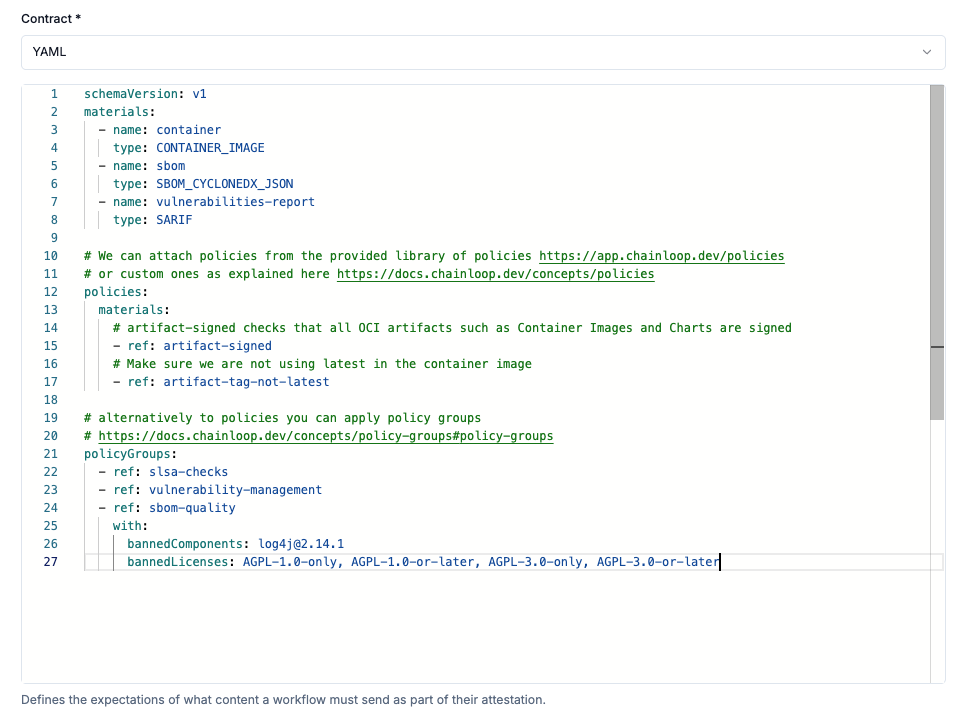
As we did before, let's ["Update our contract"](https://app.chainloop.dev/contracts/myproject-build-container-image/update), but this time the contract will contain policies and policy groups.
 ```yaml theme={"dark"}
apiVersion: chainloop.dev/v1
kind: Contract
metadata:
name: myproject-build-container-image
spec:
materials:
- name: container
type: CONTAINER_IMAGE
- name: sbom
type: SBOM_CYCLONEDX_JSON
- name: vulnerabilities-report
type: SARIF
# We can attach policies from the provided library of policies https://app.chainloop.dev/policies
# or custom ones as explained here https://docs.chainloop.dev/concepts/policies
policies:
materials:
# artifact-signed checks that all OCI artifacts such as Container Images and Charts are signed
- ref: artifact-signed
# Make sure we are not using latest in the container image
- ref: artifact-tag-not-latest
# alternatively to policies you can apply policy groups
# https://docs.chainloop.dev/concepts/policy-groups#policy-groups
policyGroups:
- ref: slsa-checks
- ref: vulnerability-management
- ref: sbom-quality
with:
bannedComponents: log4j@2.14.1
bannedLicenses: AGPL-1.0-only, AGPL-1.0-or-later, AGPL-3.0-only, AGPL-3.0-or-later
```
```bash theme={"dark"}
chainloop wf contract update --contract https://raw.githubusercontent.com/chainloop-dev/chainloop/refs/heads/main/docs/examples/quickstart/contract-with-policies.yaml
```
Use this command to create a contract from a remote location:
```bash theme={"dark"}
chainloop wf contract create --contract https://raw.githubusercontent.com/chainloop-dev/chainloop/refs/heads/main/docs/examples/quickstart/contract-with-policies-oss.yaml
```
In this contract, we added two [policies](/concepts/policies) and three [policy groups](/concepts/policy-groups).
* `artifact-signed` policy checks that all OCI artifacts (container images and Helm Charts) are properly signed with Cosign or Notary
* `artifact-tag-not-latest` checks that the container image is not using the `latest` tag
* `slsa-checks` is a policy group that makes sure the attestation is compliant with the SLSA framework
* `vulnerability-management` is a policy group that makes sure the attestation is compliant with the vulnerability management policy
* `sbom-quality` is a policy group that makes sure the attestation is compliant with the SBOM quality policy
Chainloop comes with a set of built-in policies and policy groups, you can see them all in the ["Policies library"](https://app.chainloop.dev/policies).
```yaml theme={"dark"}
apiVersion: chainloop.dev/v1
kind: Contract
metadata:
name: myproject-build-container-image
spec:
materials:
- name: container
type: CONTAINER_IMAGE
- name: sbom
type: SBOM_CYCLONEDX_JSON
- name: vulnerabilities-report
type: SARIF
# We can attach policies from the provided library of policies https://app.chainloop.dev/policies
# or custom ones as explained here https://docs.chainloop.dev/concepts/policies
policies:
materials:
# artifact-signed checks that all OCI artifacts such as Container Images and Charts are signed
- ref: artifact-signed
# Make sure we are not using latest in the container image
- ref: artifact-tag-not-latest
# alternatively to policies you can apply policy groups
# https://docs.chainloop.dev/concepts/policy-groups#policy-groups
policyGroups:
- ref: slsa-checks
- ref: vulnerability-management
- ref: sbom-quality
with:
bannedComponents: log4j@2.14.1
bannedLicenses: AGPL-1.0-only, AGPL-1.0-or-later, AGPL-3.0-only, AGPL-3.0-or-later
```
```bash theme={"dark"}
chainloop wf contract update --contract https://raw.githubusercontent.com/chainloop-dev/chainloop/refs/heads/main/docs/examples/quickstart/contract-with-policies.yaml
```
Use this command to create a contract from a remote location:
```bash theme={"dark"}
chainloop wf contract create --contract https://raw.githubusercontent.com/chainloop-dev/chainloop/refs/heads/main/docs/examples/quickstart/contract-with-policies-oss.yaml
```
In this contract, we added two [policies](/concepts/policies) and three [policy groups](/concepts/policy-groups).
* `artifact-signed` policy checks that all OCI artifacts (container images and Helm Charts) are properly signed with Cosign or Notary
* `artifact-tag-not-latest` checks that the container image is not using the `latest` tag
* `slsa-checks` is a policy group that makes sure the attestation is compliant with the SLSA framework
* `vulnerability-management` is a policy group that makes sure the attestation is compliant with the vulnerability management policy
* `sbom-quality` is a policy group that makes sure the attestation is compliant with the SBOM quality policy
Chainloop comes with a set of built-in policies and policy groups, you can see them all in the ["Policies library"](https://app.chainloop.dev/policies).
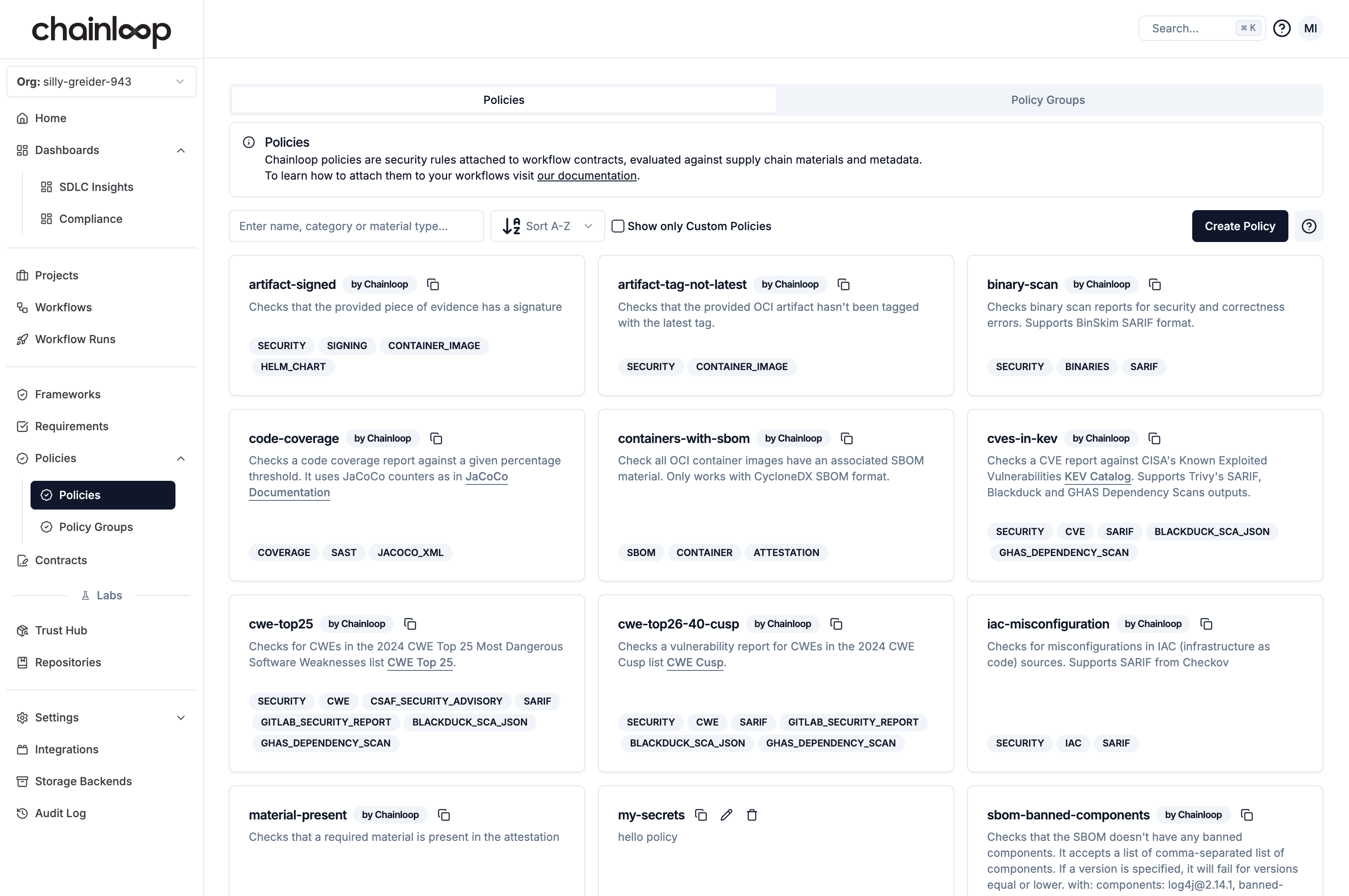 You can also create custom policies tailored to your needs. For more information about authoring policies, see this [guide](/guides/custom-policies).
## Evaluating policies
Let's create an attestation and add our materials to see how policies are evaluated:
```bash theme={"dark"}
chainloop att init --workflow build-container-image --project myproject --replace
```
```bash theme={"dark"}
chainloop att add --name container --value ghcr.io/chainloop-dev/chainloop/control-plane
```
You'll notice how Chainloop will evaluate automatically as part of providing the container image.
```bash theme={"dark"}
chainloop att add --name sbom --value https://raw.githubusercontent.com/chainloop-dev/chainloop/refs/heads/main/docs/examples/quickstart/sbom.json
```
```bash theme={"dark"}
chainloop att add --name vulnerabilities-report --value https://raw.githubusercontent.com/chainloop-dev/chainloop/refs/heads/main/docs/examples/quickstart/vulnerability-report.json
```
```bash theme={"dark"}
chainloop att push
```
You can also create custom policies tailored to your needs. For more information about authoring policies, see this [guide](/guides/custom-policies).
## Evaluating policies
Let's create an attestation and add our materials to see how policies are evaluated:
```bash theme={"dark"}
chainloop att init --workflow build-container-image --project myproject --replace
```
```bash theme={"dark"}
chainloop att add --name container --value ghcr.io/chainloop-dev/chainloop/control-plane
```
You'll notice how Chainloop will evaluate automatically as part of providing the container image.
```bash theme={"dark"}
chainloop att add --name sbom --value https://raw.githubusercontent.com/chainloop-dev/chainloop/refs/heads/main/docs/examples/quickstart/sbom.json
```
```bash theme={"dark"}
chainloop att add --name vulnerabilities-report --value https://raw.githubusercontent.com/chainloop-dev/chainloop/refs/heads/main/docs/examples/quickstart/vulnerability-report.json
```
```bash theme={"dark"}
chainloop att push
```
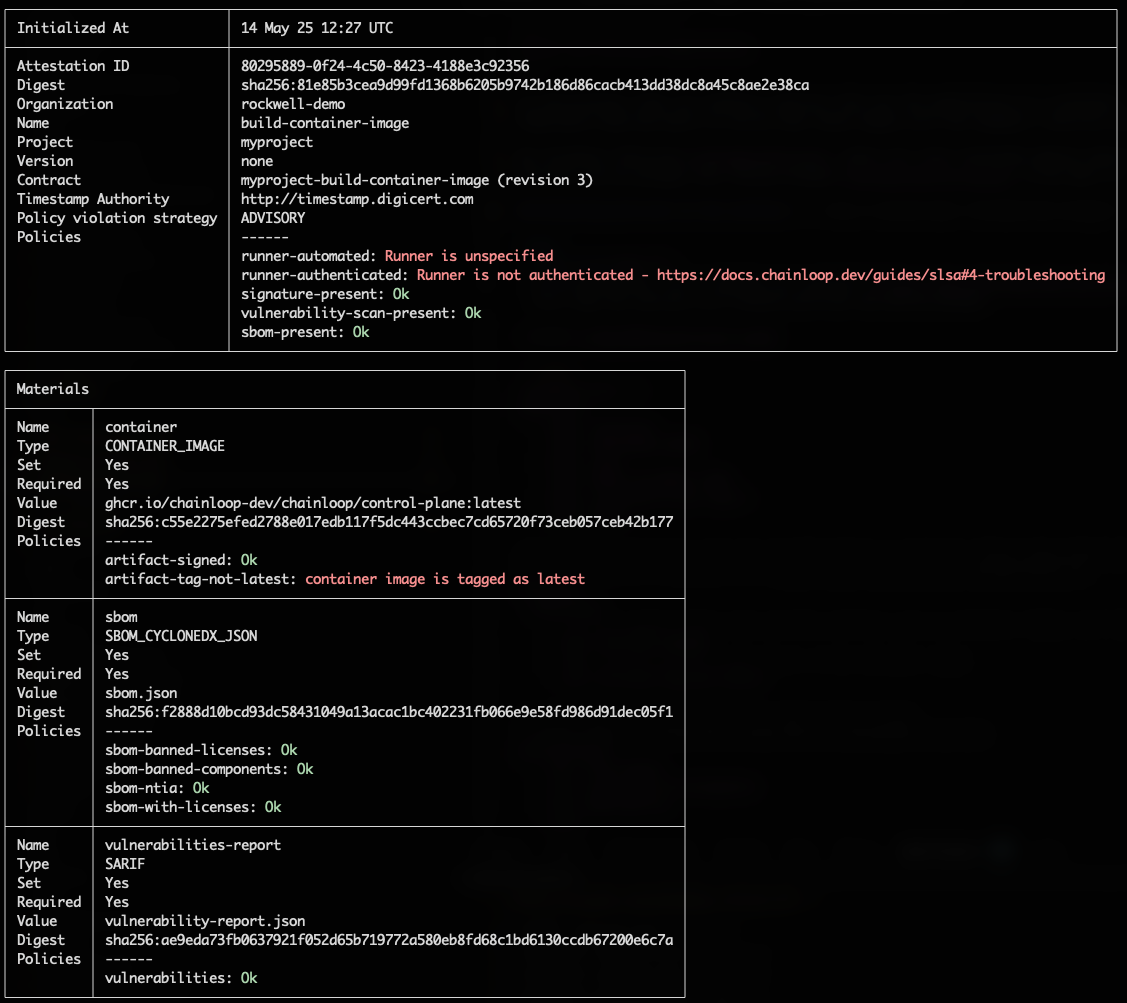 We can see in the output that the policies have been evaluated and the only ones failing are:
* the ones related to the build-environment, since we are running the attestation process locally.
* the one that checks the container image is not using the `latest` tag.
You can give it a try and attach an old SBOM or Vulnerability report with vulnerabilities to see how the policies being evaluated and failing.
## Inspecting policy evaluations
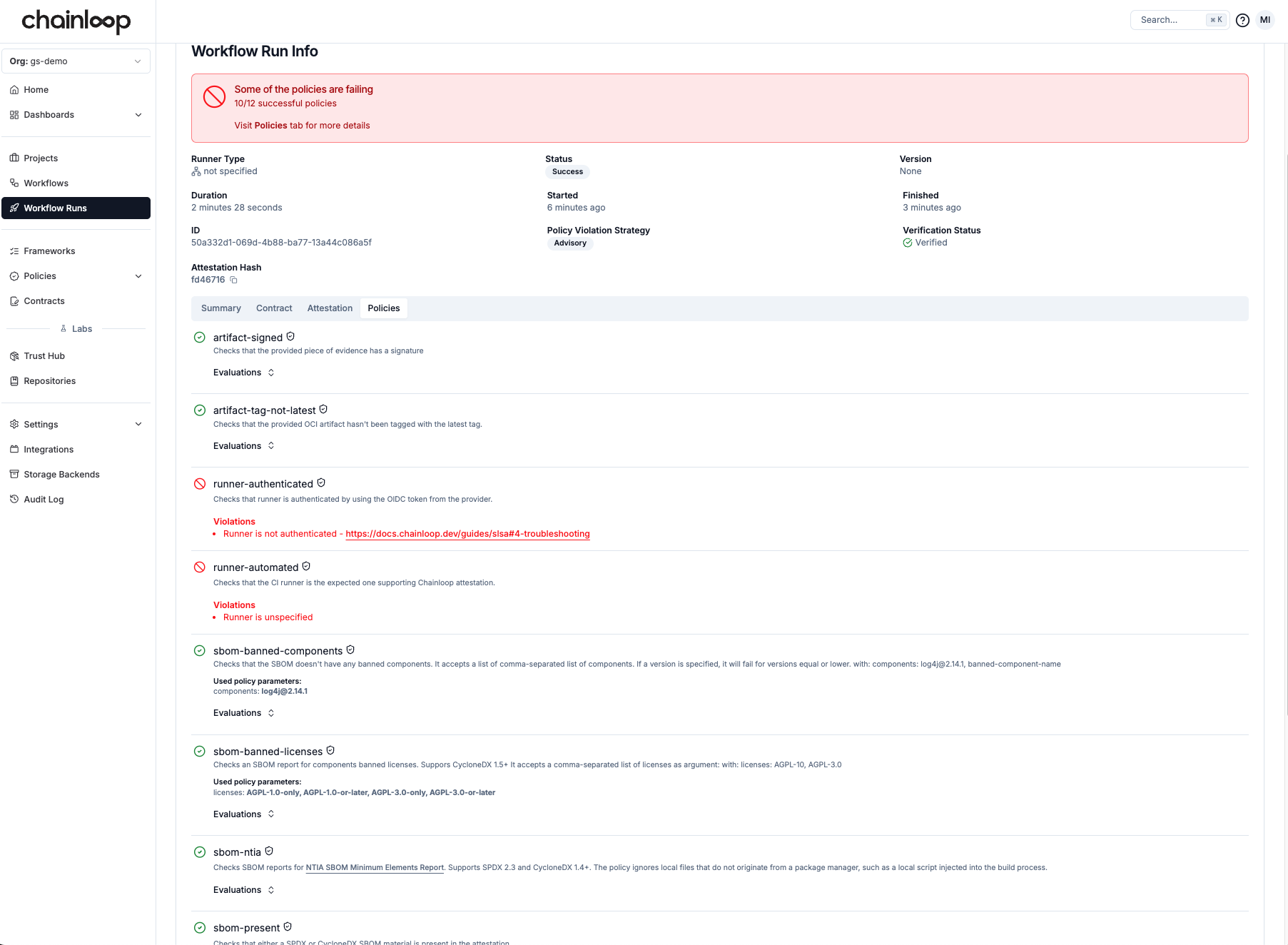
Now, the Chainloop platform gives us more insights into the status of the attestation. If we go to the [workflow run](https://app.chainloop.dev/workflow-runs) view, besides the usual attestation and material information, we can now see the result of those policy evaluations.
We can see in the output that the policies have been evaluated and the only ones failing are:
* the ones related to the build-environment, since we are running the attestation process locally.
* the one that checks the container image is not using the `latest` tag.
You can give it a try and attach an old SBOM or Vulnerability report with vulnerabilities to see how the policies being evaluated and failing.
## Inspecting policy evaluations
Now, the Chainloop platform gives us more insights into the status of the attestation. If we go to the [workflow run](https://app.chainloop.dev/workflow-runs) view, besides the usual attestation and material information, we can now see the result of those policy evaluations.