> ## Documentation Index
> Fetch the complete documentation index at: https://docs.chainloop.dev/llms.txt
> Use this file to discover all available pages before exploring further.
# Workflow Templates
## Overview
**Preview.** Workflow templates are available on Chainloop's [paid plans](https://chainloop.dev/pricing) and are currently a Preview feature — the schema and behavior may change.
A **Workflow Template** is a reusable blueprint for creating [workflows](/concepts/workflows). Instead of configuring a [contract](/concepts/contracts) and delivery settings from scratch for every project, you define a template once and instantiate it wherever you need it — while [onboarding a project](/concepts/projects-versions), editing an existing one, or adding a new workflow.
A template bundles together everything a workflow needs:
* **A contract** — either embedded inline or a reference to an existing organization contract — that defines the evidence and [policies](/concepts/policies) the resulting workflow expects.
* **Delivery mode(s)** — how attestations reach Chainloop.
* **Inputs** (optional) — parameters that let a single template adapt to different projects.
Templates come in two flavors:
* **Built-in templates** — global, Chainloop-provided blueprints (for example, vulnerability, SAST, and secret scans) available to every organization.
* **Custom templates** — org-scoped blueprints you define and manage yourself with `chainloop apply`.
## Anatomy of a Template
Workflow templates follow the same Kubernetes-style schema as other [declarative resources](/guides/declarative-resource-management), with `apiVersion`, `kind`, `metadata`, and `spec`:
```yaml theme={"dark"}
apiVersion: chainloop.dev/v1
kind: WorkflowTemplate
metadata:
name: vulnerability-scan
display_name: Vulnerability Scan
description: >-
Validates dependency / artifact vulnerability reports against the vulnerability-management
policy group and verifies the commit that triggered the scan.
spec:
delivery:
- DELIVERY_MODE_MANUAL
contract:
materials:
- type: SARIF
name: vulnerability-report
- type: SBOM_CYCLONEDX_JSON
name: sbom
policies:
attestation:
- ref: source-commit
materials:
- ref: cves-in-kev
policy_groups:
- ref: vulnerability-management
```
### Metadata
| Name | Required | Description |
| -------------- | -------- | -------------------------------------------------------------------------------------------------- |
| `name` | yes | Machine-readable, globally unique identifier (lowercase letters, numbers, and hyphens — DNS-1123). |
| `display_name` | no | Human-readable name shown in the UI. |
| `description` | no | Short summary of what the template does, shown alongside it in the UI. |
### Spec
| Name | Required | Description |
| --------------------------------- | -------- | --------------------------------------------------------------------------------------------------------------------------------- |
| `delivery` | no | List of supported [delivery modes](#delivery-modes). Defaults to manual delivery when omitted. |
| `contract` | \* | An embedded [contract](/concepts/contracts) (`materials`, `policies`, `policy_groups`). Mutually exclusive with `contract_ref`. |
| `contract_ref` | \* | Name of an existing organization contract to reference instead of embedding one. Mutually exclusive with `contract`. |
| `inputs` | no | Configurable [inputs](#template-inputs) the template advertises. Only valid with an embedded `contract`, not with `contract_ref`. |
| `singleton` | no | If `true`, only one workflow instance per repository can be created from this template. |
| `scmProviders` | no | Restrict which repositories can use the template by SCM provider (`GITHUB`, `GITLAB`). Empty means all providers. |
| `manual_installation_description` | no | Markdown instructions shown for manual/self-service setup. |
Exactly one of `contract` or `contract_ref` must be set — never both, and never neither.
## Embedded vs. Referenced Contracts
A template can carry its contract in one of two ways:
* **Embedded** — define the contract inline under `spec.contract`. Use this when the contract is specific to the template.
* **Referenced** — point at an existing organization contract by name with `spec.contract_ref`. Use this when you want several templates to share (and stay in sync with) a single contract.
```yaml theme={"dark"}
spec:
delivery:
- DELIVERY_MODE_MANUAL
contract_ref: my-org-contract
```
## Delivery Modes
`spec.delivery` declares how workflows created from the template deliver their attestations.
* **`DELIVERY_MODE_MANUAL`** — the **push model**: attestations are performed from your own CI/CD pipeline and pushed to Chainloop. This is the mode you use in your own templates. When `delivery` is omitted, the template defaults to manual delivery.
* **`DELIVERY_MODE_MANAGED`** — reserved for Chainloop's own system and used by built-in templates. It is not intended for custom templates.
## Template Inputs
Templates can declare **inputs** — parameters that make a single template reusable across projects with different requirements. Inputs are referenced as `{{ inputs. }}` placeholders inside [policy](/concepts/policies) and [policy group](/concepts/policy-groups) parameters, so a shared template can ship policies that need organization- or project-specific values.
```yaml theme={"dark"}
apiVersion: chainloop.dev/v1
kind: WorkflowTemplate
metadata:
name: vulnerability-scan
display_name: Vulnerability Scan
spec:
delivery:
- DELIVERY_MODE_MANUAL
inputs:
- name: severity
description: Minimum severity that fixes are expected to address within the defined SLA.
type: string
default: "HIGH"
contract:
materials:
- type: SARIF
name: vulnerability-report
policy_groups:
- ref: vulnerability-management
with:
severity: "{{ inputs.severity }}"
```
Each input supports the following fields:
| Name | Required | Description |
| ------------- | -------- | -------------------------------------------------------------------------------------------------------------------- |
| `name` | yes | Identifier used in `{{ inputs. }}` placeholders (letters, numbers, and underscores; must start with a letter). |
| `description` | no | Human-readable description shown in the UI. |
| `type` | no | Scalar type of the input. Currently only `string` is supported. |
| `enum` | no | Optional list of allowed values. |
| `default` | no | Default value used when none is provided. |
| `required` | no | Whether a value must be supplied. |
Input values are validated when the template is applied and can be edited later from the project and workflow edit forms.
## Managing Custom Templates
Custom (org-scoped) templates are managed declaratively with `chainloop apply`, the same command used for other [Chainloop resources](/guides/declarative-resource-management). Applying a template creates it if it does not exist, or updates it if a template with the same name already exists:
```bash theme={"dark"}
# Apply a single template
chainloop apply -f vulnerability-scan.yaml
# Apply every template in a directory
chainloop apply -f ./workflow-templates/
```
Use `--dry-run` to validate a template and preview the changes without persisting them:
```bash theme={"dark"}
chainloop apply -f vulnerability-scan.yaml --dry-run
```
Creating and updating org-scoped workflow templates requires an admin or owner role. Built-in templates are read-only.
## Using Templates
Templates show up across the UI. You can:
* **Create a workflow from a template** — pick a template and Chainloop provisions a workflow with the template's contract, delivery mode, and input values already wired up.
* **Select templates while onboarding or editing a project** — attach one or more templates as part of project setup.
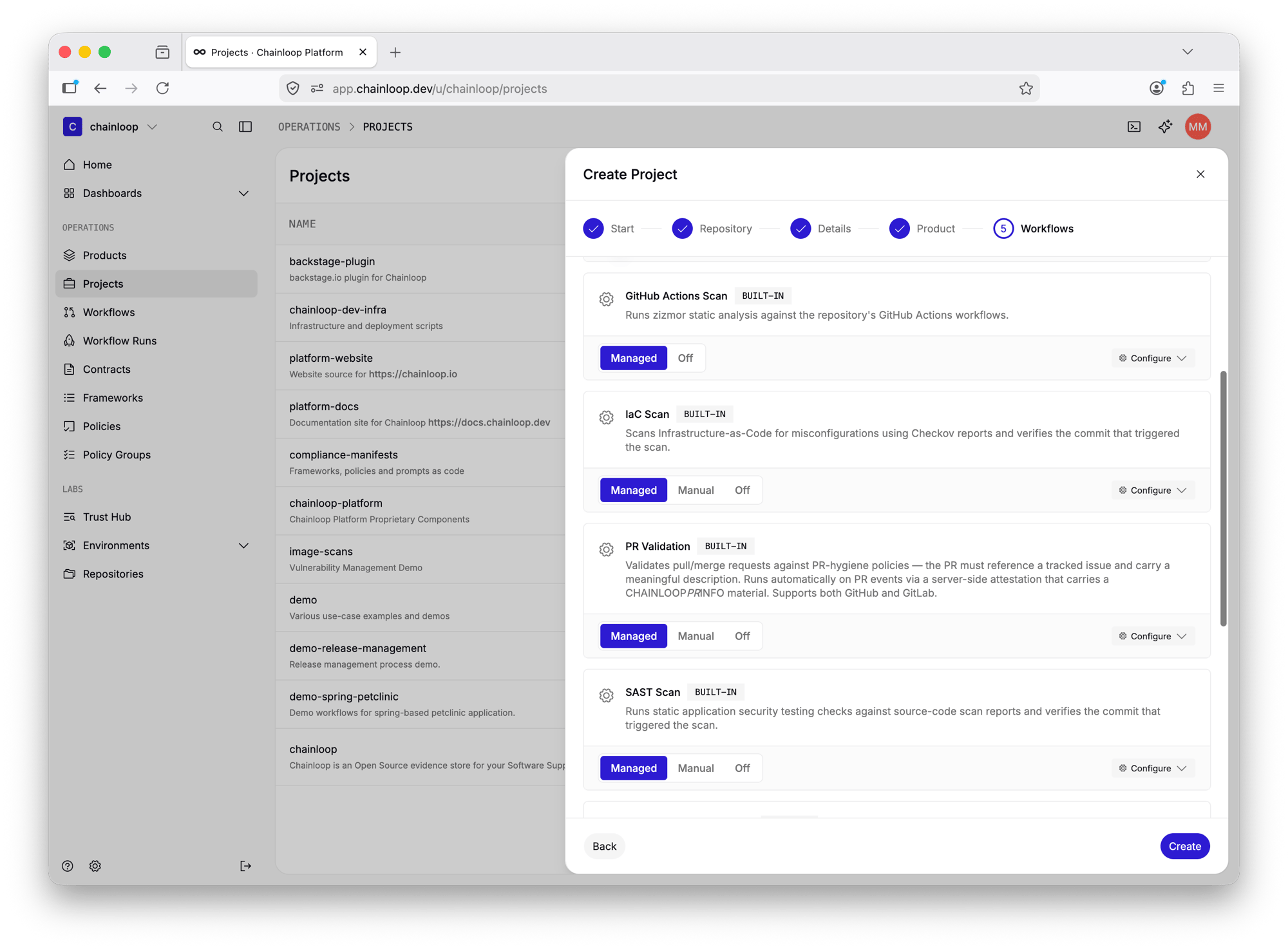
For example, the **Workflows** step of the Create Project wizard lists the built-in and custom templates available for the project's repository, letting you enable each one and choose its delivery mode inline:
 Each workflow remembers the template it was created from, so template-backed workflows can be recognized and updated consistently.