> ## Documentation Index
> Fetch the complete documentation index at: https://docs.chainloop.dev/llms.txt
> Use this file to discover all available pages before exploring further.
# Vulnerability Management and Risk Assessment
> Triage, assess, and remediate vulnerabilities for any project version, with automatic deduplication, AI-assisted assessments, and feedback into your control gates
**Vulnerability Management and Risk Assessment turns scanner output into triaged, audited, enforceable decisions.** On any Chainloop project version, it surfaces the vulnerabilities affecting your attested components and artifacts, and lets you (or an AI agent) record formal risk assessments against them. You'll find it in the Chainloop UI under the **Security** tab.
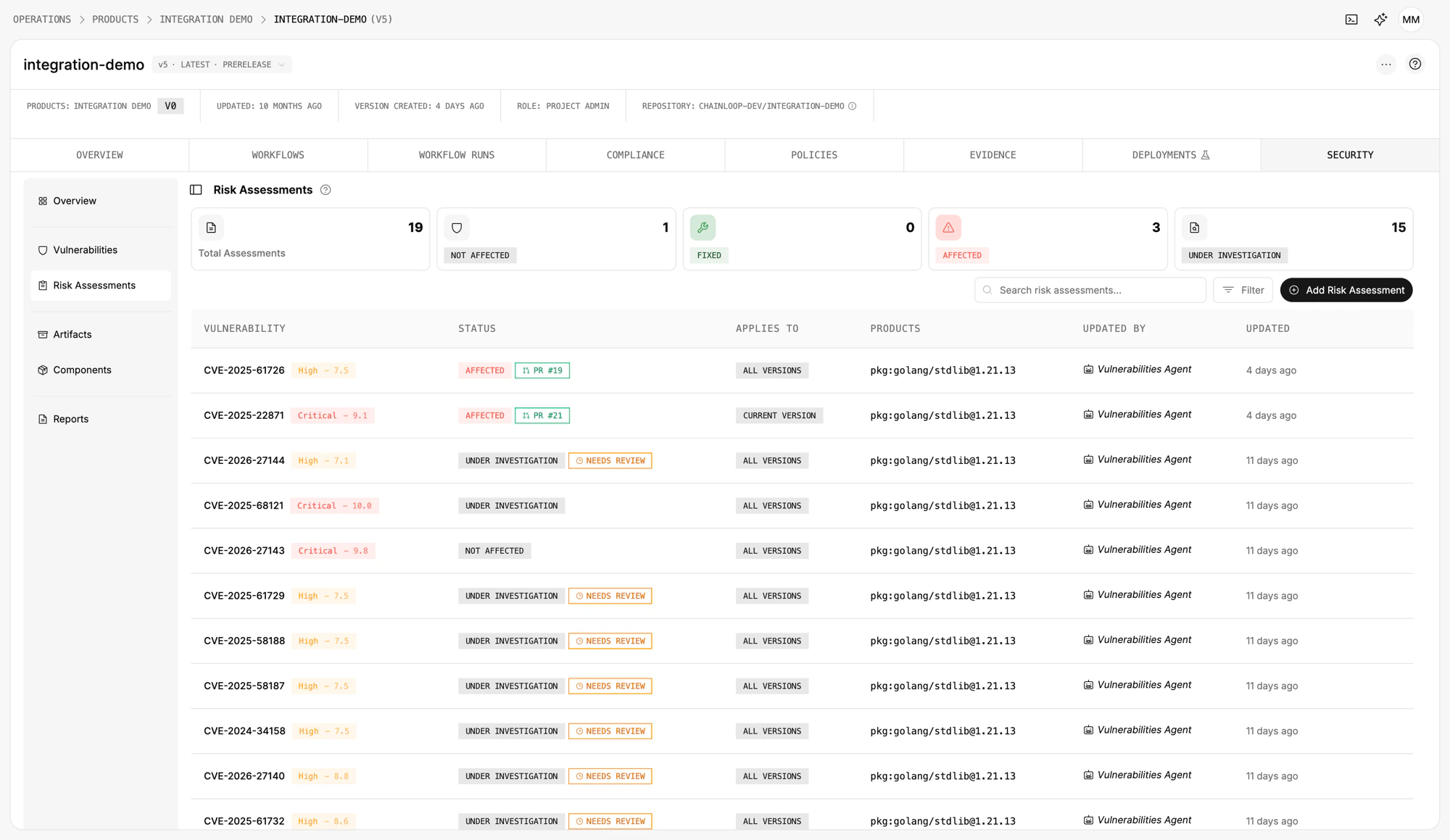 **Status.** Vulnerability findings are GA. AI-driven assessment and remediation are in Preview. Other finding types (SAST, license, secrets, supply-chain misconfiguration) are on the roadmap.
For a step-by-step guide on how to set it up on your project, see [Set up Vulnerability Management in your project](/guides/vulnerability-management).
## The problem it solves
**Vulnerability handling is both a security baseline and a hard regulatory requirement.** The EU [Cyber Resilience Act (CRA)](/reference/cyber-resilience-act) mandates it throughout the product lifecycle (Annex I, Part II). SOC 2 (CC7.1), ISO 27001, PCI DSS, and FedRAMP carry equivalent obligations.
**In practice, the data ends up scattered.** Trivy and Grype produce JSON in CI logs. SBOMs land in artifact registries. The "we're not affected" justifications live in Confluence, Slack threads, and screenshots that nobody can find when an auditor asks.
**Gates built on raw scanner output don't help either.** They either over-block (every CVE breaks the build) or under-block (the team learns to ignore them).
**Vulnerability Management and Risk Assessment gives you one place where every finding lands, gets triaged once, and stays reusable.** Used by your team, your control gates, your auditors, and your customers. See [Compliance](#compliance) for how the same data drives your compliance frameworks.
## How it works
**In one screen, you see what's wrong with your software, who decided what to do about it, and the evidence behind every step.** Under the hood, a five-stage pipeline:
1. **Ingest**: your CI/CD attests an SBOM, a vulnerability scan report (or a single CycloneDX SBOM containing both), and an artifact reference such as a container image.
2. **Normalize**: a Chainloop policy evaluates the evidence. Findings are deduplicated across scanners and runs; components and artifacts are extracted; everything is scoped to the project version.
3. **Decide**: your team triages the findings and records risk assessments, manually or with AI agents that draft assessments using your source code as context.
4. **Distribute**: approved assessments produce a live VEX feed, PDF reports, and inputs that Chainloop control gates can read to filter false positives and false negatives.
5. **Audit**: every signal is signed. The evidence, the policy evaluation, every revision of every assessment.
The page is organized around four pillars, each backed by part of this pipeline:
| Pillar | What it shows | Where the data comes from |
| ----------------------------------------------------- | ---------------------------------------------------- | -------------------------------------------- |
| [Vulnerability findings](#vulnerability-findings) | One entry per CVE × package, deduplicated | Vulnerability scan report + Chainloop policy |
| [Risk assessments](#risk-assessments) | Versioned decisions on findings | Your team and/or the Vulnerabilities Agent |
| [Components and artifacts](#components-and-artifacts) | Packages discovered + the build outputs they live in | SBOM + artifact references |
| [Reports](#reports) | Generated VEX feeds and PDF assessment reports | Approved risk assessments |
**Status.** Vulnerability findings are GA. AI-driven assessment and remediation are in Preview. Other finding types (SAST, license, secrets, supply-chain misconfiguration) are on the roadmap.
For a step-by-step guide on how to set it up on your project, see [Set up Vulnerability Management in your project](/guides/vulnerability-management).
## The problem it solves
**Vulnerability handling is both a security baseline and a hard regulatory requirement.** The EU [Cyber Resilience Act (CRA)](/reference/cyber-resilience-act) mandates it throughout the product lifecycle (Annex I, Part II). SOC 2 (CC7.1), ISO 27001, PCI DSS, and FedRAMP carry equivalent obligations.
**In practice, the data ends up scattered.** Trivy and Grype produce JSON in CI logs. SBOMs land in artifact registries. The "we're not affected" justifications live in Confluence, Slack threads, and screenshots that nobody can find when an auditor asks.
**Gates built on raw scanner output don't help either.** They either over-block (every CVE breaks the build) or under-block (the team learns to ignore them).
**Vulnerability Management and Risk Assessment gives you one place where every finding lands, gets triaged once, and stays reusable.** Used by your team, your control gates, your auditors, and your customers. See [Compliance](#compliance) for how the same data drives your compliance frameworks.
## How it works
**In one screen, you see what's wrong with your software, who decided what to do about it, and the evidence behind every step.** Under the hood, a five-stage pipeline:
1. **Ingest**: your CI/CD attests an SBOM, a vulnerability scan report (or a single CycloneDX SBOM containing both), and an artifact reference such as a container image.
2. **Normalize**: a Chainloop policy evaluates the evidence. Findings are deduplicated across scanners and runs; components and artifacts are extracted; everything is scoped to the project version.
3. **Decide**: your team triages the findings and records risk assessments, manually or with AI agents that draft assessments using your source code as context.
4. **Distribute**: approved assessments produce a live VEX feed, PDF reports, and inputs that Chainloop control gates can read to filter false positives and false negatives.
5. **Audit**: every signal is signed. The evidence, the policy evaluation, every revision of every assessment.
The page is organized around four pillars, each backed by part of this pipeline:
| Pillar | What it shows | Where the data comes from |
| ----------------------------------------------------- | ---------------------------------------------------- | -------------------------------------------- |
| [Vulnerability findings](#vulnerability-findings) | One entry per CVE × package, deduplicated | Vulnerability scan report + Chainloop policy |
| [Risk assessments](#risk-assessments) | Versioned decisions on findings | Your team and/or the Vulnerabilities Agent |
| [Components and artifacts](#components-and-artifacts) | Packages discovered + the build outputs they live in | SBOM + artifact references |
| [Reports](#reports) | Generated VEX feeds and PDF assessment reports | Approved risk assessments |
 ## Vulnerability findings
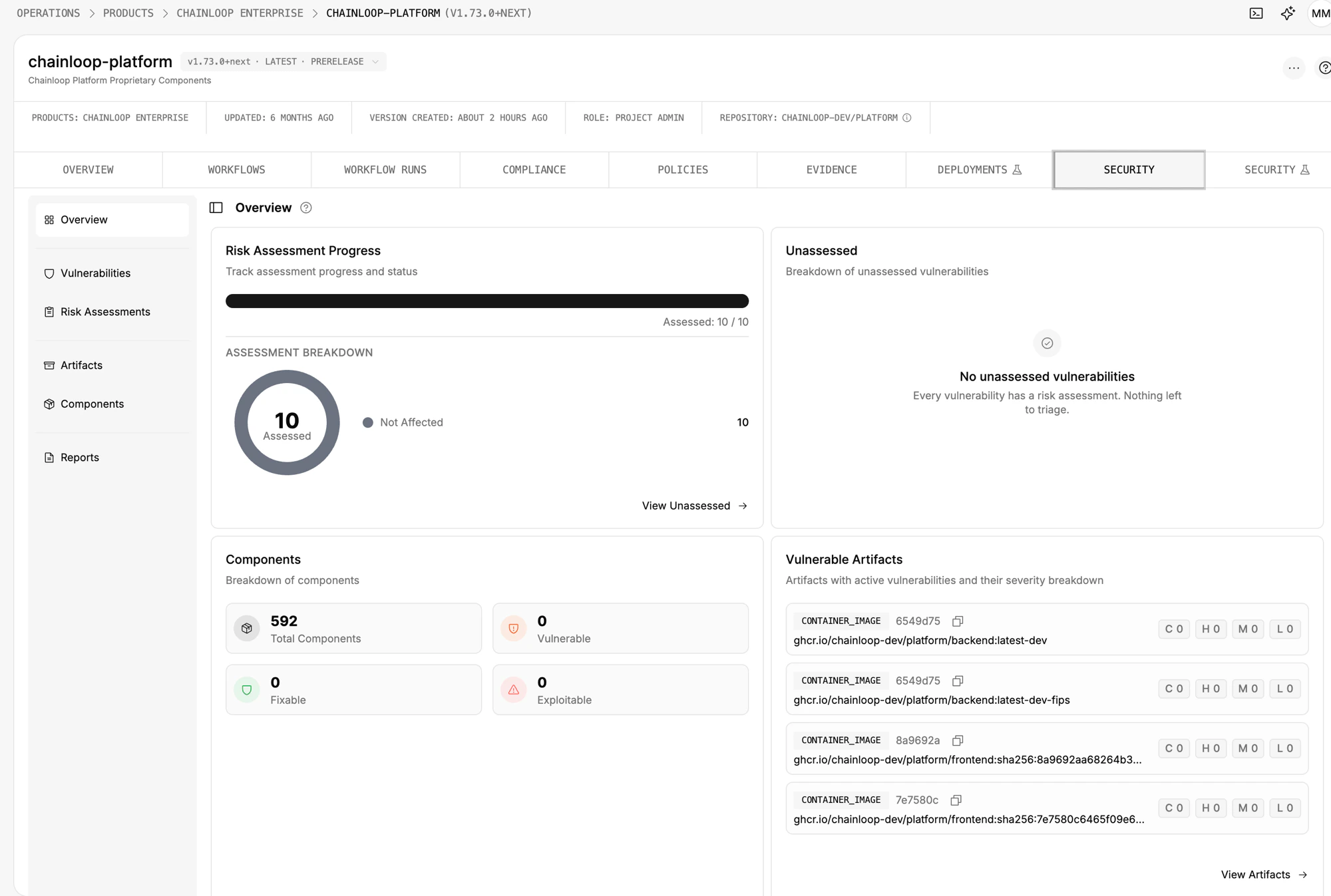
A **finding** is a single vulnerability instance: one CVE on one package within one artifact in this project version.
**Findings are deduplicated automatically.** The same CVE on the same package collapses to a single entry across attestations, regardless of which scanner reported it or how many builds saw it. The dedup key is `(finding type, CVE id, package PURL)`.
Each finding carries:
* **Severity**: Critical, High, Medium, Low, Unknown
* **Status**: Open, In Progress, Resolved, Rejected
* **Fixability**: whether a known upstream version fixes it
* **KEV flag**: whether the CVE is in CISA's Known Exploited Vulnerabilities catalog
* **Affected package**: the package PURL the CVE lands on
* **Linked artifacts**: every container image or build output the package lives in
* **Evidence trail**: direct links to the signed [scanner attestation](/concepts/attestations) and the [policy](/concepts/policies) that produced the finding
The Vulnerabilities view is the triage list. **Search** by CVE id or component, **filter** by severity, status, KEV, fixability, assessment state, or specific artifact. **Share a filtered view as a URL** to hand off a slice of work. Resolved and rejected findings are hidden by default, so the list reflects open work.
## Vulnerability findings
A **finding** is a single vulnerability instance: one CVE on one package within one artifact in this project version.
**Findings are deduplicated automatically.** The same CVE on the same package collapses to a single entry across attestations, regardless of which scanner reported it or how many builds saw it. The dedup key is `(finding type, CVE id, package PURL)`.
Each finding carries:
* **Severity**: Critical, High, Medium, Low, Unknown
* **Status**: Open, In Progress, Resolved, Rejected
* **Fixability**: whether a known upstream version fixes it
* **KEV flag**: whether the CVE is in CISA's Known Exploited Vulnerabilities catalog
* **Affected package**: the package PURL the CVE lands on
* **Linked artifacts**: every container image or build output the package lives in
* **Evidence trail**: direct links to the signed [scanner attestation](/concepts/attestations) and the [policy](/concepts/policies) that produced the finding
The Vulnerabilities view is the triage list. **Search** by CVE id or component, **filter** by severity, status, KEV, fixability, assessment state, or specific artifact. **Share a filtered view as a URL** to hand off a slice of work. Resolved and rejected findings are hidden by default, so the list reflects open work.
 ## Risk assessments
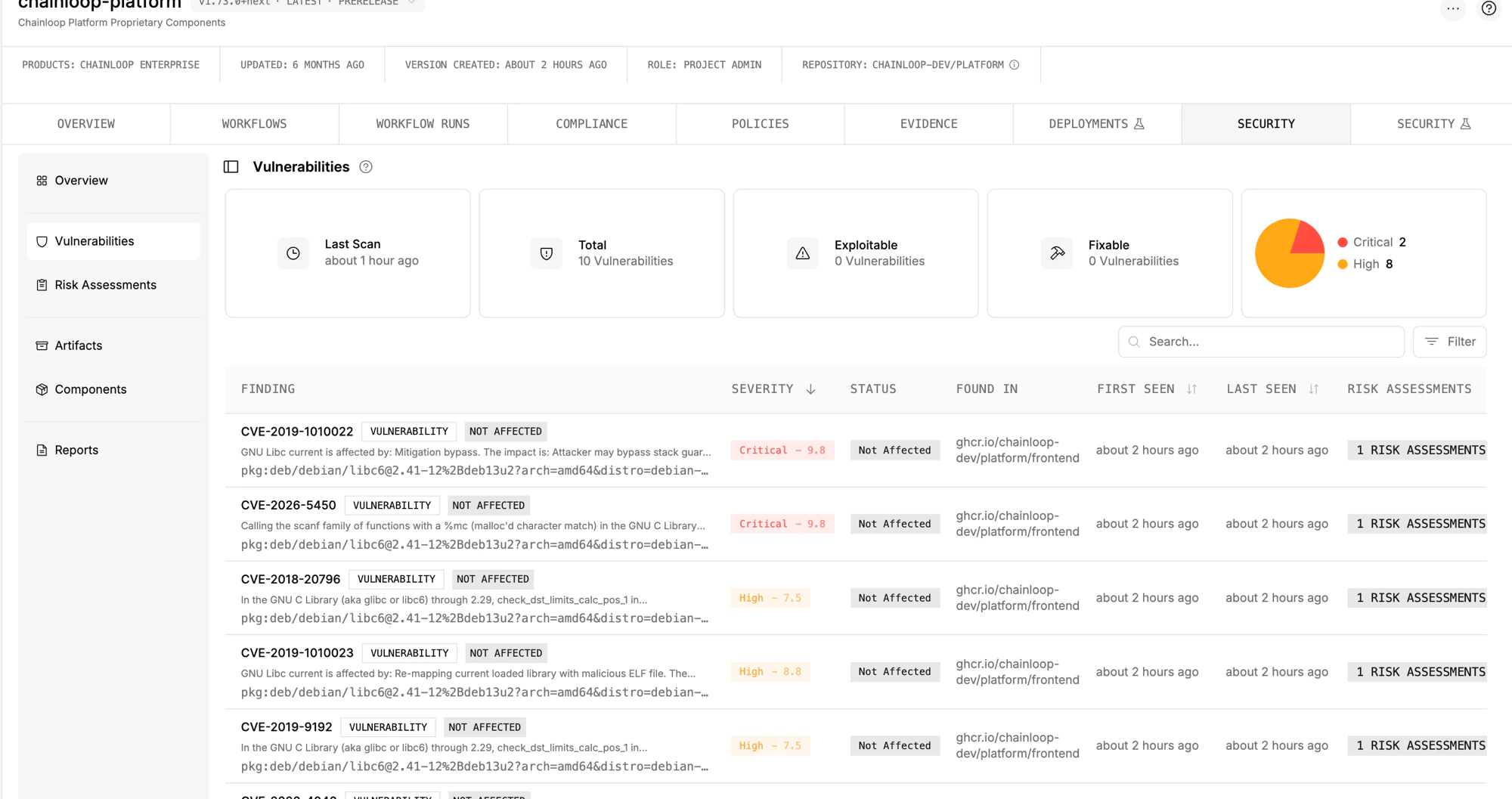
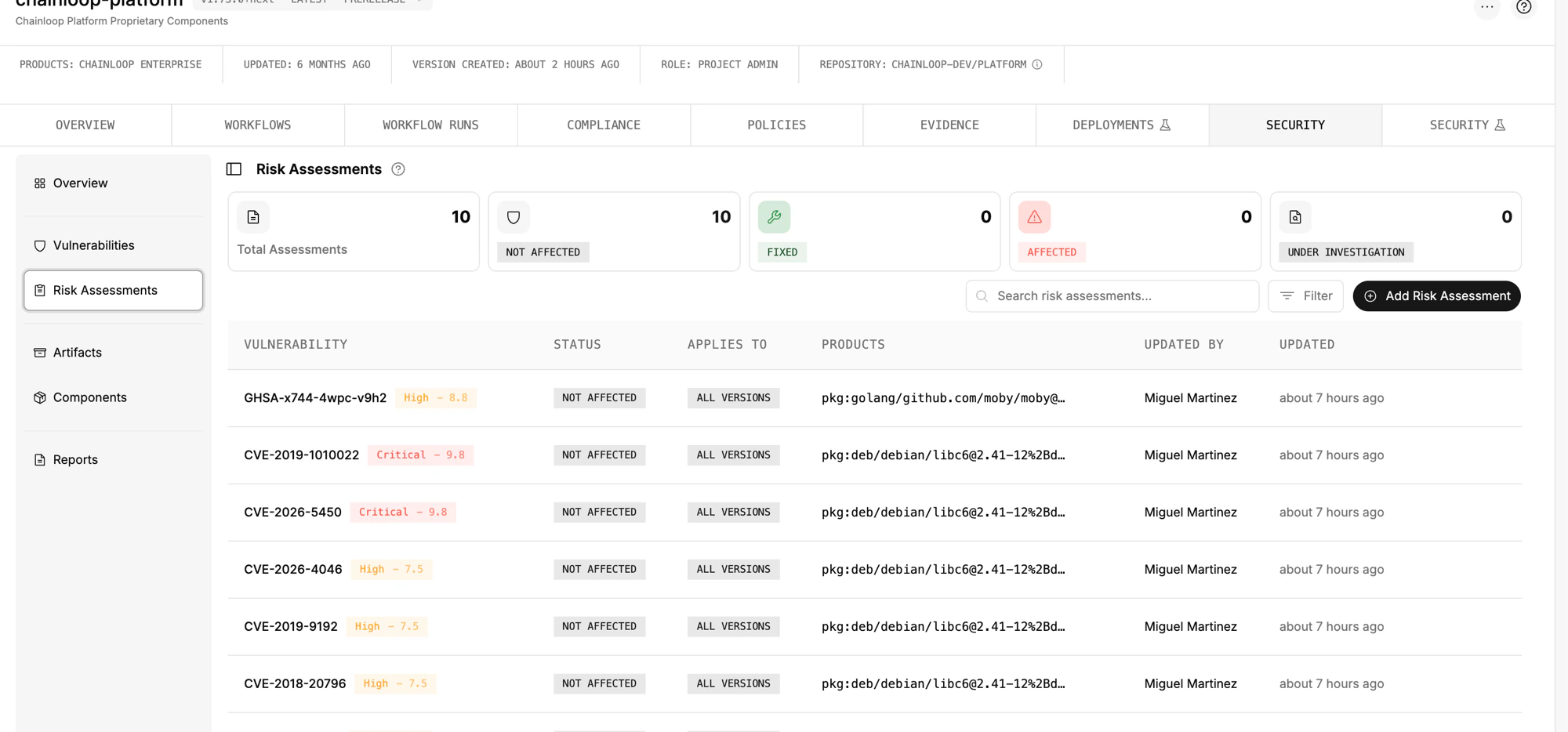
A **risk assessment** is a versioned record of a team's review of one or more findings: a verdict (*Affected*, *Not Affected*, *Under Investigation*, *Fixed*) and the reasoning behind it.
**Assessments are how triage decisions are captured, signed, and reused.** Every approved assessment drives the status of every finding it covers, generates VEX statements automatically, and can feed back into your control gates.
### The assessment workflow
* **Create**: write the assessment yourself or accept the AI agent's draft
* **Discuss**: built-in thread for back-and-forth between security, dev, and compliance reviewers
* **Approve**: separate "create" and "approve" actions, both captured with author and timestamp
* **Revise**: every change is preserved as a new revision; the full history is auditable
## Risk assessments
A **risk assessment** is a versioned record of a team's review of one or more findings: a verdict (*Affected*, *Not Affected*, *Under Investigation*, *Fixed*) and the reasoning behind it.
**Assessments are how triage decisions are captured, signed, and reused.** Every approved assessment drives the status of every finding it covers, generates VEX statements automatically, and can feed back into your control gates.
### The assessment workflow
* **Create**: write the assessment yourself or accept the AI agent's draft
* **Discuss**: built-in thread for back-and-forth between security, dev, and compliance reviewers
* **Approve**: separate "create" and "approve" actions, both captured with author and timestamp
* **Revise**: every change is preserved as a new revision; the full history is auditable
 ### Assessment scope: where a decision applies
An assessment can be scoped at any level of the Chainloop data model:
* **Project-version scope**: *"This CVE doesn't affect this release"*
* **Project scope**: *"This CVE doesn't affect this project, ever"*
**Assess once at the right level. The verdict cascades down.** A project-scoped *Not Affected* applies to every version of that project, so the same CVE doesn't have to be re-litigated every release.
### Assessment and auto-remediation using AI
The Vulnerabilities Agent and Remediation Agent are in **Preview**.
Two agents extend the assessment workflow.
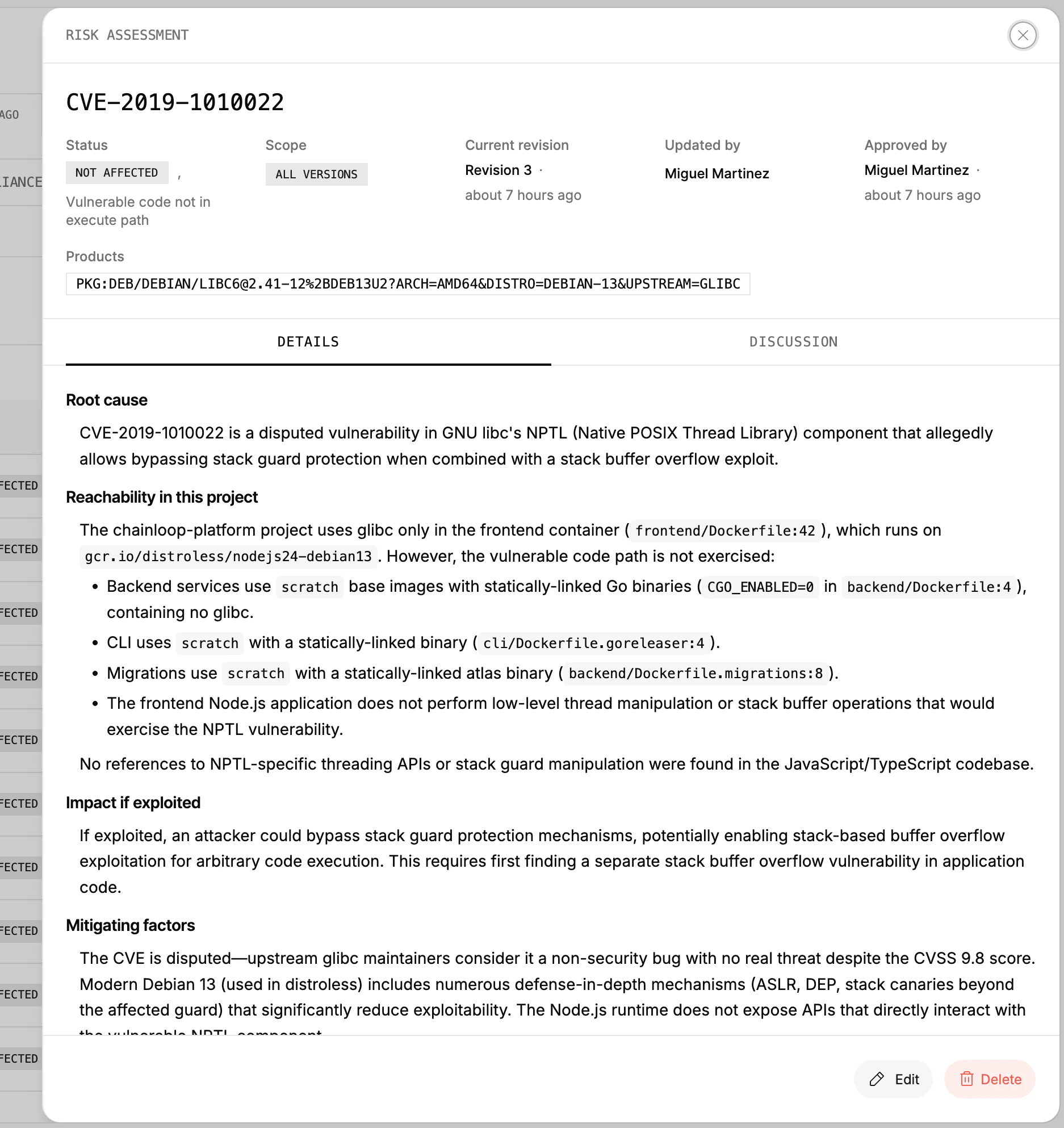
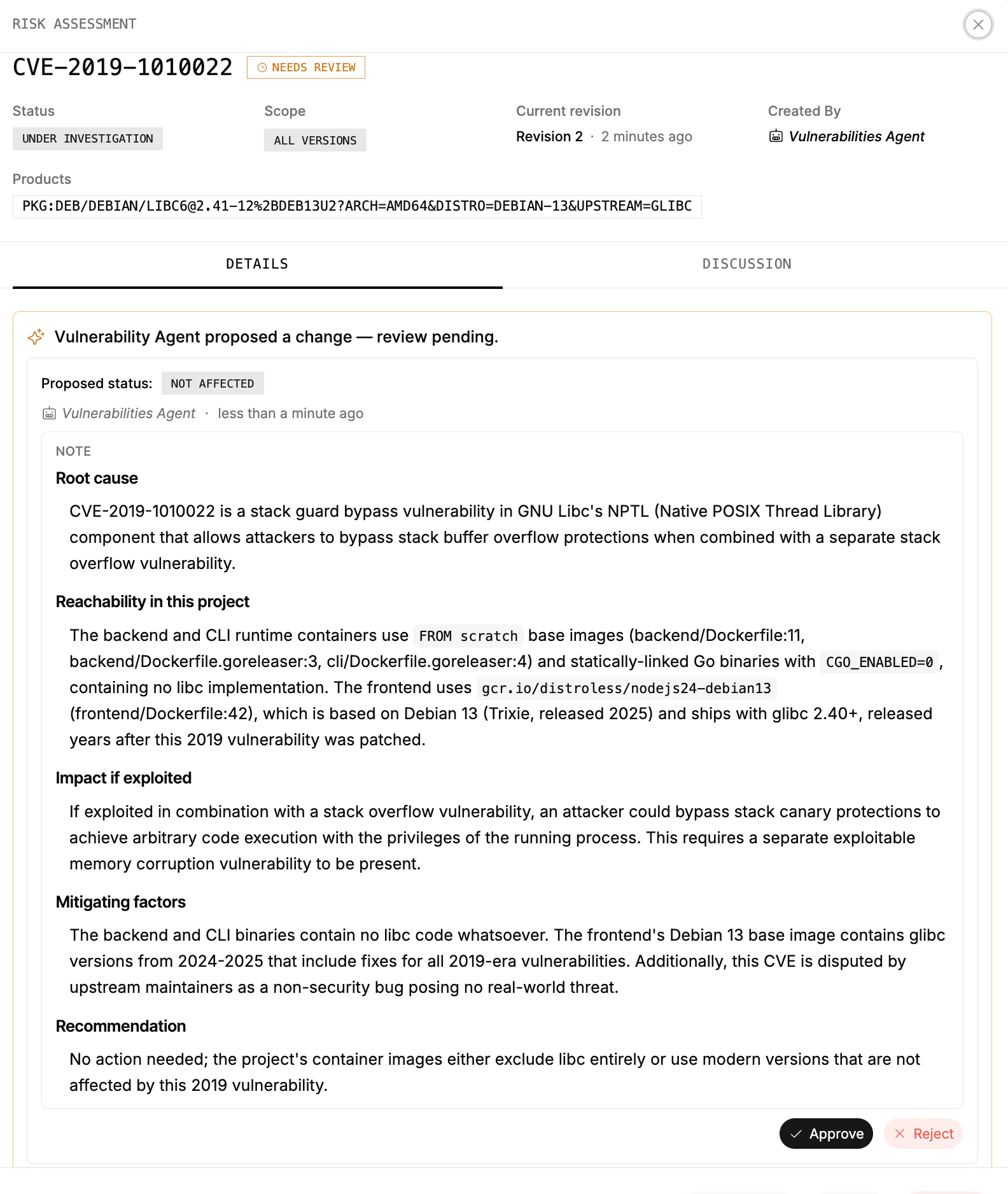
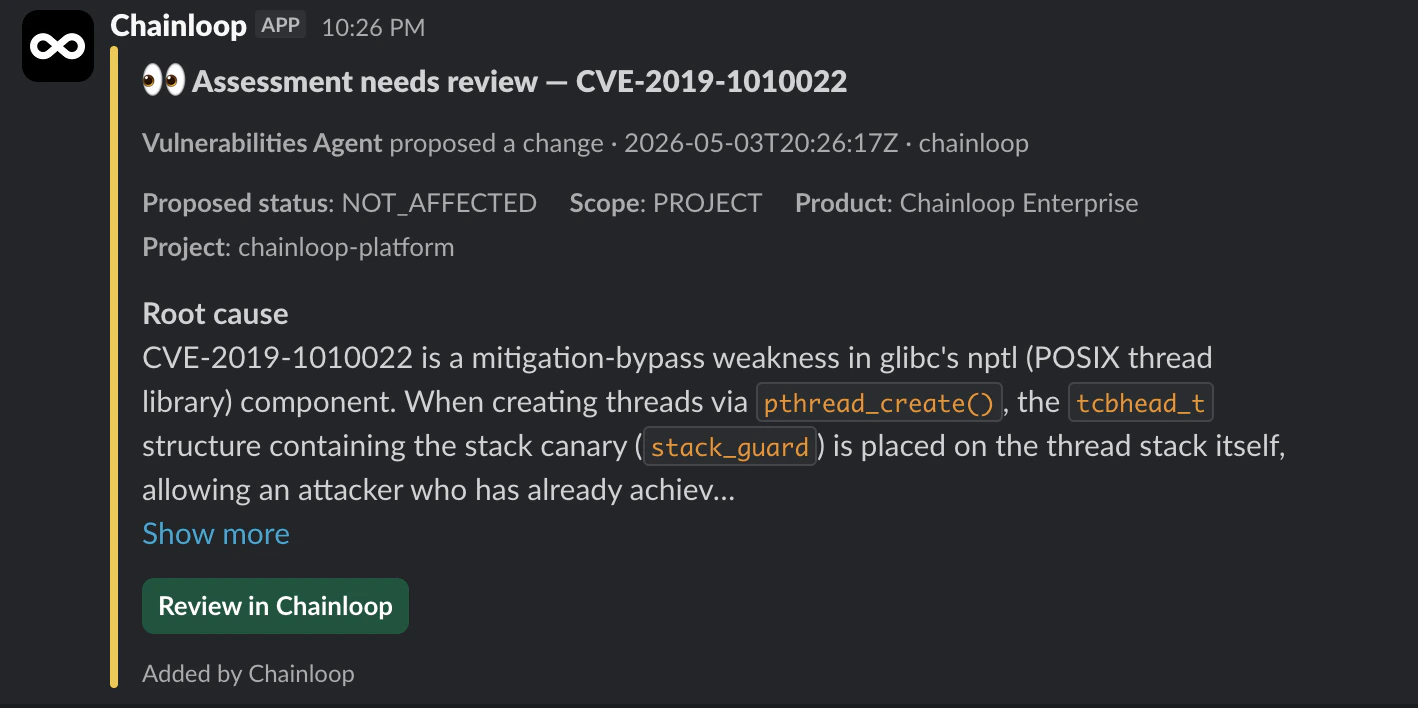
**Vulnerabilities Agent.** Drafts a full assessment for new findings, using vulnerability metadata (severity, KEV, fixability, CVSS), scanner context, and **your source code and Dockerfiles**. The output: a structured analysis (root cause, reachability, impact, mitigating factors, recommendation), a proposed verdict, and a **confidence score**. The assessment lands in `Under Investigation / Needs Review` until a human approves or rejects it (or [auto-approval](#configuring-automation) is enabled for that severity). **Until then, the agent's verdict doesn't affect finding status.**
### Assessment scope: where a decision applies
An assessment can be scoped at any level of the Chainloop data model:
* **Project-version scope**: *"This CVE doesn't affect this release"*
* **Project scope**: *"This CVE doesn't affect this project, ever"*
**Assess once at the right level. The verdict cascades down.** A project-scoped *Not Affected* applies to every version of that project, so the same CVE doesn't have to be re-litigated every release.
### Assessment and auto-remediation using AI
The Vulnerabilities Agent and Remediation Agent are in **Preview**.
Two agents extend the assessment workflow.
**Vulnerabilities Agent.** Drafts a full assessment for new findings, using vulnerability metadata (severity, KEV, fixability, CVSS), scanner context, and **your source code and Dockerfiles**. The output: a structured analysis (root cause, reachability, impact, mitigating factors, recommendation), a proposed verdict, and a **confidence score**. The assessment lands in `Under Investigation / Needs Review` until a human approves or rejects it (or [auto-approval](#configuring-automation) is enabled for that severity). **Until then, the agent's verdict doesn't affect finding status.**
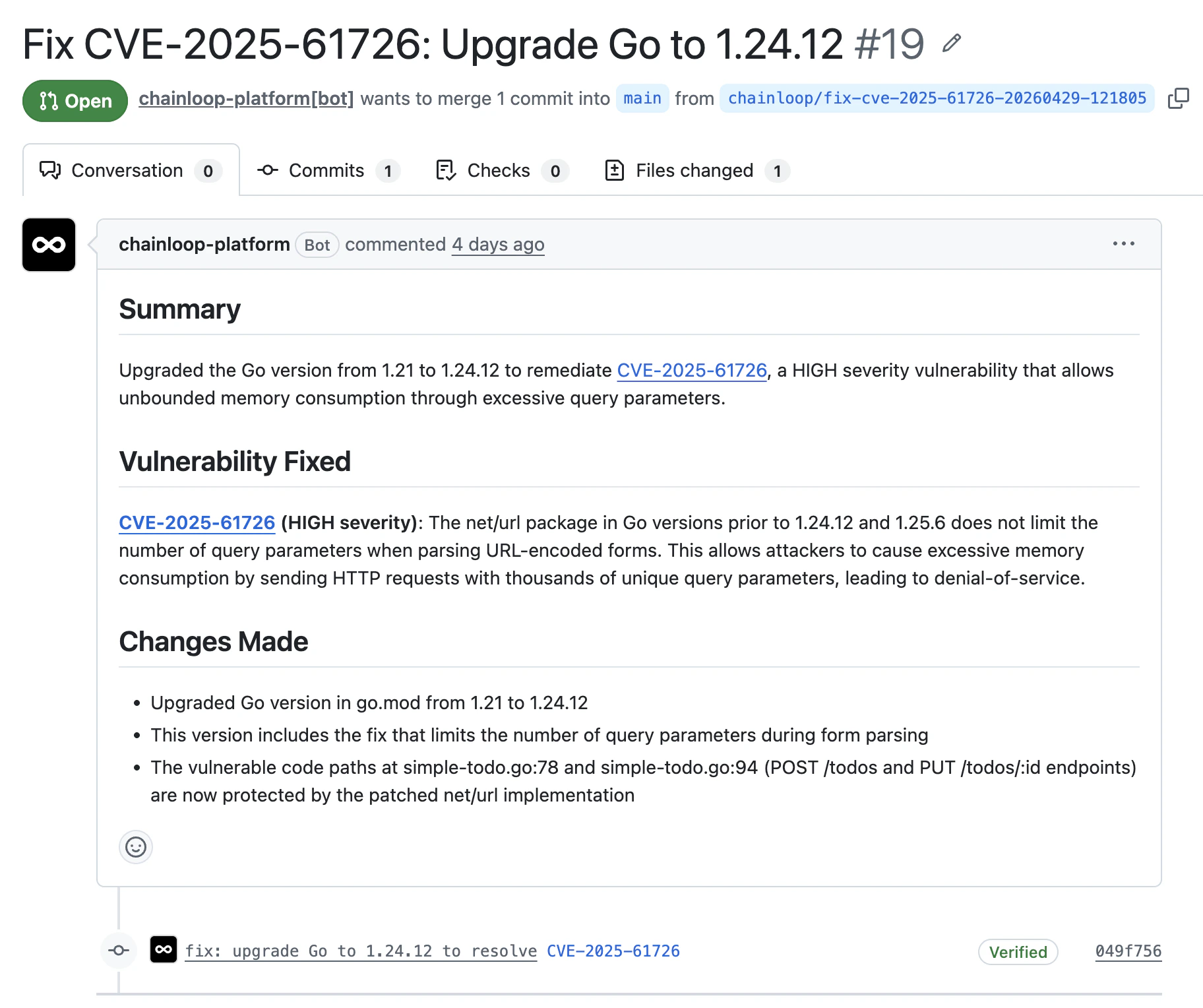
 **Remediation Agent.** When an assessment is *Affected* with high enough confidence, the agent **patches the affected files and opens a pull request** against your repository. Trigger it manually, or let it fire automatically via the [automation settings](#configuring-automation) below. Each PR is linked back to the assessment, so remediation history stays attached to the finding.
 The PR itself contains the full context (the CVE, the fix summary, and the exact changes), so reviewers can verify the remediation without leaving the pull request.
 #### Configuring automation
How much of this pipeline runs on its own is up to you. The **Vulnerability Automation** section on the organization settings page (admins and owners only) controls what the AI pipeline does with each new finding, per severity, across every project in the organization:
* **Auto-assess**: the Vulnerabilities Agent drafts a risk assessment for every new finding of that severity as soon as it's ingested. Findings of other severities can still be assessed on demand.
* **Auto-approve**: the agent's proposed verdict is approved automatically when its confidence is high enough, skipping the human review step. Auto-approved revisions are recorded with an explanatory note instead of a reviewer, and low-confidence drafts still land in *Needs Review*.
* **Auto-fix**: when an approved assessment marks a finding *Affected* and fixable with high confidence, the Remediation Agent patches it and opens the pull request automatically. A finding that already has a remediation attempt is never retried automatically.
#### Configuring automation
How much of this pipeline runs on its own is up to you. The **Vulnerability Automation** section on the organization settings page (admins and owners only) controls what the AI pipeline does with each new finding, per severity, across every project in the organization:
* **Auto-assess**: the Vulnerabilities Agent drafts a risk assessment for every new finding of that severity as soon as it's ingested. Findings of other severities can still be assessed on demand.
* **Auto-approve**: the agent's proposed verdict is approved automatically when its confidence is high enough, skipping the human review step. Auto-approved revisions are recorded with an explanatory note instead of a reviewer, and low-confidence drafts still land in *Needs Review*.
* **Auto-fix**: when an approved assessment marks a finding *Affected* and fixable with high confidence, the Remediation Agent patches it and opens the pull request automatically. A finding that already has a remediation attempt is never retried automatically.
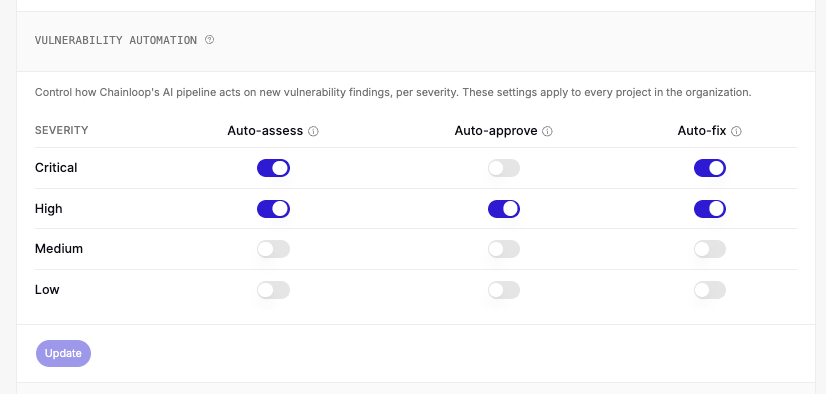 By default, only auto-assessment of **Critical** and **High** findings is enabled — everything else waits for a human.
### Outputs: VEX feed, PDFs, and smarter control gates
**Approved assessments don't just sit in the UI.** Chainloop produces:
* A **live VEX feed** that updates as assessments are added, consumable by external tools, customers, and auditors
* **PDF reports** for auditors and customers
* **Inputs to your Chainloop control gates.** Chainloop already lets you build release-gating [policies](/concepts/policies) and [control gates](/concepts/control-gates) (e.g. *"block any release with an unassessed Critical vulnerability"*). Those policies can now read assessments to remove **false positives** (dismissed findings shouldn't keep blocking) and **false negatives** (findings flagged *Affected* should still block, even if a later scan misses them).
The typical loop:
1. A scanner flags a vulnerability in a build.
2. A Chainloop control-gate policy blocks the release because the finding has no assessment.
3. The team writes (or accepts the agent's draft) and approves an assessment.
4. The policy re-evaluates against the updated assessment data and lets the release proceed.
**Assessments carry forward**, so the same finding doesn't need to be reviewed in every pipeline.
## Components and artifacts
**Findings live inside a package, which lives inside a build output.** Two views let you navigate from either side:
* **Components**: every package discovered in the project version's SBOMs, with a rollup of the vulnerabilities affecting each. Useful for answering *"is this dependency a problem anywhere?"*.
* **Artifacts**: every container image (or other SBOM-scoped artifact) in the version, with its vulnerability count. Drill in to see exactly which findings came from each one.
### The data model behind both
Components and artifacts sit inside a broader hierarchy:
| Level | What it is |
| ------------------- | -------------------------------------------------------------------------------------- |
| **Component** | A package discovered in an SBOM (with PURL) |
| **Artifact** | A container image or other build output that carries components |
| **Project version** | A specific release of a [project](/concepts/projects-versions) |
| **Project** | The software project across all versions |
| **Product** | A bundle of one or more projects shipped to customers ([Products](/concepts/products)) |
**That shared model is why a single risk assessment can apply at any of these levels.** See [Assessment scope](#assessment-scope-where-a-decision-applies) for how the cascade works.
By default, only auto-assessment of **Critical** and **High** findings is enabled — everything else waits for a human.
### Outputs: VEX feed, PDFs, and smarter control gates
**Approved assessments don't just sit in the UI.** Chainloop produces:
* A **live VEX feed** that updates as assessments are added, consumable by external tools, customers, and auditors
* **PDF reports** for auditors and customers
* **Inputs to your Chainloop control gates.** Chainloop already lets you build release-gating [policies](/concepts/policies) and [control gates](/concepts/control-gates) (e.g. *"block any release with an unassessed Critical vulnerability"*). Those policies can now read assessments to remove **false positives** (dismissed findings shouldn't keep blocking) and **false negatives** (findings flagged *Affected* should still block, even if a later scan misses them).
The typical loop:
1. A scanner flags a vulnerability in a build.
2. A Chainloop control-gate policy blocks the release because the finding has no assessment.
3. The team writes (or accepts the agent's draft) and approves an assessment.
4. The policy re-evaluates against the updated assessment data and lets the release proceed.
**Assessments carry forward**, so the same finding doesn't need to be reviewed in every pipeline.
## Components and artifacts
**Findings live inside a package, which lives inside a build output.** Two views let you navigate from either side:
* **Components**: every package discovered in the project version's SBOMs, with a rollup of the vulnerabilities affecting each. Useful for answering *"is this dependency a problem anywhere?"*.
* **Artifacts**: every container image (or other SBOM-scoped artifact) in the version, with its vulnerability count. Drill in to see exactly which findings came from each one.
### The data model behind both
Components and artifacts sit inside a broader hierarchy:
| Level | What it is |
| ------------------- | -------------------------------------------------------------------------------------- |
| **Component** | A package discovered in an SBOM (with PURL) |
| **Artifact** | A container image or other build output that carries components |
| **Project version** | A specific release of a [project](/concepts/projects-versions) |
| **Project** | The software project across all versions |
| **Product** | A bundle of one or more projects shipped to customers ([Products](/concepts/products)) |
**That shared model is why a single risk assessment can apply at any of these levels.** See [Assessment scope](#assessment-scope-where-a-decision-applies) for how the cascade works.
 ## Reports
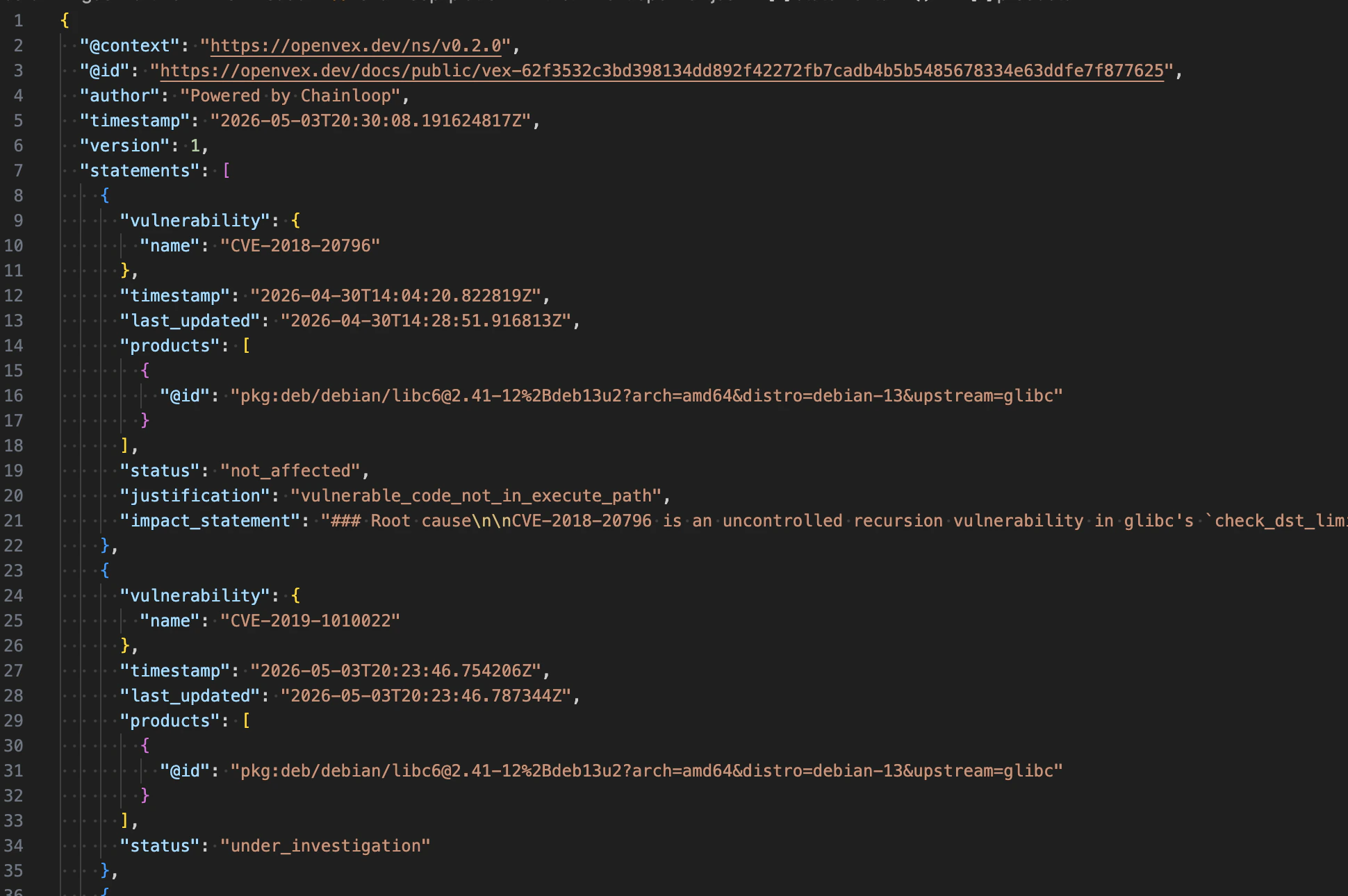
**Reports is where the deliverables live**: the [VEX](https://www.cisa.gov/sites/default/files/2023-01/VEX_Use_Cases_Aprill2022.pdf) feed and PDF reports Chainloop generates from your approved assessments. Download any of them to share with auditors, customers, or downstream tools.
The VEX feed follows the [OpenVEX](https://openvex.dev/) spec, so any tool that consumes OpenVEX can read it directly. Each statement maps to one approved assessment, with its verdict (`not_affected`, `affected`, `under_investigation`, `fixed`), justification, and the products (PURLs) it covers.
## Reports
**Reports is where the deliverables live**: the [VEX](https://www.cisa.gov/sites/default/files/2023-01/VEX_Use_Cases_Aprill2022.pdf) feed and PDF reports Chainloop generates from your approved assessments. Download any of them to share with auditors, customers, or downstream tools.
The VEX feed follows the [OpenVEX](https://openvex.dev/) spec, so any tool that consumes OpenVEX can read it directly. Each statement maps to one approved assessment, with its verdict (`not_affected`, `affected`, `under_investigation`, `fixed`), justification, and the products (PURLs) it covers.
 The raw inputs (SBOMs and scanner reports) live separately in Chainloop as signed [evidence](/concepts/material-types) under the project's [attestations](/concepts/attestations).
## Compliance
**Dev teams get a tool to triage and remediate vulnerabilities and other issues. Compliance teams get accurate, framework-aligned output for free.** The same SBOMs, scanner reports, and risk assessments feeding daily triage also drive Chainloop's [framework engine](/concepts/compliance-frameworks). No separate audit pipeline, no copy-paste, no spreadsheets.
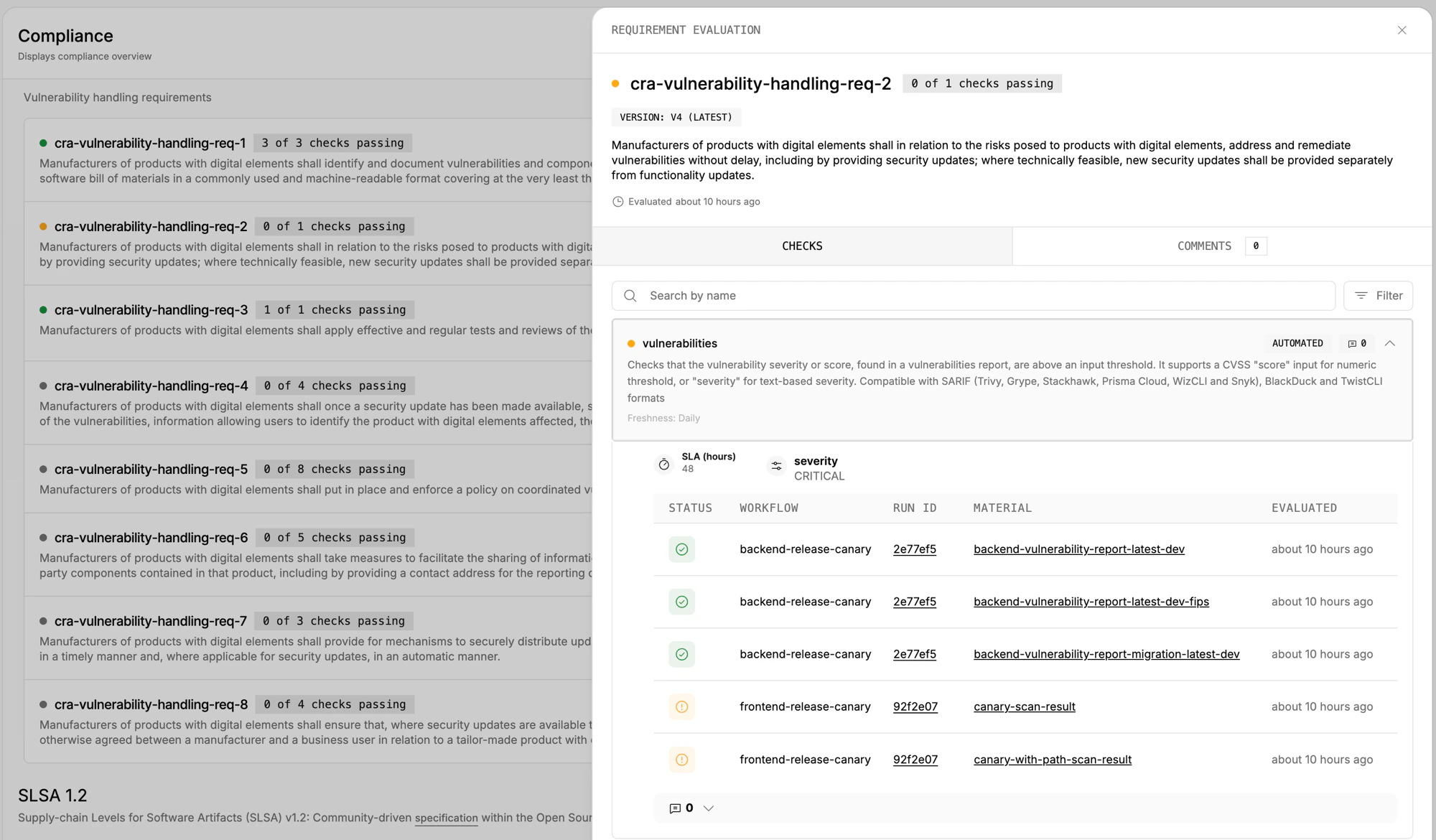
Take the EU [Cyber Resilience Act (CRA)](/reference/cyber-resilience-act): Annex I, Part II requires manufacturers to identify, document, address, and report vulnerabilities throughout the product lifecycle. The framework breaks each obligation into a numbered requirement (`cra-vulnerability-handling-req-1` through `req-8`), and each requirement runs automated checks against your evidence: scanner severity thresholds, SBOM presence, SLA compliance, and so on. When the checks pass, the requirement turns green; when they don't, you can drill straight into the failing workflow run, material, and finding.
The raw inputs (SBOMs and scanner reports) live separately in Chainloop as signed [evidence](/concepts/material-types) under the project's [attestations](/concepts/attestations).
## Compliance
**Dev teams get a tool to triage and remediate vulnerabilities and other issues. Compliance teams get accurate, framework-aligned output for free.** The same SBOMs, scanner reports, and risk assessments feeding daily triage also drive Chainloop's [framework engine](/concepts/compliance-frameworks). No separate audit pipeline, no copy-paste, no spreadsheets.
Take the EU [Cyber Resilience Act (CRA)](/reference/cyber-resilience-act): Annex I, Part II requires manufacturers to identify, document, address, and report vulnerabilities throughout the product lifecycle. The framework breaks each obligation into a numbered requirement (`cra-vulnerability-handling-req-1` through `req-8`), and each requirement runs automated checks against your evidence: scanner severity thresholds, SBOM presence, SLA compliance, and so on. When the checks pass, the requirement turns green; when they don't, you can drill straight into the failing workflow run, material, and finding.
 The same model applies to **any other framework Chainloop supports that mandates vulnerability handling.** See the [CRA reference](/reference/cyber-resilience-act) for the full requirement set, the [CRA tracking guide](/guides/cra) to wire it onto a project, or [Compliance frameworks](/concepts/compliance-frameworks) for the broader model.
## Notifications and integrations
**Slack is the collaboration surface for vulnerability work.** Chainloop pushes signals into your channels and lets your team ask questions back, so the whole loop happens where your team already works. Email and Microsoft Teams also support outbound notifications.
### Push: notifications that carry context
Notifications include enough context to act on directly, no extra clicks needed.
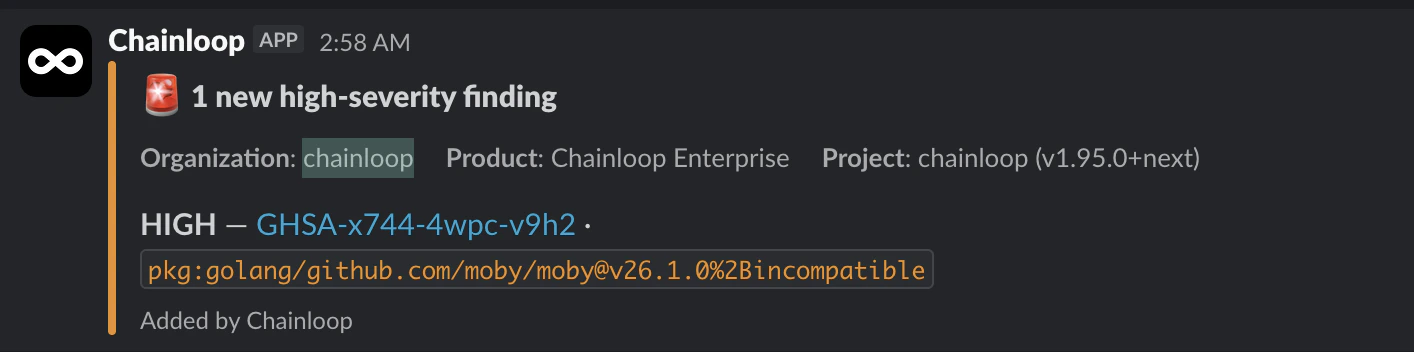
A new high-severity finding lands with the organization, product, project version, severity, CVE/GHSA id, and the affected package PURL:
The same model applies to **any other framework Chainloop supports that mandates vulnerability handling.** See the [CRA reference](/reference/cyber-resilience-act) for the full requirement set, the [CRA tracking guide](/guides/cra) to wire it onto a project, or [Compliance frameworks](/concepts/compliance-frameworks) for the broader model.
## Notifications and integrations
**Slack is the collaboration surface for vulnerability work.** Chainloop pushes signals into your channels and lets your team ask questions back, so the whole loop happens where your team already works. Email and Microsoft Teams also support outbound notifications.
### Push: notifications that carry context
Notifications include enough context to act on directly, no extra clicks needed.
A new high-severity finding lands with the organization, product, project version, severity, CVE/GHSA id, and the affected package PURL:
 When the Vulnerabilities Agent drafts an assessment, the notification includes the proposed status, scope, product, project, a root-cause excerpt, and a *Review in Chainloop* button to jump straight into the assessment:
 ### Pull: ask Chainloop from Slack
**Anyone in the workspace can ask Chainloop a question** about a project version's posture and get an answer from live data, including current assessment state:
### Pull: ask Chainloop from Slack
**Anyone in the workspace can ask Chainloop a question** about a project version's posture and get an answer from live data, including current assessment state:
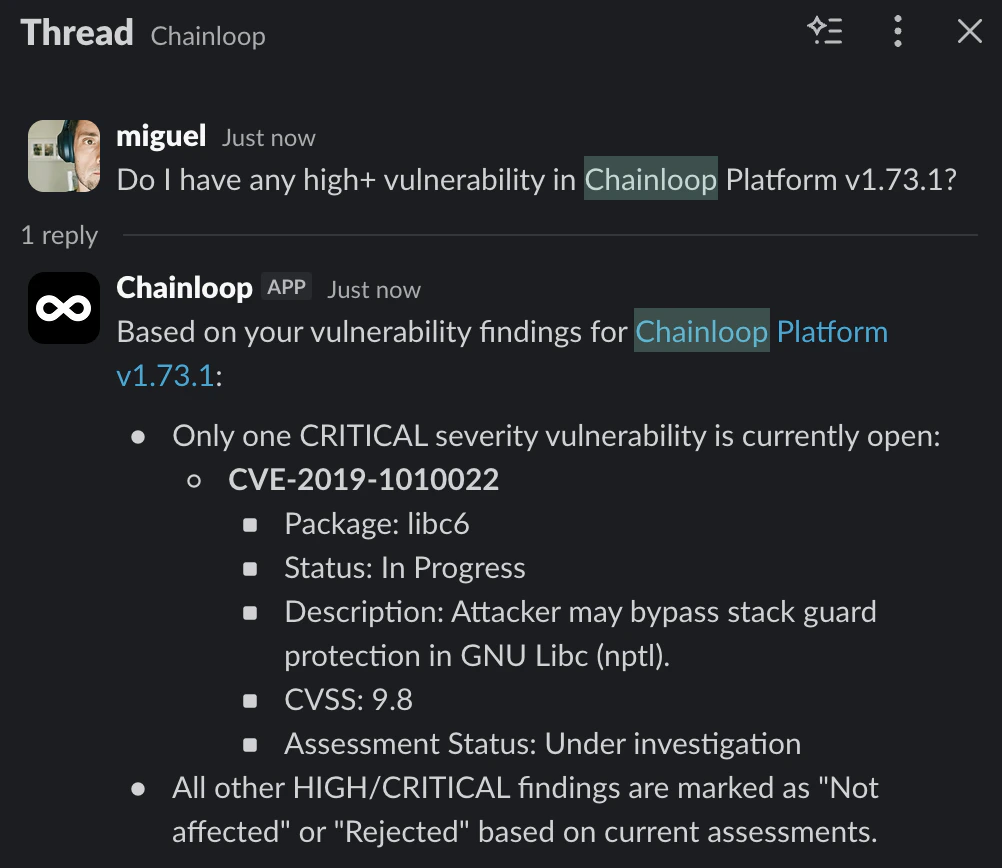 This means dev, security, and compliance can **answer "are we exposed?" without leaving Slack.**
### Channels and triggers
* **Outbound channels**: Slack, Microsoft Teams, email
* **Conversational channel**: Slack (Ask Chainloop)
* **Triggers**: new vulnerabilities, assessments awaiting approval, agent activity
* **Roadmap**: Jira and Linear, auto-create tickets to assign findings to owners
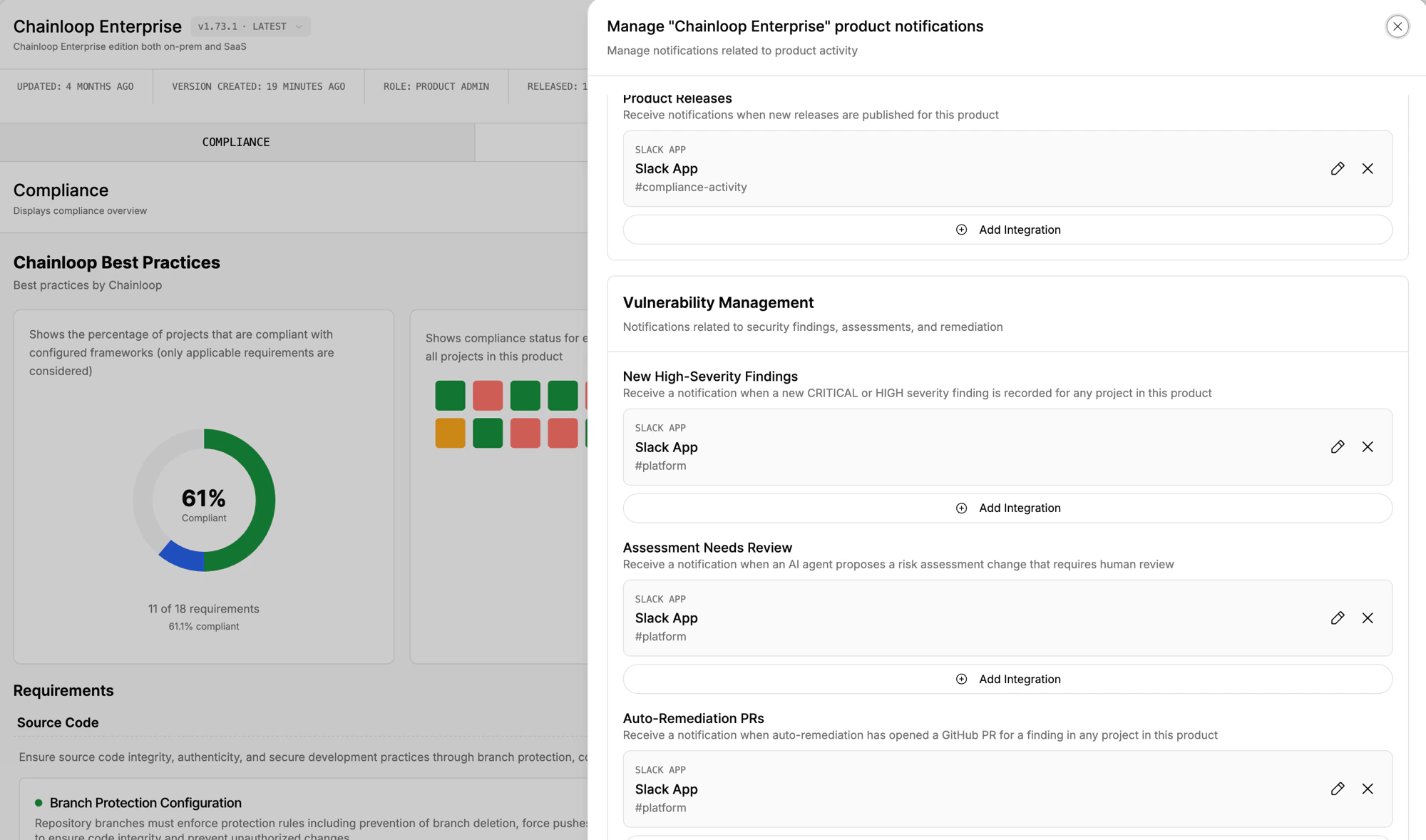
### Configuring notifications
Notifications are configured from the **Manage Notifications** panel on a product, where you map each event type (*New High-Severity Findings*, *Assessment Needs Review*, *Auto-Remediation PRs*, and so on) to one or more integrations:
This means dev, security, and compliance can **answer "are we exposed?" without leaving Slack.**
### Channels and triggers
* **Outbound channels**: Slack, Microsoft Teams, email
* **Conversational channel**: Slack (Ask Chainloop)
* **Triggers**: new vulnerabilities, assessments awaiting approval, agent activity
* **Roadmap**: Jira and Linear, auto-create tickets to assign findings to owners
### Configuring notifications
Notifications are configured from the **Manage Notifications** panel on a product, where you map each event type (*New High-Severity Findings*, *Assessment Needs Review*, *Auto-Remediation PRs*, and so on) to one or more integrations:
 See [Notifications](/concepts/notifications) for outbound setup and [Ask Chainloop](/concepts/ask-chainloop) for the conversational interface.
## Trust: signed evidence end-to-end
**Every signal in this section is backed by Chainloop's signed evidence chain.**
* Every scanner report is **cryptographically [attested](/concepts/attestations)** at build time
* Every policy evaluation is **stored immutably**
* Every assessment is **versioned and signed**
* Enterprise edition adds a full **[audit log](/reference/audit-logs)** of every state change
Chainloop is the evidence store for your software factory. Vulnerability Management and Risk Assessment is the layer on top where signed evidence becomes triage, assessments, VEX, and remediation, all inside the same trust boundary.
## Roadmap
* More finding types: SAST, secrets, license, SBOM / supply-chain misconfiguration
* More integrations: Jira, Linear, additional notification channels
* More agent workflows on the same signed evidence base
## Set it up
[Start managing your components and vulnerabilities](/guides/vulnerability-management).
See [Notifications](/concepts/notifications) for outbound setup and [Ask Chainloop](/concepts/ask-chainloop) for the conversational interface.
## Trust: signed evidence end-to-end
**Every signal in this section is backed by Chainloop's signed evidence chain.**
* Every scanner report is **cryptographically [attested](/concepts/attestations)** at build time
* Every policy evaluation is **stored immutably**
* Every assessment is **versioned and signed**
* Enterprise edition adds a full **[audit log](/reference/audit-logs)** of every state change
Chainloop is the evidence store for your software factory. Vulnerability Management and Risk Assessment is the layer on top where signed evidence becomes triage, assessments, VEX, and remediation, all inside the same trust boundary.
## Roadmap
* More finding types: SAST, secrets, license, SBOM / supply-chain misconfiguration
* More integrations: Jira, Linear, additional notification channels
* More agent workflows on the same signed evidence base
## Set it up
[Start managing your components and vulnerabilities](/guides/vulnerability-management).