> ## Documentation Index
> Fetch the complete documentation index at: https://docs.chainloop.dev/llms.txt
> Use this file to discover all available pages before exploring further.
# Projects and Versions
**Important: A "project" is different than a ["product"](/concepts/products)**, as well as a "project version" is different than a "product version".
Project versions represent the version of the component while product versions represent the version of the product.
Products and project versions can evolve independently.
Chainloop offers a structured approach to modeling **Projects** (software components) and their **Versions**. During the attestation process, you must specify the Project to which the Workflow belongs, as Projects serve as the primary way to organize Workflows. Versions, on the other hand, are optional and can remain empty.
Projects and Versions are crucial when it comes to Compliance. Compliance teams apply Requirements to these projects. *Requirements* can be written in a high-level language, like "container images must be signed", "an AGPL license is forbidden", "the software must be free from high-severity vulnerabilities", "code repositories must be configured with least privilege principle access controls", etc.
Your projects can be found at the [Projects](https://app.chainloop.dev/projects) page in the Web UI.
[ ](./img/projects-3.png)
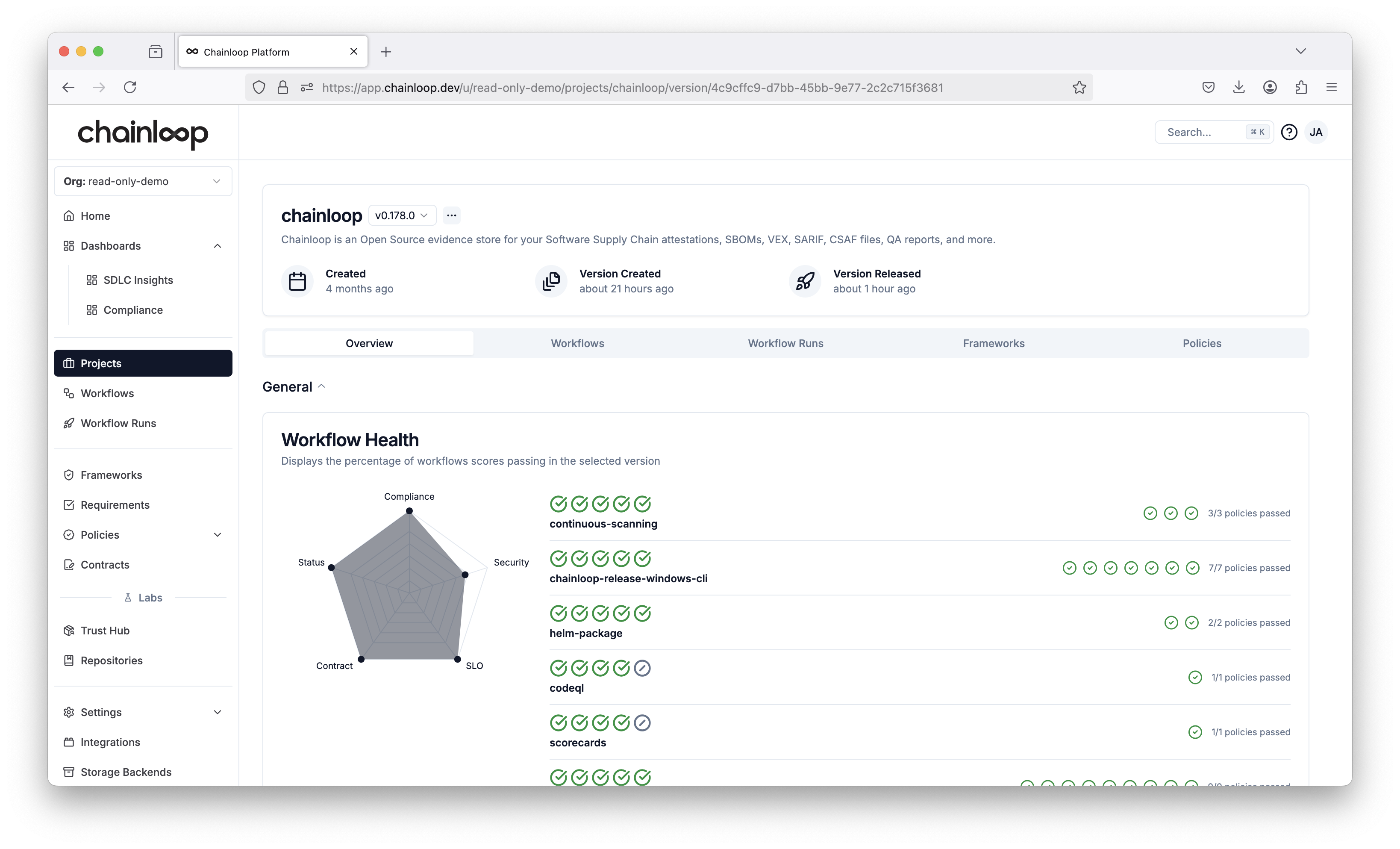
**The goal of this view is to show you a high-level, aggregated view of your project workflows, pieces of evidence, policy evaluations and compliance score.**
You can change the project version by clicking on the version name and selecting the desired version from the dropdown menu.
At the bottom of the page, you can see the list of compliance frameworks attached to the project [through products](./products).
[
](./img/projects-3.png)
**The goal of this view is to show you a high-level, aggregated view of your project workflows, pieces of evidence, policy evaluations and compliance score.**
You can change the project version by clicking on the version name and selecting the desired version from the dropdown menu.
At the bottom of the page, you can see the list of compliance frameworks attached to the project [through products](./products).
[ ](./img/projects-4.png)
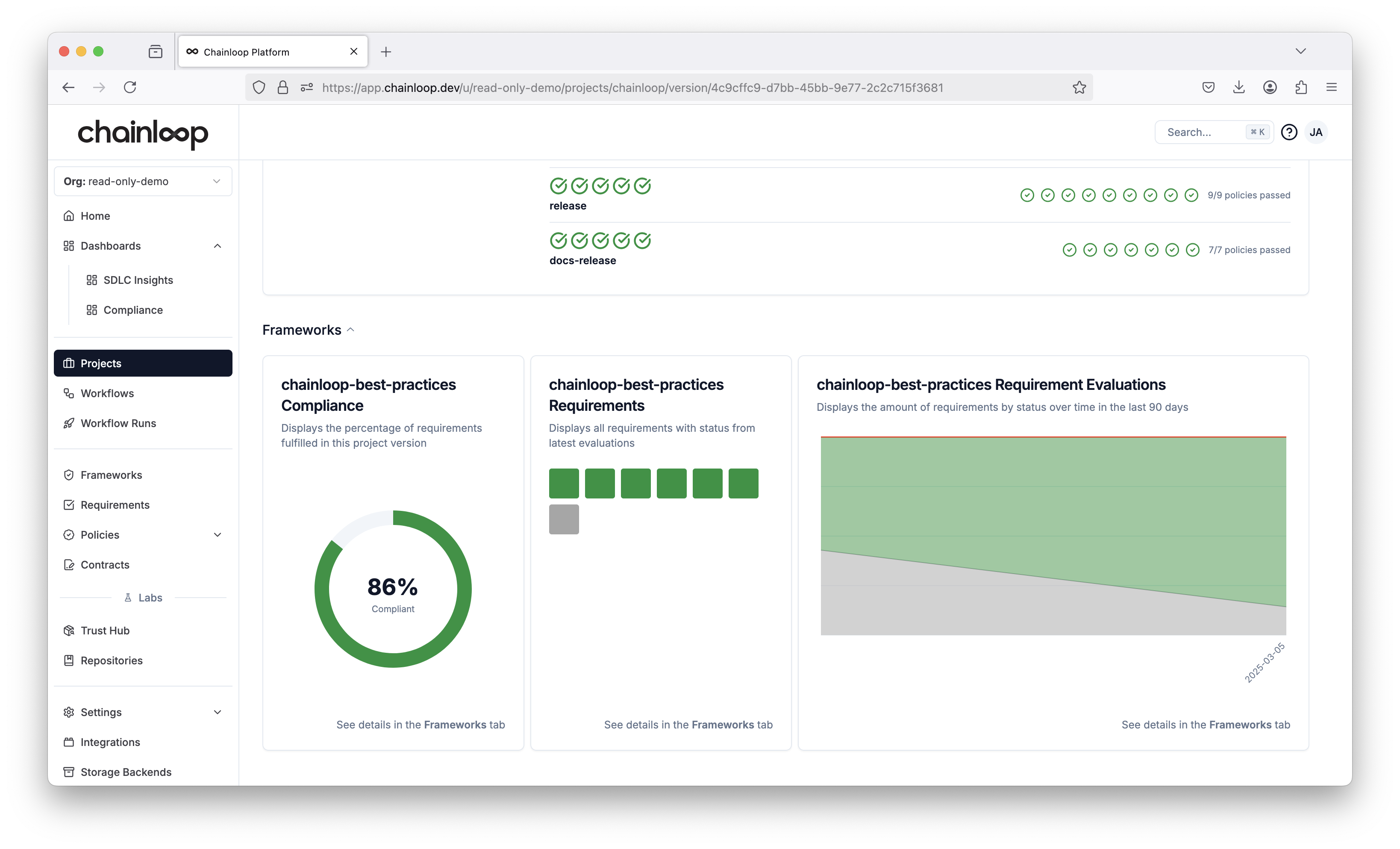
The display shows the percentage of total framework requirements being met. In the center, a detailed breakdown of individual requirements is provided, categorized by status with the following color codes:
* Gray: No requirement evaluations are available for the current project version.
* Green: Requirements are evaluated and passing.
* Red: Requirements are evaluated but not passing.
* Yellow: Requirements are evaluated but not all policies are passing.
* Blue: Requirements are not passing, but a team member has created an exception.
Finally, on the right side, the progression of requirement evaluations over time is displayed.
Frameworks can be associated to a project at any time by [attaching them to one of its products](./products).
## Evidence Tab
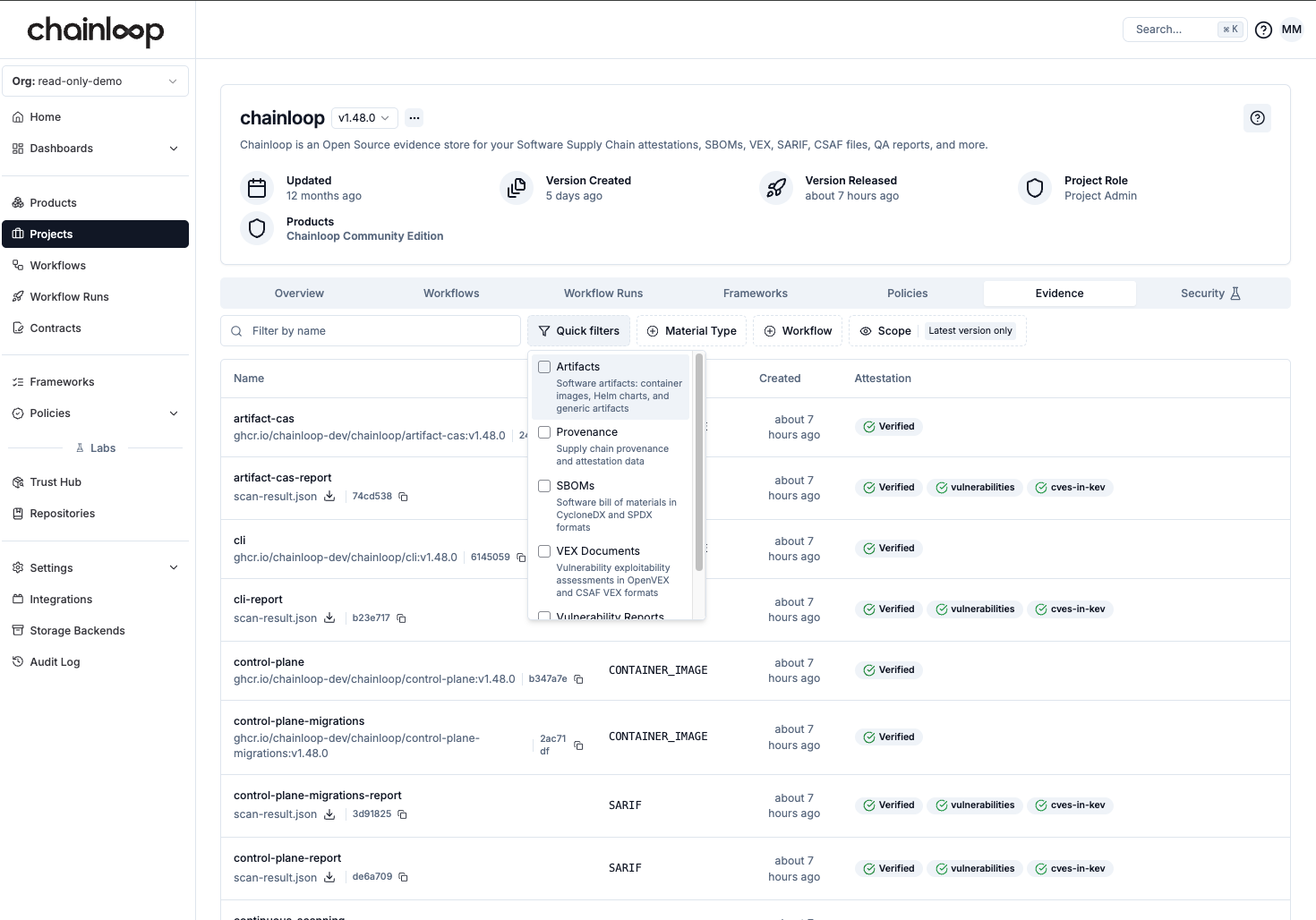
The Evidence tab in the project view provides a comprehensive view of all pieces of evidence associated with a specific project version. This centralized location allows you to inspect and filter all the materials that have been collected through attestations.
[
](./img/projects-4.png)
The display shows the percentage of total framework requirements being met. In the center, a detailed breakdown of individual requirements is provided, categorized by status with the following color codes:
* Gray: No requirement evaluations are available for the current project version.
* Green: Requirements are evaluated and passing.
* Red: Requirements are evaluated but not passing.
* Yellow: Requirements are evaluated but not all policies are passing.
* Blue: Requirements are not passing, but a team member has created an exception.
Finally, on the right side, the progression of requirement evaluations over time is displayed.
Frameworks can be associated to a project at any time by [attaching them to one of its products](./products).
## Evidence Tab
The Evidence tab in the project view provides a comprehensive view of all pieces of evidence associated with a specific project version. This centralized location allows you to inspect and filter all the materials that have been collected through attestations.
[ ](./img/evidence.png)
### Filtering Evidence
The Evidence tab supports filtering by Material Type, making it easy to focus on specific types of evidence:
* **Artifacts** - Software artifacts, container images, Helm charts, and generic artifacts
* **Provenance** - Supply chain provenance and attestation data
* **SBOMs** - Software Bill of Materials in CycloneDX and SPDX formats
* **VEX Documents** - Vulnerability exploitability assessments in OpenVEX and CSAF VEX formats
* **Vulnerability Reports** - Vulnerability scan results in SARIF format
This view helps security and compliance teams quickly access and review all evidence for a project version, supporting audit and compliance workflows.
## How to create a new Project
There are several ways of creating new Projects:
* Automatically when you perform an attestation
* Through the UI in advance
To create a project, Go ot the projects list and click, [Create Project](https://app.chainloop.dev/projects/new).
](./img/evidence.png)
### Filtering Evidence
The Evidence tab supports filtering by Material Type, making it easy to focus on specific types of evidence:
* **Artifacts** - Software artifacts, container images, Helm charts, and generic artifacts
* **Provenance** - Supply chain provenance and attestation data
* **SBOMs** - Software Bill of Materials in CycloneDX and SPDX formats
* **VEX Documents** - Vulnerability exploitability assessments in OpenVEX and CSAF VEX formats
* **Vulnerability Reports** - Vulnerability scan results in SARIF format
This view helps security and compliance teams quickly access and review all evidence for a project version, supporting audit and compliance workflows.
## How to create a new Project
There are several ways of creating new Projects:
* Automatically when you perform an attestation
* Through the UI in advance
To create a project, Go ot the projects list and click, [Create Project](https://app.chainloop.dev/projects/new).
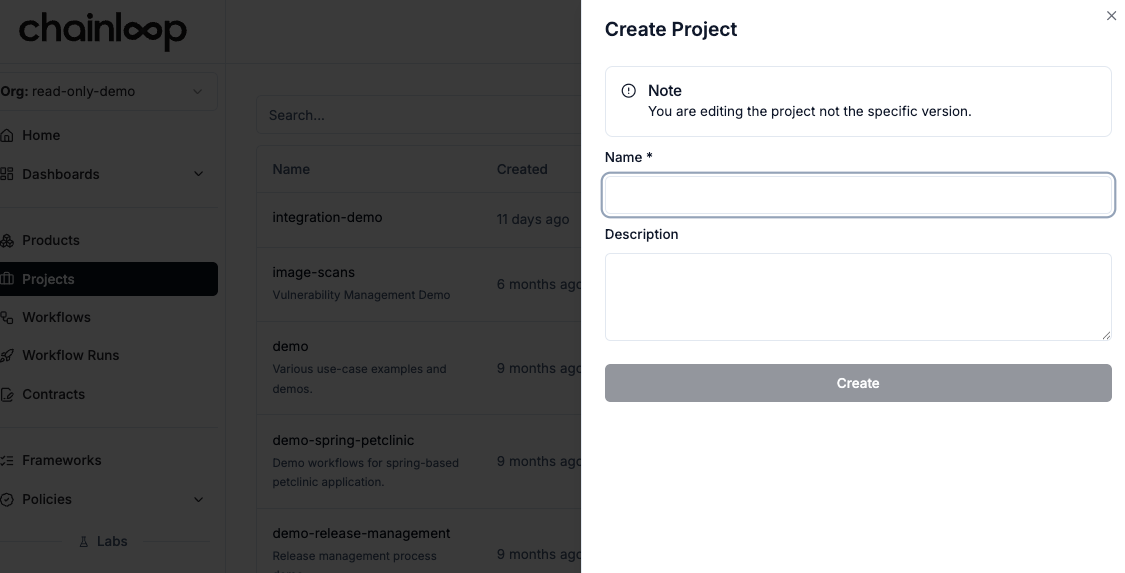 * Name: Unique name of the project in the organization. It normally matches a specific software product.
* Description: A description of what the project is about.
After creating the project, if you try to view its details, you’ll be notified that you must first create a project version.
During the attestation process, you can provide the name of the project the workflow belongs to and, optionally, a version.
For example, the following command will initialize an attestation associated with the project `myproject` and no version:
```bash theme={"dark"}
chainloop att init --workflow mywf --project myproject
```
```
INF Attestation initialized! now you can check its status or add materials to it
┌───────────────────────────┬──────────────────────────────────────┐
│ Initialized At │ 04 Mar 25 11:39 UTC │
├───────────────────────────┼──────────────────────────────────────┤
│ Attestation ID │ 9b94fcc1-161b-4a97-afa5-245aa1795faf │
│ Organization │ demo-org │
│ Name │ mywf │
│ Project │ myproject │
│ Version │ none │
│ Contract │ myproject-mywf (revision 1) │
│ Timestamp Authority │ http://timestamp.digicert.com │
│ Policy violation strategy │ ENFORCED │
└───────────────────────────┴──────────────────────────────────────┘
```
As a result, the Workflow and the Project will be associated from that moment on.
## Project Versions
**Important: A "project" is different than a ["product"](/concepts/products)**, as well as a "project version" is different than a "product version".
Project versions represent the version of the component while product versions represent the version of the product.
Products and project versions can evolve independently.
Project versions help manage different releases or frozen states of your software component. They are essential for Compliance, as Requirement evaluations for a project occur at the project version level.
This approach allows Chainloop to capture a snapshot of a project's status at a specific point in time.
### Attest to a specific version
During the attestation process, alongside providing the `project` you can also provide a `version`.
For example, the following line will initialize an attestation associated with the project `myproject` and version v0.0.1
```bash theme={"dark"}
chainloop att init --workflow mywf --project myproject --version v0.0.1
```
```
INF Attestation initialized! now you can check its status or add materials to it
┌───────────────────────────┬──────────────────────────────────────┐
│ Initialized At │ 05 Mar 25 09:36 UTC │
├───────────────────────────┼──────────────────────────────────────┤
│ Attestation ID │ c4dd5471-b07c-4ae1-8bd6-e9642aaff455 │
│ Organization │ demo-org │
│ Name │ mywf │
│ Project │ myproject │
│ Version │ v0.0.1 (prerelease) │
│ Contract │ myproject-mywf (revision 1) │
│ Timestamp Authority │ http://timestamp.digicert.com │
│ Policy violation strategy │ ENFORCED │
└───────────────────────────┴──────────────────────────────────────┘
```
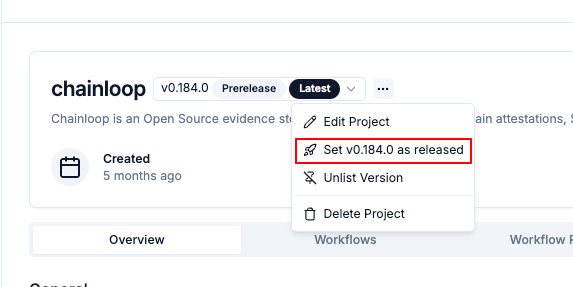
### Promote a pre-release version
Note how the version in the previous output is `v0.0.1 (prerelease)`. Think of **prerelease** as a work-in-progress version, not yet finished until an explicit `release` event is performed.
To release an existing pre-release version, you can do it either
* Performing another attestation but this time provide the `--release` flag.
* From the Web UI
```
chainloop att init --workflow mywf --project myproject --version v0.0.1 --release
```
```
INF Attestation initialized! now you can check its status or add materials to it
┌───────────────────────────┬──────────────────────────────────────┐
│ Initialized At │ 05 Mar 25 09:49 UTC │
├───────────────────────────┼──────────────────────────────────────┤
│ Attestation ID │ e903906d-e937-4bf0-828a-5bc6054e7324 │
│ Organization │ demo-org │
│ Name │ mywf │
│ Project │ myproject │
│ Version │ v0.0.1 (will be released) │
│ Contract │ myproject-mywf (revision 1) │
│ Timestamp Authority │ http://timestamp.digicert.com │
│ Policy violation strategy │ ENFORCED │
└───────────────────────────┴──────────────────────────────────────┘
```
See how the message now has changed to v0.0.1 (will be released). Once the attestation is successfully crafted and pushed, **the version will be promoted to v0.0.1 when the attestation is pushed**.
[
* Name: Unique name of the project in the organization. It normally matches a specific software product.
* Description: A description of what the project is about.
After creating the project, if you try to view its details, you’ll be notified that you must first create a project version.
During the attestation process, you can provide the name of the project the workflow belongs to and, optionally, a version.
For example, the following command will initialize an attestation associated with the project `myproject` and no version:
```bash theme={"dark"}
chainloop att init --workflow mywf --project myproject
```
```
INF Attestation initialized! now you can check its status or add materials to it
┌───────────────────────────┬──────────────────────────────────────┐
│ Initialized At │ 04 Mar 25 11:39 UTC │
├───────────────────────────┼──────────────────────────────────────┤
│ Attestation ID │ 9b94fcc1-161b-4a97-afa5-245aa1795faf │
│ Organization │ demo-org │
│ Name │ mywf │
│ Project │ myproject │
│ Version │ none │
│ Contract │ myproject-mywf (revision 1) │
│ Timestamp Authority │ http://timestamp.digicert.com │
│ Policy violation strategy │ ENFORCED │
└───────────────────────────┴──────────────────────────────────────┘
```
As a result, the Workflow and the Project will be associated from that moment on.
## Project Versions
**Important: A "project" is different than a ["product"](/concepts/products)**, as well as a "project version" is different than a "product version".
Project versions represent the version of the component while product versions represent the version of the product.
Products and project versions can evolve independently.
Project versions help manage different releases or frozen states of your software component. They are essential for Compliance, as Requirement evaluations for a project occur at the project version level.
This approach allows Chainloop to capture a snapshot of a project's status at a specific point in time.
### Attest to a specific version
During the attestation process, alongside providing the `project` you can also provide a `version`.
For example, the following line will initialize an attestation associated with the project `myproject` and version v0.0.1
```bash theme={"dark"}
chainloop att init --workflow mywf --project myproject --version v0.0.1
```
```
INF Attestation initialized! now you can check its status or add materials to it
┌───────────────────────────┬──────────────────────────────────────┐
│ Initialized At │ 05 Mar 25 09:36 UTC │
├───────────────────────────┼──────────────────────────────────────┤
│ Attestation ID │ c4dd5471-b07c-4ae1-8bd6-e9642aaff455 │
│ Organization │ demo-org │
│ Name │ mywf │
│ Project │ myproject │
│ Version │ v0.0.1 (prerelease) │
│ Contract │ myproject-mywf (revision 1) │
│ Timestamp Authority │ http://timestamp.digicert.com │
│ Policy violation strategy │ ENFORCED │
└───────────────────────────┴──────────────────────────────────────┘
```
### Promote a pre-release version
Note how the version in the previous output is `v0.0.1 (prerelease)`. Think of **prerelease** as a work-in-progress version, not yet finished until an explicit `release` event is performed.
To release an existing pre-release version, you can do it either
* Performing another attestation but this time provide the `--release` flag.
* From the Web UI
```
chainloop att init --workflow mywf --project myproject --version v0.0.1 --release
```
```
INF Attestation initialized! now you can check its status or add materials to it
┌───────────────────────────┬──────────────────────────────────────┐
│ Initialized At │ 05 Mar 25 09:49 UTC │
├───────────────────────────┼──────────────────────────────────────┤
│ Attestation ID │ e903906d-e937-4bf0-828a-5bc6054e7324 │
│ Organization │ demo-org │
│ Name │ mywf │
│ Project │ myproject │
│ Version │ v0.0.1 (will be released) │
│ Contract │ myproject-mywf (revision 1) │
│ Timestamp Authority │ http://timestamp.digicert.com │
│ Policy violation strategy │ ENFORCED │
└───────────────────────────┴──────────────────────────────────────┘
```
See how the message now has changed to v0.0.1 (will be released). Once the attestation is successfully crafted and pushed, **the version will be promoted to v0.0.1 when the attestation is pushed**.
[  ](./img/projects-2.png)
### Make Released Versions Immutable
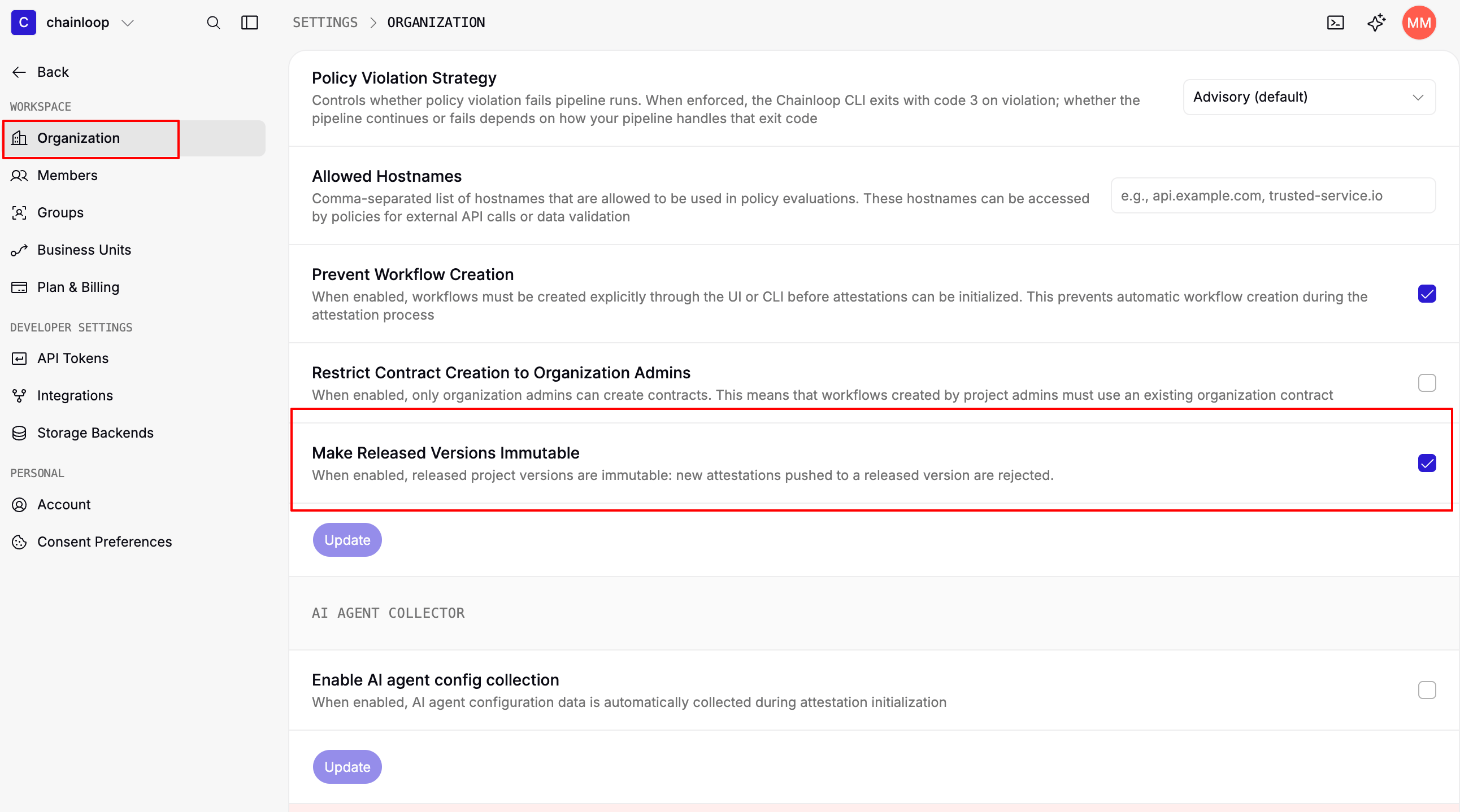
By default, releasing a version does not prevent further changes: new attestations can still be pushed to it. If you want a released version to represent a fixed, auditable point in time, you can enable the **"Make Released Versions Immutable"** organization setting.
When this setting is enabled, pushing an attestation to a version that has already been released is rejected by the control plane, and `chainloop attestation push` fails with a clear error message.
This setting is disabled by default and applies to the whole organization. Only organization owners and admins can change it.
Navigate to the [organization settings](https://app.chainloop.dev/settings) and enable the toggle in the **Attestation Process Configuration** section.
](./img/projects-2.png)
### Make Released Versions Immutable
By default, releasing a version does not prevent further changes: new attestations can still be pushed to it. If you want a released version to represent a fixed, auditable point in time, you can enable the **"Make Released Versions Immutable"** organization setting.
When this setting is enabled, pushing an attestation to a version that has already been released is rejected by the control plane, and `chainloop attestation push` fails with a clear error message.
This setting is disabled by default and applies to the whole organization. Only organization owners and admins can change it.
Navigate to the [organization settings](https://app.chainloop.dev/settings) and enable the toggle in the **Attestation Process Configuration** section.
 ```bash theme={"dark"}
chainloop org update --name [my-org-name] --block-attestations-on-released-versions
```
Set the flag to `false` to disable it again:
```bash theme={"dark"}
chainloop org update --name [my-org-name] --block-attestations-on-released-versions=false
```
### Automatically load the version
An alternative to provide the `--version` flag in each attestation is to use a `.chainloop.yml` file in your repo.
```yaml theme={"dark"}
# your-project/.chainloop.yml
projectVersion: v0.1.0 # example version
```
The CLI, during attestation init will traverse up the directory tree and load the version from the `.chainloop.yml` file automatically if it exists.
```bash theme={"dark"}
chainloop org update --name [my-org-name] --block-attestations-on-released-versions
```
Set the flag to `false` to disable it again:
```bash theme={"dark"}
chainloop org update --name [my-org-name] --block-attestations-on-released-versions=false
```
### Automatically load the version
An alternative to provide the `--version` flag in each attestation is to use a `.chainloop.yml` file in your repo.
```yaml theme={"dark"}
# your-project/.chainloop.yml
projectVersion: v0.1.0 # example version
```
The CLI, during attestation init will traverse up the directory tree and load the version from the `.chainloop.yml` file automatically if it exists.