> ## Documentation Index
> Fetch the complete documentation index at: https://docs.chainloop.dev/llms.txt
> Use this file to discover all available pages before exploring further.
# Policies
> Implement control gates and security checks in your attestations.
## Overview
Policies are rules evaluated against materials and/or the whole attestation document. They represent acceptance criteria for the system to ingest those materials. Even in failure cases (when there are policy violations), attestations are still sent to Chainloop but marked as “not compliant.” This way, Chainloop keeps track of everything happening in the system, even if it's unacceptable. Policies are written in Rego language.
Policies are also a fundamental piece in Chainloop's compliance platform, as they are directly related to framework requirements. With the assistance of SecOps and developers, Requirements are matched to specific logic in Policies (programmed) written in the OPA Rego language. Rego is a rule engine and language used to automate the analysis of different reports and inputs to the system.
Policies can also be grouped into [Policy Groups](/concepts/policy-groups) to facilitate reuse across different products. For instance, a SAST (static application security testing) policy group can consist of a “no-vulnerabilities” policy, a “CWE” policy for common weaknesses, and a “secrets detection” policy.
## Policy types
Policies can be of two types:
* Built-in: policies that are part of the Chainloop platform
* Custom: policies that are created and stored in the Chainloop platform
### Built-in policies
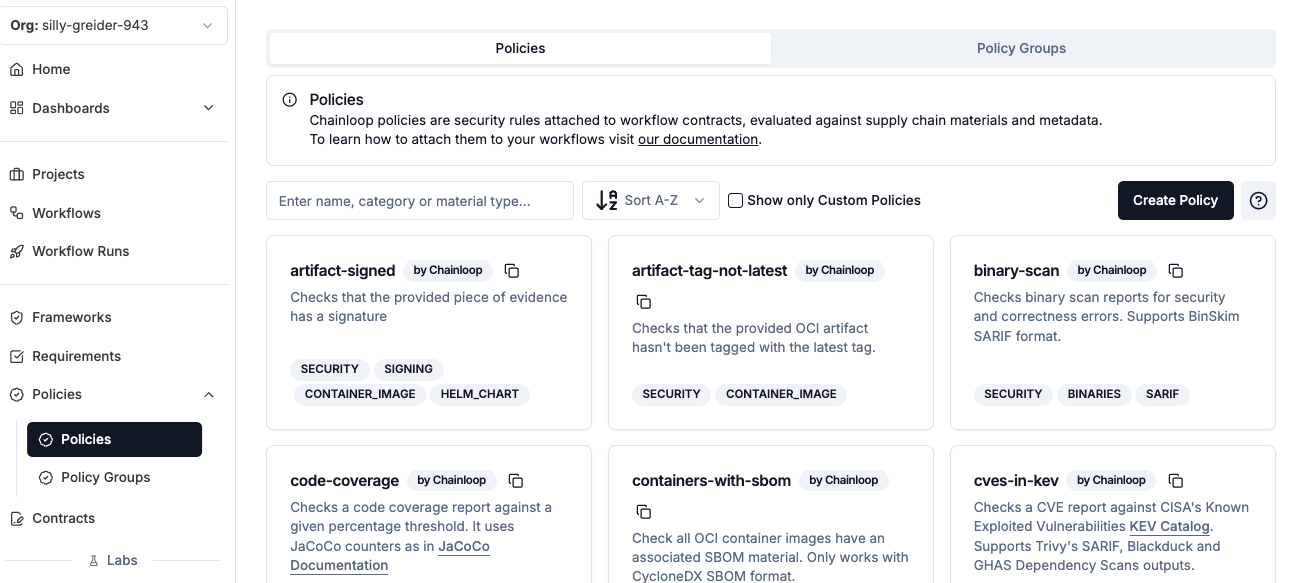
Chainloop provides a curated set of policies tailored to common compliance controls, like:
* SBOM sanity checks,
* Artifact signature verification,
* Licenses and component versions ban policies
* SAST, linters result checks, code quality and coverage
* CVE scans,
* etc.
They can be found in the "Policies" section in Chainloop platform:
 If none of the built-in policies fit your needs, you can create your own, more on that later.
### Custom policies
Custom policies are policies created by the user that can be stored in the Chainloop platform or in a local or remote file.
## Using Policies
### Attaching policies to a contract
Policies are attached to a contract via the `policies` section. Policies can be applied to any material, but also to the attestation statement as a whole.
#### Option 1 - By reference
You can reference policies via three methods:
* If it's a policy stored in the Chainloop platform (either built-in and custom), you can reference it by name
* If it's a custom policy, you can reference it by URL or by path
To store a custom policy in the Chainloop platform, see [Store Custom Policy](/guides/custom-policies#store-custom-policy).
```yaml theme={"dark"}
apiVersion: chainloop.dev/v1
kind: Contract
metadata:
name: policy-example-contract
spec:
materials:
- name: sbom
type: SBOM_CYCLONEDX_JSON
- name: another-sbom
type: SBOM_CYCLONEDX_JSON
- name: my-image
type: CONTAINER_IMAGE
policies:
materials: # policies applied to materials
- ref: sbom-banned-licenses # (1) built-in policy
# or optionally with the digest appended, see integrity checks below
# - ref: sbom-banned-licenses@sha256:5b40425cb7bcba16ac47e3d8a8d3af7288afeeb632096994e741decedd5d38b3
with:
licenses: "AGPL-10, AGPL-3.0"
attestation: # policies applied to the whole attestation
- ref: https://my-org.com/policies/my-custom-remotepolicy.yaml # (2) custom remote policy
```
Here we can see that:
* (1) is a built-in policy referenced by name. Since that policy is compatible with `SBOM_CYCLONEDX_JSON`, only SBOM materials (`sbom` and `another-sbom` in this case) will be evaluated against it.
If we wanted to only evaluate the policy against one specific `sbom` material, and skip the other, we should filter them by name:
```yaml theme={"dark"}
policies:
materials:
- ref: sbom-banned-licenses # (1)
selector:
name: sbom
```
Here, we are making explicit that only `sbom` material must be evaluated by the `sbom-banned-licenses` policy.
* (2) the attestation in-toto statement as a whole will be evaluated against the remote policy `my-custom-remotepolicy.yaml`, which has a `type` property set to `ATTESTATION`.
This brings the opportunity to validate global attestation properties, like annotations, the presence of a material, etc. You can see this policy and other examples in the [examples folder](https://github.com/chainloop-dev/chainloop/tree/main/docs/examples/policies).
Policies can also receive **inputs** (arguments) that tune their behavior, such as the `licenses` list in the `sbom-banned-licenses` example above. Inputs are normally declared in the contract through the policy's `with:` field. For material-type policies, an input can also be sourced dynamically from a CSV or JSON file at attestation time using the [`--policy-input-from-file` flag](/concepts/attestations#sourcing-policy-inputs-from-a-file) — useful for large, data-driven values like exclusion lists.
Finally, note that material policies are evaluated during `chainloop attestation add` commands, while attestation policies run at `chainloop attestation push` by default. Attestation policies can also be configured to run at `chainloop attestation init` using [attestation phases](#attestation-phases).
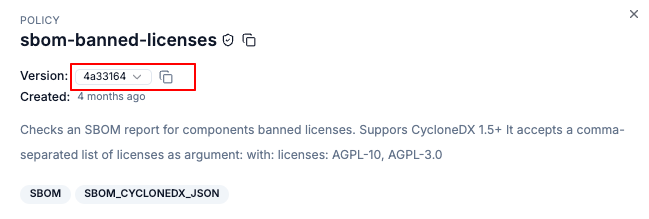
Optionally, you can append the sha256 hash of the policy file content to your policy attachment reference. By doing so, the policy engine will make sure the resolved policy matches the expected hash in the contract reference.
For policies stored in the Chainloop platform, you can find the sha256 hash in the policy details page:
If none of the built-in policies fit your needs, you can create your own, more on that later.
### Custom policies
Custom policies are policies created by the user that can be stored in the Chainloop platform or in a local or remote file.
## Using Policies
### Attaching policies to a contract
Policies are attached to a contract via the `policies` section. Policies can be applied to any material, but also to the attestation statement as a whole.
#### Option 1 - By reference
You can reference policies via three methods:
* If it's a policy stored in the Chainloop platform (either built-in and custom), you can reference it by name
* If it's a custom policy, you can reference it by URL or by path
To store a custom policy in the Chainloop platform, see [Store Custom Policy](/guides/custom-policies#store-custom-policy).
```yaml theme={"dark"}
apiVersion: chainloop.dev/v1
kind: Contract
metadata:
name: policy-example-contract
spec:
materials:
- name: sbom
type: SBOM_CYCLONEDX_JSON
- name: another-sbom
type: SBOM_CYCLONEDX_JSON
- name: my-image
type: CONTAINER_IMAGE
policies:
materials: # policies applied to materials
- ref: sbom-banned-licenses # (1) built-in policy
# or optionally with the digest appended, see integrity checks below
# - ref: sbom-banned-licenses@sha256:5b40425cb7bcba16ac47e3d8a8d3af7288afeeb632096994e741decedd5d38b3
with:
licenses: "AGPL-10, AGPL-3.0"
attestation: # policies applied to the whole attestation
- ref: https://my-org.com/policies/my-custom-remotepolicy.yaml # (2) custom remote policy
```
Here we can see that:
* (1) is a built-in policy referenced by name. Since that policy is compatible with `SBOM_CYCLONEDX_JSON`, only SBOM materials (`sbom` and `another-sbom` in this case) will be evaluated against it.
If we wanted to only evaluate the policy against one specific `sbom` material, and skip the other, we should filter them by name:
```yaml theme={"dark"}
policies:
materials:
- ref: sbom-banned-licenses # (1)
selector:
name: sbom
```
Here, we are making explicit that only `sbom` material must be evaluated by the `sbom-banned-licenses` policy.
* (2) the attestation in-toto statement as a whole will be evaluated against the remote policy `my-custom-remotepolicy.yaml`, which has a `type` property set to `ATTESTATION`.
This brings the opportunity to validate global attestation properties, like annotations, the presence of a material, etc. You can see this policy and other examples in the [examples folder](https://github.com/chainloop-dev/chainloop/tree/main/docs/examples/policies).
Policies can also receive **inputs** (arguments) that tune their behavior, such as the `licenses` list in the `sbom-banned-licenses` example above. Inputs are normally declared in the contract through the policy's `with:` field. For material-type policies, an input can also be sourced dynamically from a CSV or JSON file at attestation time using the [`--policy-input-from-file` flag](/concepts/attestations#sourcing-policy-inputs-from-a-file) — useful for large, data-driven values like exclusion lists.
Finally, note that material policies are evaluated during `chainloop attestation add` commands, while attestation policies run at `chainloop attestation push` by default. Attestation policies can also be configured to run at `chainloop attestation init` using [attestation phases](#attestation-phases).
Optionally, you can append the sha256 hash of the policy file content to your policy attachment reference. By doing so, the policy engine will make sure the resolved policy matches the expected hash in the contract reference.
For policies stored in the Chainloop platform, you can find the sha256 hash in the policy details page:
 #### Option 2 - Embedded
As an alternative to referencing policies, you can also embed them in your contract. This is useful if you want to ensure that the policy source cannot be changed, as it's stored and versioned within the contract.
```yaml theme={"dark"}
policies:
materials:
- embedded:
apiVersion: workflowcontract.chainloop.dev/v1
kind: Policy
metadata:
name: cve-policy
spec:
policies:
- kind: SBOM_CYCLONEDX_JSON
path: cves-cyclonedx.rego
```
### Understanding policy evaluation results
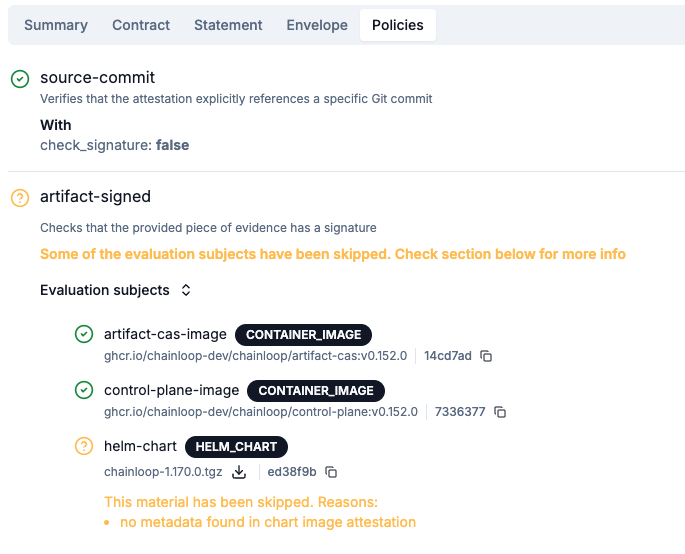
Once configured, Policies are evaluated against inputs (inputs, materials, and artifacts, will be explained in the following sections). Evaluation results will include:
* Overall result: success, failure, skipped
* Policy violations: if the evaluation failed, what were the failures. For example: “component x, version y has critical vulnerabilities”
* Skip reason: if the policy couldn't be evaluated, what's the reason (input might have the wrong format, for example)
#### Option 2 - Embedded
As an alternative to referencing policies, you can also embed them in your contract. This is useful if you want to ensure that the policy source cannot be changed, as it's stored and versioned within the contract.
```yaml theme={"dark"}
policies:
materials:
- embedded:
apiVersion: workflowcontract.chainloop.dev/v1
kind: Policy
metadata:
name: cve-policy
spec:
policies:
- kind: SBOM_CYCLONEDX_JSON
path: cves-cyclonedx.rego
```
### Understanding policy evaluation results
Once configured, Policies are evaluated against inputs (inputs, materials, and artifacts, will be explained in the following sections). Evaluation results will include:
* Overall result: success, failure, skipped
* Policy violations: if the evaluation failed, what were the failures. For example: “component x, version y has critical vulnerabilities”
* Skip reason: if the policy couldn't be evaluated, what's the reason (input might have the wrong format, for example)
 The results of policy evaluations are stored in Chainloop on every attestation and can be queried through the user interface:
 ### Attestation Phases
Attestation-level policies can be scoped to specific phases of the attestation lifecycle using the `attestation_phases` field in the policy spec. This allows policy authors to control *when* their attestation policies are evaluated during the workflow.
There are two available phases:
| Phase | Runs at | Use cases |
| ------ | ---------------------------- | -------------------------------------------------------------------------- |
| `INIT` | `chainloop attestation init` | Pre-condition checks, early validation (e.g. required annotations exist) |
| `PUSH` | `chainloop attestation push` | Full attestation validation (e.g. all materials present, signature checks) |
#### Configuring phases in a policy spec
The `attestation_phases` field is set in the policy spec on entries with `kind: ATTESTATION`. You can specify one or both phases:
```yaml theme={"dark"}
# Single phase — runs only at init
apiVersion: workflowcontract.chainloop.dev/v1
kind: Policy
metadata:
name: pre-condition-check
spec:
policies:
- kind: ATTESTATION
attestation_phases:
- INIT
path: pre-condition.rego
```
```yaml theme={"dark"}
# Multiple phases — runs at both init and push
apiVersion: workflowcontract.chainloop.dev/v1
kind: Policy
metadata:
name: full-lifecycle-check
spec:
policies:
- kind: ATTESTATION
attestation_phases:
- INIT
- PUSH
path: lifecycle-check.rego
```
When `attestation_phases` is omitted, the policy runs at **all phases** (`INIT` and `PUSH`) by default. Set `attestation_phases` to restrict evaluation to a single phase.
#### Phase result handling
* If a policy runs at both `INIT` and `PUSH`, the `PUSH` result **overwrites** the `INIT` result for that policy.
* If a policy runs only at `INIT`, its result is **preserved** through the push phase.
* Running `chainloop attestation status` displays existing policy results without re-evaluating them.
The `attestation_phases` field only applies to policies with `kind: ATTESTATION`. Material policies are always evaluated during `chainloop attestation add` and are not affected by this setting.
### Configuring Enforcement
Control and Quality gates are checkpoints in your software supply chain that enforce policies and security checks, ensuring only compliant artifacts and evidence progress through your CI/CD pipeline. When a control gate is triggered, policy violations will block the pipeline while still recording the attestation for audit purposes.
For detailed information about configuring enforcement, using control gates in CI/CD pipelines, and handling exceptions, please see the [Control and Quality Gates](/concepts/control-gates) guide.
## Writing policies
You can learn more about writing policies in the [custom policies](/guides/custom-policies) guide.
### Attestation Phases
Attestation-level policies can be scoped to specific phases of the attestation lifecycle using the `attestation_phases` field in the policy spec. This allows policy authors to control *when* their attestation policies are evaluated during the workflow.
There are two available phases:
| Phase | Runs at | Use cases |
| ------ | ---------------------------- | -------------------------------------------------------------------------- |
| `INIT` | `chainloop attestation init` | Pre-condition checks, early validation (e.g. required annotations exist) |
| `PUSH` | `chainloop attestation push` | Full attestation validation (e.g. all materials present, signature checks) |
#### Configuring phases in a policy spec
The `attestation_phases` field is set in the policy spec on entries with `kind: ATTESTATION`. You can specify one or both phases:
```yaml theme={"dark"}
# Single phase — runs only at init
apiVersion: workflowcontract.chainloop.dev/v1
kind: Policy
metadata:
name: pre-condition-check
spec:
policies:
- kind: ATTESTATION
attestation_phases:
- INIT
path: pre-condition.rego
```
```yaml theme={"dark"}
# Multiple phases — runs at both init and push
apiVersion: workflowcontract.chainloop.dev/v1
kind: Policy
metadata:
name: full-lifecycle-check
spec:
policies:
- kind: ATTESTATION
attestation_phases:
- INIT
- PUSH
path: lifecycle-check.rego
```
When `attestation_phases` is omitted, the policy runs at **all phases** (`INIT` and `PUSH`) by default. Set `attestation_phases` to restrict evaluation to a single phase.
#### Phase result handling
* If a policy runs at both `INIT` and `PUSH`, the `PUSH` result **overwrites** the `INIT` result for that policy.
* If a policy runs only at `INIT`, its result is **preserved** through the push phase.
* Running `chainloop attestation status` displays existing policy results without re-evaluating them.
The `attestation_phases` field only applies to policies with `kind: ATTESTATION`. Material policies are always evaluated during `chainloop attestation add` and are not affected by this setting.
### Configuring Enforcement
Control and Quality gates are checkpoints in your software supply chain that enforce policies and security checks, ensuring only compliant artifacts and evidence progress through your CI/CD pipeline. When a control gate is triggered, policy violations will block the pipeline while still recording the attestation for audit purposes.
For detailed information about configuring enforcement, using control gates in CI/CD pipelines, and handling exceptions, please see the [Control and Quality Gates](/concepts/control-gates) guide.
## Writing policies
You can learn more about writing policies in the [custom policies](/guides/custom-policies) guide.