> ## Documentation Index
> Fetch the complete documentation index at: https://docs.chainloop.dev/llms.txt
> Use this file to discover all available pages before exploring further.
# Integrations
## Overview
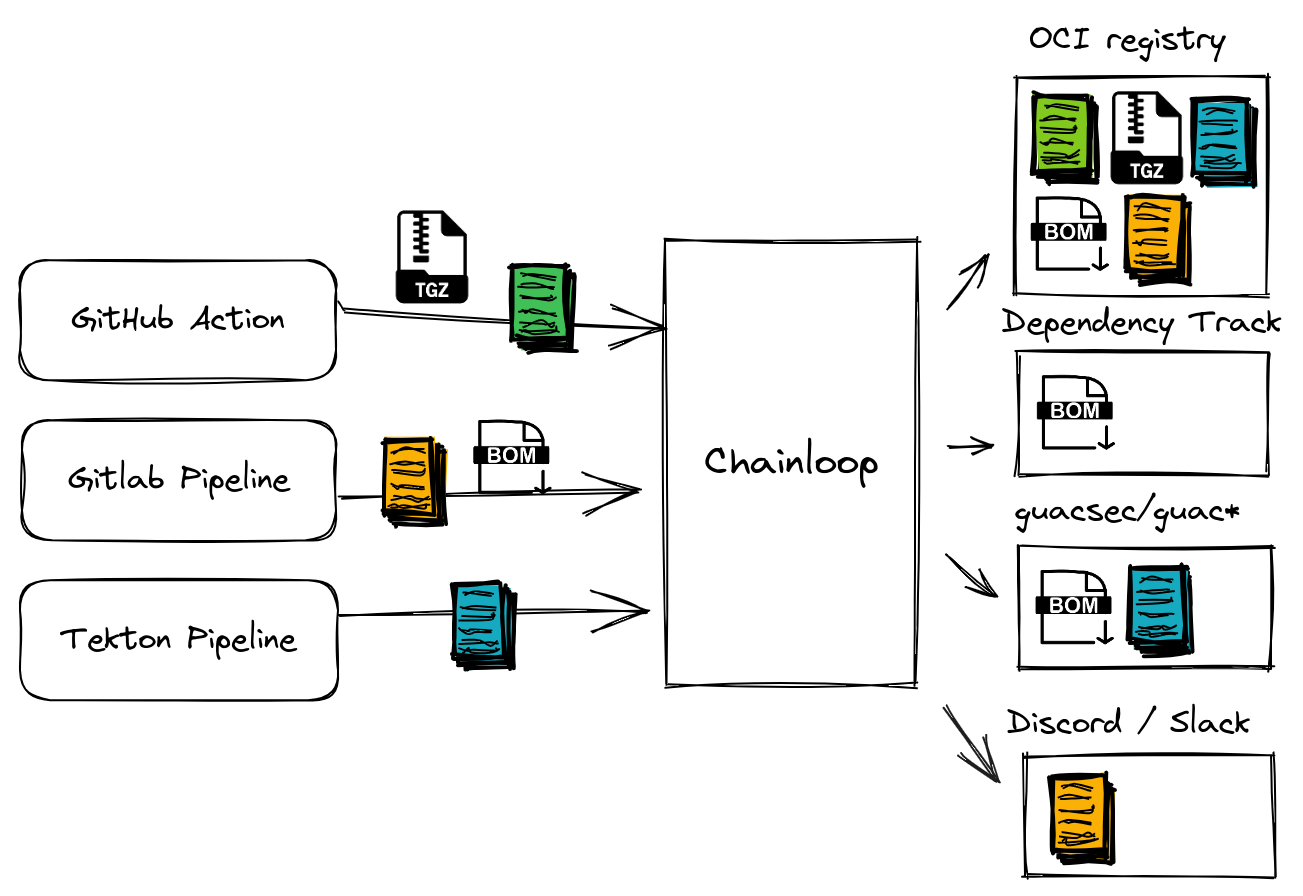
Operators can extend Chainloop functionality by setting up third-party integrations that operate on your attestation metadata and workflow events. Integrations can range from sending a Slack message, uploading the attestation to a storage backend or sending a Software Bill Of Materials (SBOMs) to a third-party service for analysis, for example.
 ### Integration capabilities
Chainloop integrations provide the following capabilities:
* **Keyless Attestation** — Attest directly from CI/CD environments using OIDC tokens, with no API keys to manage.
* **Repository Integration** — Link source code repositories to Chainloop projects so attestations are scoped and validated per-repo.
* **Fan-Out** — Distribute attestations, SBOMs, and artifacts to external systems after a workflow run.
* **Notifications** — Send alerts about product updates, system status, and workflow events.
* **Issue Tracker** — Create and track issues in your team's issue tracker from security assessments.
* **Chainloop Ask** — Power the [Ask Chainloop](/concepts/ask-chainloop) natural language assistant in the web UI and Slack.
* **Evidence AI Prompt** — Evaluate attestation evidence using AI-driven, natural-language policies. See the [LLM-driven policies guide](https://docs.chainloop.dev/guides/llm-policies) and the [LLM support reference](/reference/llm-support).
Below you can find the list of currently available integrations. If you can't find the integration you are looking for, feel free to reach out or [contribute your own!](https://github.com/chainloop-dev/chainloop)
## Integration providers
Keyless attestation, repository integration
Keyless attestation, repository integration
Notifications, Chainloop Ask
Issue tracker (create issues from assessments)
Fan-out (CycloneDX SBOMs)
Fan-out (attestation delivery)
Chainloop Ask, Evidence AI Prompt
Chainloop Ask, Evidence AI Prompt
Fan-out (attestation + SBOM export)
Fan-out (generic POST)
Fan-out, Notifications
Notifications
***
For how GitHub and GitLab differ, what connecting a repository enables, and self-hosted setup, see the [Repository Integration](/guides/repository-integration) overview.
### GitHub
| Capability | Description |
| --------------------------------------------------------------------------------------------------------------------------------------------------------------------------------------------------------------------------------------------------------------------------------- | ------------------------------------------------------------------------------------------------- |
| **Keyless Attestation** | Attest from GitHub Actions using OIDC tokens — no API keys required. |
| **Repository Integration** | Enroll GitHub repositories and link them to Chainloop projects for scoped attestation validation. |
| GitHub integration leverages GitHub's native OIDC identity provider, enabling your CI pipelines to perform attestations without managing long-lived credentials. Repositories are enrolled in Chainloop and linked to projects, so only authorized repos can submit attestations. | |
Step-by-step setup for OIDC-based keyless attestations from GitHub Actions.
### GitLab
| Capability | Description |
| -------------------------- | ------------------------------------------------------------------------------------------------- |
| **Keyless Attestation** | Attest from GitLab CI runners using OIDC tokens — no API keys required. |
| **Repository Integration** | Enroll GitLab repositories and link them to Chainloop projects for scoped attestation validation. |
GitLab integration uses GitLab's OIDC tokens with a `chainloop` audience claim. Like GitHub, repositories are enrolled and linked to projects before attestations are accepted.
Step-by-step setup for OIDC-based keyless attestations from GitLab CI.
### Slack
This feature is only available on Chainloop's platform [paid plans](https://chainloop.dev/pricing).
| Capability | Description |
| ----------------- | ------------------------------------------------------------------------------------------------------------------------------ |
| **Notifications** | Receive alerts about product updates, system status, and workflow events via Slack channels. |
| **Chainloop Ask** | Query your supply chain data using natural language directly from Slack (requires an AI provider such as Anthropic or OpenAI). |
Slack can be configured as both a notification channel and a Chainloop Ask interface. Notifications are configured at the organization or product level. Chainloop Ask in Slack requires a registered [AI provider](#openai) to function.
Configure Slack notification channels and preferences.
Learn about the AI-powered assistant available in web and Slack.
### Linear
This feature is only available on Chainloop's platform [paid plans](https://chainloop.dev/pricing).
| Capability | Description |
| ----------------- | ------------------------------------------------------------------------------------------------------------------------------------- |
| **Issue Tracker** | Create [Linear](https://linear.app/) issues from security assessments, capturing severity, scope, justification, and linked findings. |
Turn a security assessment into a Linear issue so your team can triage and track remediation alongside their existing work.
Learn how to connect Linear and create issues from assessments.
### Dependency Track
| Capability | Description |
| ----------- | -------------------------------------------------------------------------------------------------------------------------------- |
| **Fan-Out** | Automatically send CycloneDX SBOMs to your [Dependency-Track](https://dependencytrack.org/) instance for vulnerability analysis. |
This integration forwards SBOM materials collected during attestation to Dependency-Track, enabling continuous vulnerability monitoring of your software components.
Supported metadata: `SBOM_CYCLONEDX_JSON`
[View integration source](https://github.com/chainloop-dev/chainloop/blob/main/app/controlplane/plugins/core/dependency-track/v1/README.md)
### Discord
| Capability | Description |
| ----------- | ------------------------------------------------------------ |
| **Fan-Out** | Send attestation summaries to Discord channels via webhooks. |
[View integration source](https://github.com/chainloop-dev/chainloop/blob/main/app/controlplane/plugins/core/discord-webhook/v1/README.md)
### OpenAI
This feature is only available on Chainloop's platform [paid plans](https://chainloop.dev/pricing).
| Capability | Description |
| ---------------------- | -------------------------------------------------------------------------------------- |
| **Chainloop Ask** | Powers the [Ask Chainloop](/concepts/ask-chainloop) assistant in the web UI and Slack. |
| **Evidence AI Prompt** | Evaluate attestation evidence using natural-language policies via OpenAI models. |
Register OpenAI as an AI provider to enable Chainloop Ask across the web UI and Slack, and to use LLM-driven policy evaluations on attestation evidence.
Natural language assistant for supply chain queries.
Configuration details for AI providers.
### Anthropic
This feature is only available on Chainloop's platform [paid plans](https://chainloop.dev/pricing).
| Capability | Description |
| ---------------------- | -------------------------------------------------------------------------------------- |
| **Chainloop Ask** | Powers the [Ask Chainloop](/concepts/ask-chainloop) assistant in the web UI and Slack. |
| **Evidence AI Prompt** | Evaluate attestation evidence using natural-language policies via Anthropic models. |
Register Anthropic as an AI provider to enable Chainloop Ask across the web UI and Slack, and to use LLM-driven policy evaluations on attestation evidence.
Natural language assistant for supply chain queries.
Configuration details for AI providers.
### GUAC
| Capability | Description |
| ----------- | ---------------------------------------------------------------------------------------------------------------------------------- |
| **Fan-Out** | Export attestation and SBOM metadata to a blob storage backend for consumption by [guacsec/guac](https://github.com/guacsec/guac). |
Supported metadata: `SBOM_CYCLONEDX_JSON`, `SBOM_SPDX_JSON`
[View integration source](https://github.com/chainloop-dev/chainloop/blob/main/app/controlplane/plugins/core/guac/v1/README.md)
### Webhook
| Capability | Description |
| ----------- | ---------------------------------------------------------------------------- |
| **Fan-Out** | Send attestations and SBOMs to any HTTP endpoint via a generic POST webhook. |
A flexible integration for forwarding attestation data to any system that accepts webhooks.
Supported metadata: `Attestation`, `SBOM_CYCLONEDX_JSON`, `SBOM_SPDX_JSON`
[View integration source](https://github.com/chainloop-dev/chainloop/blob/main/app/controlplane/plugins/core/webhook/v1/README.md)
### SMTP / Email
| Capability | Description |
| ----------------- | ------------------------------------------------------------------- |
| **Fan-Out** | Send emails containing attestation information after workflow runs. |
| **Notifications** | Receive system and product notifications via email. |
SMTP can be used as both a fan-out integration (attached to workflows) and a notification channel (configured at the organization or product level).
View SMTP fan-out integration source.
Configure email notification preferences.
### Microsoft Teams
This feature is only available on Chainloop's platform [paid plans](https://chainloop.dev/pricing).
| Capability | Description |
| ----------------- | ------------------------------------------------------------------------------------------------------ |
| **Notifications** | Receive alerts about product updates, system status, and workflow events via Microsoft Teams channels. |
Check the [Notifications documentation](./notifications) for configuration details.
***
## Setting up integrations
Both Fan-Out and Notification integrations follow the same registration process. The key difference is how they are used after registration:
* **Fan-Out integrations** are attached to individual workflows
* **Notification integrations** are configured at different scopes for alerting purposes (Organization-level, Product-level)
* **Issue Tracker integrations** are connected once per organization, then used from the assessment view to create issues
* **LLM integrations** are registered globally, and used in agentic policies
### Step 1: Check available integrations
First, make sure that the integration you are looking for is available in your Chainloop instance:
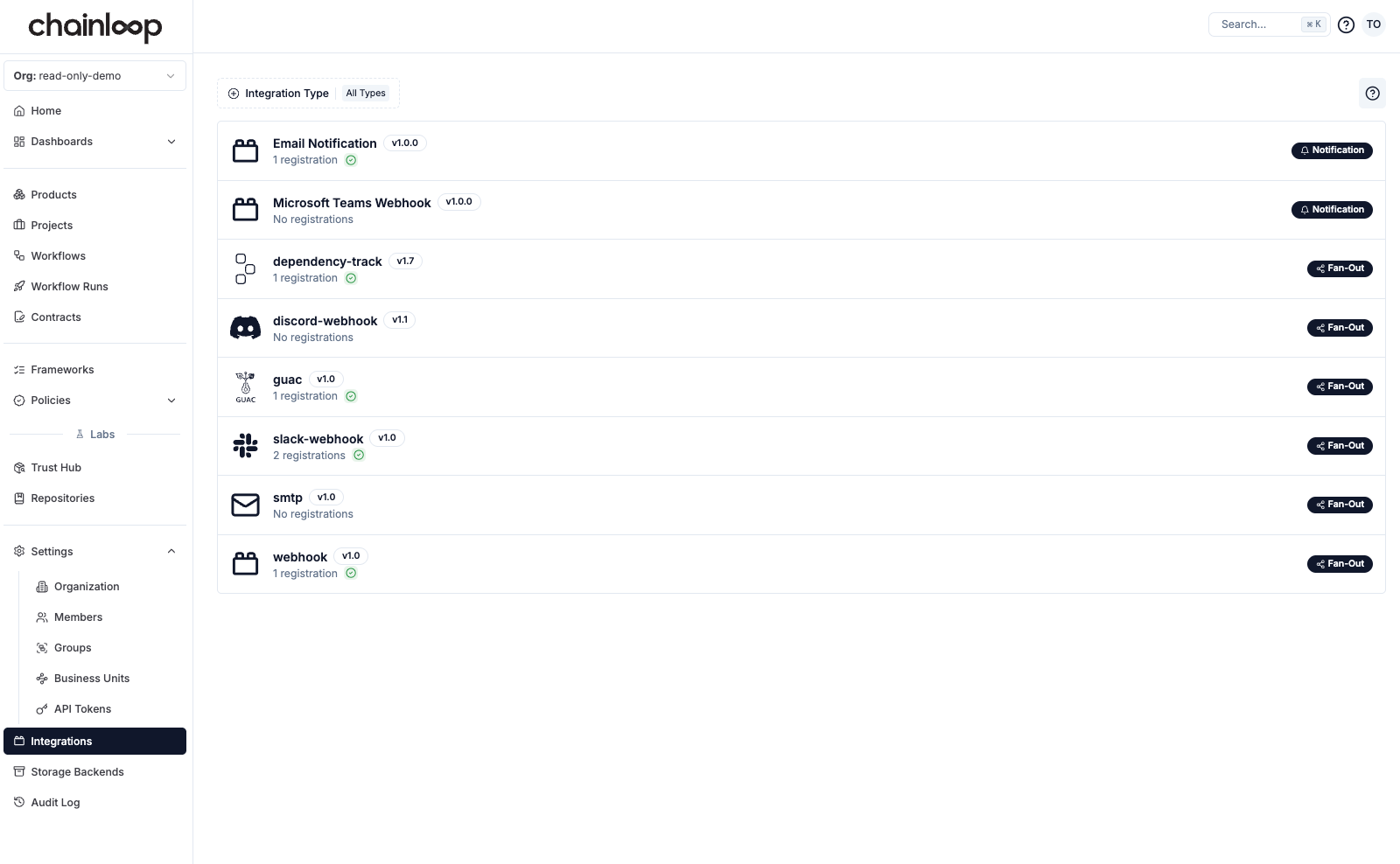
Go to the [Integrations](https://app.chainloop.dev/integrations) page and check if the integration you are looking for is available.
### Integration capabilities
Chainloop integrations provide the following capabilities:
* **Keyless Attestation** — Attest directly from CI/CD environments using OIDC tokens, with no API keys to manage.
* **Repository Integration** — Link source code repositories to Chainloop projects so attestations are scoped and validated per-repo.
* **Fan-Out** — Distribute attestations, SBOMs, and artifacts to external systems after a workflow run.
* **Notifications** — Send alerts about product updates, system status, and workflow events.
* **Issue Tracker** — Create and track issues in your team's issue tracker from security assessments.
* **Chainloop Ask** — Power the [Ask Chainloop](/concepts/ask-chainloop) natural language assistant in the web UI and Slack.
* **Evidence AI Prompt** — Evaluate attestation evidence using AI-driven, natural-language policies. See the [LLM-driven policies guide](https://docs.chainloop.dev/guides/llm-policies) and the [LLM support reference](/reference/llm-support).
Below you can find the list of currently available integrations. If you can't find the integration you are looking for, feel free to reach out or [contribute your own!](https://github.com/chainloop-dev/chainloop)
## Integration providers
Keyless attestation, repository integration
Keyless attestation, repository integration
Notifications, Chainloop Ask
Issue tracker (create issues from assessments)
Fan-out (CycloneDX SBOMs)
Fan-out (attestation delivery)
Chainloop Ask, Evidence AI Prompt
Chainloop Ask, Evidence AI Prompt
Fan-out (attestation + SBOM export)
Fan-out (generic POST)
Fan-out, Notifications
Notifications
***
For how GitHub and GitLab differ, what connecting a repository enables, and self-hosted setup, see the [Repository Integration](/guides/repository-integration) overview.
### GitHub
| Capability | Description |
| --------------------------------------------------------------------------------------------------------------------------------------------------------------------------------------------------------------------------------------------------------------------------------- | ------------------------------------------------------------------------------------------------- |
| **Keyless Attestation** | Attest from GitHub Actions using OIDC tokens — no API keys required. |
| **Repository Integration** | Enroll GitHub repositories and link them to Chainloop projects for scoped attestation validation. |
| GitHub integration leverages GitHub's native OIDC identity provider, enabling your CI pipelines to perform attestations without managing long-lived credentials. Repositories are enrolled in Chainloop and linked to projects, so only authorized repos can submit attestations. | |
Step-by-step setup for OIDC-based keyless attestations from GitHub Actions.
### GitLab
| Capability | Description |
| -------------------------- | ------------------------------------------------------------------------------------------------- |
| **Keyless Attestation** | Attest from GitLab CI runners using OIDC tokens — no API keys required. |
| **Repository Integration** | Enroll GitLab repositories and link them to Chainloop projects for scoped attestation validation. |
GitLab integration uses GitLab's OIDC tokens with a `chainloop` audience claim. Like GitHub, repositories are enrolled and linked to projects before attestations are accepted.
Step-by-step setup for OIDC-based keyless attestations from GitLab CI.
### Slack
This feature is only available on Chainloop's platform [paid plans](https://chainloop.dev/pricing).
| Capability | Description |
| ----------------- | ------------------------------------------------------------------------------------------------------------------------------ |
| **Notifications** | Receive alerts about product updates, system status, and workflow events via Slack channels. |
| **Chainloop Ask** | Query your supply chain data using natural language directly from Slack (requires an AI provider such as Anthropic or OpenAI). |
Slack can be configured as both a notification channel and a Chainloop Ask interface. Notifications are configured at the organization or product level. Chainloop Ask in Slack requires a registered [AI provider](#openai) to function.
Configure Slack notification channels and preferences.
Learn about the AI-powered assistant available in web and Slack.
### Linear
This feature is only available on Chainloop's platform [paid plans](https://chainloop.dev/pricing).
| Capability | Description |
| ----------------- | ------------------------------------------------------------------------------------------------------------------------------------- |
| **Issue Tracker** | Create [Linear](https://linear.app/) issues from security assessments, capturing severity, scope, justification, and linked findings. |
Turn a security assessment into a Linear issue so your team can triage and track remediation alongside their existing work.
Learn how to connect Linear and create issues from assessments.
### Dependency Track
| Capability | Description |
| ----------- | -------------------------------------------------------------------------------------------------------------------------------- |
| **Fan-Out** | Automatically send CycloneDX SBOMs to your [Dependency-Track](https://dependencytrack.org/) instance for vulnerability analysis. |
This integration forwards SBOM materials collected during attestation to Dependency-Track, enabling continuous vulnerability monitoring of your software components.
Supported metadata: `SBOM_CYCLONEDX_JSON`
[View integration source](https://github.com/chainloop-dev/chainloop/blob/main/app/controlplane/plugins/core/dependency-track/v1/README.md)
### Discord
| Capability | Description |
| ----------- | ------------------------------------------------------------ |
| **Fan-Out** | Send attestation summaries to Discord channels via webhooks. |
[View integration source](https://github.com/chainloop-dev/chainloop/blob/main/app/controlplane/plugins/core/discord-webhook/v1/README.md)
### OpenAI
This feature is only available on Chainloop's platform [paid plans](https://chainloop.dev/pricing).
| Capability | Description |
| ---------------------- | -------------------------------------------------------------------------------------- |
| **Chainloop Ask** | Powers the [Ask Chainloop](/concepts/ask-chainloop) assistant in the web UI and Slack. |
| **Evidence AI Prompt** | Evaluate attestation evidence using natural-language policies via OpenAI models. |
Register OpenAI as an AI provider to enable Chainloop Ask across the web UI and Slack, and to use LLM-driven policy evaluations on attestation evidence.
Natural language assistant for supply chain queries.
Configuration details for AI providers.
### Anthropic
This feature is only available on Chainloop's platform [paid plans](https://chainloop.dev/pricing).
| Capability | Description |
| ---------------------- | -------------------------------------------------------------------------------------- |
| **Chainloop Ask** | Powers the [Ask Chainloop](/concepts/ask-chainloop) assistant in the web UI and Slack. |
| **Evidence AI Prompt** | Evaluate attestation evidence using natural-language policies via Anthropic models. |
Register Anthropic as an AI provider to enable Chainloop Ask across the web UI and Slack, and to use LLM-driven policy evaluations on attestation evidence.
Natural language assistant for supply chain queries.
Configuration details for AI providers.
### GUAC
| Capability | Description |
| ----------- | ---------------------------------------------------------------------------------------------------------------------------------- |
| **Fan-Out** | Export attestation and SBOM metadata to a blob storage backend for consumption by [guacsec/guac](https://github.com/guacsec/guac). |
Supported metadata: `SBOM_CYCLONEDX_JSON`, `SBOM_SPDX_JSON`
[View integration source](https://github.com/chainloop-dev/chainloop/blob/main/app/controlplane/plugins/core/guac/v1/README.md)
### Webhook
| Capability | Description |
| ----------- | ---------------------------------------------------------------------------- |
| **Fan-Out** | Send attestations and SBOMs to any HTTP endpoint via a generic POST webhook. |
A flexible integration for forwarding attestation data to any system that accepts webhooks.
Supported metadata: `Attestation`, `SBOM_CYCLONEDX_JSON`, `SBOM_SPDX_JSON`
[View integration source](https://github.com/chainloop-dev/chainloop/blob/main/app/controlplane/plugins/core/webhook/v1/README.md)
### SMTP / Email
| Capability | Description |
| ----------------- | ------------------------------------------------------------------- |
| **Fan-Out** | Send emails containing attestation information after workflow runs. |
| **Notifications** | Receive system and product notifications via email. |
SMTP can be used as both a fan-out integration (attached to workflows) and a notification channel (configured at the organization or product level).
View SMTP fan-out integration source.
Configure email notification preferences.
### Microsoft Teams
This feature is only available on Chainloop's platform [paid plans](https://chainloop.dev/pricing).
| Capability | Description |
| ----------------- | ------------------------------------------------------------------------------------------------------ |
| **Notifications** | Receive alerts about product updates, system status, and workflow events via Microsoft Teams channels. |
Check the [Notifications documentation](./notifications) for configuration details.
***
## Setting up integrations
Both Fan-Out and Notification integrations follow the same registration process. The key difference is how they are used after registration:
* **Fan-Out integrations** are attached to individual workflows
* **Notification integrations** are configured at different scopes for alerting purposes (Organization-level, Product-level)
* **Issue Tracker integrations** are connected once per organization, then used from the assessment view to create issues
* **LLM integrations** are registered globally, and used in agentic policies
### Step 1: Check available integrations
First, make sure that the integration you are looking for is available in your Chainloop instance:
Go to the [Integrations](https://app.chainloop.dev/integrations) page and check if the integration you are looking for is available.
 ```bash theme={"dark"}
chainloop integration available list
```
```bash theme={"dark"}
┌──────────────────┬─────────┬──────────────────────┬───────────────────────────────────────────────────────────┐
│ ID │ VERSION │ MATERIAL REQUIREMENT │ DESCRIPTION │
├──────────────────┼─────────┼──────────────────────┼───────────────────────────────────────────────────────────┤
│ dependency-track │ 1.2 │ SBOM_CYCLONEDX_JSON │ Send CycloneDX SBOMs to your Dependency-Track instance │
├──────────────────┼─────────┼──────────────────────┼───────────────────────────────────────────────────────────┤
│ smtp │ 1.0 │ │ Send emails with information about a received attestation │
├──────────────────┼─────────┼──────────────────────┼───────────────────────────────────────────────────────────┤
│ oci-registry │ 1.0 │ │ Send attestations to a compatible OCI registry │
├──────────────────┼─────────┼──────────────────────┼───────────────────────────────────────────────────────────┤
│ discord-webhook │ 1.1 │ │ Send attestations to Discord │
└──────────────────┴─────────┴──────────────────────┴───────────────────────────────────────────────────────────┘
```
In addition to the UI, you can find all the available operations related to integrations in the CLI by running `chainloop integration --help`
### Step 2: Register the integration
Registration is when a specific instance of the integration is configured in a Chainloop organization. A registered instance is then available to be attached to workflows (for Fan-Out) or configured globally (for Notifications). Each registration shows its configuration status in the UI.
In our case, as an example, we want to register an instance of the webhook integration.
To do so, click on the integration. You'll see two sections: Registration inputs, and Attachment inputs.
```bash theme={"dark"}
chainloop integration available list
```
```bash theme={"dark"}
┌──────────────────┬─────────┬──────────────────────┬───────────────────────────────────────────────────────────┐
│ ID │ VERSION │ MATERIAL REQUIREMENT │ DESCRIPTION │
├──────────────────┼─────────┼──────────────────────┼───────────────────────────────────────────────────────────┤
│ dependency-track │ 1.2 │ SBOM_CYCLONEDX_JSON │ Send CycloneDX SBOMs to your Dependency-Track instance │
├──────────────────┼─────────┼──────────────────────┼───────────────────────────────────────────────────────────┤
│ smtp │ 1.0 │ │ Send emails with information about a received attestation │
├──────────────────┼─────────┼──────────────────────┼───────────────────────────────────────────────────────────┤
│ oci-registry │ 1.0 │ │ Send attestations to a compatible OCI registry │
├──────────────────┼─────────┼──────────────────────┼───────────────────────────────────────────────────────────┤
│ discord-webhook │ 1.1 │ │ Send attestations to Discord │
└──────────────────┴─────────┴──────────────────────┴───────────────────────────────────────────────────────────┘
```
In addition to the UI, you can find all the available operations related to integrations in the CLI by running `chainloop integration --help`
### Step 2: Register the integration
Registration is when a specific instance of the integration is configured in a Chainloop organization. A registered instance is then available to be attached to workflows (for Fan-Out) or configured globally (for Notifications). Each registration shows its configuration status in the UI.
In our case, as an example, we want to register an instance of the webhook integration.
To do so, click on the integration. You'll see two sections: Registration inputs, and Attachment inputs.
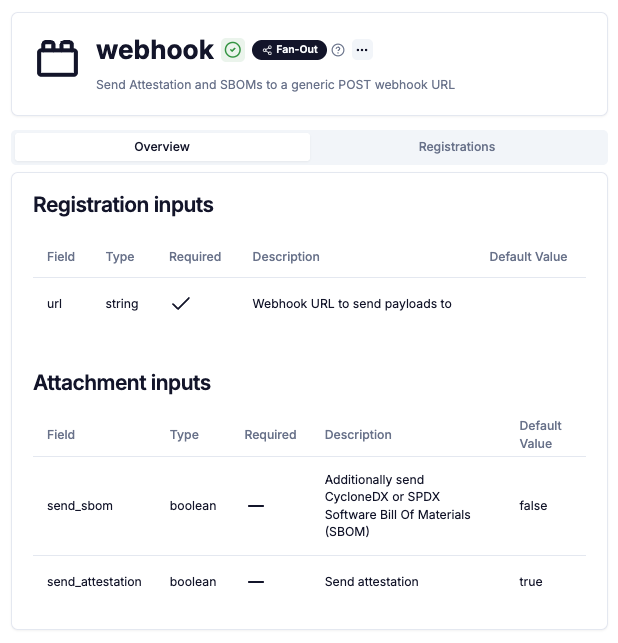 **Registration inputs** are a one-time set of fields required to register the integration in your organization. In this case, the URL of the webhook. However, Attachment inputs are properties set at the workflow level, which can vary from one workflow to another within the same organization.
Click "Add Registration" to set the URL value
**Registration inputs** are a one-time set of fields required to register the integration in your organization. In this case, the URL of the webhook. However, Attachment inputs are properties set at the workflow level, which can vary from one workflow to another within the same organization.
Click "Add Registration" to set the URL value
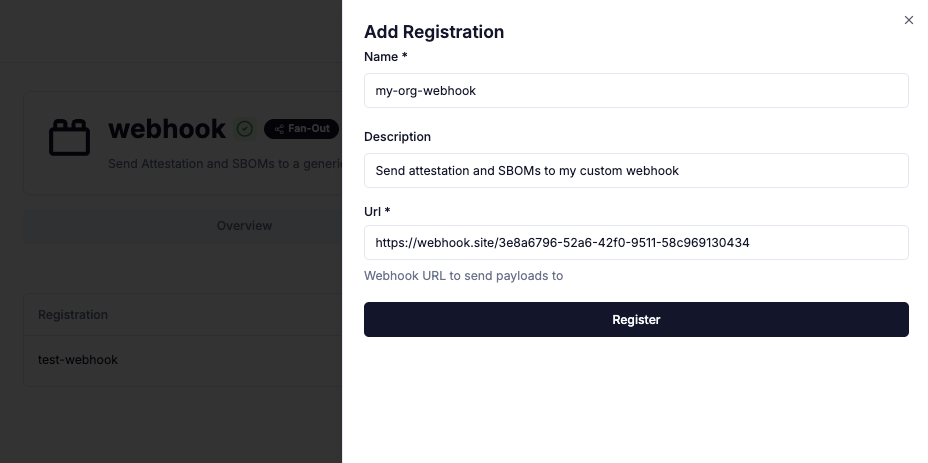
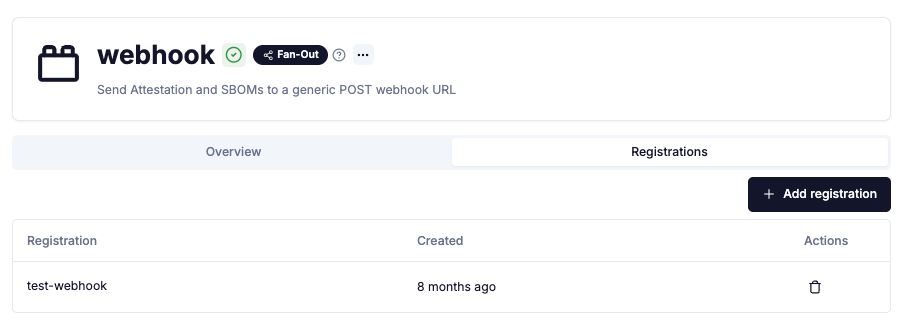 After clicking "Register" you'll see your integration in the "Registrations" tab:
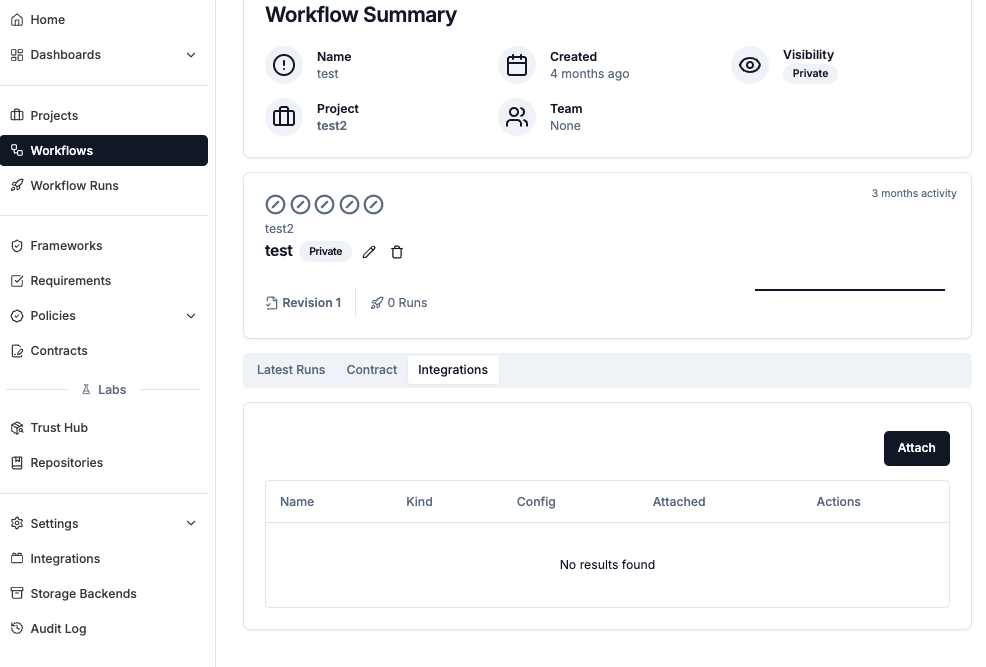 Check the required **registration inputs**
```bash theme={"dark"}
chainloop integration available describe --name webhook
┌─────────┬─────────┬─────────────────────────────────────┬──────────────────────────────────────────────────────────┐
│ NAME │ VERSION │ MATERIAL REQUIREMENT │ DESCRIPTION │
├─────────┼─────────┼─────────────────────────────────────┼──────────────────────────────────────────────────────────┤
│ webhook │ 1.0 │ SBOM_CYCLONEDX_JSON, SBOM_SPDX_JSON │ Send Attestation and SBOMs to a generic POST webhook URL │
└─────────┴─────────┴─────────────────────────────────────┴──────────────────────────────────────────────────────────┘
┌─────────────────────────────────────────────────────────────┐
│ Registration inputs │
├───────┬────────┬──────────┬─────────────────────────────────┤
│ FIELD │ TYPE │ REQUIRED │ DESCRIPTION │
├───────┼────────┼──────────┼─────────────────────────────────┤
│ url │ string │ Yes │ Webhook URL to send payloads to │
└───────┴────────┴──────────┴─────────────────────────────────┘
...
```
lastly, register the integration providing the required input parameter
```bash theme={"dark"}
# Example of registering a webhook integration
chainloop integration registered add webhook \
--name [unique-registration-name] \
--opt url=[webhook-url]
```
### Step 3: Attaching Fan-Out integrations to workflows
For Notification integrations: Check the [Notifications documentation](./notifications) for reference.
Once the integration is registered, the next step depends on the integration type:
Attach the integration to specific workflows. In practice this means that attestations and material information generated in those workflows will be sent to the registered integration.
In the workflow view, click on the integrations tab:
Check the required **registration inputs**
```bash theme={"dark"}
chainloop integration available describe --name webhook
┌─────────┬─────────┬─────────────────────────────────────┬──────────────────────────────────────────────────────────┐
│ NAME │ VERSION │ MATERIAL REQUIREMENT │ DESCRIPTION │
├─────────┼─────────┼─────────────────────────────────────┼──────────────────────────────────────────────────────────┤
│ webhook │ 1.0 │ SBOM_CYCLONEDX_JSON, SBOM_SPDX_JSON │ Send Attestation and SBOMs to a generic POST webhook URL │
└─────────┴─────────┴─────────────────────────────────────┴──────────────────────────────────────────────────────────┘
┌─────────────────────────────────────────────────────────────┐
│ Registration inputs │
├───────┬────────┬──────────┬─────────────────────────────────┤
│ FIELD │ TYPE │ REQUIRED │ DESCRIPTION │
├───────┼────────┼──────────┼─────────────────────────────────┤
│ url │ string │ Yes │ Webhook URL to send payloads to │
└───────┴────────┴──────────┴─────────────────────────────────┘
...
```
lastly, register the integration providing the required input parameter
```bash theme={"dark"}
# Example of registering a webhook integration
chainloop integration registered add webhook \
--name [unique-registration-name] \
--opt url=[webhook-url]
```
### Step 3: Attaching Fan-Out integrations to workflows
For Notification integrations: Check the [Notifications documentation](./notifications) for reference.
Once the integration is registered, the next step depends on the integration type:
Attach the integration to specific workflows. In practice this means that attestations and material information generated in those workflows will be sent to the registered integration.
In the workflow view, click on the integrations tab:
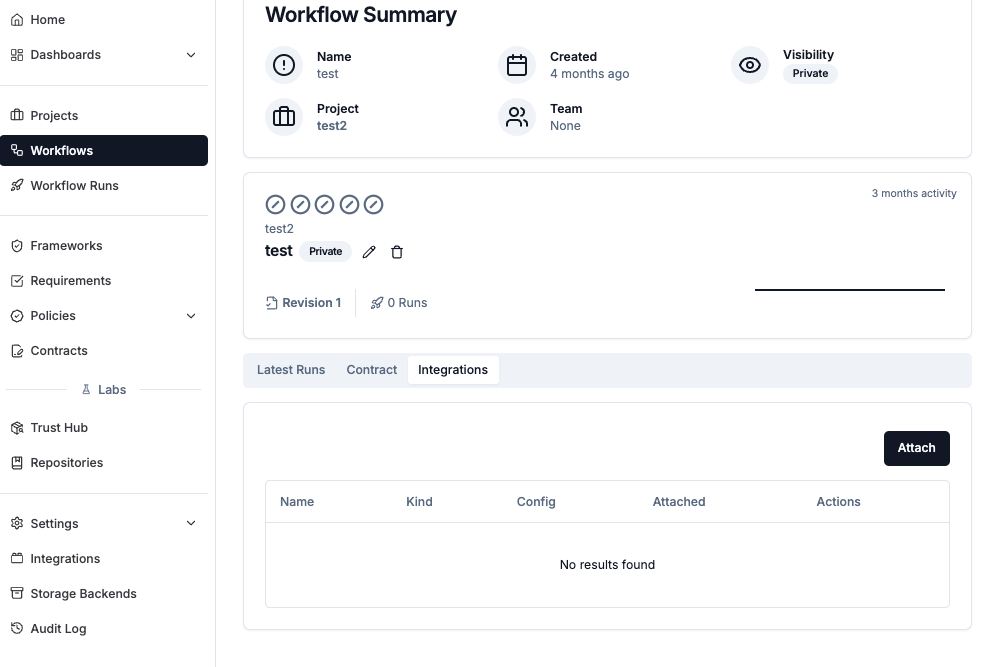 When clicking "Attach" you'll be presented with the list of available integrations for your organization (which were prepared in the previous step).
When an integration is selected, you'll see the list of attachment properties that can be set at the workflow level. In this case, the two Attachment Input properties we saw in the previous section. This particular integration can receive full attestation documents, SBOMs, or both.
When clicking "Attach" you'll be presented with the list of available integrations for your organization (which were prepared in the previous step).
When an integration is selected, you'll see the list of attachment properties that can be set at the workflow level. In this case, the two Attachment Input properties we saw in the previous section. This particular integration can receive full attestation documents, SBOMs, or both.
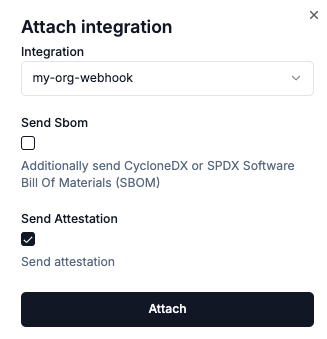 Check the available attachment properties, which in this case we have two optional properties: `send_attestation` and `send_sbom`.
```bash theme={"dark"}
$ chainloop integration available describe --name webhook
┌─────────┬─────────┬─────────────────────────────────────┬──────────────────────────────────────────────────────────┐
│ NAME │ VERSION │ MATERIAL REQUIREMENT │ DESCRIPTION │
├─────────┼─────────┼─────────────────────────────────────┼──────────────────────────────────────────────────────────┤
│ webhook │ 1.0 │ SBOM_CYCLONEDX_JSON, SBOM_SPDX_JSON │ Send Attestation and SBOMs to a generic POST webhook URL │
└─────────┴─────────┴─────────────────────────────────────┴──────────────────────────────────────────────────────────┘
...
┌──────────────────────────────────────────────────────────────────────────────────────────────────────────────────────────┐
│ Attachment inputs │
├──────────────────┬─────────┬─────────────────────┬───────────────────────────────────────────────────────────────────────┤
│ FIELD │ TYPE │ REQUIRED │ DESCRIPTION │
├──────────────────┼─────────┼─────────────────────┼───────────────────────────────────────────────────────────────────────┤
│ send_attestation │ boolean │ No (default: true) │ Send attestation │
│ send_sbom │ boolean │ No (default: false) │ Additionally send CycloneDX or SPDX Software Bill Of Materials (SBOM) │
└──────────────────┴─────────┴─────────────────────┴───────────────────────────────────────────────────────────────────────┘
```
```bash theme={"dark"}
chainloop integration attached add \
--workflow [workflow-name] --project [project-name] \
--integration [integration-name] \
# and optionally set the attachment properties
--opt send_attestation=[true|false] \
--opt send_sbom=[true|false]
```
Check the available attachment properties, which in this case we have two optional properties: `send_attestation` and `send_sbom`.
```bash theme={"dark"}
$ chainloop integration available describe --name webhook
┌─────────┬─────────┬─────────────────────────────────────┬──────────────────────────────────────────────────────────┐
│ NAME │ VERSION │ MATERIAL REQUIREMENT │ DESCRIPTION │
├─────────┼─────────┼─────────────────────────────────────┼──────────────────────────────────────────────────────────┤
│ webhook │ 1.0 │ SBOM_CYCLONEDX_JSON, SBOM_SPDX_JSON │ Send Attestation and SBOMs to a generic POST webhook URL │
└─────────┴─────────┴─────────────────────────────────────┴──────────────────────────────────────────────────────────┘
...
┌──────────────────────────────────────────────────────────────────────────────────────────────────────────────────────────┐
│ Attachment inputs │
├──────────────────┬─────────┬─────────────────────┬───────────────────────────────────────────────────────────────────────┤
│ FIELD │ TYPE │ REQUIRED │ DESCRIPTION │
├──────────────────┼─────────┼─────────────────────┼───────────────────────────────────────────────────────────────────────┤
│ send_attestation │ boolean │ No (default: true) │ Send attestation │
│ send_sbom │ boolean │ No (default: false) │ Additionally send CycloneDX or SPDX Software Bill Of Materials (SBOM) │
└──────────────────┴─────────┴─────────────────────┴───────────────────────────────────────────────────────────────────────┘
```
```bash theme={"dark"}
chainloop integration attached add \
--workflow [workflow-name] --project [project-name] \
--integration [integration-name] \
# and optionally set the attachment properties
--opt send_attestation=[true|false] \
--opt send_sbom=[true|false]
```