> ## Documentation Index
> Fetch the complete documentation index at: https://docs.chainloop.dev/llms.txt
> Use this file to discover all available pages before exploring further.
# Business Units
This feature is only available on Chainloop's platform [paid plans](https://chainloop.dev/pricing).
Business Units are optional top-level organizational entities that help structure your organization and manage products at scale. They provide a way to model your company's organizational hierarchy, whether that's by department, division, team, or any other logical grouping that makes sense for your business.
## Overview
Business Units serve as containers for [Products](/concepts/products), enabling you to:
* **Model organizational structure**: Reflect your company's actual business structure in Chainloop
* **Group related products**: Organize products by business unit, making it easier to manage and navigate
* **Scale management**: As your organization grows, business units provide a clear organizational framework
* **Enhance visibility**: Get a clear view of which products belong to which business units
## Use Cases
Business Units are particularly useful for:
* **Multi-division companies**: Separate products by different business divisions (e.g., "Cloud Infrastructure", "SaaS Products", "Enterprise Solutions")
* **Department-based organization**: Organize by functional departments (e.g., "Engineering", "Platform", "Data")
* **Geographic regions**: Group products by regional teams or markets
* **Client-specific segments**: For organizations managing products for different clients or business segments
## Creating a Business Unit
Business Units can only be created through the Chainloop Web UI:
1. Navigate to **Settings** in the left sidebar
2. Click on the **Business Units** tab
3. Click the **Create Business Unit** button
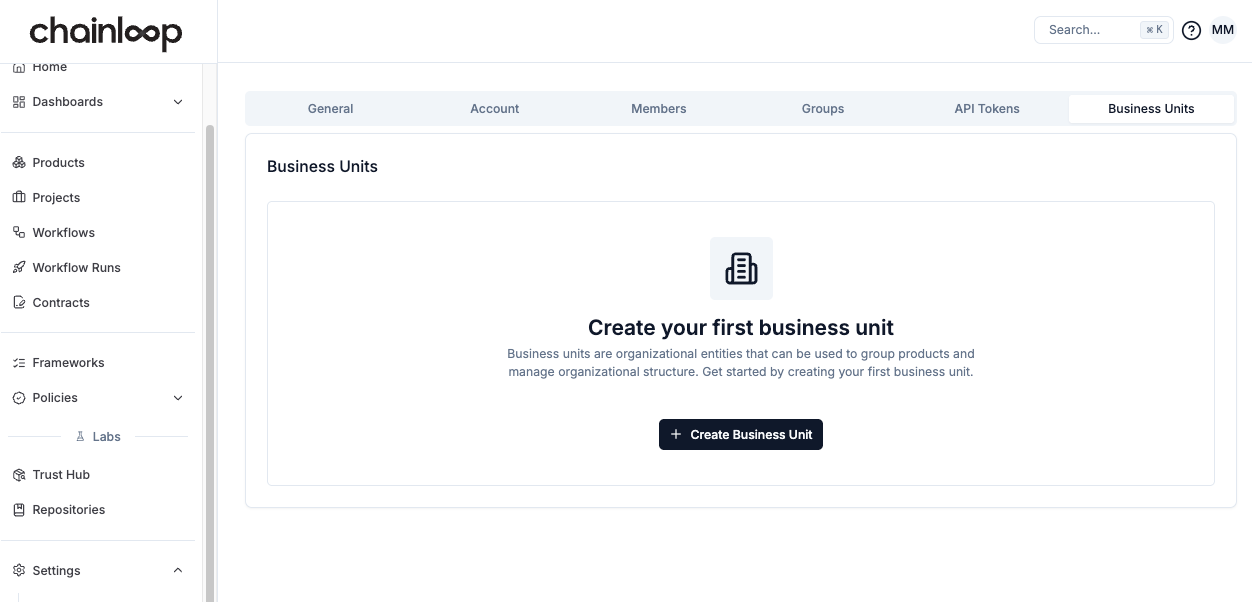 4. Fill in the business unit details:
* **Name**: A unique name for the business unit (e.g., "CloudBU", "Platform Team")
* **Description**: A brief description of what this business unit represents
5. Click **Create** to finalize the business unit creation
### Associating Products with Business Units
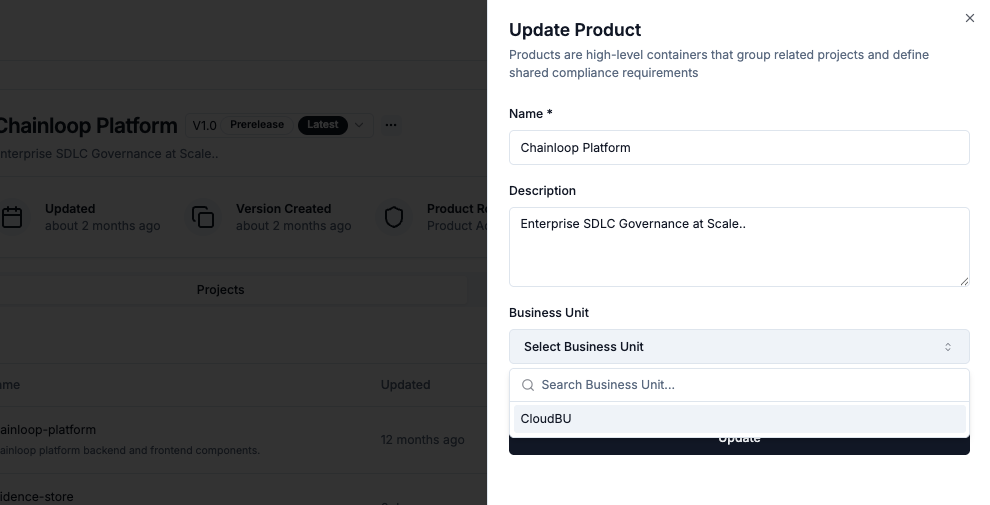
When creating or editing a [Product](/concepts/products), you can optionally assign it to a Business Unit:
1. Go to the **Products** section
2. Click **Create Product** or select **Edit Product** from an existing product's menu
3. In the product form, select the desired Business Unit from the dropdown
4. The dropdown includes a search function to help find the right business unit
4. Fill in the business unit details:
* **Name**: A unique name for the business unit (e.g., "CloudBU", "Platform Team")
* **Description**: A brief description of what this business unit represents
5. Click **Create** to finalize the business unit creation
### Associating Products with Business Units
When creating or editing a [Product](/concepts/products), you can optionally assign it to a Business Unit:
1. Go to the **Products** section
2. Click **Create Product** or select **Edit Product** from an existing product's menu
3. In the product form, select the desired Business Unit from the dropdown
4. The dropdown includes a search function to help find the right business unit
 Once a product is associated with a business unit, this relationship helps in:
* Organizing your product catalog
* Understanding your organizational structure
* Managing compliance and access control at scale
## Relationship to Products and Projects
Business Units are a property of Products that help with organizational grouping:
* **Products** can optionally be assigned to a **Business Unit**
* **Products** contain multiple **Projects** (software components)
* **Projects** contain **Workflows** that generate attestations
Using Business Units allows you to:
* Group related products by organizational structure
* Get a clear view of which products belong to which business units
* Better organize your product catalog as your organization scales
Business Units are optional and are not required to use Chainloop. While Business Units group products for organizational purposes, they don't directly affect workflow execution or attestation processes. Their primary role is organizational structure and management.
## Next Steps
* Learn more about [Products](/concepts/products) and how they relate to business units
* Understand [Projects and Versions](/concepts/projects-versions) within products
* Configure [Role-Based Access Control](/reference/rbac) for your organization
Once a product is associated with a business unit, this relationship helps in:
* Organizing your product catalog
* Understanding your organizational structure
* Managing compliance and access control at scale
## Relationship to Products and Projects
Business Units are a property of Products that help with organizational grouping:
* **Products** can optionally be assigned to a **Business Unit**
* **Products** contain multiple **Projects** (software components)
* **Projects** contain **Workflows** that generate attestations
Using Business Units allows you to:
* Group related products by organizational structure
* Get a clear view of which products belong to which business units
* Better organize your product catalog as your organization scales
Business Units are optional and are not required to use Chainloop. While Business Units group products for organizational purposes, they don't directly affect workflow execution or attestation processes. Their primary role is organizational structure and management.
## Next Steps
* Learn more about [Products](/concepts/products) and how they relate to business units
* Understand [Projects and Versions](/concepts/projects-versions) within products
* Configure [Role-Based Access Control](/reference/rbac) for your organization