> ## Documentation Index
> Fetch the complete documentation index at: https://docs.chainloop.dev/llms.txt
> Use this file to discover all available pages before exploring further.
# Overview
There are **two main APIs**, one in the controlplane and another in the platform backend.
The following examples are using the available chainloop cloud API endpoints, if you are using a self-hosted instance you will need to replace the endpoints with your own.
Chainloop platform backend API is only available on Chainloop's platform [paid plans](https://chainloop.dev/pricing).
* Chainloop controlplane, i.e `https://api.cp.chainloop.dev`, handles operations on `organizations`, `workflows`, `workflow runs` , `contracts`, `discovery` , …
* Chainloop platform backend, i.e [`https://api.app.chainloop.dev`](https://api.app.chainloop.dev/), handles operations on `policies`, `policy groups`, `frameworks`, `requirements`, `projects`
## List Available API operations
You can use the `buf curl` command to list the available operations for a given API
```bash theme={"dark"}
# Controlplane API
$ buf curl https://api.cp.chainloop.dev --list-methods --protocol grpc
# Platform Backend API
$ buf curl https://api.app.chainloop.dev --list-methods --protocol grpc
```
or a web interface such as [grpcUI](https://github.com/fullstorydev/grpcui) or Postman
```bash theme={"dark"}
grpcui -rpc-header "Authorization: Bearer $API_TOKEN" api.cp.chainloop.dev:443
```
## Calling the API
### Authentication and Authorization
The API is currently authenticated via `user` tokens and `api tokens`
* user tokens are credentials valid for 24 hours that are generated after logging in the platform or using `chainloop auth login` command. **It is not recommended to use this token for unattended operations because of its ephemerality properties.**
* API tokens are credentials with an optional expiration date **associated with an organization** meant to be used for unattended workflows, i.e CI attestations or automation in general. The set of operations that they can perform today is not configurable but this will likely change in the future
Some operations are restricted to only user tokens. We are working on offering a way to configure API tokens permissions in the future, in the meantime, please contact us if there is a specific operation you need to perform that you can't do with an API token.
For more information on authentication methods please [read the docs](/reference/api-tokens).
To authenticate just use the `Authorization` header with your token of choice, example.
```bash theme={"dark"}
buf curl -H "Authorization: Bearer $API_TOKEN" https://api.cp.chainloop.dev/controlplane.v1.APITokenService/List --protocol grpc
```
Additionally, you can **select the user organization explicitly** if you are using a user token (API tokens come already pre-configured with an organization). Otherwise it will pick the configured default organization `chainloop org ls`
```bash theme={"dark"}
buf curl -H "Authorization: Bearer $API_TOKEN" \
-H "chainloop-organization: my-org-name" \
https://api.cp.chainloop.dev/controlplane.v1.APITokenService/List --protocol grpc
```
### API Clients
By default, these APIs are exposed as **gRPC** although some of those APIs are exposed as **REST API**, more on that [below](#rest-api).
This means that you can leverage any gRPC client to interact with the API.
#### buf curl
To call the API from the terminal you can use [buf curl](https://buf.build/docs/reference/cli/buf/curl/)
```bash theme={"dark"}
# List existing methods
buf curl -H "Authorization: Bearer $API_TOKEN" https://api.cp.chainloop.dev --list-methods --protocol grpc
# example: call API tokens listing endpoints
buf curl -H "Authorization: Bearer $API_TOKEN" -H \
https://api.cp.chainloop.dev/controlplane.v1.APITokenService/List --protocol grpc
```
#### postman or grpcui
Use a user interface such as [grpcUI](https://github.com/fullstorydev/grpcui) or Postman
```bash theme={"dark"}
grpcui -rpc-header "Authorization: Bearer $API_TOKEN" api.cp.chainloop.dev:443
```
Or generate your own client by using the proto definitions that can be found [here](https://github.com/chainloop-dev/chainloop/tree/main/app/controlplane/api/controlplane/v1) (only for the controlplane API, for the backend one please ask us)
#### Native gRPC client
You can compile the proto definitions and use the native gRPC client to interact with the API.
**Controlplane API**
* Pre-compiled gRPC web typescript clients can be found [here](https://github.com/chainloop-dev/chainloop/tree/main/app/controlplane/api/gen/frontend)
* Pre-compiled gRPC go clients can be found [here](https://github.com/chainloop-dev/chainloop/tree/main/app/controlplane/api/controlplane/v1)
* If those are not enough you can compile the proto definitions yourself and generate the gRPC client. The source protocol buffer code can be found [here](https://github.com/chainloop-dev/chainloop/tree/main/app/controlplane/api) and you can use the `make api` or `buf generate` commands.
**Platform Backend API**
We are not exposing the clients publicly yet, if you need them please reach out to us.
## Rest API
Currently, we have a limited set of endpoints exposed as REST API but we are planning on exposing more alongside its documentation. Stay tuned and let us know if you are interested in this feature.
### Getting the API Spec
If you are using a self-hosted instance of Chainloop, you can find the pre-configured API spec for your instance in your portal web UI
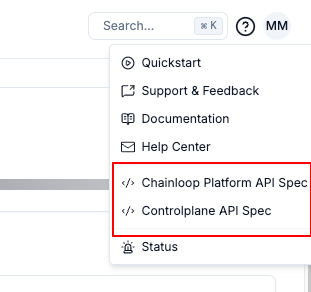 You can download the OpenAPI spec for the REST API in the following URLs:
* Portal Spec [https://api.app.chainloop.dev/openapi.yaml](https://api.app.chainloop.dev/openapi.yaml)
* Controlplane Spec [https://cp.chainloop.dev/openapi.yaml](https://cp.chainloop.dev/openapi.yaml)
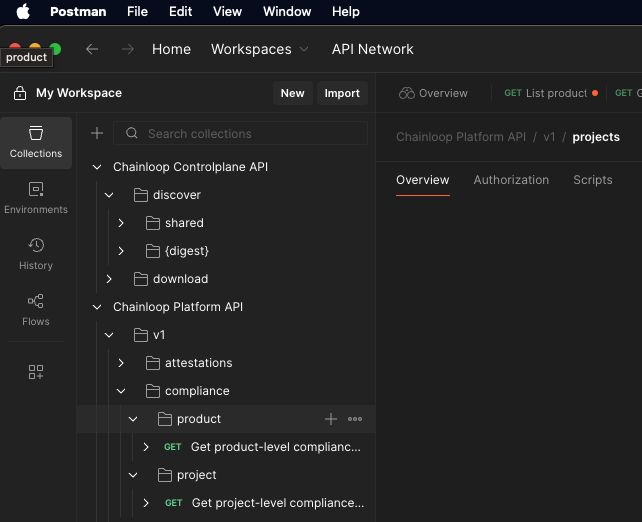
You can import the OpenAPI specs into Postman collections to start calling the API endpoints.
You can download the OpenAPI spec for the REST API in the following URLs:
* Portal Spec [https://api.app.chainloop.dev/openapi.yaml](https://api.app.chainloop.dev/openapi.yaml)
* Controlplane Spec [https://cp.chainloop.dev/openapi.yaml](https://cp.chainloop.dev/openapi.yaml)
You can import the OpenAPI specs into Postman collections to start calling the API endpoints.
 ### Using the Rest API
You can call the API using any REST API client such as Postman or curl like this:
```bash theme={"dark"}
# Example of http API endpoint
curl https://cp.chainloop.dev/infoz
{"loginURL":"https://app.chainloop.dev/login", "version":"0.172.0", "chartVersion":"1.190.0"}%
```
## MCP Server
Chainloop provides a remote MCP server that can be used to interact with Chainloop from your AI clients or agents. Please refer to this [guide](/guides/chainloop-mcp) to learn how to connect to the MCP server.
### Using the Rest API
You can call the API using any REST API client such as Postman or curl like this:
```bash theme={"dark"}
# Example of http API endpoint
curl https://cp.chainloop.dev/infoz
{"loginURL":"https://app.chainloop.dev/login", "version":"0.172.0", "chartVersion":"1.190.0"}%
```
## MCP Server
Chainloop provides a remote MCP server that can be used to interact with Chainloop from your AI clients or agents. Please refer to this [guide](/guides/chainloop-mcp) to learn how to connect to the MCP server.